Welcome back to our exploration of Azure's data platform. In the previous lesson, we contrasted two distinct approaches to network-attached storage, Azure Files and Azure NetApp Files, focusing on how their underlying architectures dictate their suitability for different enterprise file-sharing scenarios.
In this lesson, we turn our attention from shared network storage to dedicated block storage for your virtual machines. This is a fundamental component of any IaaS (Infrastructure as a Service) architecture. We will address the learning outcome: Compare Azure Managed Disk types (Standard HDD/SSD, Premium SSD, Ultra) for VM storage workloads.
Just as you would select an appropriate EBS volume type in AWS based on performance and cost, Azure offers a spectrum of Managed Disks. For a principal engineer, selecting the right disk isn't just a technical detail; it's a critical architectural decision that directly impacts application performance, user experience, reliability, and, crucially, your monthly cloud bill. Your background in system design and interest in the economics of software will be central to navigating these trade-offs.
The Challenge of VM Storage: Performance vs. Cost
Virtual Machine storage is a significant component of cloud expenditure and a frequent source of performance bottlenecks. It's common for organizations to either under-provision disks, leading to poor application performance, or over-provision them "just in case," leading to wasted budget.

This image illustrates the core problem: Managed Disk costs can be substantial, yet utilization is often low. The art of cloud architecture lies in precisely matching the storage characteristics to the workload's requirements, avoiding both performance issues and unnecessary spending.
What are Azure Managed Disks?
Before we compare the types, it's important to understand what a Managed Disk is. In the early days of Azure, you had to manage the underlying storage accounts for your VM disks yourself. This added complexity and created performance risks, as multiple busy disks in the same storage account could throttle each other.
Managed Disks abstract this complexity away. You simply request a disk of a certain type and size, and Azure handles the underlying storage account placement, scalability, and resilience for you. This makes them a first-class Azure resource, manageable via ARM, with their own RBAC and lifecycle.
John Savill provides an excellent overview of the transition from unmanaged to managed disks and introduces the key performance metrics we'll be discussing.
This video explains the concept of Managed Disks, their core performance metrics, and the importance of understanding your workload's needs.
Please watch the segment from the introduction to workload analysis. As you watch, focus on these key concepts: The abstraction that Managed Disks provide over the old storage account model. The four critical performance characteristics: capacity, IOPS (Input/Output Operations Per Second), throughput, and latency. The necessity of analyzing your workload's average and peak performance requirements before selecting a disk.
With these fundamental concepts of IOPS, throughput, and latency in mind, let's explore the spectrum of disk types Azure offers.
The Spectrum of Managed Disks
Azure provides five distinct types of managed disks, forming a hierarchy of performance and cost. The official Microsoft Learn documentation provides an essential comparison table that we will use as our foundation.
Select a disk type for Azure IaaS VMs - managed disks - Azure Virtual Machines | Microsoft Learn
This document from Microsoft Learn is the canonical reference for Managed Disk types.
Please start by carefully reviewing the main comparison table. Pay close attention to the "Scenario," "Max IOPS," "Max Throughput," and "Usable as OS Disk?" columns.
This table gives us the raw data. Our task now is to interpret it through an architectural lens, understanding the "why" behind each option. We can group these five types into three broad categories: Standard, Premium, and Ultra.
1. Standard Tiers (HDD & SSD): For Non-Critical Workloads
- Standard HDD (Hard Disk Drive): This is the lowest-cost, lowest-performance option, backed by traditional magnetic spinning disks. It offers high latency (tens of milliseconds) and performance is described as "up to" a certain limit, meaning it is not guaranteed.
- Best Fit: Backup, archival, non-critical workloads where low cost is the primary driver and performance is not a concern. Note that its use as an OS disk is being retired, signaling its niche role.
- Standard SSD (Solid-State Drive): This is a significant step up from HDD, offering single-digit millisecond latency. Performance is still "up to" and not guaranteed, but it's far more consistent than HDD.
- Key Feature: Credit-Based Bursting. Standard SSDs can accumulate credits when operating below their baseline performance. These credits can be spent to "burst" to higher performance for short periods (up to 30 minutes), which is ideal for handling spiky workloads like VM boot-up or infrequent traffic spikes.
- Best Fit: The default choice for dev/test environments, web servers, and lightly used enterprise applications that need better performance and responsiveness than HDD but don't require the guaranteed performance of Premium tiers.
John Savill explains the Standard tiers and the crucial concept of non-guaranteed performance.
This video segment details the characteristics of Standard HDD and Standard SSD.
Watch from Standard HDD and SSD. Focus on the distinction between "up to" performance for Standard tiers versus the "provisioned" performance we will see in Premium tiers.
2. Premium Tiers (SSD & SSD v2): The Production Standard
This is where the most critical architectural decisions for production workloads lie. Premium tiers offer provisioned (guaranteed) performance and low single-digit millisecond latency.
-
Premium SSD (v1): For years, this has been the workhorse for production databases and applications. Its defining characteristic is that performance is tightly coupled to capacity.
- When you provision a Premium SSD, you select a size (e.g., P10 for 128 GiB, P20 for 512 GiB, P30 for 1 TiB). This size dictates a fixed amount of IOPS and throughput.
- The Architectural Trade-Off: If you have a small database (e.g., 50 GiB) that needs high IOPS (e.g., 4,000), you are forced to provision a much larger disk (like a P30/1TiB, which provides 5,000 IOPS) just to get the performance. You end up paying for 974 GiB of capacity you don't need. This is a classic source of the over-provisioning shown in the infographic earlier.
-
Premium SSD v2: This is a newer generation designed to solve the exact problem described above. Its defining characteristic is that performance is decoupled from capacity.
- With Premium SSD v2, you provision three things independently: Capacity, IOPS, and Throughput.
- Every v2 disk comes with a generous baseline of 3,000 IOPS and 125 MB/s throughput included free of charge. You then pay for any additional IOPS or throughput you provision, on top of the capacity cost.
- The Architectural Advantage: You can now create that 50 GiB disk and provision exactly the 4,000 IOPS it needs. This "right-sizing" makes it dramatically more cost-effective for I/O-intensive workloads that don't require large capacity.
The following video provides an excellent, detailed comparison of the v1 and v2 models.
This video by John Savill is a quick but powerful look at the evolution from Premium SSD v1 to v2.
Please watch these two key sections: Premium SSD v1 Explained: This covers the capacity-performance coupling, bursting, and performance tiers of the original Premium SSDs. Premium SSD v2 Explained: This highlights the new model of decoupling capacity, IOPS, and throughput, and how you configure them independently.
3. Ultra Disk: For Extreme Performance Needs
- Ultra Disk: This is the highest tier of block storage in Azure, designed for data-intensive, mission-critical workloads that demand the absolute best performance.
- Key Features: It offers sub-millisecond latency and allows you to dynamically adjust performance (IOPS/throughput) on a live, running VM without a restart. Like Premium SSD v2, its performance is decoupled from capacity.
- Architectural Constraints: This power comes with significant limitations. Ultra Disks cannot be used as OS disks, do not support disk snapshots (requiring Azure Backup instead), are not available in all regions, and are only compatible with specific VM series.
- Best Fit: Top-tier databases like SAP HANA, Oracle, and other transaction-heavy financial or e-commerce systems where even a millisecond of latency matters. It should only be used when Premium SSD v2 cannot meet the requirements.
The Final piece of the puzzle: The VM Limit
A critical mistake in system design is to provision a high-performance disk and attach it to a VM that cannot handle the I/O. Every Azure VM size has its own maximum IOPS and throughput limits. If your disks can collectively deliver 20,000 IOPS but your VM is capped at 10,000 IOPS, you have wasted money on disk performance that can never be realized.
This segment explains the crucial relationship between disk performance and the limits of the virtual machine itself.
Please watch the section from VM Storage Limits. The key takeaway is that the VM itself can become the performance bottleneck, regardless of the attached disks.
A Principal Engineer must always consider the entire system. The effective performance is the minimum of what the disks can provide and what the VM can handle.
A Decision Framework
We can now synthesize this information into a decision-making framework. The following flowchart provides a great visual guide for selecting the right disk for performance.
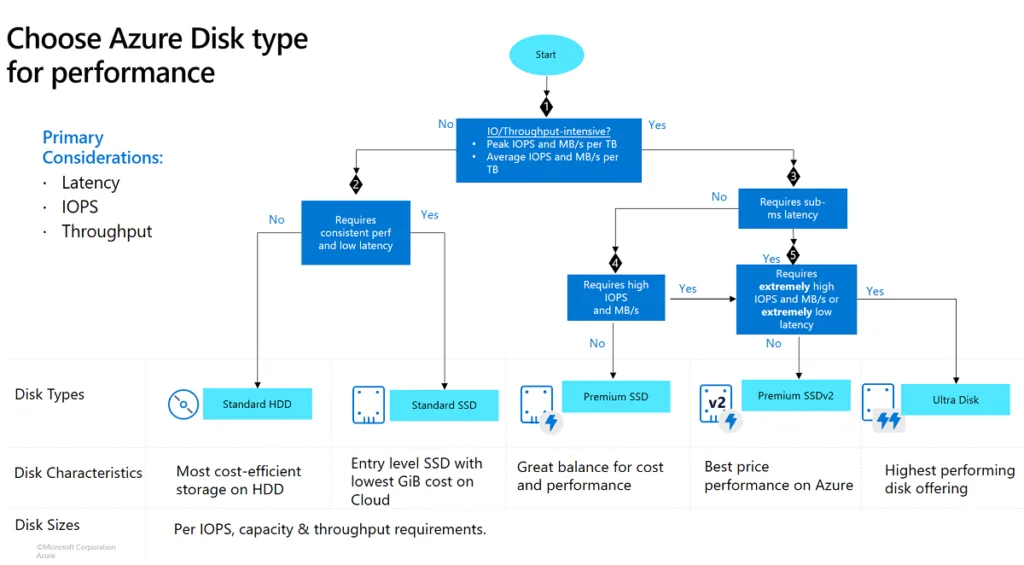
Here's a summary of the decision logic in a framework you can use:
| Workload Requirement | Start With... | Why? |
|---|---|---|
| Non-Production / Dev/Test | Standard SSD | Provides a good balance of low cost and decent responsiveness. Bursting handles spiky developer activity well. |
| Backup / Archival | Standard HDD | The cheapest option for capacity where performance is irrelevant. |
| Production Web/App Server | Standard SSD or Premium SSD (small) | If traffic is low and predictable, Standard SSD may suffice. For more demanding apps, a small Premium SSD (e.g., P10/P20) provides guaranteed performance. |
| Production Database (SQL, PostgreSQL) | Premium SSD v2 | This is the new default. It allows you to provision the exact IOPS/throughput your database needs without wasting money on unused capacity. Provides sub-millisecond latency. |
| Legacy Production Database needing high IOPS and large capacity | Premium SSD (v1) | If your capacity and performance needs align well with the fixed P-tiers, the simplicity of v1 can still be a valid choice. |
| Extreme OLTP / SAP HANA | Ultra Disk | When you need the absolute lowest latency (sub-millisecond) and the highest possible IOPS/throughput, and are willing to work within its constraints. |
Conclusion
In this lesson, we dissected the five types of Azure Managed Disks, moving from a simple feature list to an architectural decision framework. You are now equipped to choose the right block storage for your VM-based workloads, balancing performance, cost, and operational complexity.
Our key takeaways are:
- A Spectrum of Choice: Azure offers a full range of disks from low-cost, low-performance Standard HDDs to extreme-performance, high-cost Ultra Disks.
- Guaranteed vs. "Up To": Standard tiers offer non-guaranteed ("up to") performance, while Premium and Ultra tiers offer provisioned, guaranteed performance suitable for production.
- Premium SSD v2 is the new standard: Its ability to decouple performance from capacity makes it the most cost-effective and flexible choice for the majority of new production workloads, especially databases.
- The VM is Part of the System: Always verify that your chosen VM size can support the IOPS and throughput of your disks. The VM is often the hidden bottleneck.
- Right-Sizing is Key: Choosing the right disk tier is a primary lever for cost optimization in IaaS environments, preventing both performance issues and wasted spend.
We have now covered storage for objects (Blobs), files (Azure Files/ANF), and VM disks. In our final lesson for this module, we will explore a storage service built specifically for the demands of big data and analytics: Azure Data Lake Storage Gen2. This will form the foundation for understanding Azure's modern data platform capabilities.