Welcome back. In the previous lesson, we examined how to authorize identities using Azure's Role-Based Access Control (RBAC). We saw that a role assignment combines a security principal (who), a role definition (what), and a scope (where). Among the types of security principals, we briefly mentioned identities for applications: service principals and managed identities.
This lesson will focus squarely on these non-human identities. Our goal is to move beyond just defining them and instead build a decision framework for choosing between them. As an architect, your primary responsibility is to design systems that are secure, scalable, and operationally efficient. The choice between a service principal and a managed identity is a fundamental architectural decision that directly impacts all three of these pillars. We will dissect the trade-offs, explore their underlying mechanisms, and establish clear guidelines for when to use each.
The Fundamental Challenge: Application Authentication
Imagine a common scenario: you have an application running on an Azure Virtual Machine that needs to read data from an Azure Storage Account. The application code must authenticate to Azure to prove it has the right to access that data. How does it do this without embedding a password or a key directly in the code or a configuration file—a practice you know from experience is a major security vulnerability?
This is the core problem that both service principals and managed identities aim to solve. However, they approach it from different architectural standpoints.
The Traditional Approach: Service Principals
The classic solution in Azure for application identity is the service principal. In the last lesson, we learned that a service principal is the local representation, or instance, of an application within a Microsoft Entra ID tenant. You typically create one through an "App Registration" in Entra ID.
To authenticate as a service principal, an application needs a credential. This is usually one of two things:
- A client secret (essentially a password).
- A certificate.
The application code uses this credential to request an access token from Entra ID, which it then presents to the target resource (like the Storage Account) to prove its identity and permissions.
While this works, it introduces a significant operational and security burden. You are now responsible for:
- Credential Management: Where do you securely store the client secret or certificate? You can't check it into source control. You might use Azure Key Vault, but then the application first needs to authenticate to Key Vault—a classic chicken-and-egg problem.
- Credential Rotation: These credentials expire. You must have a process to manually or programmatically rotate them before they do, or your application will break.
- Risk of Exposure: A leaked secret gives an attacker a direct path into your Azure resources.
Despite these drawbacks, service principals are essential for certain scenarios, particularly when the authenticating code runs outside of Azure. A common example is a CI/CD pipeline (like GitHub Actions or Azure DevOps) that needs to deploy resources to Azure. Another is an on-premises application that needs to interact with Azure APIs. In these cases, since the code is not running on a managed Azure resource, a service principal is your only option.
The video below gives a concise overview of the purpose of a service principal, highlighting the CI/CD pipeline use case.
AZ-204 Azure: Understanding the Difference Between Service Principal and Managed Identity
This video from Learn Smart Coding explains the distinct purposes of service principals and managed identities.
Watch the section on the purpose of a service principal from this timestamp. It provides a clear, real-world example of using a service principal for automation.
The Modern, Preferred Approach: Managed Identities
Recognizing the challenges of credential management, Microsoft introduced managed identities. A managed identity is a special type of service principal whose lifecycle and credentials are automatically managed by Azure.
This is the key architectural difference: with a managed identity, there are no secrets or certificates in your code.
When you enable a managed identity for an Azure resource (like a VM, App Service, or Function App), Azure creates an identity for it in Entra ID. The resource can then use this identity to request tokens from Entra ID without any credentials being exposed to your application code. This completely eliminates the credential management problem.
The following video provides an excellent deep dive into why managed identities exist and how they solve the core problem of application authentication.
Microsoft Azure Managed Identity Deep Dive
This video from John Savill's Technical Training offers a thorough explanation of the problem managed identities solve, starting with the traditional service principal approach.
First, watch the segment from the beginning to understand the fundamental problem of storing secrets. Then, continue through the section from explaining service principals. This will ground your understanding of the "old way" before we dive deeper into the "new way."
There are two distinct types of managed identities, and choosing the right one is another key architectural decision.
1. System-Assigned Managed Identity
- Lifecycle: It is created and deleted along with the Azure resource. It has a 1:1 relationship with the resource. A VM has one system-assigned identity, and that identity cannot be assigned to another VM.
- Simplicity: It's enabled with a simple toggle switch on the resource's configuration page.
- Use Case: Ideal when an identity is needed for a single, self-contained workload. For example, a specific web application that needs to access a specific database.
2. User-Assigned Managed Identity
- Lifecycle: It is a standalone Azure resource. You create, manage, and delete it independently of any other resource.
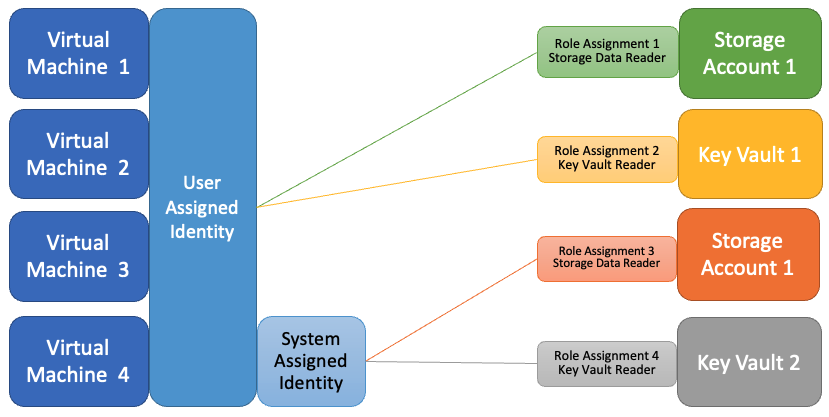
- Flexibility: It can be assigned to one or more Azure resources. This creates a many-to-many relationship.
- Use Case: Perfect for scenarios where you need to grant a set of permissions to a group of resources. For example, a fleet of virtual machines in a scale set all performing the same function. You can create one user-assigned identity, grant it the necessary RBAC permissions once, and then assign that identity to all VMs in the scale set. This simplifies permissions management significantly.
The diagram below illustrates this architectural difference clearly.
To solidify your understanding of these two types, continue with the John Savill video.
Microsoft Azure Managed Identity Deep Dive
This part of the video explains the two types of managed identities and shows how they are configured and used.
Please watch these segments: Introduction to managed identities, which covers the creation of the underlying service principal. System-assigned vs. User-assigned, which details the lifecycle and relationship differences. A practical portal demonstration showing how permissions are assigned to both types of identities.
A Framework for Decision-Making
Now we can synthesize this into a clear architectural decision framework. When securing application access, follow this logic:
-
Is the application code running on an Azure service that supports managed identities?
- Yes: Use a managed identity. This is the default, most secure, and operationally simplest choice.
- No (e.g., it's on-premises, in another cloud, or a CI/CD agent): You must use a service principal with a secret or certificate.
-
If using a managed identity, which type should you choose?
- Will the identity be shared across multiple resources? (e.g., a VM scale set, a group of Logic Apps)
- Yes: Use a user-assigned identity.
- Do you need to pre-authorize resources before they are created? (e.g., grant access to a Key Vault for a VM that will be deployed later)
- Yes: Use a user-assigned identity, as its lifecycle is independent.
- Is the identity for a single, self-contained Azure resource?
- Yes: Use a system-assigned identity. It's simpler to manage as its lifecycle is tied to the resource.
- Will the identity be shared across multiple resources? (e.g., a VM scale set, a group of Logic Apps)
This table provides a concise summary of the key differences to aid in this decision.
| Feature | Service Principal | Managed Identity |
|---|---|---|
| Credential Management | Manual (by you) | Automatic (by Azure) |
| Lifecycle | Independent. Must be manually created and deleted. | Tied to Azure resource (System-Assigned) or managed as a separate resource (User-Assigned). |
| Primary Use Case | Applications running outside of Azure (e.g., CI/CD, on-prem). Multi-tenant apps. | Azure resources authenticating to other Azure resources. |
| Security Posture | Lower. Requires you to manage and protect secrets. | Higher. No credentials exposed in your code or configuration. |
For a quick textual review of these points, the following article provides a clear comparison.
Azure Service Principal vs Managed Identity: What's the Difference?
This blog post from Atmosera offers a direct comparison of the pros, cons, and key differences between service principals and managed identities.
Focus on these three short sections: Pros & Cons of Service Principal Pros & Cons of Managed Identity The table under the heading "Managed Identity vs Service Principal", which provides an excellent summary.
Under the Hood: How Managed Identity Works
For an architect, understanding the mechanism behind a technology is as important as knowing how to use it. So how does managed identity achieve "passwordless" authentication?
When an application on a resource with a managed identity needs a token, it doesn't talk to Entra ID directly. Instead, it makes a request to a local, non-routable endpoint available on the resource.
- For VMs and VM Scale Sets, this is the Azure Instance Metadata Service (IMDS) at the IP address
169.254.169.254. - For other services like App Service and Functions, a local environment variable points to a similar endpoint.
This local service intercepts the request. It then communicates with Azure's internal fabric to securely fetch the managed identity's credential (which you never see) and uses it to authenticate to Entra ID on your application's behalf. Entra ID validates the request and returns an access token to the local service, which then passes it back to your application. Your code simply receives a valid access token, ready to be used.
This design also provides significant resiliency benefits. Managed identities use regional token services and employ a long-lived token (24 hours) that is proactively refreshed halfway through its lifetime, making applications that use them far more resilient to potential Entra ID outages.
Microsoft Azure Managed Identity Deep Dive
This final segment from John Savill's video explains the token acquisition flow and the powerful resiliency advantages of using managed identities.
Watch the detailed explanation from "How this actually works". Understanding this mechanism provides deep insight into why managed identity is a superior architectural choice for Azure-native applications.
Conclusion
In this lesson, we established a clear architectural framework for choosing between service principals and managed identities. You now have the rationale to guide your teams toward more secure and operationally sound application designs in Azure.
Here are your key takeaways:
- Managed Identities are the default choice for any application running on an Azure service that supports them. They eliminate the security risks and operational overhead of credential management.
- Service Principals are a necessity for applications running outside of Azure or for services that do not yet support managed identities.
- System-Assigned Identities are best for simple, self-contained resources with a 1:1 identity-to-resource relationship.
- User-Assigned Identities are the solution for sharing an identity across multiple resources or when you need the identity's lifecycle to be independent of the compute resource.
- The underlying mechanism of managed identities not only improves security but also enhances application resiliency.
You now have a solid grasp on what an application's identity is and how to choose the right type. In our next lesson, we will add another layer to our security model by exploring Conditional Access. This will allow us to define the specific conditions under which an identity—whether a user or an application—is granted access, moving us closer to a true Zero Trust architecture.