Welcome to the first lesson of our second module, where we pivot from the foundational aspects of resource management and governance to the critical domain of security. In the previous module, we established how to organize, deploy, and financially manage your Azure resources. Now, we'll explore how to secure them, starting with the most fundamental component: identity. In the cloud, where the traditional network perimeter is dissolving, identity has become the primary security boundary.
This lesson introduces you to the cornerstone of identity and access management in the Microsoft cloud: Microsoft Entra ID. Our goal is to dissect its core components and, most importantly, to draw a clear distinction between this modern, cloud-native service and the traditional on-premises Active Directory that has been a fixture in enterprise IT for decades. Understanding this distinction is crucial for making sound architectural decisions in a hybrid and cloud-first world.
By the end of this lesson, you will be able to describe the essential architecture of Microsoft Entra ID and articulate how its design, purpose, and capabilities differ from those of on-premises Windows Server Active Directory.
Setting the Stage: A Quick Look at Traditional Active Directory
For the past two decades, Windows Server Active Directory (often just called "Active Directory" or "AD") has been the de facto directory service for on-premises enterprise networks. Given your extensive experience in software engineering, you have likely interacted with systems that rely on it for authentication and authorization.
Traditional AD was designed for a world of corporate-owned devices on a secure internal network, protected by a firewall. Its architecture is hierarchical, built around domains and organizational units (OUs), and managed by dedicated servers called domain controllers.
The video below provides a concise overview of the components and design philosophy of traditional Active Directory Domain Services.
Active Directory vs Azure AD vs Azure AD DS | MCSA | AZ-104
This video, "Active Directory vs Azure AD vs Azure AD DS," begins by summarizing the key features of on-premises Active Directory.
Please watch the segment from the overview of AD. Pay attention to the list of capabilities it provides beyond just users and computers: Group Policy for machine configuration, DNS services for the internal network, and a hierarchical structure (OUs). These are the classic features we will contrast with Entra ID.
The key takeaway is that traditional AD is a powerful but complex system built to control a well-defined, perimeter-based network. Its core authentication protocols, Kerberos and NTLM, were created with this trusted internal environment in mind.
The Shift to the Cloud: Introducing Microsoft Entra ID
As organizations moved to the cloud, adopted SaaS applications, and embraced mobile and remote work, the old model of a secure internal network began to break down. A new identity solution was needed—one built for the internet, not the intranet. This is Microsoft Entra ID.
First, a quick clarification on naming. You will see "Azure Active Directory," "Azure AD," and "Microsoft Entra ID" used in documentation and videos. In 2023, Microsoft rebranded the service to unify its identity and network access products. For our purposes, Microsoft Entra ID is the current name for what was formerly Azure Active Directory.
What is Entra ID, Entra Domain Services, and Windows AD?
The video "What is Entra ID, Entra Domain Services, and Windows AD?" starts by explaining this recent name change.
Watch the first short segment explaining the rename. This will help you contextualize older resources and understand the current product family.
Microsoft Entra ID is a cloud-based Identity as a Service (IDaaS) solution. It acts as the central identity control plane for all of Microsoft's cloud services (like Microsoft 365 and Azure) and can integrate with thousands of third-party SaaS applications.
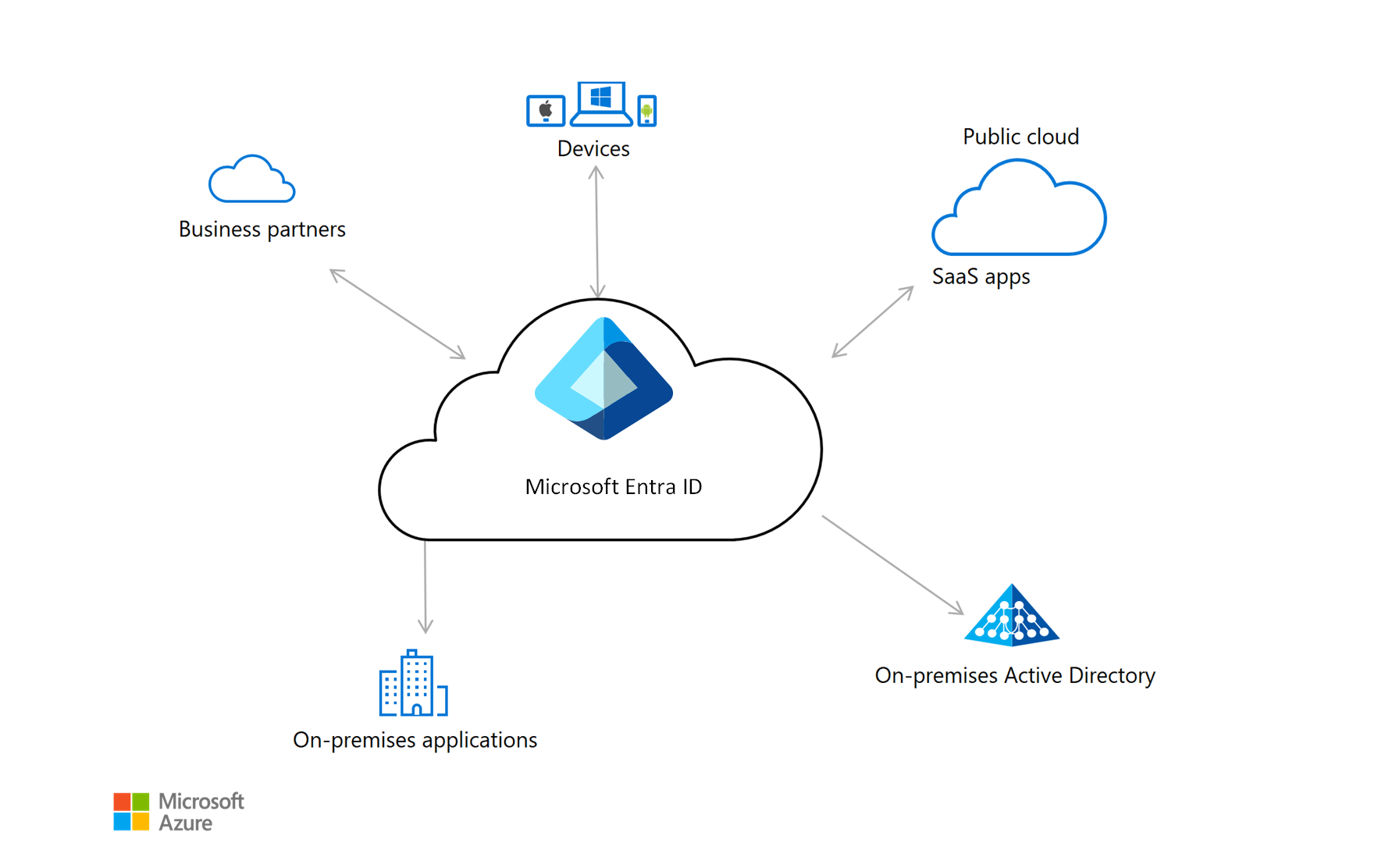
Unlike traditional AD, which you manage on your own servers, Entra ID is a fully managed, globally distributed service. This architectural difference is fundamental to its capabilities.
Under the Hood: The Architecture of Entra ID
Your interest in system design makes Entra ID's architecture particularly relevant. It is a massive-scale, multi-tenant system designed for high availability and performance. To achieve this, it uses a partitioned, distributed data store.
Architecture overview - Microsoft Entra | Microsoft Learn
This Microsoft Learn article provides an excellent overview of the service's internal design. It explains how Entra ID achieves scalability and resilience.
Please read the sections on service design and scalability, and continuous availability. As you read, focus on these key system design concepts: Partitions: How data is divided into independent scale units. Primary vs. Secondary Replicas: The read/write segregation model. All writes go to a single primary replica, while reads are served by many geographically distributed secondary replicas. This is a classic pattern for scaling read-heavy systems. Geo-redundancy: How every write is replicated to at least two datacenters before it is acknowledged, ensuring data durability. Fault Tolerance: How the system handles the failure of a datacenter or replica without service interruption for reads and with minimal impact on writes.
This architecture is what allows Entra ID to handle billions of authentications per day from all over the world. It was designed from the ground up as a global cloud service, a stark contrast to the on-premises, server-based model of traditional AD.
Comparing the Two Worlds: AD vs. Entra ID
Now we arrive at the core of our lesson. While they share a name, Entra ID is not simply "Active Directory hosted in the cloud." They are different services with different purposes, built with different technologies.
The following table from Microsoft Learn provides a comprehensive feature-by-feature comparison. We will then break down the most critical architectural differences.
Compare Active Directory to Microsoft Entra ID - Microsoft Entra | Microsoft Learn
This document directly compares the concepts and capabilities of Windows Server Active Directory and Microsoft Entra ID.
Scan the entire document, but pay close attention to the table comparisons under the headings for Users, Apps, and Devices. Notice the repeated pattern: where AD relies on on-premises mechanisms (like LDAP or domain join), Entra ID uses cloud-native, web-based approaches.
Let's distill that comparison into the most important distinctions for an architect:
-
Authentication Protocols:
- AD: Uses Kerberos and NTLM, protocols designed for trusted, private networks.
- Entra ID: Uses modern, web-friendly protocols like OAuth 2.0, OpenID Connect (OIDC), and SAML. These are designed to work securely over the open internet and are the foundation of single sign-on (SSO) for modern web and mobile apps.
-
Structure & Administration:
- AD: Has a hierarchical structure (forests, domains, OUs) managed via Group Policy Objects (GPOs) to enforce settings on domain-joined machines.
- Entra ID: Has a flat structure. While it has "groups," it lacks OUs. Policy enforcement is not done via GPOs but through services like Microsoft Entra Conditional Access (for access control) and Microsoft Intune (for device management).
-
Application & Device Identity:
- AD: Manages on-premises servers and domain-joined Windows PCs.
- Entra ID: Designed to manage identity for any device (Windows, macOS, iOS, Android) and any application (SaaS, mobile, your own custom apps). It has a robust application registration model and concepts like Managed Identities that we will explore later, which are far more suited to cloud services than traditional service accounts.
The video below offers another excellent summary of these key differences.
What is Entra ID, Entra Domain Services, and Windows AD?
Returning to Travis Roberts' video, this segment directly contrasts the design philosophies of Windows AD and Entra ID.
Watch the section covering Windows AD characteristics and then immediately watch the contrasting section on Entra ID characteristics. He clearly highlights the shift from perimeter-based protocols to web-based, Zero Trust protocols.
Bridging the Gap: Hybrid Identity
Most large enterprises don't live in a pure on-premises or pure cloud world. They live in a hybrid state. For users to have a seamless experience, they need a single identity that works for both on-premises file shares and cloud SaaS apps.
This is achieved using Microsoft Entra Connect. It is a synchronization service that runs on-premises and synchronizes identity objects (users, groups) from your traditional AD to Microsoft Entra ID. This allows for a common identity and enables features like single sign-on.

This hybrid model is the reality for most large organizations, including Microsoft itself. Understanding it is key to designing solutions for the modern enterprise.
What is Entra ID, Entra Domain Services, and Windows AD?
This part of the video explains why this synchronization is necessary and the role Entra Connect Sync plays.
Watch the segment on hybrid identities to solidify your understanding of how these two different directory systems are made to work together.
A Final Point of Clarification: Microsoft Entra Domain Services
To complete the picture and prevent confusion, there is a third service to be aware of: Microsoft Entra Domain Services (Entra DS).
Think of this as "AD-as-a-Service." It is a managed service in Azure that provides traditional domain services (like Kerberos, NTLM, Group Policy, and LDAP) for your cloud workloads. It is used primarily for "lift-and-shift" scenarios where you move a legacy application to Azure VMs, and that application requires traditional AD authentication.
It is not a replacement for on-premises AD and it is not the same as Entra ID. It's a compatibility layer for legacy apps in the cloud.
What is Entra ID, Entra Domain Services, and Windows AD?
The video concludes by explaining this niche service and summarizing the roles of all three.
Watch the explanation of Entra Domain Services and the final summary comparison. This will help place all three services in their proper context.
Conclusion
In this lesson, we have established the foundational concepts of identity in the Microsoft ecosystem. We've seen that while they share part of a name, Microsoft Entra ID and traditional Active Directory are fundamentally different systems designed for different eras of computing.
Here are the key takeaways:
- Traditional Active Directory is designed for on-premises, perimeter-secured networks, using protocols like Kerberos/NTLM and managed with GPOs.
- Microsoft Entra ID is a cloud-native, globally distributed Identity as a Service (IDaaS) solution. It uses modern web protocols (OAuth 2.0, OIDC) and is the identity control plane for Azure, Microsoft 365, and modern applications.
- The architecture of Entra ID is built for massive scale and high availability using a partitioned, primary/secondary replica model.
- Hybrid identity, enabled by Microsoft Entra Connect, is the common pattern for enterprises, synchronizing on-premises identities to the cloud to provide single sign-on.
- Microsoft Entra Domain Services is a niche PaaS offering that provides managed legacy AD features in Azure for compatibility with older applications.
You now have a solid mental model of the identity foundation upon which all Azure security is built. In our next lesson, we will build directly on this by exploring Role-Based Access Control (RBAC). We will see how you can use the identities stored in Entra ID to grant granular permissions to your Azure resources.