In our first lesson, we established the organizational blueprint of Azure—the hierarchy of management groups, subscriptions, and resource groups that provides the structure for all your cloud assets. This is the "where" of resource management. Today, we turn our attention to the "how." We'll explore the engine that drives all activity within this structure: the Azure Resource Manager (ARM).
Your goal is to understand the Azure ecosystem at an architectural level, and ARM is the absolute core of Azure's operational model. It's the central nervous system for resource provisioning and management. By the end of this lesson, you will be able to explain ARM's pivotal role in orchestrating every create, update, and delete operation in Azure, a concept fundamental to designing automated, secure, and well-governed cloud solutions.
The Consistent Management Layer
In any complex system, a unified API or entry point is a design principle that brings consistency and predictability. Azure embodies this through the Azure Resource Manager. Whether you're clicking in the Azure portal, running a script with PowerShell or the Azure CLI, or making calls from your application code using an SDK, every request is funneled through ARM.
This design choice has profound implications. It means that capabilities like security, logging, and policy are applied universally, regardless of the tool you use. There is no "back door" to managing resources; ARM is the single front door.
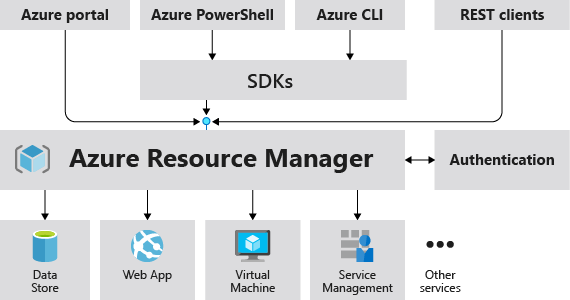
To get a formal definition of ARM and its role, the official documentation is the best place to start.
What is Azure Resource Manager? - Microsoft Learn
This article from Microsoft Learn provides the foundational overview of Azure Resource Manager.
Please read the introductory section, which defines ARM, followed by the section titled Consistent management layer. Focus on how ARM centralizes all management requests, ensuring consistent behavior across all Azure tools.
This centralization contrasts with the more federated model of service endpoints you might be accustomed to in AWS. While AWS has a consistent API style, Azure's ARM provides a single, monolithic control plane endpoint (management.azure.com) for all resource management activities.
How ARM Works: Resource Providers and Declarative Syntax
So, what happens when a request hits ARM? ARM authenticates and authorizes the request and then routes it to the appropriate Resource Provider. A resource provider is a service that supplies the resources for a specific Azure service. For example, Microsoft.Compute is the resource provider for VMs and disks, while Microsoft.Storage provides storage accounts.
This architecture, composed of dozens of resource providers unified under ARM, is what makes the Azure platform extensible.
The following video provides an excellent whiteboard explanation of this concept and introduces the core benefits of using ARM.
Benefits and Usage of Azure Resource Manager - AZ-900 Certification Course
This video by John Savill, titled "Benefits and Usage of Azure Resource Manager," breaks down how ARM functions.
Watch the introduction from "this is built around the idea of resource providers" to understand this core concept. See a practical example of resource providers from a command-line demonstration. Next, watch the explanation of how ARM acts as the central management layer for all tools. Finally, understand the security implications, as Savill explains how policy and authorization are enforced at the ARM level, making them impossible to bypass.
One of the most significant architectural benefits of ARM is its support for declarative provisioning, a concept you'll be familiar with from AWS CloudFormation. Instead of writing a sequence of imperative commands ("create this, then configure that"), you define the desired end state of your infrastructure in a template file. ARM then figures out the steps needed to make the current state match your declaration.
This approach, known as Infrastructure as Code (IaC), is crucial for building repeatable, scalable, and version-controlled environments. Azure's native IaC languages are:
- ARM Templates: JSON files that define the resources to be deployed.
- Bicep: A newer, more human-readable domain-specific language (DSL) that transpiles into ARM JSON.
We will cover Bicep in more detail in a later module, but for now, it's important to recognize that both are mechanisms for leveraging ARM's declarative capabilities.
The benefits of using this ARM-based approach are significant for an architect:
- Idempotent Deployments: You can redeploy the same template repeatedly, and the result will always be the same. ARM will only make changes if the deployed state has drifted from the template's definition.
- Dependency Management: ARM automatically calculates the dependency graph between resources in a template and deploys them in the correct order, in parallel where possible.
- Unified Governance: As mentioned, Azure Policy and Role-Based Access Control (RBAC) are integrated directly into ARM, providing a single point of enforcement.
- Group-based Management: ARM operates on the resource groups we discussed in the last lesson. When you delete a resource group, ARM orchestrates the deletion of every resource within it. This is a key difference from AWS, where deleting a resource group (a tag-based collection) does not delete the resources themselves.
This last point is worth emphasizing, as it highlights a fundamental design difference in resource lifecycle management.
Compare AWS and Azure Resource Management - Azure Architecture Center | Microsoft Learn
This article from the Azure Architecture Center directly compares the concept of resource groups in AWS and Azure.
Read the section comparing the two. Pay close attention to the difference in deletion behavior and how resources are assigned, as this is a critical distinction in day-to-day operations and management.
The Architect's View: Control Plane vs. Data Plane
We now arrive at the most critical architectural concept related to ARM: the distinction between the control plane and the data plane. This separation of concerns is vital for designing secure and resilient systems.
-
The Control Plane is Azure Resource Manager. It's used for operations that manage the resources themselves: creating a storage account, modifying the network rules on a firewall, deleting a VM, or assigning a user an access role. All the activities we've discussed so far—authenticated via
management.azure.com—are control plane operations. -
The Data Plane is where you use the resource's own functionality. It involves interacting with the data within the service. Examples include uploading a file to a blob in a storage account, querying a SQL database, or sending a message to a Service Bus queue. These operations use service-specific endpoints (e.g.,
mystorageaccount.blob.core.windows.net) and often have their own, separate authorization mechanisms (e.g., storage access keys, connection strings, or data-plane-specific RBAC roles).
A lock on the control plane does not necessarily affect the data plane. You could place a ReadOnly lock on a storage account via ARM, which would prevent anyone from deleting the account or changing its configuration. However, applications with the correct credentials could still upload and delete blobs within that account, because those are data plane operations.
Understanding this separation is not just academic; it's a cornerstone of Azure security and operational design. The following video demonstrates this concept perfectly.
Understanding Control vs Data Plane in Azure
John Savill's video "Understanding Control vs Data Plane in Azure" provides a clear, practical explanation of this crucial distinction.
First, watch the segment from the beginning that defines the control plane as ARM. Next, see how governance features are tied to the control plane. Then, watch the example from using a storage account to illustrate the difference between managing the account (control plane) and interacting with blobs (data plane). Finally, the most important part is the demonstration from where a control plane lock is applied. Observe how it prevents management changes but has no effect on uploading or deleting data. This clearly visualizes the separation.
As a principal engineer, recognizing this boundary is key. It informs how you secure services, diagnose issues, and design for high availability. For instance, ARM's high availability ensures you can manage resources even during some service outages, and a data plane's availability is independent of ARM's.
Conclusion
In this lesson, we've moved from the static structure of Azure's hierarchy to the dynamic engine that operates upon it. You now understand that Azure Resource Manager is not just a tool but the foundational management fabric of the entire platform.
Here are the key takeaways for your architectural framework:
- ARM is the Control Plane: It is the single, unified endpoint for all resource management operations (create, read, update, delete).
- Consistency is Key: By forcing all tools through ARM, Azure ensures that security, policy, and logging are applied consistently everywhere.
- Declarative Provisioning: ARM enables Infrastructure as Code through ARM templates and Bicep, allowing for repeatable and reliable environment creation, similar to AWS CloudFormation.
- Control vs. Data Plane: The most critical distinction is between managing a resource (control plane) and using its functionality (data plane). These have separate endpoints, often separate permissions, and their availability can be independent.
With a firm grasp of the Azure hierarchy and the ARM engine, you now have the two most fundamental building blocks of Azure architecture. In our next lesson, we will start applying this knowledge by comparing strategies for organizing these components—specifically subscriptions and resource groups—to meet the complex needs of a large enterprise.