Welcome to your course on the Azure ecosystem. As this is our first lesson, we'll begin by establishing the foundational structure that underpins all services and operations in Azure. Your extensive experience with AWS will be a significant asset here, as we'll frequently draw comparisons to help map Azure's concepts to the structures you already know.
Today's goal is to describe the Azure resource hierarchy, which consists of four main levels: management groups, subscriptions, resource groups, and resources. Understanding this hierarchy is the first and most critical step in designing, governing, and managing any large-scale Azure environment. Just as you wouldn't design a complex software system without a clear module and component structure, you can't architect a robust cloud solution without mastering its organizational framework.
The Azure Hierarchical Model
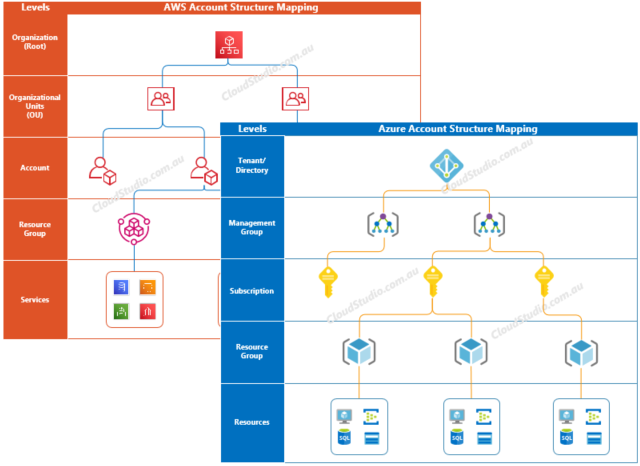
Every cloud provider offers a way to organize and manage resources, and your familiarity with the AWS model of Organizations, Organizational Units (OUs), and Accounts provides a great starting point. Azure has a similar, but distinct, structure.
At the very top of the hierarchy is the Microsoft Entra ID tenant. This is the foundation for identity and access management for your entire organization in Azure. Think of it as the parent container for all your users, groups, and applications. Every Azure subscription is associated with one, and only one, Entra ID tenant.
Beneath the tenant, the organizational structure is composed of four primary levels:
- Management Groups: For applying governance (policies, access control) across multiple subscriptions.
- Subscriptions: A unit of management, billing, and scale, analogous to an AWS Account.
- Resource Groups: A mandatory logical container for resources that share a common lifecycle.
- Resources: The individual instances of services you deploy, like VMs, databases, and virtual networks.
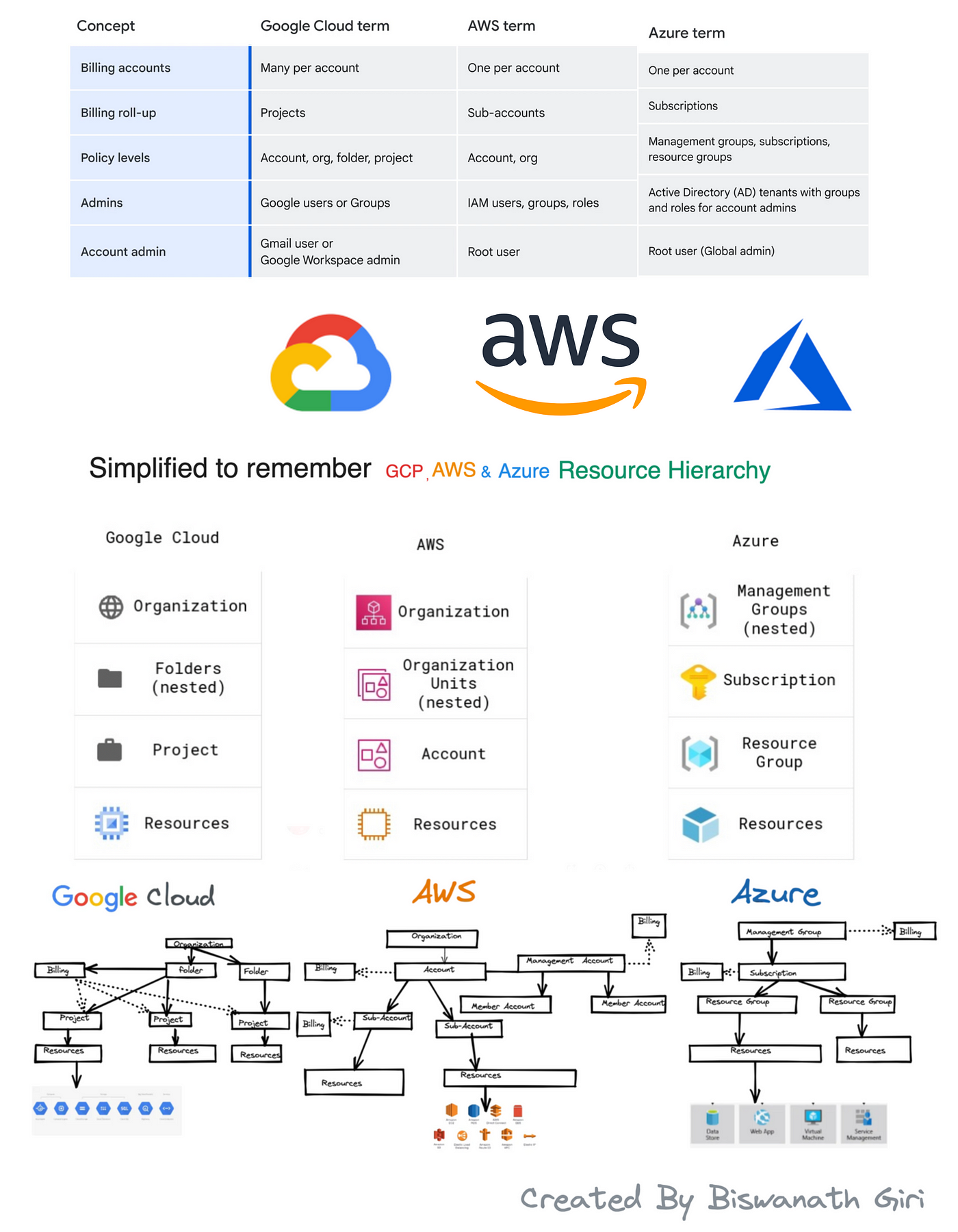
The following image provides a comparative overview of the resource hierarchies across Azure, AWS, and GCP. Pay close attention to the Azure and AWS columns to see the parallels and differences.
Let's break down each level of the Azure hierarchy, starting from the top.
Management Groups: Organizing at Scale
For a large enterprise, managing a handful of subscriptions might be feasible, but as the organization grows to tens or hundreds of subscriptions—for different departments, environments (dev/test/prod), or projects—you need a way to manage them collectively. This is the role of Management Groups.
Management Groups are the Azure equivalent of AWS Organizational Units (OUs). They allow you to group subscriptions together and apply governance conditions, like Azure Policy and Role-Based Access Control (RBAC), that are inherited by all subscriptions within the group.
Azure management groups - Governance
To understand the mechanics and rules of management groups, please read the following sections from the Microsoft Learn article "What are Azure management groups?".
First, read the introductory section, "What are Azure management groups?", to grasp their fundamental purpose. Next, review the section on hierarchy to see how they form a tree structure and enable inherited access control. Then, read the "Important facts" section to learn about the structural limits, such as the maximum depth of six levels. Finally, read the section on the root management group, which serves as the single, top-level container for all management groups and subscriptions in your tenant.
The key takeaway is that management groups are a tool for applying policies and permissions at a scope above a single subscription, enabling consistent governance across large segments of your organization.
Subscriptions: The Core Unit of Management
In Azure, the subscription is the central component. It functions as both a management boundary and a billing unit. This is the most direct parallel to an AWS Account. When your organization signs up for Azure, you get at least one subscription.
A subscription serves several key purposes:
- Billing Boundary: Costs are aggregated and billed at the subscription level.
- Administrative Boundary: A subscription is a scope for assigning administrative permissions.
- Scale Boundary: Subscriptions have certain limits and quotas for resources (e.g., number of vCPUs per region).
Compare AWS and Azure Accounts - Azure Architecture Center | Microsoft Learn
This Microsoft Learn article directly compares AWS and Azure account structures. It will help solidify your understanding by using your existing AWS knowledge.
Please read the section comparing AWS accounts and Azure subscriptions. Focus on how a subscription acts as a logical unit for services, a billing container, and a boundary for resource quotas, just as an AWS account does.
For an architect, a common decision is how to use subscriptions. A large organization might use separate subscriptions to isolate environments (production vs. development), business units (HR vs. Finance), or major applications, thereby creating clear lines for billing, resource limits, and access control.
Resource Groups: A Unique Azure Construct
Here we encounter a concept that is fundamental to Azure but does not have a direct equivalent in the AWS account structure. In Azure, every resource must exist inside one, and only one, resource group.
A Resource Group is a logical container for grouping resources that share a common lifecycle. For example, all the components of a single application—the web server VM, its database, its storage account, and its virtual network interface—would typically be placed in the same resource group. When you are ready to decommission the application, you can simply delete the resource group, and all the resources within it are deleted together.
It is crucial to understand that a resource group is a logical grouping for management, not a physical one. Resources within a single resource group can exist in different geographic regions.
A Dynamic Walkthrough of the Hierarchy
Reading about these concepts is one thing; seeing them connected dynamically can provide deeper clarity. The following video by John Savill provides an excellent whiteboard explanation of how these components—management groups, subscriptions, and resource groups—work together with identity and policy.
Watch this segment from "Azure Landing Zones Overview" for a concise explanation of the core hierarchical components.
Focus on the first part of the video from the core concepts. Pay attention to how Savill illustrates the flow from subscriptions down to resource groups and how management groups are layered on top to organize subscriptions. This provides a great visual summary of everything we've discussed so far.
The "Why" Behind Management Groups
To reinforce the specific architectural value of management groups, this next short video focuses entirely on their benefits and usage. As you watch, consider how you would use this capability to enforce enterprise standards in a large, multi-team organization.
Benefits and Usage of Management Groups - AZ-900 Certification Course
This video, "Benefits and Usage of Management Groups," offers a targeted look at the problem management groups solve and how they function.
Watch the introduction explaining the problem of managing many subscriptions. The next segment describes the hierarchy from the Azure AD tenant down to management groups and subscriptions. Pay attention to how inheritance works, as policies and RBAC assigned at a higher level flow down to child resources. Finally, watch the recap which summarizes the core purpose of management groups.
Conclusion
In this lesson, we have laid the groundwork for your understanding of the entire Azure ecosystem by dissecting its resource hierarchy. This structure is the scaffold upon which all architecture, governance, and management activities are built.
Here are the key takeaways:
- Azure Resource Hierarchy: The structure flows from the Microsoft Entra ID Tenant down through Management Groups, Subscriptions, Resource Groups, and finally to individual Resources.
- Comparison to AWS:
- An Azure Subscription is functionally equivalent to an AWS Account.
- An Azure Management Group is the counterpart to an AWS Organizational Unit (OU).
- The Resource Group: This is a mandatory container in Azure for organizing resources with a shared lifecycle. Every Azure resource must belong to exactly one resource group.
- Inheritance: Governance controls like policies and access permissions (RBAC) are applied at different levels of the hierarchy and are inherited downwards, enabling scalable management.
Now that you understand the "what" and "where" of resource organization, our next lesson will focus on the "how." We will explore Azure Resource Manager (ARM), the deployment and management service that acts as the engine for all create, read, update, and delete operations on your resources within this hierarchy.