Welcome to our third lesson. In our previous sessions, we established the foundational structure of Azure—the hierarchy of management groups, subscriptions, and resource groups—and explored the Azure Resource Manager (ARM), the engine that orchestrates all actions within that structure. You now have the "what" and the "how" of Azure resource management.
Today, we transition from mechanics to strategy. We will address the crucial architectural question of how to organize subscriptions and resource groups to support the complex demands of a large enterprise. This isn't merely an administrative exercise; the strategy you choose has profound implications for governance, security, cost management, and developer agility. For your goal of operating at a Principal Engineer level, mastering these organizational patterns is essential for designing scalable and well-governed cloud environments. By the end of this lesson, you will be able to compare different enterprise-scale strategies and understand the trade-offs involved in each.
The Case for Multiple Subscriptions
At first glance, using a single subscription for all of an organization's resources might seem like the simplest approach. However, as an organization's cloud footprint grows, this model quickly breaks down. Several critical issues emerge, which are fundamental drivers for adopting a multi-subscription strategy.
How to Organize Azure Subscriptions and Management Groups
This article provides a concise rationale for why a single-subscription model is inadequate for enterprise use.
Please read the section "Why Multiple Subscriptions". As you read, focus on the four key problems listed: subscription limits, blast radius, cost isolation, and team autonomy. These are the core business and technical drivers for the strategies we will discuss next.
The principles outlined in the article—isolating risk, enabling autonomy, and providing clear financial accountability—are universal in large-scale system design. The practice of creating separate environments for distinct purposes is often called subscription democratization. This approach treats subscriptions as readily available units of management that can be allocated to teams and workloads as needed, rather than as a scarce, centrally-managed resource.
The following video from a Microsoft engineering team discusses this concept and its benefits. Pay close attention to the point about the difficulty of moving resources between subscriptions; this underscores why getting the initial structure right is so important from an architectural perspective.
Azure Landing Zones - How many subscriptions should I use in Azure?
This video, "Azure Landing Zones - How many subscriptions should I use in Azure?", explains the core philosophy behind a multi-subscription strategy.
Please watch the segment from the beginning of the discussion, which covers the key benefits of using multiple subscriptions. Notice the emphasis on simplifying RBAC and policy, and empowering application teams.
An Analogy to Your AWS Experience
Your familiarity with AWS provides a powerful mental model here. The organizational concepts in Azure have direct parallels in the AWS world.
- An Azure Subscription is the closest equivalent to an AWS Account. It is the fundamental unit of billing, a boundary for service limits, and the primary container for resources.
- An Azure Management Group is analogous to an AWS Organization and its Organizational Units (OUs). It's a way to group subscriptions (accounts) hierarchically to apply governance and access policies at scale.
This image provides a clear side-by-side comparison.
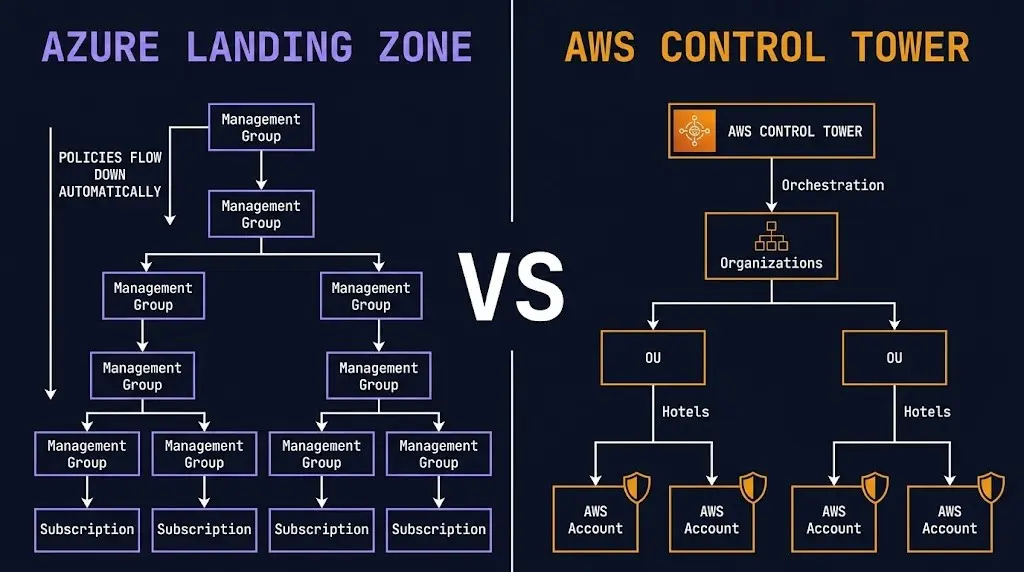
Just as you would organize AWS accounts into OUs based on business units, environments, or security requirements, you do the same in Azure by organizing Subscriptions into Management Groups. The strategies are conceptually identical.
Enterprise Organizational Patterns
With the "why" established, let's explore the "how." Enterprises typically adopt one of a few common patterns for organizing their subscriptions, ranging from simple to highly structured.
Pattern 1: Organization by Environment
The most basic strategy is to create separate subscriptions for each stage of the development lifecycle: Production, Staging, Development, etc. This provides clear environmental isolation but can become crowded and difficult to manage as the number of applications grows.
Pattern 2: Organization by Application and Environment
A more scalable approach gives each application or service its own set of subscriptions (e.g., App1-Prod, App1-Dev). This provides strong isolation and autonomy for application teams but increases the number of subscriptions to manage, necessitating automation for provisioning.
Pattern 3: The Enterprise-Scale / Azure Landing Zone Model
This is the most comprehensive and widely recommended pattern for large enterprises. It establishes a clear separation between foundational "platform" services and the "landing zones" where application workloads reside.

This model typically includes:
- Platform Management Group: Contains subscriptions for shared services essential for the entire enterprise.
- Identity Subscription: Often houses domain controllers or other identity-related infrastructure.
- Connectivity Subscription: Contains the central network hub, such as the ExpressRoute gateway, VPN gateway, or Azure Firewall. This forms the core of a hub-spoke network topology.
- Management Subscription: Includes resources for platform-wide operations, like Log Analytics workspaces and automation accounts.
- Landing Zones Management Group: A parent for subscriptions that host the actual business applications. These can be further segmented by business unit, application archetype (e.g.,
Corpvs.Online), or other criteria. - Sandbox Management Group: For subscriptions where developers can experiment with fewer policy restrictions, but with strict spending limits and no connectivity to production environments.
The following resources provide more detail on these patterns, including a real-world example of how Microsoft's own IT department structures its environment.
How to Organize Azure Subscriptions and Management Groups
This article details the three patterns we just discussed.
Please read the section "Subscription Organization Patterns". It provides a concise summary with diagrams for each of the three main strategies.
Organizing subscriptions and resource groups within the Enterprise | Microsoft Azure Blog
This official blog post explains how Microsoft's Core Services Engineering and Operations (CSEO) team organizes their vast Azure estate.
Start by reading the section that introduces the business unit pattern. Then, continue to the next section, which details the hierarchy they use: Enterprise, Federal, State, and Local. This provides a concrete, large-scale implementation of the enterprise model.
The enterprise-scale model is the foundation of what Microsoft calls Azure Landing Zones. The following video explains how this architecture is implemented.
This video from John Savill provides a detailed walkthrough of the enterprise-scale landing zone architecture.
Watch the segment explaining the enterprise-scale approach. Focus on the architecture diagram and how it breaks down the environment into dedicated subscriptions for identity, management, connectivity, and application landing zones.
The Role of Resource Groups Within a Subscription
Once you have your subscription strategy, the final layer of organization is the resource group. A common point of confusion is when to use a new subscription versus a new resource group. The rule of thumb is:
- Subscriptions provide autonomy, isolation, and policy boundaries. Use a new subscription when a workload requires a different set of permissions, policies, or billing chargebacks.
- Resource Groups provide lifecycle management. Use a resource group to contain all the components of a single application or service that are deployed, managed, and decommissioned together.
Think of the Microsoft IT example: the "Tax Service" exists within one subscription (the "Local" level). Within that subscription, there are multiple resource groups: one for the data warehouse application, one for a web portal, one for a calculation engine, and so on. Deleting the "calculation engine" resource group removes all of its components (VMs, storage, etc.) without affecting the other applications in the same subscription.
This is a critical difference from AWS, where a "resource group" is merely a tag-based filter. In Azure, deleting a resource group deletes all resources within it. This makes it a powerful tool for lifecycle management but also requires careful planning.
A Framework for Decision-Making
Choosing the right strategy depends on your organization's scale and complexity. The following resources provide a framework for making this architectural decision.
How to Organize Azure Subscriptions and Management Groups
This resource offers a simple decision tree to guide your choice.
Review the brief section titled "Decision Framework." It provides a good starting point based on the number of workloads and teams.
For a more nuanced architectural evaluation, consider the broader design areas discussed in the following clip. These are the types of questions a Principal Engineer would explore to determine the optimal structure.
Azure Landing Zones - How many subscriptions should I use in Azure?
This video details the key design areas that influence subscription strategy.
Watch the segment from where the speakers discuss the five main decision areas: business operations, networking constraints, governance models, environment separation, and subscription limits.
Conclusion
In this lesson, we've explored the strategic dimension of resource organization in Azure. You've moved beyond the basic definitions to compare enterprise-grade patterns for structuring a cloud environment for security, governance, and agility.
Here are the key architectural takeaways:
- Subscriptions are the unit of scale: They are analogous to AWS Accounts and serve as the primary boundary for billing, policy, and isolation. Relying on a single subscription is not a viable enterprise strategy.
- Enterprise patterns separate platform from applications: The recommended approach involves creating dedicated subscriptions for shared platform services (identity, connectivity, management) and separate "landing zone" subscriptions for application workloads.
- Resource groups are for lifecycle management: Within a subscription, resource groups should contain components that are managed and deployed together as a single unit (e.g., a microservice).
- Structure dictates governance: The hierarchy of management groups and subscriptions you design becomes the scaffolding upon which you will apply security policies (Azure Policy) and access controls (RBAC).
You now have a solid framework for how to architect the foundational layout of an Azure environment. In our next lesson, we'll build directly on this by looking at a crucial tool for managing resources within this structure: designing a resource tagging strategy. We will see how effective tagging enables cost tracking, operational management, and automation across your newly organized subscriptions.