Welcome to the fifth module of our course, where we shift our focus from compute infrastructure to the heart of any application: the data platform. In the previous module, we established a framework for choosing the right Azure compute service to run your code. Now, we need to address where and how to store the data that these services generate and consume.
We will begin this journey with Azure Blob Storage, the foundational object storage service in Azure, analogous to AWS S3 which you are familiar with. This lesson is dedicated to a core architectural concept in cloud storage: cost optimization through data tiering. Your goal as a future Principal Engineer is not just to build functional systems, but to build them efficiently and economically. This lesson directly supports that by targeting the learning outcome: Compare Azure Blob Storage access tiers (Hot, Cool, Cold, Archive) and design lifecycle management policies for cost optimization.
We will explore the fundamental trade-off between the cost of storing data and the cost of accessing it, and then examine the tools Azure provides to manage this trade-off automatically at enterprise scale.
The Economics of Data: Storage vs. Access Costs
Azure Blob Storage is designed to store massive amounts of unstructured data—images, videos, log files, backups, and more. A key principle of cloud economics is that not all data is created equal. Some data is accessed constantly, while other data might be written once and rarely, if ever, read again. Storing all data in a high-performance tier would be prohibitively expensive.
Azure addresses this with access tiers, which allow you to pay for the right blend of storage cost and access performance based on your data's usage patterns. The fundamental trade-off is:
- Higher storage cost is paired with lower access cost for frequently accessed data.
- Lower storage cost is paired with higher access cost for infrequently accessed data.
Azure provides four primary access tiers for block blobs. To get a clear picture of each, we'll start with the official Microsoft documentation and supplement it with a video that adds pricing context.
Access tiers for blob data - Azure Storage | Microsoft Learn
This Microsoft Learn document provides the authoritative definitions and use cases for each access tier.
Please read the following sections: The initial list of tiers for a quick overview. The section on Online access tiers to understand Hot, Cool, and Cold. Pay attention to the example use cases. The section on the Archive tier to grasp its unique offline nature and the concept of rehydration. Finally, review the summary table for a consolidated comparison.
Now, let's watch a video that breaks down these tiers with concrete pricing examples, which helps to make the economic trade-offs more tangible.
Azure Storage Access Tiers: Hot, Cool, Cold & Archive Explained
This video from Travis Roberts provides a clear, practical explanation of the tiers and their associated costs.
Watch these segments to see how the cost structure works for each tier: Hot tier Cool tier Cold tier Archive tier Comparative analysis Focus on how the costs for storage, reads, and writes change as you move from Hot to Archive. Also, take note of the minimum storage durations and the concept of "early deletion penalties."
Synthesizing the Tiers
From these resources, we can build a clear mental model:
| Tier | Primary Use Case | Storage Cost | Access Cost | Latency | Key Consideration |
|---|---|---|---|---|---|
| Hot | Actively used data, frequent reads/writes (e.g., website content, transactional data) | Highest | Lowest | Milliseconds | Default tier; optimized for performance. |
| Cool | Infrequently accessed data, short-term backups, DR (e.g., recent logs, older user content) | Lower | Higher | Milliseconds | Minimum 30-day storage duration. |
| Cold | Rarely accessed data, but needs immediate retrieval (e.g., older backups) | Even lower | Higher still | Milliseconds | Minimum 90-day storage duration. |
| Archive | Long-term archival, compliance data (e.g., raw telemetry, legal holds) | Lowest | Highest | Hours | Offline. Data must be "rehydrated" to an online tier before access. Minimum 180-day storage. |
The existence of an offline tier (Archive) is a critical architectural distinction. You cannot access a blob in the Archive tier directly. You must initiate a rehydration job, which copies the blob to an online tier (Hot, Cool, or Cold). This process can take several hours, making the Archive tier unsuitable for any data that might be needed urgently.
Automating Cost Optimization: Lifecycle Management
Manually moving millions or billions of blobs between tiers is impractical. The real power comes from automating this process using Lifecycle Management policies. These are rule-based policies you define at the storage account level to automatically transition data between tiers or delete it altogether.
Designing these policies is a key architectural activity. A well-designed policy can lead to significant cost savings with minimal effort. The rules can be based on two main triggers:
- Days since modification: This is a simple and effective strategy for data with a predictable lifecycle, like application logs that become less relevant over time.
- Days since last access: This is a more intelligent approach. It tiers data based on when it was last read. This prevents old but still-relevant data from being moved to a colder, more expensive-to-access tier. This requires enabling
Last access time trackingon the storage account.
The following resources provide an excellent, hands-on look at designing and implementing these policies.
How to Optimize Azure Blob Storage Costs with Lifecycle ...
This blog post provides practical examples and best practices for creating effective policies.
Please read the following sections: Step 3, which shows a concrete JSON policy definition. Note how prefixMatch is used to apply different rules to logs/ versus backups/. Step 4, which explains the more advanced access-time policies and the important enableAutoTierToHotFromCool setting. This feature automatically moves data back to Hot if it's accessed in the Cool tier, preventing bill shock from high access charges on suddenly "hot" data. Step 8, which offers a checklist of crucial design considerations.
To see how this looks in practice within the Azure Portal, the next video provides a concise demonstration.
Optimizing your storage costs with Azure Blob Storage | Azure Friday
This Azure Friday video features a Microsoft PM demonstrating how to configure a lifecycle policy.
Watch the segment from how easy it is to set up a lifecycle policy. The presenter builds a rule that combines last-access-time tiering (Hot -> Cool -> Archive) with an eventual deletion, which is a very common and powerful pattern.
Architectural Synthesis: A Backup and Restore Scenario
Let's tie all these concepts together by analyzing a common architectural pattern: backing up on-premises workloads to the cloud.
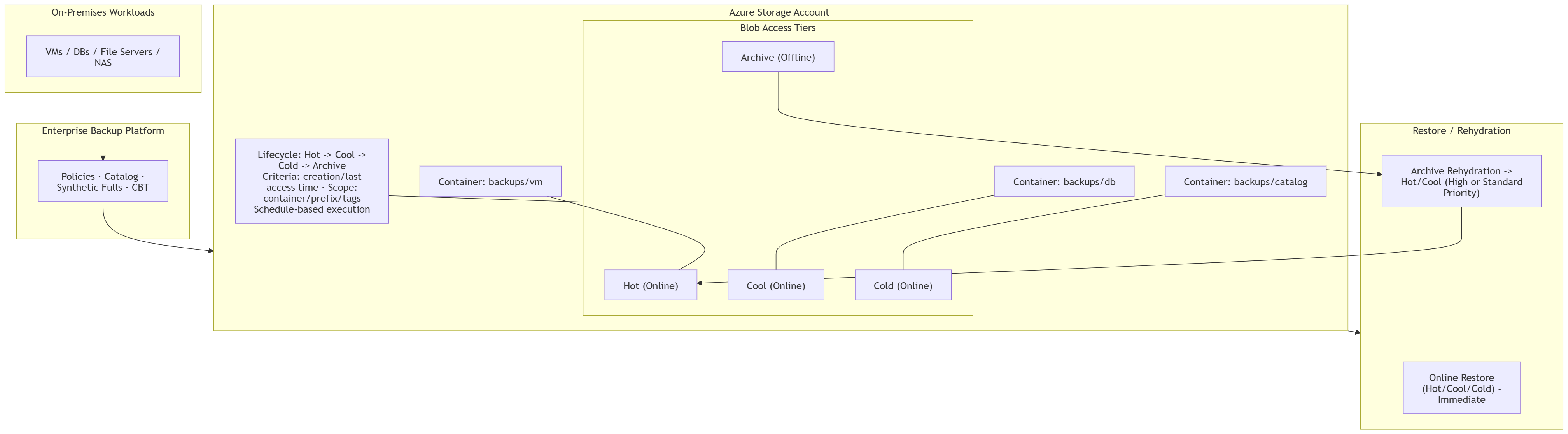
This architecture clearly demonstrates the principles we've discussed:
- Data Ingestion: On-premises workloads (VMs, databases) are backed up via an "Enterprise Backup Platform" and written to an Azure Storage Account. By default, these new backups would land in the Hot tier for immediate availability in case a very recent restore is needed.
- Lifecycle Policy: A policy is defined to manage the data's lifecycle:
Hot -> Cool -> Cold -> Archive. This automates the process of moving older backups to progressively cheaper storage tiers as the probability of needing them for a restore decreases. - Data Segmentation: The diagram shows separate containers for different backup types (
backups/vm,backups/db,backups/catalog). This is a best practice, as it allows you to apply different lifecycle rules. For example, the backup catalog might need to stay in a warmer tier for longer than the raw database backups to facilitate searching. - Restore Paths: The architecture explicitly shows two distinct restore processes:
- Online Restore: For backups in Hot, Cool, or Cold tiers, the restore is "Immediate" because the data is online.
- Archive Rehydration: For backups in the Archive tier, a "Rehydration" step is required to move the data back to an online tier (Hot or Cool) before the restore can proceed. This is a time-consuming process, reflecting the trade-off made for lower storage costs.
This single diagram effectively captures the architectural decisions and trade-offs involved in using blob storage tiers for a real-world use case.
Conclusion
In this lesson, we established a foundational understanding of cost optimization in Azure Blob Storage. This is a critical skill for any cloud architect, directly impacting the economic viability of the systems you design.
The key takeaways from this lesson are:
- Azure Blob Storage offers four access tiers—Hot, Cool, Cold, and Archive—that balance storage cost against access cost and latency.
- The Archive tier is offline and requires a time-consuming "rehydration" process before data can be accessed, making it suitable only for long-term archival.
- Lifecycle Management policies are the primary tool for automating data tiering and deletion at scale, enabling significant cost savings.
- Effective policy design involves analyzing data access patterns and using rule-based triggers (modification or access time) and filters (such as blob prefixes) to apply the right lifecycle to the right data.
In our next lesson, we will build upon this foundation by exploring another critical dimension of storage architecture: redundancy. We will compare options like LRS, ZRS, GRS, and RA-GRS to understand the trade-offs between cost, data durability, and service availability.