Welcome to the final lesson of our module on Azure Compute Services. Over the past several lessons, we have surveyed the primary compute offerings in Azure, from IaaS Virtual Machines and Scale Sets to PaaS offerings like App Service and Azure Container Apps, and the serverless model of Azure Functions. Now, we will synthesize this knowledge into a coherent decision-making framework.
This lesson is designed to directly address the learning outcome: Evaluate the architectural trade-offs between IaaS, PaaS, and serverless compute options for a given scenario. As a future Principal Engineer, your most critical function will be to make these foundational choices, balancing technical requirements, operational capacity, and business objectives. We will move beyond individual service features to the strategic level, establishing the "when" and "why" for each compute model.
The Spectrum of Control: IaaS, PaaS, and Serverless
The core of your decision-making will revolve around a fundamental trade-off: the more control you retain over the infrastructure, the more responsibility you assume for managing it. This spectrum is typically categorized into three main hosting models.
- Infrastructure as a Service (IaaS): You manage the applications, data, runtime, middleware, and operating system. The cloud provider manages the underlying physical servers, storage, and networking. Azure Virtual Machines are the canonical example. This is the closest model to a traditional on-premises data center.
- Platform as a Service (PaaS): You manage only your applications and data. The cloud provider handles everything else, including the OS, patching, runtime, and infrastructure. Azure App Service and Azure Container Apps are prime examples.
- Serverless (often FaaS, or Functions as a Service): This is an evolution of PaaS where the platform not only manages the infrastructure but also runs your code in response to events, automatically scaling resources and charging only for the time your code is executing. Azure Functions is the classic example.
To solidify these concepts, the following video provides a clear and concise explanation of the shared responsibility model for IaaS, PaaS, and SaaS (of which FaaS is a part).
AZ-900 Episode 5 | IaaS vs PaaS vs SaaS cloud service models | Microsoft Azure Fundamentals Course
This video from the "Azure for Everyone" series clearly breaks down the different cloud service models by illustrating who manages which part of the technology stack.
Please watch these segments: On-Premises Model: This sets the baseline by showing all the layers you would manage yourself. IaaS: Understand what Azure manages versus what you manage. PaaS: See how the responsibility shifts further to the platform. Summary Table: This provides a final, clear visual comparison.
The Azure Architecture Center also provides a great textual explanation of this trade-off.
Choose an Azure Compute Service
This document provides an official breakdown of the hosting models.
Please read the section titled Understand the hosting models. Focus on the definitions of IaaS, PaaS, and FaaS and the concluding paragraph about the trade-off between control and ease of management.
A Framework for Architectural Decisions
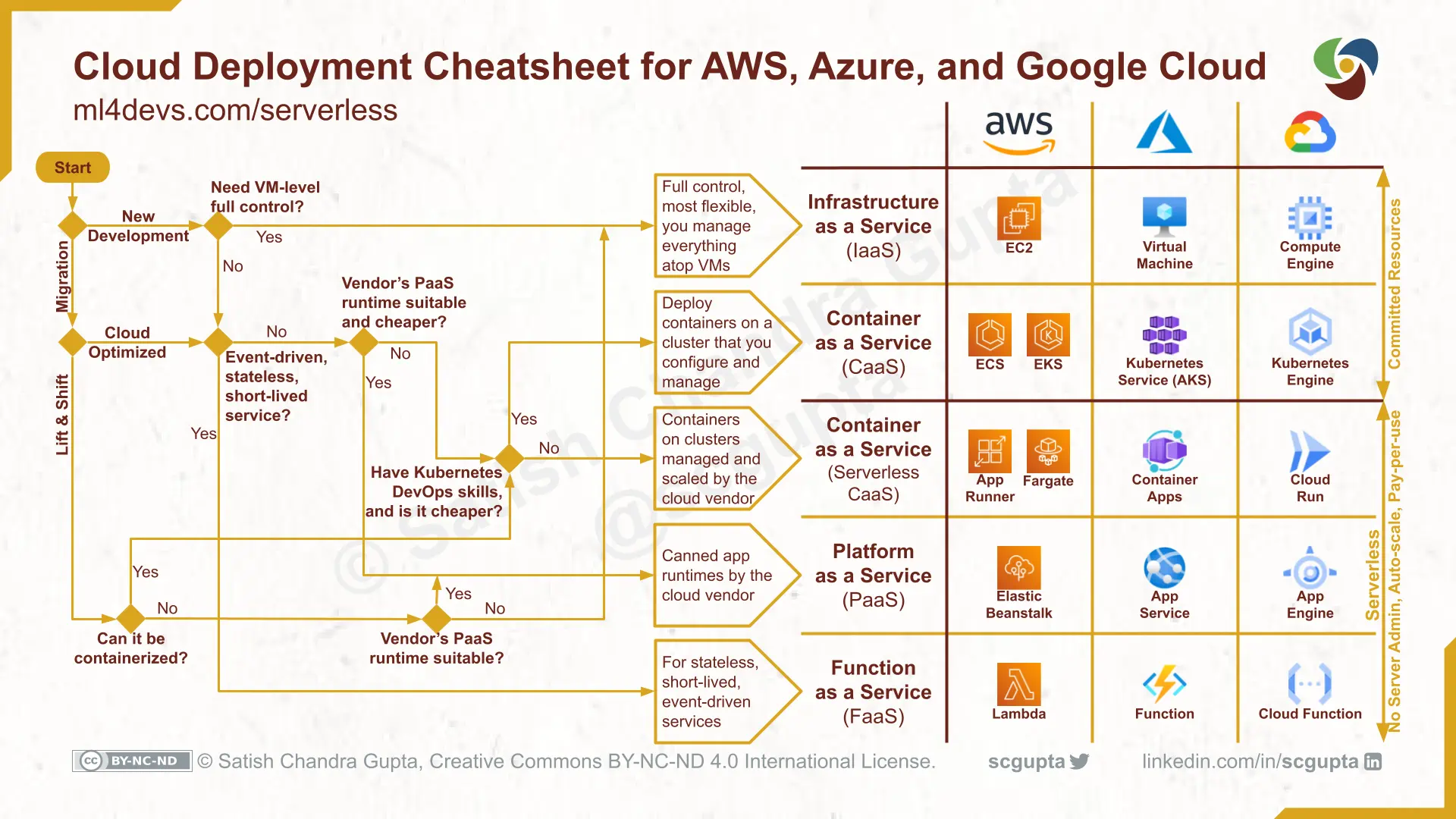
With the models defined, let's build a practical framework for choosing the right service. A decision is rarely based on a single factor; it's a multi-faceted evaluation. We will use a decision flowchart as our guide, supported by detailed comparisons.

Let's use this flowchart as our map and explore the key decision points.
1. Migration Strategy: Lift & Shift vs. Cloud Optimized
The first question in the flowchart—"Migrate" or "Build new?"—is critical.
- Lift and Shift (Rehosting): This involves moving an existing application to the cloud with minimal or no code changes. This is often the fastest path to the cloud.
- Ideal Model: IaaS (Azure Virtual Machines). If your application has dependencies on a specific OS configuration, requires custom software installation, or is a COTS (Commercial Off-the-Shelf) application that can't be containerized, VMs are your primary choice. You are essentially replicating your on-premises server in the cloud.
- Cloud Optimized (Refactoring/Re-architecting): This involves modifying an application to take advantage of cloud-native features. This is the goal for new applications ("greenfield") and the long-term strategy for modernized ones ("brownfield").
- Ideal Models: PaaS and Serverless. These models offer the greatest benefits in terms of scalability, operational efficiency, and cost-effectiveness for applications designed to leverage them.
2. Workload Characteristics: Predictable vs. Bursty
The nature of your application's workload heavily influences the cost-effectiveness of the chosen model.
- Steady, Predictable Workloads: If your application has high, constant utilization (e.g., a core business system running 24/7), the provisioned capacity model of IaaS can be more economical, especially when combined with Azure Reservations or Savings Plans.
- Variable, Bursty, or Event-Driven Workloads: For workloads with significant peaks and troughs in traffic (e.g., an e-commerce site during a flash sale, a data processing job that runs hourly, an API that responds to user actions), the consumption-based pricing of serverless is ideal. You pay only for what you use, avoiding the cost of idle infrastructure.
This blog post provides an excellent analysis of this economic trade-off.
IaaS vs. Serverless: Choosing Azure Functions Wisely
This article frames the choice between IaaS and Serverless from a business and cost-efficiency perspective, which aligns with your interests in economics.
Read the following sections: The case for VMs, which outlines scenarios where IaaS is the right fit. The case for Functions, which details the benefits of the serverless model for specific workloads. Pay close attention to the cost comparison example. It provides a concrete illustration of the potential savings. Finally, review the decision framework provided, as it simplifies the choice into a few key questions.
3. Control and Customization
As we've established, this is the central trade-off.
- Maximum Control (IaaS): Choose Azure VMs/VMSS when you need to:
- Install custom software or third-party agents that require OS-level access.
- Configure specific OS-level settings (e.g., registry, kernel parameters).
- Meet strict compliance requirements that mandate a dedicated, isolated OS environment.
- Run Windows Server containers (requires AKS, which runs on VM node pools).
- Managed Platform (PaaS): Choose App Service or Container Apps when your focus is on application code, not infrastructure. The platform handles patching, security, and scaling, increasing developer velocity.
- Abstracted Environment (Serverless/FaaS): Choose Azure Functions when you can express your logic in small, stateless units of code triggered by events. This offers the lowest operational overhead.
4. Team Skills and Operational Overhead
The choice of compute model is also a choice about how your engineering team will spend its time.
- IaaS (VMs, AKS): Requires a team with strong operations skills. For VMs, this means OS administration, patching, and security hardening. For AKS, it requires deep Kubernetes expertise for cluster management, networking, and security.
- PaaS/Serverless (App Service, Functions, ACA): Shifts the operational burden to Azure. Your team can focus on application development, performance monitoring, and business logic. This model is often described as "less ops," not "no ops," as you are still responsible for your code's reliability and security.
The following comprehensive video provides an excellent summary of all the compute services we've covered in this module, framing them within these trade-offs.
AZ-900 Episode 9 | Compute Services | VMs, VM Scale Set, App Service, Functions, ACI, AKS | Azure
This video recaps the main Azure compute services, comparing their characteristics and ideal use cases. It's a perfect review to tie everything together.
Focus on these segments where the presenter summarizes the positioning of each service: Virtual Machines (IaaS): High control, high maintenance, lift-and-shift. App Service (PaaS): Enterprise web hosting, less control, low maintenance. Azure Functions (Serverless/FaaS): Small pieces of code, lowest control, least maintenance, consumption pricing. Summary: The final summary brings all the services together and mentions the compute decision flow.
Synthesizing into Scenarios
Let's apply this framework to a few architectural scenarios.
Scenario 1: Migrating a traditional, three-tier .NET application from an on-premises data center.
- Initial Step (Lift & Shift): Deploy the web tier, application tier, and database (e.g., SQL Server) onto Azure Virtual Machines (IaaS). This is the fastest path with minimal risk, as it mirrors the existing environment.
- Analysis: This choice is driven by the "Migrate" path. The application may have dependencies on GAC assemblies, specific IIS configurations, or local file system writes that make it unsuitable for PaaS initially.
- Modernization Path:
- Migrate the database from SQL Server on a VM to Azure SQL Managed Instance (PaaS) to reduce database administration overhead.
- Refactor the web and application tiers to be stateless and package them as containers.
- Deploy the containerized application to Azure App Service for Containers or Azure Container Apps (PaaS) to benefit from managed scaling and deployments.
Scenario 2: Building a new backend for a mobile application that handles image uploads, processing, and user notifications.
- Architecture: A highly event-driven, serverless design.
- Mobile app uploads an image directly to Azure Blob Storage.
- The upload event triggers an Azure Function (Serverless/FaaS).
- The Function resizes the image, adds a watermark, updates a record in Azure Cosmos DB, and sends a message to an Azure Service Bus queue.
- Another Azure Function is triggered by the Service Bus message to send a push notification to the user.
- Analysis: This is a "Build New," cloud-optimized workload. The traffic is inherently bursty (it only runs when a user uploads an image). A serverless model provides extreme cost-efficiency, as you only pay for the few seconds of processing time per upload, and it scales automatically to handle viral growth.
Scenario 3: Developing a large-scale, multi-tenant SaaS platform based on microservices.
- Architecture: This requires a sophisticated orchestration platform.
- Azure Kubernetes Service (AKS) (IaaS/PaaS hybrid) is the leading candidate.
- Analysis: While Azure Container Apps (PaaS) is excellent for simpler microservices, a large-scale SaaS platform often requires the full control offered by AKS for:
- Complex Networking: Implementing a service mesh like Istio for advanced traffic management and security.
- Strict Multi-tenancy: Using Kubernetes namespaces and network policies to create strong isolation between tenant workloads.
- Ecosystem Integration: Leveraging a wide array of open-source CNCF tools for observability (Prometheus), GitOps (ArgoCD), etc.
- The cost is a managed cluster, but the flexibility is required for the platform's complexity.
Finally, for a cross-cloud perspective that leverages your AWS knowledge, the following cheatsheet provides a helpful visual mapping of IaaS, PaaS, and FaaS services across AWS, Azure, and GCP.
Conclusion
You have now completed the journey through Azure's core compute infrastructure. This final lesson integrated the services we've studied into a strategic framework for making architectural decisions.
Your key takeaways should be:
- The choice between IaaS, PaaS, and Serverless is a primary architectural decision that balances control, flexibility, cost, and operational overhead.
- IaaS (VMs) is the foundation, offering maximum control, best suited for legacy applications and highly custom workloads.
- PaaS (App Service, ACA) provides a managed platform that accelerates developer velocity, ideal for modern web applications and microservices.
- Serverless (Functions) offers the highest level of abstraction and cost-efficiency for event-driven, intermittent workloads.
- Modern architectures are often hybrid, using the right compute model for the right job—for example, combining IaaS for a stateful database with PaaS/Serverless for the stateless application tiers.
With a solid understanding of how to host and run your application code, we will turn our attention in the next module to one of the most critical components of any system: data. Our next lesson will introduce Azure Storage Solutions, beginning with Azure Blob Storage, the foundational service for unstructured data in the cloud.