Welcome to our second lesson on Azure's data platform. In our previous discussion, we focused on optimizing storage costs by examining Azure Blob Storage access tiers and automating data movement with lifecycle management policies. We established how to manage the economic trade-offs between storage and access costs over the lifetime of your data.
Now, we turn to another crucial architectural pillar: resilience. Storing data cost-effectively is one half of the equation; ensuring it survives failures and remains available to your applications is the other. This lesson addresses the learning outcome: Explain Azure Storage redundancy options (LRS, ZRS, GRS, RA-GRS) and their durability/availability trade-offs.
We will dissect the different strategies Azure provides to protect your data, from failures within a single datacenter to the complete loss of a geographical region. Your experience with distributed systems will be valuable here as we analyze the trade-offs between cost, complexity, and resilience, which are central to architectural decision-making.
The Foundations: Durability, Availability, and Failure Domains
Before comparing the specific redundancy options, it's critical to be precise about our terminology. In the context of storage systems:
- Durability refers to the guarantee of data preservation against loss or corruption. It's typically expressed as a percentage of objects you can expect to not lose over a year. For example, "eleven nines" (99.999999999%) durability means that for a set of 100 million objects, you might expect to lose one object every 100 years.
- Availability refers to the uptime of the storage service, meaning the system is operational and can respond to read/write requests. This is governed by a Service Level Agreement (SLA) and is usually a lower percentage than durability. A system can be temporarily unavailable without losing any data.
The redundancy options Azure offers are designed to protect against failures across different failure domains:
- Node/Rack Failure: A single server or a rack of servers fails.
- Datacenter (Zonal) Failure: An entire datacenter becomes unavailable due to a power outage, cooling failure, or network issue. In Azure, datacenters within a region are grouped into Availability Zones (AZs).
- Regional Failure: An entire Azure region is affected by a major natural disaster or widespread outage.
The choice of which redundancy strategy to use is fundamentally a business decision, driven by your application's Recovery Point Objective (RPO) and Recovery Time Objective (RTO). To ground these concepts firmly, let's watch a segment from a broader discussion on disaster recovery.
Disaster Recovery in Microsoft Azure
John Savill provides a clear and concise definition of RPO and RTO, which are the business requirements that drive your technical redundancy choices.
Watch the segment explaining RPO and RTO. Focus on how RPO defines acceptable data loss (e.g., 5 minutes) and RTO defines acceptable downtime (e.g., 30 minutes). These two metrics are the lens through which you should evaluate every redundancy option.
With these foundational concepts in mind, let's explore the specific options Azure provides.
Redundancy Within a Single Region
The first level of protection operates within the boundaries of a single Azure region. These options are about providing high availability and durability against localized hardware failures.
- Locally-Redundant Storage (LRS): This is the most basic and lowest-cost option. Your data is replicated three times synchronously within a single physical datacenter in the primary region. LRS protects your data from server rack and drive failures. However, if that single datacenter has a major failure (like a fire or flood), all copies of your data could be lost or become unavailable.
- Zone-Redundant Storage (ZRS): This option provides superior availability. Your data is replicated synchronously across three distinct Availability Zones within the primary region. Since each AZ is a physically separate datacenter with independent power, cooling, and networking, ZRS can tolerate the failure of an entire datacenter without data loss and with continued availability for both reads and writes.
To understand these options in detail, the official Microsoft documentation is the best source.
Data redundancy - Azure Storage
This document provides the authoritative definitions for redundancy in the primary region.
Read the section on primary region redundancy. Pay close attention to the diagrams and the durability numbers (11 nines for LRS vs. 12 nines for ZRS).
Redundancy Across Regions: Planning for Disaster Recovery
While ZRS protects against a datacenter failure, it cannot protect your data from a disaster that affects an entire region. For this, Azure provides geo-redundancy, which replicates your data to a second, geographically distant region.
A key concept in Azure's geo-redundancy strategy is the paired region. Unlike AWS, where you are free to replicate to any region you choose, Azure has predefined pairs (e.g., East US is paired with West US). This design has significant operational benefits. For instance, Microsoft ensures that platform updates are rolled out sequentially to paired regions, not simultaneously, preventing an update-related issue from affecting both your primary and secondary copies.

With this in mind, let's examine the geo-redundant options:
- Geo-Redundant Storage (GRS): This option combines LRS in the primary region with asynchronous replication to a secondary paired region, where the data is also stored with LRS (3 copies). This results in a total of six copies of your data.
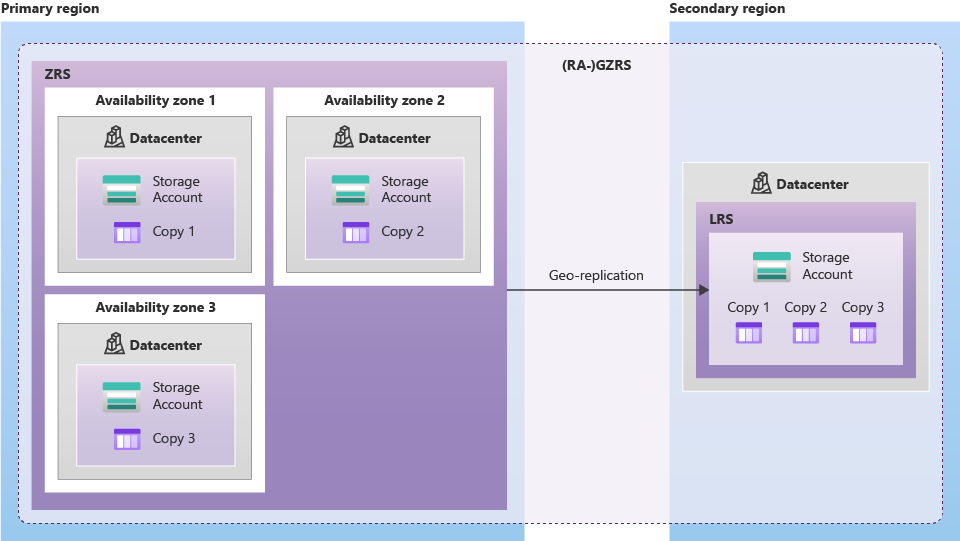
- Geo-Zone-Redundant Storage (GZRS): This is the most comprehensive pre-configured redundancy option. It combines ZRS in the primary region (3 copies across 3 AZs) with asynchronous replication to the secondary region, where the data is stored with LRS (3 copies).
The keyword here is asynchronous. The replication to the secondary region lags behind the writes to the primary region. This delay defines your RPO. In the event of a primary region disaster, any data written since the last replication point will be lost.
The following reading explains these powerful but more complex options.
Data redundancy - Azure Storage
This section of the documentation covers the geo-replication options.
Please read the part on redundancy in a secondary region. Focus on understanding the asynchronous nature of the replication and the distinction between GRS (LRS in primary) and GZRS (ZRS in primary).
High Availability: Read Access to the Secondary Region
With GRS or GZRS, the data in the secondary region is a "dark" copy. It exists for durability but is not accessible for reads or writes unless you initiate a formal account failover to the secondary region. This failover process itself takes time, contributing to your RTO.
To improve availability and reduce RTO for read operations, you can enable read access on your secondary copy:
- Read-Access Geo-Redundant Storage (RA-GRS): An extension of GRS that provides a read-only endpoint for the data in your secondary region.
- Read-Access Geo-Zone-Redundant Storage (RA-GZRS): An extension of GZRS that provides the same read-only secondary endpoint.
This feature is architecturally significant. It allows you to design applications that can redirect read traffic to the secondary region if the primary region becomes unresponsive, thus maintaining partial functionality. This is a common pattern for active-passive DR configurations.
Benefits and Usage of Storage Account Resources - AZ-900 Certification Course - December 2024 Update
John Savill provides a whiteboard explanation that clearly distinguishes the geo-redundant options and the read-access add-on.
Watch the following segments to solidify your understanding: GRS GZRS Read-Access options
Architectural Synthesis: Making the Right Choice
As a principal engineer, your role is to select the option that meets the business requirements (RPO/RTO) at the most reasonable cost. The Microsoft Learn documentation contains an excellent set of summary tables that are invaluable for this decision-making process.
Data redundancy - Azure Storage
These tables are a crucial reference for comparing the options side-by-side.
Carefully review the summary tables. Pay particular attention to the "Durability and availability by outage scenario" table, as it directly maps each option to the failure domains we discussed.
Here is a simplified decision framework based on those tables:
| If your primary concern is... | And you can tolerate... | Choose... |
|---|---|---|
| Lowest cost | Data loss in a datacenter-level outage. | LRS |
| High availability within a region | Data loss in a regional outage. | ZRS |
| Disaster recovery from a regional outage | Downtime during a failover to the secondary region. | GRS |
| Maintaining read availability during a regional outage | Eventual consistency and higher cost. | RA-GRS |
| Maximum availability AND durability | The highest cost and complexity. | RA-GZRS |
Finally, it's important to be aware of service constraints. High-performance Premium storage tiers, for example, typically do not support geo-redundancy options. They are optimized for low-latency I/O within a single region and thus only offer LRS and ZRS. This is a critical trade-off: you may have to choose between the highest performance and the highest level of disaster recovery.
Conclusion
In this lesson, we have moved from cost optimization to resilience, exploring the critical dimension of data redundancy in Azure Storage. You are now equipped to analyze the trade-offs between cost, durability, and availability.
Our key takeaways are:
- Redundancy is about protecting against failures across different domains: rack (LRS), datacenter (ZRS), and region (GRS/GZRS).
- LRS is the cheapest but least resilient option, vulnerable to a datacenter outage.
- ZRS provides high availability within a region by replicating across three Availability Zones.
- GRS and GZRS provide disaster recovery by asynchronously replicating data to a paired secondary region, offering the highest durability.
- RA-GRS and RA-GZRS enhance availability by providing a read-only endpoint to the secondary region, enabling active-passive architectural patterns.
- The choice of redundancy option is a business decision driven by your application's RPO and RTO requirements, balanced against cost and operational complexity.
Having covered how to store object data both cost-effectively and resiliently, our next lesson will broaden our scope. We will investigate storage solutions designed for a different purpose: enterprise file shares, comparing Azure Files and Azure NetApp Files.