Hello! Welcome to your next lesson in the "Enterprise SEO: Rendering, Duplication & Migrations" module.
In our last session, we focused on optimizing client-side rendered websites, a crucial skill for working with modern web applications. We learned how to make an existing JavaScript-heavy site as search-friendly as possible by implementing best practices for link structures, dynamic meta tags, and error handling.
Today, we shift our focus to one of the most significant and high-stakes projects in an SEO's career: a site migration. Mishandling a migration can lead to catastrophic drops in traffic and visibility. Proper planning is the only way to ensure a smooth transition.
This lesson is designed to equip you with the foundational planning skills for this process. Our goal is to develop a pre-migration SEO checklist and benchmark performance for an enterprise website. By the end of this session, you will have a structured framework for auditing a site before a migration and establishing the critical performance benchmarks needed to measure success and diagnose any post-launch issues.
1. Understanding the Stakes of a Site Migration
Before diving into checklists, it's essential to understand why this process demands such meticulous planning. A site migration involves changing a site's location, platform, structure, content, or design. For search engines, this is a major event.
A common fear is that traffic will inevitably drop during a migration. While this is a risk, it's not a certainty. To get a high-level perspective from Google on the realities of site moves, let's start with a short video.
Site Migrations: SEO Mythbusting
The video 'Site Migrations: SEO Mythbusting' from the Google Search Central channel provides crucial context. It addresses common misconceptions and offers strategic advice on how to approach a migration to minimize risk.
Please watch the following segments: 01:17 - 02:38: Listen for the discussion on the myth of guaranteed traffic loss and what a 'clean move' looks like. 02:58 - 04:14 & 18:35 - 19:34: Pay close attention to the repeated, critical advice about not changing too many variables at once. This is the single most important strategic takeaway.
The key message from Google's team is clear: isolate your variables. If you are changing your domain, try not to simultaneously redesign the entire site, change the URL structure, and switch your tech stack. Each change introduces a new risk. For an enterprise site, where complexity is already high, combining multiple major changes multiplies the potential points of failure and makes troubleshooting nearly impossible.
Your role as the SEO is to be the voice of caution and methodical planning, ensuring the team understands these risks. The pre-migration checklist is your primary tool for managing this process.
2. The Pre-Migration SEO Checklist: A Four-Part Framework
A successful migration is 90% preparation. The pre-migration phase is where you do the heavy lifting to inventory assets, identify risks, and create a baseline for what "normal" looks like. We can organize this work into a clear, four-part framework.
Two of the most comprehensive guides on this topic come from Search Engine Land and BrightEdge. They will serve as our primary references.
Site Migration SEO Guide: Preserve Rankings & Traffic
The 'Site Migration SEO Guide' from Search Engine Land provides an exhaustive, step-by-step process. We'll use it to structure our checklist.
Skim the 'Pre-site migration SEO checklist' section to get a feel for the level of detail involved. We will be referencing specific parts of this guide throughout the lesson. You don't need to read it all in-depth right now.
Based on this guide and industry best practices, here is our framework:
- Full Site Audit & Inventory: Crawl the entire current site to create a complete inventory of every URL, its content, and its technical attributes. This is your master blueprint.
- Performance Benchmarking: Capture a comprehensive snapshot of the site's current performance across multiple dimensions (traffic, rankings, technical health, conversions). This is your "before" picture.
- Asset Identification & Strategic Planning: Pinpoint your most valuable pages (by traffic, links, and revenue) to ensure they receive special care. Plan for the preservation and enhancement of elements like schema markup.
- Staging Site Validation: Before the new site goes live, conduct a full audit on a private "staging" version to catch critical errors before they impact your live traffic.
Let's now walk through the practical steps for the first three parts of this framework.
3. Part 1: Full Site Audit & Inventory
You can't migrate what you don't know you have. The first step is to crawl the entire website to create a master list of all URLs and their associated SEO elements.
Since you're experienced with Screaming Frog, you know it's the perfect tool for this job. The goal is to export a complete picture of the current site.
Screaming Frog SEO Spider Tutorial - How To Do An SEO Audit In 2025
The 'Screaming Frog SEO Spider Tutorial' offers a great refresher on using the tool for a technical audit. This will help you focus on the specific data points needed for a pre-migration inventory.
Watch the segments from 00:00 - 03:33, 05:15 - 07:45, and 07:45 - 09:04. As you watch, focus on how you would use these features to build your inventory: Initiating a crawl to gather all URLs. Checking the Response Codes tab to find all existing 200s, 301s, and 404s. Auditing on-page elements like Page Titles, Meta Descriptions, and H1s. Using the Issues tab to quickly identify existing problems that should ideally be fixed before the migration.
The output of this crawl, typically exported to a Google Sheet, becomes your foundational document. It should list every URL and, at a minimum, its:
- HTTP Status Code
- Page Title
- Meta Description
- H1 Tag
- Canonical Tag URL
robotsdirectives (e.g., index/noindex)
This inventory serves two purposes:
- It documents all existing assets that need to be accounted for in the migration.
- It reveals pre-existing technical issues (like broken links or duplicate titles) that you can advocate to fix during the migration process, thereby improving the site's health.
4. Part 2: Performance Benchmarking
With your inventory in hand, the next step is to document how everything is performing. This benchmark is non-negotiable. Without it, you cannot accurately assess the impact of the migration or diagnose what went wrong if traffic drops.
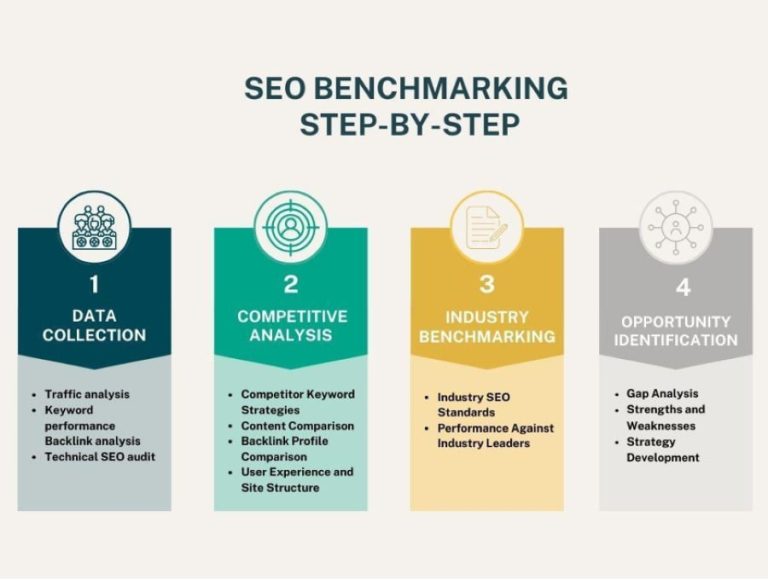
The Search Engine Land guide provides an excellent, detailed list of what to record.
Site Migration SEO Guide: Preserve Rankings & Traffic
Let's return to the 'Site Migration SEO Guide' for a granular look at creating your benchmark.
Read section #1, 'Audit the site and benchmark current site performance.' Pay close attention to the three categories of data to collect: Technical and schema: Note the recommendation to record schema types and Core Web Vitals. On-page SEO and backlinks: Focus on the specific data to export from Google Search Console (queries, pages, clicks, impressions, CTR). Marketing and tracking: Understand the importance of documenting tracking tags (GA4, etc.) and connected marketing technologies.
To summarize your benchmarking checklist:
- Technical Health:
- Screaming Frog crawl data (number of 404s, 301s, etc.).
- Core Web Vitals performance (from PageSpeed Insights or GSC).
- Number of indexed pages (from GSC's Indexing report).
- Organic Performance:
- Overall organic traffic and conversions (from GA4) for the last 12-16 months.
- Performance by URL (Clicks, Impressions, CTR, Position) from GSC. Export this!
- Performance by Query (same metrics as above) from GSC.
- Screenshot GSC and GA4 performance graphs for a quick visual reference.
- Backlinks:
- Export your full backlink profile from Ahrefs or SEMrush. Note the total number of referring domains and backlinks.
- AI Search Visibility (Future-Proofing):
- As the BrightEdge article (
ID=[LINK](https://www.brightedge.com/blog/2025-guide-successful-site-migration-how-protect-your-seo-and-grow-era-ai-search)) suggests, if you have access to tools that track visibility in AI Overviews or generative results, benchmark this as well. This is crucial for a 2026-focused strategy.
- As the BrightEdge article (

5. Part 3: Asset Identification & Strategic Planning
Not all pages are created equal. Within your massive list of URLs, some are far more valuable than others. You must identify these "crown jewel" assets to ensure they are handled with extreme care during the migration.
Site Migration SEO Guide: Preserve Rankings & Traffic
The Search Engine Land guide again provides a practical, tool-based approach for identifying your most important pages.
Read section #5, 'Identify high-value pages.' Follow the specific instructions for using: Google Search Console to find pages with the most clicks. Google Analytics 4 to find pages that drive revenue or have high engagement.
Your list of high-value pages should include:
- Top traffic-driving pages (from GSC).
- Top revenue-generating pages (from GA4).
- Pages with the most high-quality backlinks (from your backlink audit).
Flag these pages in your master spreadsheet. During the migration, these are the URLs you will test first and monitor most closely.
Test your understanding!
You are preparing for a migration of a large e-commerce site from Magento to Shopify. A stakeholder asks, "Why are we spending so much time exporting data from all these tools? Can't we just move the site and see what happens?" How would you justify the benchmarking process, referencing at least two specific data points you are collecting and why they are critical?
Show answer
A strong answer would be:
"That's a fair question. The benchmarking process is our insurance policy. By documenting everything now, we can ensure a smooth transition and quickly fix any issues. For example:
- We are exporting performance data by page from Google Search Console. If, after the migration, we see a 20% traffic drop, this data will allow us to pinpoint exactly which pages lost traffic. Without it, we'd be flying blind.
- We are also documenting all high-value pages that generate the most revenue in GA4. This allows us to prioritize our testing and monitoring on the pages that directly impact the business's bottom line, ensuring they are working perfectly from day one of the launch."
This response connects the process directly to risk mitigation and business value.
Conclusion
Excellent work. You now have a robust, structured process for the critical pre-migration phase. This meticulous preparation is what separates a successful site migration from a disastrous one. It transforms a high-risk event into a managed project.
Key Takeaways:
- Plan, Don't Panic: The vast majority of site migration work happens before the launch day. Thorough preparation is the key to success.
- Isolate Variables: Avoid changing the domain, platform, and design all at once. Each simultaneous change adds a layer of risk and complicates troubleshooting.
- Your Checklist is Your Guide: A pre-migration checklist should be built on four pillars: a full site inventory, comprehensive performance benchmarking, high-value asset identification, and staging site validation.
- Benchmark Everything: You must have a "before" picture to measure against the "after." This includes technical health (crawl data), organic performance (GSC/GA4), and backlink profiles.
We've now inventoried every URL on the old site. The next logical question is: where will each of those URLs go on the new site? In our next lesson, you will learn how to create a comprehensive URL mapping and 301 redirect strategy for a site migration. This is the critical next step in our enterprise migration plan.