Hello! Welcome back to our module on Enterprise SEO.
In our last lesson, you created a comprehensive pre-migration checklist and benchmarked the performance of a website. You now have a complete inventory of the old site's URLs and a clear "before" picture of its performance. This preparation is the foundation for the most critical technical step of any migration.
Today, we will build the bridge from the old site to the new one. Our learning outcome is to create a comprehensive URL mapping and 301 redirect strategy for a site migration. This process involves meticulously planning where every old URL will point on the new site to preserve traffic, user experience, and hard-earned link equity. A mistake here is one of the quickest ways to lose search visibility, so careful planning is essential.
1. The Core of a Migration: Understanding 301 Redirects and Signal Transfer
You're already familiar with redirects, but during a migration, their role is magnified. A 301 redirect permanently passes ranking signals—what's often called "link juice" or "link equity"—from an old URL to a new one. This tells search engines that a page has moved for good, and they should transfer its authority.
Let's start with a quick, practical refresher on why this is so vital.
301 Redirects: The Ultimate Guide To Website Migration (SEO)
The video '301 Redirects: The Ultimate Guide To Website Migration' from Apotheca Marketing provides a concise overview of the role of 301s in a migration context.
Please watch the first four minutes (00:00 - 04:15). Focus on: How 301s instruct Google to transfer 'Google juice' from an old page to a new one. The different strategies for redirecting pages: one-to-one, redirecting to a category page, or redirecting to the homepage when content is removed.
From Google's perspective, a large number of 301 redirects, combined with a 'Change of Address' declaration in Search Console, provides a strong signal that a site move is intentional. This helps them transfer the signals they've associated with your old domain to the new one more efficiently.
2. Phase 1: Compiling the Master List of "From" URLs
In the previous lesson, you performed a site crawl to begin your inventory. Now, we need to create the definitive, exhaustive list of every single URL that needs a redirect. A simple crawl isn't enough, as it can miss pages that aren't linked internally but still receive traffic or have valuable backlinks.
The following guide offers an excellent, practical workflow for this data collection phase.
Mapping 301 redirects for SEO-friendly site migrations
The article 'Mapping 301 redirects for SEO-friendly site migrations' from Builtvisible provides a step-by-step, tool-based approach to building your URL list. It aligns perfectly with your hands-on preference.
Please read the 'Data collection' section. Pay attention to the four primary sources recommended for gathering URLs: XML sitemaps: The list of pages the site wants indexed. Google Analytics: Pages that have received organic traffic. Backlink checker: Pages with link equity (using Ahrefs, SEMrush, or Majestic). Site crawls: Your existing Screaming Frog data to fill in the gaps. The goal is to combine the exports from these sources into a single, de-duplicated list in a spreadsheet. This will form the 'Old URL' column of your redirect map.
By aggregating URLs from all these sources, you ensure that you account for:
- Pages that drive direct traffic.
- Pages that have valuable backlinks but may not get traffic.
- Orphaned pages that crawlers might miss but users or search engines still access.
3. Phase 2: Mapping Old URLs to New Destinations
Once you have your master list of old URLs, the next step is to determine the corresponding new URL for each one. This is the heart of the mapping process. You will need to have a crawl of the new (staging) site ready to identify the destination URLs.
We will continue with the Builtvisible guide, as it details several practical techniques for this.
Mapping 301 redirects for SEO-friendly site migrations
Let's return to the Builtvisible article to learn how to match old URLs to their new counterparts using data from your crawls.
Read the 'Redirect mapping' section. Focus on the three core techniques for matching URLs at scale using Excel or Google Sheets: H1s & title tags: Using VLOOKUP to match pages based on their titles. URL stems: Stripping domains and file extensions to find matching slugs. Top ranking URLs: Using site: searches for manual lookups when automated methods fail.
Your mapping strategy will fall into a few common patterns:
- One-to-One: The ideal scenario.
old-site.com/product-a->new-site.com/products/product-a. - One-to-Relevant-Parent: If a page is being retired.
old-site.com/outdated-feature->new-site.com/features. - Consolidation (Many-to-One): If several weak pages are being merged into one strong one.
old-site.com/blue-widgets-v1,old-site.com/blue-widgets-v2->new-site.com/blue-widgets. - Let it Go (404/410): For pages with no traffic, no backlinks, and no strategic value, it is sometimes acceptable to let them return a 404 (Not Found) or 410 (Gone) status code. However, during a major migration, it's safer to redirect as much as possible, even if it's to the homepage.
Test your understanding!
You have an old URL /blog.php?id=123 whose H1 is "Our Q3 Company Update". On the new site, the equivalent page is /insights/q3-company-update. The URL stem doesn't match, so a rule-based redirect won't work. Which mapping technique from the Builtvisible article would be most effective here, and what function in a spreadsheet would you use to execute it?
Show answer
The most effective technique would be mapping by H1s. You would have a sheet with the old URLs and their H1s, and another sheet with the new URLs and their H1s. You could then use the VLOOKUP function in Excel or Google Sheets to find the matching H1 "Our Q3 Company Update" in the new site's data and return its corresponding new URL, /insights/q3-company-update.
4. Advanced Strategy for Enterprise-Scale Redirects
For a site with hundreds of thousands or millions of URLs, creating a 1:1 map is often impractical. This is where enterprise-level strategies become critical for managing the process efficiently.
This next resource is focused specifically on the challenges of large-scale migrations.
A Guide To Enterprise-Level Migrations (100k + URLs)
The article 'A Guide To Enterprise-Level Migrations' from Search Engine Journal will give you the strategies needed to handle redirects at scale.
Read the sections 'What Is Migration Lag?,' 'Defining The Migration Strategy,' and 'Setting Up 301 Redirects At Scale.' Focus on these key enterprise concepts: Prioritizing Redirects: Using data (traffic, revenue, links) to decide which redirects to implement first. Using Wildcards: A crucial technique to redirect entire sections of a site with a single rule (e.g., /product/*). Handling Parameters: How to manage URLs with query parameters. Breaking Redirect Chains: The importance of mapping from the original source URL to the final destination. Overcoming Redirect Limits: How to handle platforms like Salesforce Commerce Cloud that have hard limits on the number of redirects.
These techniques—prioritization, wildcards, and managing platform constraints—are what distinguish standard redirect mapping from an enterprise-level strategy. Being able to advise on these points demonstrates a senior level of technical SEO expertise.
5. The Role of AI in URL Mapping
While most redirect mapping is currently a data-heavy, manual, or rule-based task, AI is beginning to offer more sophisticated solutions. New tools are emerging that use Natural Language Processing (NLP) to automate the matching process.
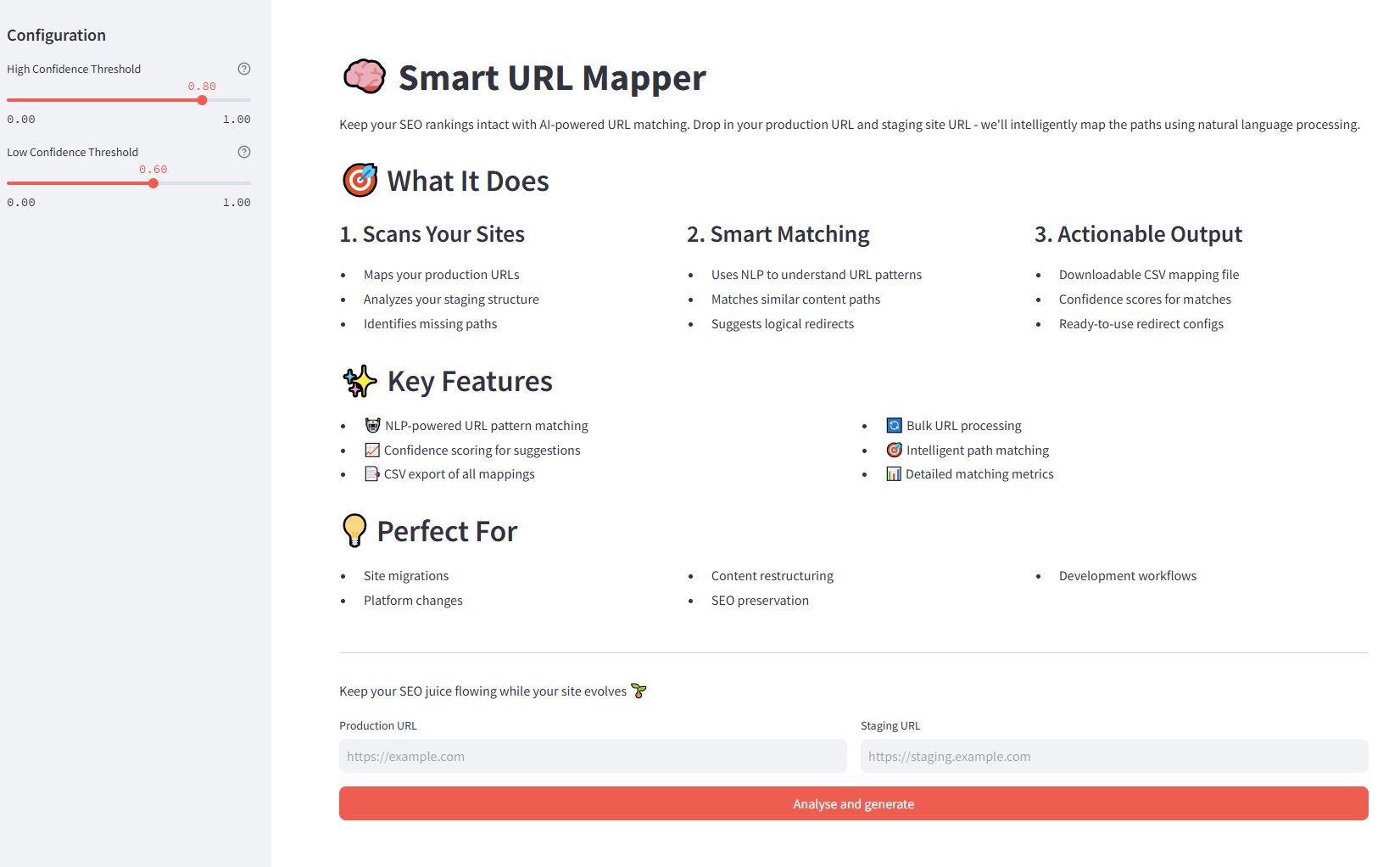
Instead of relying on an exact match of a URL slug or H1, these AI tools can identify that /articles/benefits-of-running on the old site is the semantic equivalent of /blog/why-jogging-is-good-for-you on the new site. This reduces manual effort and improves the accuracy of the mapping, especially when content is being restructured. As an SEO in 2026, proficiency with such tools will be a significant advantage.
The Final Deliverable: The Redirect Map File
The culmination of this entire process is a simple but powerful document: a redirect map. This is typically a two-column CSV file:
| Source URL (Old) | Destination URL (New) |
|---|---|
https://old-domain.com/page-a |
https://new-domain.com/new-page-a |
https://old-domain.com/category-b/ |
https://new-domain.com/products/category-b/ |
https://old-domain.com/about-us.html |
https://new-domain.com/about |
This file is the final instruction set you provide to the development team. They will use it to implement the redirects at the server level (e.g., via .htaccess, Nginx config) or within the CMS, depending on the tech stack.
Conclusion
You have now designed the architectural blueprint for transferring your site's authority and user pathways from the old domain to the new one. This redirect map is the single most important document for safeguarding your SEO performance during a migration.
Key Takeaways:
- A Redirect Map is Your Blueprint: It's a comprehensive plan that dictates how link equity and user traffic will flow to the new site.
- Aggregate from All Sources: A complete URL list requires data from crawls, sitemaps, analytics, and backlink tools.
- Use a Hybrid Mapping Approach: Combine automated techniques (rules, VLOOKUPs on titles/H1s) for scale and manual checks for high-value pages.
- Think at Enterprise Scale: Use prioritization, wildcards, and awareness of platform limits to manage migrations with 100k+ URLs.
- The Output is Simple: Your work results in a clean, two-column file that developers can directly implement.
You've planned the migration and mapped the URLs. What's next? Testing. In our next lesson, you will perform a pre-launch SEO audit on a staging environment to prevent critical issues. This is where you'll verify that your redirect map and all other technical elements have been implemented correctly before they go live.