Hello! Welcome back.
In our last lesson, we built a framework for managing the SEO challenges of faceted navigation. We saw how a layered strategy of robots.txt, noindex tags, and canonicals can control crawl budget and prevent duplicate content. We also briefly touched on using JavaScript for client-side rendering (CSR) as a way to avoid generating new URLs for low-value filters.
Today, we'll dive deep into that world of JavaScript SEO. Your work as an SEO specialist increasingly involves websites built with modern JavaScript frameworks like React, Vue, or Angular. If search engines can't properly "see" the content on these sites, your SEO efforts will be invisible.
This lesson focuses on a critical skill for any modern SEO: diagnosing JavaScript rendering issues using Chrome DevTools and comparing Server-Side Rendering (SSR) vs. Dynamic Rendering solutions. By the end of this lesson, you will be able to identify when a rendering problem is hurting your site's performance and understand the strategic trade-offs between the primary solutions.
1. Rendering Fundamentals: How Content Gets on the Page
Before we diagnose problems, we need to understand the fundamental ways a browser (and a search engine bot) can build a webpage. The core difference lies in where the HTML is constructed: on the server before it's sent, or in the user's browser after it arrives.
To start, let's establish the difference between Server-Side Rendering (SSR) and Client-Side Rendering (CSR).
A guide to diagnosing common JavaScript SEO issues
The article 'A guide to diagnosing common JavaScript SEO issues' from Search Engine Land provides a clear, concise explanation of rendering. It will help you understand the fundamental differences between SSR and CSR.
Please read the section 'Rendering in a nutshell'. Focus on the definitions of Server-side rendering and Client-side rendering and why CSR can pose a risk for search engine crawlers.
As the article explains:
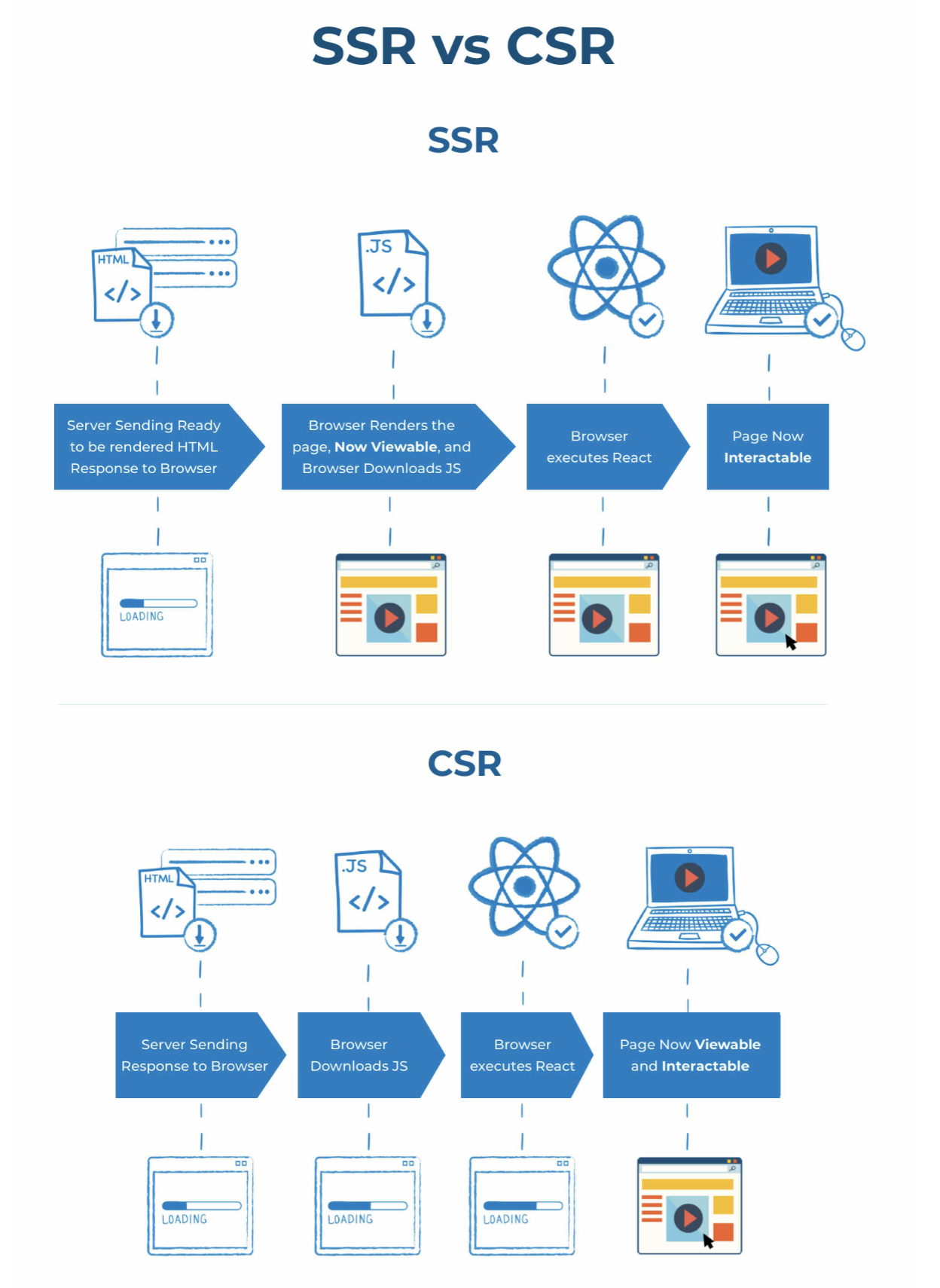
- Server-Side Rendering (SSR): The server generates the full HTML for a page in response to a request. The browser receives a complete, ready-to-display document. This is SEO-friendly because crawlers can immediately see all the content and links.
- Client-Side Rendering (CSR): The server sends a minimal HTML file, often just a shell with links to JavaScript files. The browser then executes the JavaScript to build the page content dynamically. This can be problematic for SEO because if the crawler doesn't run the JavaScript, it sees an empty or incomplete page.
The following diagram provides an excellent visual comparison of the two processes.
Your first and most basic diagnostic check is to compare what the server sends with what the browser renders.
- "View Page Source" (Ctrl+U or Cmd+Opt+U): This shows you the initial HTML document that the server sent. This is what a crawler sees on its first pass.
- "Inspect Element" (Right-click > Inspect): This shows you the live, processed Document Object Model (DOM) after the browser has executed JavaScript. This is what a user sees.
If you find essential content (like product descriptions or internal links) in the "Inspect Element" view but it's missing from the "View Page Source," you have identified a classic JavaScript-dependent page. Now, let's use more advanced tools to dig deeper.
2. Diagnosing Rendering Issues with Chrome DevTools and Google's Tools
When a JavaScript-powered page isn't performing well in search, you need to play detective. Chrome DevTools and Google's own testing tools are your magnifying glass.
To see these diagnostic techniques in action, we'll watch a video from the official Chrome for Developers channel. It walks through several real-world case studies of JavaScript SEO issues.
Debugging JavaScript SEO issues
The video 'Debugging JavaScript SEO issues' is a fantastic, practical guide. It demonstrates how to use Google's testing tools to find the root cause of common rendering problems.
Watch the sections demonstrating three different case studies, starting from the timestamp 03:55. Notice how the presenter uses the Mobile-Friendly Test (which uses the same renderer as Googlebot) and DevTools to diagnose each problem: Blocked API Call (03:55 - 05:39): See how a robots.txt file accidentally prevents content from loading. Misconfigured Service Worker (05:39 - 07:09): Learn how a site can work for repeat users but be broken for first-time visitors like Googlebot. Content Loaded on Scroll (07:09 - 08:14): Understand why content that appears on user interaction (like scrolling) might be missed by Googlebot.
The video demonstrates Google's public testing tools, but you can perform even more detailed analysis directly in your browser with Chrome DevTools.

Here are the key tabs in DevTools for an SEO audit:
- Elements Tab: As we discussed, this shows the rendered DOM. You can search this tab (Ctrl+F or Cmd+F) to confirm if text, links, or specific HTML tags have been rendered.
- Console Tab: Look for any red errors. While many are harmless for SEO, errors related to "uncaught" exceptions or failed resource loading can stop the rendering process in its tracks.
- Network Tab: This tab shows every file the browser requests. You can filter for "JS" to see JavaScript files or "Fetch/XHR" to see API requests. Check for any requests that have a "failed" or
4xx/5xxstatus code. A failed API call could be the reason your content is missing. - Coverage Tab: This tool is excellent for diagnosing performance issues. It shows you how much of the downloaded CSS and JS code was actually used to render the page. Large amounts of unused code can slow down rendering, risking that Googlebot moves on before your content appears. The "Advanced SEO Guide to Rendering" article from Sitebulb discusses this under the "Large Bundles" heading.
Test your understanding!
You are auditing an e-commerce product page built with a JavaScript framework. The "product specifications" section is not being indexed by Google.
- In Chrome, "View Page Source" shows no product specifications.
- "Inspect Element" shows the specifications correctly inside a
<div>. - The Console tab shows no red errors.
- The Network tab shows all JS files loaded with a
200 OKstatus, but an API request toapi.example.com/products/specifications/123has a403 Forbiddenstatus.
What is the most likely cause of the issue, and what would be your recommendation to the development team?
Show answer
The most likely cause is that the API endpoint required to fetch the product specifications is blocking requests from Google's servers (and possibly other external sources), resulting in a 403 Forbidden error. Even though the JavaScript code runs, it fails to fetch the data needed to populate the specifications <div>.
Recommendation: Advise the development team to check the server configuration or firewall rules for the API endpoint. They need to ensure that requests from Googlebot's IP ranges are allowed, so the data can be fetched successfully during the rendering process. This is similar to the robots.txt-blocked API call shown in the video.
3. Strategic Solutions: SSR vs. Dynamic Rendering
Once you've diagnosed a rendering issue, the next step is to recommend a solution. While fixing a specific bug (like a blocked API) is a tactical fix, the strategic solution often involves changing the rendering method itself.
Let's compare the two main SEO-friendly rendering patterns: Server-Side Rendering (SSR) and Dynamic Rendering.
The following article from Sitebulb provides a helpful table that summarizes various rendering methods.
Advanced SEO Guide to Rendering: How to Debug, Test & ...
The 'Advanced SEO Guide to Rendering' by Sitebulb offers an excellent overview of different rendering methodologies. We will focus on the comparison table it provides.
Please read the section 'How your website is configured is important' and pay close attention to the table comparing rendering methods. Specifically, compare the rows for SSR and Dynamic rendering, noting their descriptions, advantages, and considerations.
Server-Side Rendering (SSR)
As you know, SSR delivers a complete HTML page from the server. It's the most robust and future-proof solution because it ensures both users and crawlers receive the same fully-rendered content. It improves both user-perceived performance (First Contentful Paint) and search engine crawlability. The main consideration is that it can increase server load and development complexity.
Dynamic Rendering
Dynamic rendering is a hybrid approach. The server detects who is making the request.
- If it's a user, it serves the normal Client-Side Rendered (CSR) application.
- If it's a search engine bot (identified by its user-agent), it serves a fully rendered, static HTML version of the page (essentially an SSR version just for the bot).
To get a deeper understanding of the pros and cons, let's watch a video dedicated to this topic.
Dynamic Rendering in 2024 - SSR only for Crawlers?
The video 'Dynamic Rendering in 2024' provides a balanced view of this technique, explaining what it is, its benefits, its downsides, and when it might be an appropriate choice.
Please watch the following parts of the video: What is Dynamic Rendering? (00:00 - 02:27): This explains the core concept with a helpful infographic. Why Use It? (02:27 - 04:57): This covers the advantages, such as compatibility with crawlers that don't handle JavaScript well. Disadvantages (04:57 - 08:40): This discusses the key drawbacks, including its status as a 'workaround' and the risk of cloaking.
Comparison and Recommendation
| Feature | Server-Side Rendering (SSR) | Dynamic Rendering |
|---|---|---|
| How it works | Renders HTML on the server for every request, for both users and bots. | Serves a CSR app to users and a pre-rendered HTML version to bots. |
| SEO Advantage | Gold standard. All content is immediately available to all crawlers. No risk of cloaking. | Solves JS rendering issues for an existing CSR site without a full re-architecture. Essential for crawlers like Bingbot that struggle with JS. |
| User Experience | Excellent. Fast initial page load. | No improvement for users, as they still get the CSR version. |
| Google's Stance | Recommended and preferred. | A supported workaround. Not a recommended long-term solution. |
| Complexity | Requires a server environment capable of running JS. Can be complex to set up initially. | Adds complexity by creating two separate paths to maintain and test (one for users, one for bots). |
When to recommend which:
- Recommend SSR for new projects or major redesigns. It's the most sustainable and high-quality solution for both users and search engines.
- Recommend Dynamic Rendering as a transitional or tactical solution when you have an existing large-scale CSR site and re-architecting to full SSR is not feasible in the short term. It's also a pragmatic choice if you need to improve performance on search engines like Bing, which are less capable at rendering JavaScript than Google.
Conclusion
Congratulations! You are now equipped with the knowledge to diagnose critical JavaScript rendering issues and make strategic recommendations for fixing them. This moves you from a traditional SEO role into a technical SEO who can confidently engage with development teams on complex, modern web architectures.
Key Takeaways:
- Diagnose with a simple rule: If important content is in the "Inspected" DOM but not the "View Source" HTML, you have a JavaScript-dependent page that needs investigation.
- Use your tools: Chrome DevTools (Console, Network, Coverage) and Google's Test tools (URL Inspection, Rich Results Test) are your essential kit for finding the root cause of rendering failures.
- SSR is the gold standard: It serves complete HTML to everyone, making it the most robust solution for performance and SEO.
- Dynamic rendering is a strategic workaround: It solves indexing problems for crawlers on existing CSR sites but is considered a transitional fix by Google and adds maintenance complexity.
In our next lesson, we'll address what to do when you're stuck with a client-side rendered website. We will implement SEO best practices for client-side rendered websites, including link structures and content loading, to make them as search-engine-friendly as possible.