Hello! Welcome to the fifth module of our course, "Enterprise SEO: Rendering, Duplication & Migrations."
In the previous module, we laid the architectural groundwork for large-scale websites, culminating in how to use AI for scalable internal linking. Now, we shift our focus from building the structure to maintaining its health by tackling some of the most complex technical challenges that arise on enterprise sites.
This lesson addresses a common but critical issue: how to resolve duplicate content and crawl budget issues caused by faceted navigation using canonicalization and indexing controls. As an experienced SEO specialist, you've certainly encountered faceted navigation on e-commerce or large listing sites. Today, we'll build a systematic framework to diagnose and solve the SEO problems it creates at scale, moving beyond basic fixes to an enterprise-level strategy.
1. The SEO Challenge of Faceted Navigation
Faceted navigation—the filter and sort system common on e-commerce, travel, and real estate websites—is fantastic for user experience. It allows users to quickly narrow down thousands of options to find exactly what they need. However, for search engines, this system can create a technical SEO nightmare.
Each combination of filters can generate a new, unique URL. For a large site, this can result in millions of near-identical pages, leading to several critical problems:
- Index Bloat: Search engines are flooded with thousands of low-value, thin-content pages.
- Duplicate Content: Multiple URLs show the same products in a slightly different order, confusing search engines about which page to rank.
- Crawl Budget Waste: Googlebot spends its limited resources crawling endless parameter variations instead of your important new or updated content.
- Link Equity Dilution: Internal and external links get spread across many duplicate URLs, weakening the authority of your main category pages.
To understand these challenges in more detail, the following guide from Search Engine Land provides an excellent foundation.
Faceted navigation in SEO: Best practices to avoid issues
This guide, 'Faceted navigation in SEO: Best practices to avoid issues,' clearly explains how faceted navigation works and why it creates significant SEO risks. It's a great starting point for framing the problem.
Please read the introduction and the sections 'How faceted navigation works' and 'SEO challenges with faceted navigation.' Focus on understanding the four main problems: index bloat, duplicate content, crawl inefficiency, and link equity dilution.
2. The Solution: A Layered Control Strategy
There is no single "magic bullet" to fix faceted navigation issues. The best practice is a layered approach that combines several control mechanisms to guide search engine crawlers and consolidate ranking signals. Think of it as a hierarchy of instructions, from broad directives to highly specific ones.
The image below visually contrasts the problem—uncontrolled URL parameters creating crawl waste—with the solution, where strategic control transforms this chaos into clean, indexable pages that capture search demand.

Let's break down the three primary tools in your toolkit for achieving this transformation.
a) First Line of Defense: robots.txt
Your robots.txt file is the first gatekeeper. It tells search engine bots which parts of your site they are not allowed to crawl. This is your most direct tool for preventing crawl budget waste on parameters that never offer any SEO value.
- What it does: Blocks crawling of specific URL patterns.
- When to use it: For parameters that only change the presentation or tracking, not the core content. Common examples include sorting (
sort=price-asc), session IDs (sessionid=xyz), or items per page (items=50). - Example:
User-agent: * Disallow: /*?sort= Disallow: /*?sessionid= - Important Caveat:
robots.txtblocks crawling, not indexing. If Google already knows about a disallowed URL (e.g., from an external link), it might still be indexed without being crawled. This is whyrobots.txtis just the first layer.
b) Selective Indexing: The noindex Meta Tag
For pages that need to be crawled so that link equity can pass through them, but which shouldn't appear in search results, the noindex directive is the perfect tool. When combined with follow, you tell search engines: "Don't index this page, but do follow the links on it."
- What it does: Prevents a page from being included in the search index.
- When to use it: On filtered pages that have some value for internal linking but are not unique enough to be ranked. For example, a page filtered by two or three specific attributes (
color=blue&size=10&material=cotton) that you don't want competing with your main category. - Example:
<meta name="robots" content="noindex, follow">
c) Signal Consolidation: The rel="canonical" Tag
The canonical tag is arguably the most important tool for managing duplicate content from faceted navigation. It tells search engines that a specific URL is the "master copy" of a page and that all ranking signals (like links) from duplicate versions should be credited to that master URL.
- What it does: Consolidates ranking signals to a single, preferred URL.
- When to use it: When a filtered URL is a near-duplicate of a parent category or another specific page. For instance,
yourstore.com/shoes?color=redshould have a canonical tag pointing toyourstore.com/shoes. - Example:
<link rel="canonical" href="https://www.yourstore.com/shoes" />
The following article offers a concise overview of these strategies and includes a simple, practical example to reinforce these concepts.
Faceted Navigation & SEO 2025: Filter Smart, Rank Higher
The article 'Faceted Navigation & SEO 2025' provides a quick summary of these best practices and how they work together.
Please read sections 2, 3, and 5 ('SEO Pitfalls', 'Faceted Navigation SEO Best Practices', and 'Faceted Navigation in Action: A Fun Example'). This will reinforce the solutions we've just discussed with a clear case study.
Test your understanding!
You are auditing an e-commerce site for women's dresses. You discover the following URL parameters:
?sort=price_high_to_low(changes the display order)?brand=super-brand(filters for a popular brand with high search volume)?color=blue&size=12(a combination of two specific attributes)
For each parameter type, which control method (robots.txt disallow, noindex tag, or canonical tag to the main category) would you recommend as the primary solution, and why?
Show answer
?sort=price_high_to_low: Userobots.txtDisallow. Sorting parameters create pure duplicates that offer no unique content. Blocking them withrobots.txtis the most efficient way to save crawl budget before the crawler even requests the page.?brand=super-brand: Allow indexing (do nothing). Since this is a popular brand with high search volume, the page/dresses?brand=super-brandlikely has value as a landing page for long-tail searches like "Super Brand dresses." You would want this page to be indexed and ranked. You might even create a static URL like/dresses/super-brandfor it.?color=blue&size=12: Use arel="canonical"tag pointing to the main/dressescategory page (or perhaps to a/blue-dressespage if that exists and has search volume). This combination is too specific to warrant its own indexable page and creates duplicate content. A canonical tag effectively consolidates its ranking signals back to the main page without preventing crawlers from discovering links on it. Anoindextag would also be a valid choice here.
3. Auditing and Advanced Implementation
To effectively apply these solutions, you first need to understand the scope of the problem. This requires a thorough audit.
- Crawl Your Website: Use a tool like Screaming Frog or the Ahrefs Site Audit tool (which you're familiar with) to crawl your site. Configure the crawler to process parameter-based URLs. This will reveal how many unique URLs your faceted navigation is generating.
- Analyze Server Logs: This is a crucial step for enterprise SEO. By analyzing your server log files, you can see exactly which URLs Googlebot is spending its time crawling. If you see a high percentage of crawl requests for low-value, parameterized URLs, you have clear evidence of crawl budget waste.
- Use Google Search Console: The URL Inspection tool and Performance reports can help you identify which parameterized URLs are currently indexed and whether they are receiving any traffic.
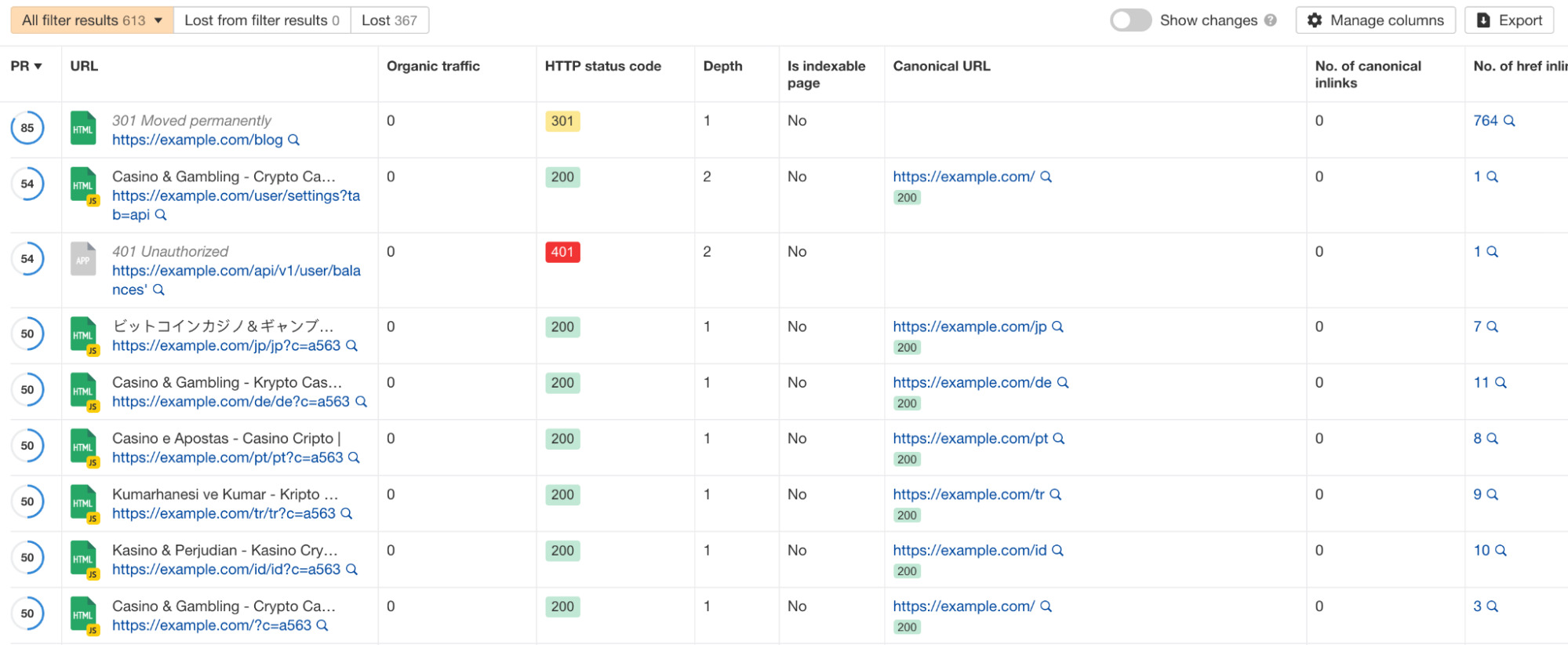
This screenshot from an SEO tool shows how you can identify pages that are being crawled but are not indexable, often due to canonicalization or noindex tags. This is exactly the kind of report you'd use to verify your faceted navigation strategy is working correctly.
Advanced Technique: Client-Side Rendering
For some low-value filters (like sorting), you can use JavaScript to update the page content dynamically without generating a new, crawlable URL. The URL in the address bar doesn't change, which prevents the creation of duplicate pages altogether. We'll explore this topic in much greater detail in our next lesson on JavaScript rendering.
Conclusion
You have now learned a robust, layered framework for taming the SEO complexities of faceted navigation. This is a fundamental skill for managing any large e-commerce or listing-based website.
Key Takeaways:
- Faceted navigation creates a conflict between user experience and SEO health, leading to index bloat, duplicate content, and wasted crawl budget.
- The solution is not a single fix but a layered strategy combining
robots.txtfor blocking low-value craws,noindextags for controlling indexing, andcanonicaltags for consolidating authority. - A thorough audit using site crawlers and server log files is the essential first step to diagnosing the problem and prioritizing which filters to control.
- The right strategy depends on the SEO value of the filter: block valueless parameters, consolidate duplicates, and allow high-demand filter combinations to be indexed.
In this lesson, we briefly mentioned using JavaScript to prevent URL generation. This opens the door to our next topic. In the upcoming lesson, we will dive deep into the world of JavaScript SEO, starting with how to diagnose JavaScript rendering issues using Chrome DevTools and compare SSR vs. dynamic rendering solutions.