Hello! Welcome back to the final lesson of our module on Enterprise SEO.
In our previous lessons, we meticulously designed the strategic blueprint for a large-scale website. We've defined the site architecture, mapped out a scalable internal linking strategy, and crafted an SEO-friendly URL structure. We've built the plan; now it's time to explore how to execute it efficiently at an enterprise scale.
This lesson directly addresses the learning outcome: Evaluate AI-powered tools for generating internal linking recommendations at scale. Manually creating and maintaining tens of thousands—or even millions—of internal links is an impossible task. AI offers a powerful solution, but choosing the right tool requires a strategic evaluation. We'll explore the landscape of these tools, from DIY solutions to enterprise-grade platforms, and establish a framework for you to choose the best fit for any large-scale project.
1. The Rise of AI in Internal Linking
Before we dive into specific tools, let's clarify what we're talking about. An AI internal linking tool is software that uses Natural Language Processing (NLP) to analyze the content of your entire website. It understands topics, entities, and the context of your pages, allowing it to suggest relevant links between them automatically. This goes far beyond simple keyword matching.
The benefits, especially for a large site, are significant. To understand these advantages and the key features to look for in enterprise-level tools, let's review two excellent resources.
I tried the 5 best AI internal linking tools in 2026
First, the article 'I tried the 5 best AI internal linking tools in 2026' provides a great definition and a clear set of evaluation criteria. Then, the article '5 Automated Internal Linking Tools For Enterprise SEO' from Quattr adds an enterprise-specific layer to these criteria.
Please read the sections 'What is an AI internal linking tool?' and 'Our criteria for the best AI internal linking tool'. Focus on the SEO benefits and the five evaluation criteria presented.
5 Automated Internal Linking Tools For Enterprise SEO
Now, let's look at this from an enterprise perspective. This article outlines the features that are critical when you're dealing with millions of pages.
Please read the section 'What are the Top Features the Best Internal Linking Tools Should Have?'. Pay attention to features like GSC integration and Googlebot crawl log integration, which are crucial for large-scale operations.
By combining these resources, we can build a comprehensive evaluation framework. When assessing an AI internal linking tool for a large website, you should consider:
- Accuracy & Relevance: How well does the AI understand context? Are the suggestions genuinely helpful or just based on keyword matching?
- Automation & Control: Does it offer full automation, or does it require manual approval? The ideal is a balance: AI does the heavy lifting, but you have the final say.
- Integration & Compatibility:
- Platform: Does it work with your CMS (e.g., WordPress, Shopify, or a custom headless setup)?
- Data: Can it integrate with Google Search Console (GSC) or even Googlebot crawl logs to make data-driven suggestions? This is a key differentiator for enterprise tools.
- Scalability & Features: Can it handle hundreds of thousands of pages? Does it offer dynamic page-level linking, bulk operations, and API access for developers?
- Value & ROI: Is the cost justified by the time saved and the potential SEO uplift?
With this framework in mind, let's explore the two primary approaches you can take.
2. Approach 1: The DIY Method with Custom GPTs
For those who prefer a hands-on, highly customizable approach, you can build your own internal linking assistant using a custom GPT in ChatGPT Plus. This method leverages the power of a large language model and feeds it specific knowledge about your site.
The two videos below demonstrate how to build and refine a custom GPT for this exact purpose.
FREE AI SEO Tool: How I Automate Internal Links with ChatGPT to Rank #1
This first video from Julian Goldie SEO provides a fantastic, practical walkthrough. It's particularly valuable because it shows the iterative process of giving the AI feedback to improve its output and avoid common errors like hallucinating links.
Please watch from the beginning until 06:26. Focus on: Initial Setup (0:43): How the custom GPT is configured with initial instructions. Input Process (2:30): The simple method of using a site's sitemap (as a CSV/text file) as a knowledge source. Refining Instructions (3:45): The crucial step of improving the prompts to ensure links are relevant, use the correct URL, and don't hallucinate.
How to Automate Internal Links With ChatGPT (Improve Your SEO)
This second video by Ryan Doser reinforces the same concepts and shows a slightly different prompting technique. It also makes a key point about the importance of a tool having live web access.
Please watch these two clips: The Prompt (2:38 - 4:05): Observe the specific prompt used to instruct the AI, including the number of links and the need for natural anchor text. Note again the use of the XML sitemap. Tool Limitations (7:27 - 8:24): This is an important comparison showing why a tool without live web access (like Claude at the time of filming) cannot perform this task effectively.
Evaluation of the DIY Approach:
- Pros:
- Cost-Effective: Requires only a ChatGPT Plus subscription.
- Highly Customizable: You have complete control over the prompts and instructions.
- Great for Smaller Batches: Excellent for adding links to new blog posts or a small set of existing pages.
- Cons:
- Not Truly Scalable: This process is semi-manual. It's not feasible for auditing and updating links across an entire 500,000-page enterprise site.
- Dependent on Prompt Quality: The results are only as good as your instructions. Poor prompts can lead to irrelevant links or repetitive anchor text.
- Lacks Data Integration: It cannot connect to GSC to prioritize links based on impressions or clicks.
Test your understanding!
Your team is using a custom GPT for internal linking, but you've noticed the AI often suggests linking from generic, repetitive anchor text (e.g., "click here," "learn more"). What specific instructions could you add to the custom GPT's configuration to generate more descriptive and varied anchor text?
Show answer
You could add several instructions to the custom GPT configuration to improve anchor text quality:
- Contextual Relevance: "The anchor text must be contextually relevant to the content of the target URL. It should accurately describe what the user will find on the linked page."
- Semantic Variation: "Avoid using generic phrases like 'click here' or 'read more.' Instead, use descriptive, keyword-rich phrases that exist naturally within the source text."
- No Exact Match Stuffing: "Vary the anchor text. Do not use the exact same anchor text for every link pointing to the same page. Use semantic variations and long-tail keywords where appropriate."
- Example-Based Instruction: "For a link to a page about 'blue running shoes', good anchor text would be 'our latest blue running shoes' or 'running shoes designed for trail running', not just 'blue running shoes'."
3. Approach 2: Dedicated Third-Party Tools
When the DIY method isn't scalable enough, you turn to dedicated commercial tools. These platforms are built specifically for internal linking automation and range from simple WordPress plugins to sophisticated, AI-driven enterprise solutions.
Below are screenshots of two such tools, AlliAI and LinkRobot, to give you a sense of their user interfaces.
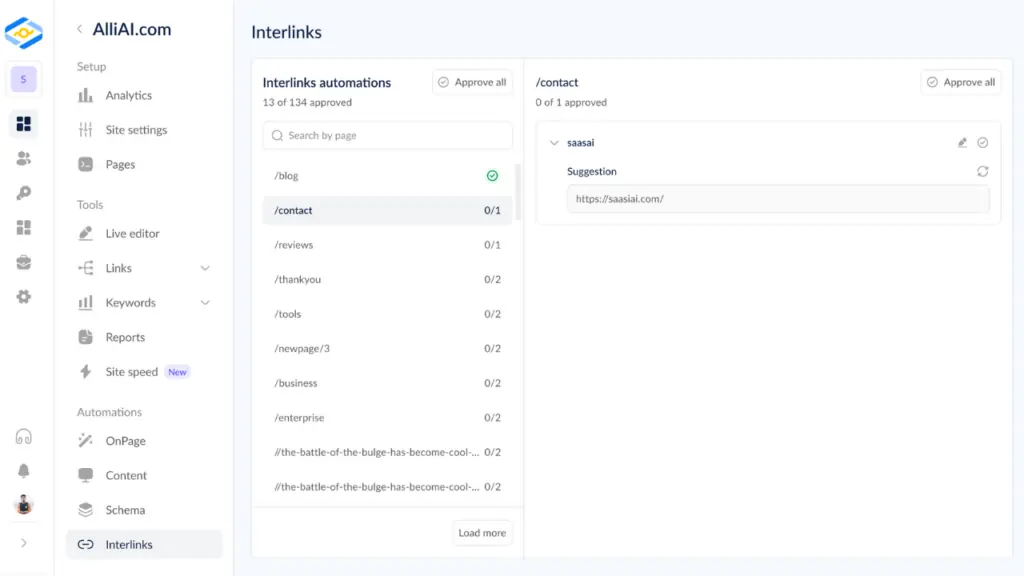
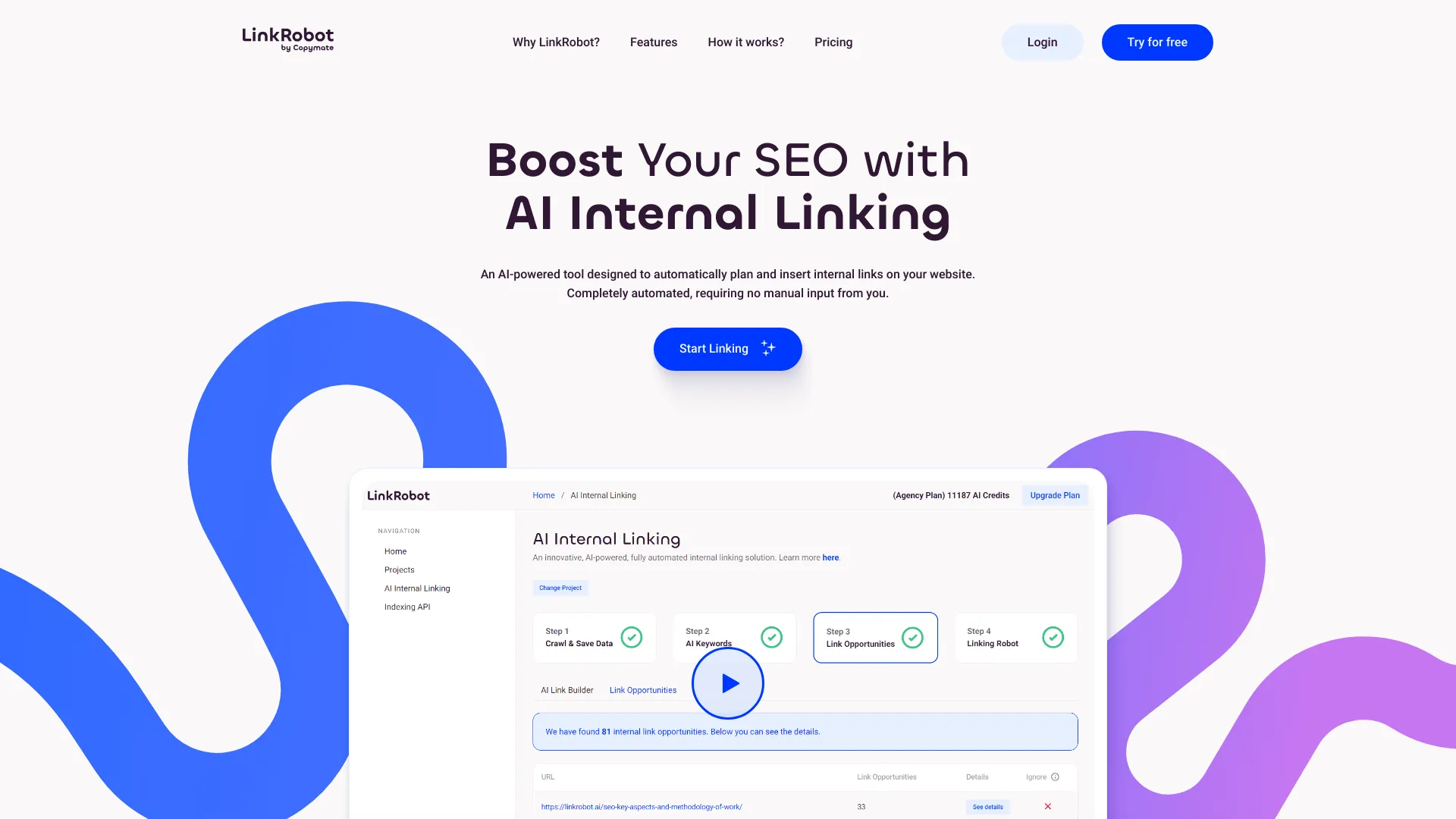
To get a comprehensive overview of the current market, the two articles you reviewed earlier contain detailed comparisons of the leading tools.
Let's revisit the two articles to evaluate specific tools. The first provides a great overview of popular tools, while the second is hyper-focused on enterprise-grade solutions.
In the eesel.ai article, review the 'Comparison of the top AI internal linking tools' table and the detailed reviews of the five tools (eesel AI, Link Whisper, Junia AI, AIOSEO Link Assistant, LinkStorm). Pay attention to the 'Best For' and 'Platform' columns.
5 Automated Internal Linking Tools For Enterprise SEO
Now for the enterprise perspective.
In the Quattr article, review the section 'Top 5 Internal Linking Tools For Enterprises' and the final comparison table. Notice how these tools (Quattr, InLinks, Positional, LinkStorm, Screaming Frog) are evaluated on features like API integration and data-driven insights.
Evaluation of the Dedicated Tool Approach:
- Pros:
- True Scalability: Designed to handle thousands or millions of pages efficiently.
- Advanced Features: Often include GSC integration, broken link detection, and detailed reporting dashboards.
- Efficiency: Drastically reduces the manual effort required, freeing up your team for strategic tasks.
- Cons:
- Cost: These tools represent a significant budget item, with enterprise plans often costing thousands of dollars per year.
- Less Flexibility: You are limited to the features and logic provided by the tool's developers.
- Potential for a "Black Box": Some tools may not be transparent about why they suggest a particular link, making it harder to align with a nuanced SEO strategy.
4. Making the Right Choice: A Decision Framework
The "best" tool is the one that fits your specific context. As an SEO specialist, evaluating these options is a key strategic responsibility. Let's walk through a scenario.
Scenario: You are the lead SEO for a global e-commerce website with 750,000 pages, running on a custom-built headless CMS. Your primary goals are to fix thousands of orphan pages and build topical authority around key product categories. Your team includes developers who can work with APIs.
How would you choose a tool?
- Eliminate the DIY Approach: A custom GPT is not viable for 750,000 pages. You need an enterprise-grade tool.
- Eliminate Platform-Specific Tools: The site uses a custom CMS, so WordPress-specific plugins like Link Whisper and AIOSEO are immediately out.
- Assess Scalability and Features: You need a tool that can handle the page count and has a robust API for your developers to integrate with the custom CMS. Tools like Quattr or Internals by Positional with API access would be strong contenders. LinkStorm is also platform-agnostic.
- Align with Strategic Goals: Your goal is to build topical authority, not just add links. You need a tool that uses semantic analysis to understand content relationships, not just keywords. Tools like InLinks (focused on entity SEO) or Quattr (which uses a three-signal approach of relevance, authority, and demand) would be more suitable than a simpler crawler.
- Consider Data Integration: To strategically build authority, you want to link from pages that have authority and impressions. A tool that integrates with GSC and crawl logs, like Quattr or LinkStorm, is essential.
Conclusion for the scenario: Based on this evaluation, you would prioritize tools like Quattr or an API-driven solution like Internals by Positional, as they meet the criteria for scale, platform compatibility, developer resources, and strategic depth.
Conclusion
You have now completed the module on Enterprise SEO Architecture. We have moved from the high-level strategy of site structure and internal linking down to the practical, automated execution required at an enterprise scale.
Key Takeaways:
- AI is Essential for Scale: Manual internal linking is not a viable strategy for large, dynamic websites.
- Two Paths Exist: You can use a cost-effective but less scalable DIY approach with custom GPTs or invest in a powerful, scalable dedicated third-party tool.
- Evaluation is Key: The right choice depends on your site's scale, technical platform, budget, team resources, and strategic goals. Use the evaluation framework to make an informed decision.
- AI is an Assistant: Even the most advanced tool requires human oversight. Your role is to guide the AI, review its suggestions, and ensure they align with your overarching SEO strategy.
This lesson concludes our deep dive into the structural foundations of enterprise SEO. In our next module, "Enterprise SEO: Rendering, Duplication & Migrations," we will tackle some of the most complex technical challenges that arise on large websites. We'll begin by addressing a problem we first identified in our URL lesson: resolving duplicate content and crawl budget issues caused by faceted navigation.