Hello! Welcome back to our final lesson in the module on Advanced Analytics & Performance Reporting.
In our previous lesson, we built the foundation for a scalable reporting system. You learned how to automate the aggregation of data from GSC, GA4, and third-party tools into a centralized dashboard or data warehouse. We've solved the problem of data collection.
However, a dashboard full of data is not the same as a report full of insights. The new bottleneck isn't getting the data; it's interpreting it. Manually sifting through thousands of rows in a spreadsheet to find meaningful patterns is no longer an efficient use of your time. This is where AI becomes your analytical partner.
Today, your learning outcome is to use AI prompts to generate summary insights and actionable recommendations from aggregated report data. We will close the loop on our reporting workflow, moving from automated data collection to AI-powered interpretation and strategy.
1. The Core Concept: Conversational Data Analysis
The paradigm for data analysis is shifting. Instead of you being the one to manually create pivot tables and charts to find insights, you can now have a conversation with your data, mediated by an AI.
This workflow typically involves three steps:
- Exporting your aggregated data (e.g., from a Looker Studio report, BigQuery view, or a simple GSC/GA4 export) into a common format like a CSV file.
- Uploading this file to a large language model (LLM) with data analysis capabilities, such as ChatGPT-4's "Advanced Data Analysis" feature (formerly Code Interpreter).
- Prompting the AI with questions, asking it to summarize findings, identify patterns, and recommend actions.

Before we dive in, a quick note on data privacy: uploading proprietary or client data to a third-party AI service carries risks. For highly sensitive data, an alternative is to use AI to write analysis scripts (e.g., in Python) that you can run locally. However, for the purpose of this lesson, we will focus on the direct-upload method, which is incredibly powerful for general analysis.
2. A Practical Walkthrough: From GA4 Data to Content Strategy
Let's walk through an end-to-end example. Imagine you've exported a year's worth of performance data for your blog from GA4. You have page titles, sessions, engagement rates, conversion rates, and the traffic medium (organic, social, etc.). How do you turn this into a content plan for the next quarter?
The following video from Orbit Media Studios provides an excellent, detailed walkthrough of this exact process.
How to Combine ChatGPT and GA4 for Content Analysis
To see this entire workflow in action, let's watch a detailed walkthrough. This video shows how to take raw data from GA4, upload it to ChatGPT, and use a series of smart prompts to extract powerful content strategy insights.
Please watch the video from 00:30 to 10:56. Pay close attention to these three stages: Data Preparation (00:30 - 03:46): Notice how the data is customized and filtered in GA4 before exporting. The quality of your input data determines the quality of the AI's output. Initial Setup (03:46 - 04:56): This covers the technical step of uploading the file to ChatGPT's Advanced Data Analysis feature. The Art of Prompting (05:23 - 10:56): This is the most important part. Observe how the prompts evolve from simple requests to complex, iterative questions that uncover nuanced insights and even create new metrics. This conversational approach is key.
As the video demonstrates, the real skill lies in the iterative prompting. You don't just ask one question. You have a conversation:
- Start with context: "You are a data marketing analyst. I'm giving you GA4 data for a blog. Can you confirm you understand the columns?"
- Ask for summaries: "Show me the top 5 performing articles for organic search traffic based on sessions and conversion rate."
- Identify outliers: "Which articles have an above-average engagement rate but below-average traffic?" (These are perfect candidates for re-promotion).
- Generate new ideas: "Based on the topics of the top-performing articles, suggest 10 new blog post titles that are likely to perform well in search."
- Get creative: "Create a new metric called 'Content Score' where
Score = (Sessions * 0.4) + (Engagement Rate * 0.6). Now, show me the top 10 articles by this new score."
This conversational process allows you to explore your data from multiple angles far more quickly than manual analysis in a spreadsheet.
3. Tactical Workflows for Quick Wins with GSC Data
Beyond high-level strategy, you can use AI for rapid, tactical optimizations using your Google Search Console data. These workflows can help you identify and act on "low-hanging fruit" in minutes.
The following video demonstrates several of these clever, AI-assisted workflows.
5 FREE AI SEO Workflows with ChatGPT & Google Search Console
This video from Julian Goldie SEO demonstrates several clever workflows for turning common GSC reports into actionable tasks with AI.
Watch the following segments to see how to turn GSC data into AI-driven actions: High Impression, Low Click Pages (00:20 - 02:06): See how to export queries with low CTR and use AI to brainstorm better titles or content angles. Indexing Issues (02:06 - 05:12): Learn how to use AI to find relevant internal linking opportunities for 'Discovered - currently not indexed' pages. Optimizing 'Money Pages' (05:12 - 08:13): Watch how to feed an AI the content of a commercial page and ask it to generate HTML for conversion-focused elements like comparison tables. Content Audits (08:13 - 10:14): A great example of feeding AI your content and auditing it against Google's core update guidelines.
These examples show that AI can not only provide insights but also generate the direct outputs you need, like HTML code for a table or a list of internal links to add.
Test your understanding!
You've exported a GSC list of 100 queries where your site ranks on page 2 (positions 11-20). The data includes query, clicks, impressions, and ctr. What would be an effective first prompt to send to ChatGPT to turn this data into an action plan?
Show answer
A good first prompt would be: "You are an SEO strategist. I'm providing you with a list of keywords where my site ranks on page 2. Your task is to analyze this data and provide an action plan. First, group these keywords into semantic clusters. Then, for each cluster, suggest whether I should create a new piece of content or update an existing one to better target this group of keywords. Prioritize the clusters based on impression volume."
This prompt gives the AI a role, explains the data, defines a clear multi-step task (cluster, suggest action, prioritize), and provides a success metric (impression volume).
4. Advanced Prompt Engineering for Comprehensive Reports
While conversational back-and-forth is powerful, you can also develop a single, highly-structured "mega-prompt" to generate a complete report from a dataset. This is a key skill in prompt engineering.
The structure of such a prompt involves telling the AI what kind of analysis to perform for each section of the report.
A Specialized AI Prompt for SEO Analysis
The quality of your AI-generated insights depends heavily on your prompts. Instead of a conversation, you can use a single, highly-structured 'mega-prompt' to generate a comprehensive report. The following article, while focused on competitor analysis, contains a phenomenal example of such a prompt that you can adapt.
Please read the section 'Step 2: A Specialized AI Prompt for SEO Analysis.' Focus entirely on the structure and components of the prompt itself. Notice how it asks the AI to act as an analyst and requests specific outputs like a quantitative breakdown, pattern recognition, SEO strategy analysis, and actionable recommendations. This is a template you can adapt for analyzing your own GSC or GA4 data exports.
Adapting this prompt for your own performance data, you might ask the AI to:
- Perform Quantitative Analysis: "Provide a statistical breakdown of clicks and impressions by content category (e.g., /blog/, /products/)."
- Identify Patterns: "Analyze the titles of the top 10% of pages. Are there common words, numbers, or structures?"
- Analyze SEO Strategy: "Based on the queries driving impressions, what is the distribution of search intent (informational, transactional)?"
- Provide Actionable Recommendations: "List 5 pages with declining clicks over the last 3 months that should be prioritized for a content refresh."
Finally, you can even ask the AI to help with the report's presentation. The article "Integrating AI into SEO Testing Workflows" from Advanced Web Ranking suggests prompting the AI with something like: “I need to report on clicks, impressions, and CTR for the marketing team. What visualizations should I include to make the data clear and impactful?”
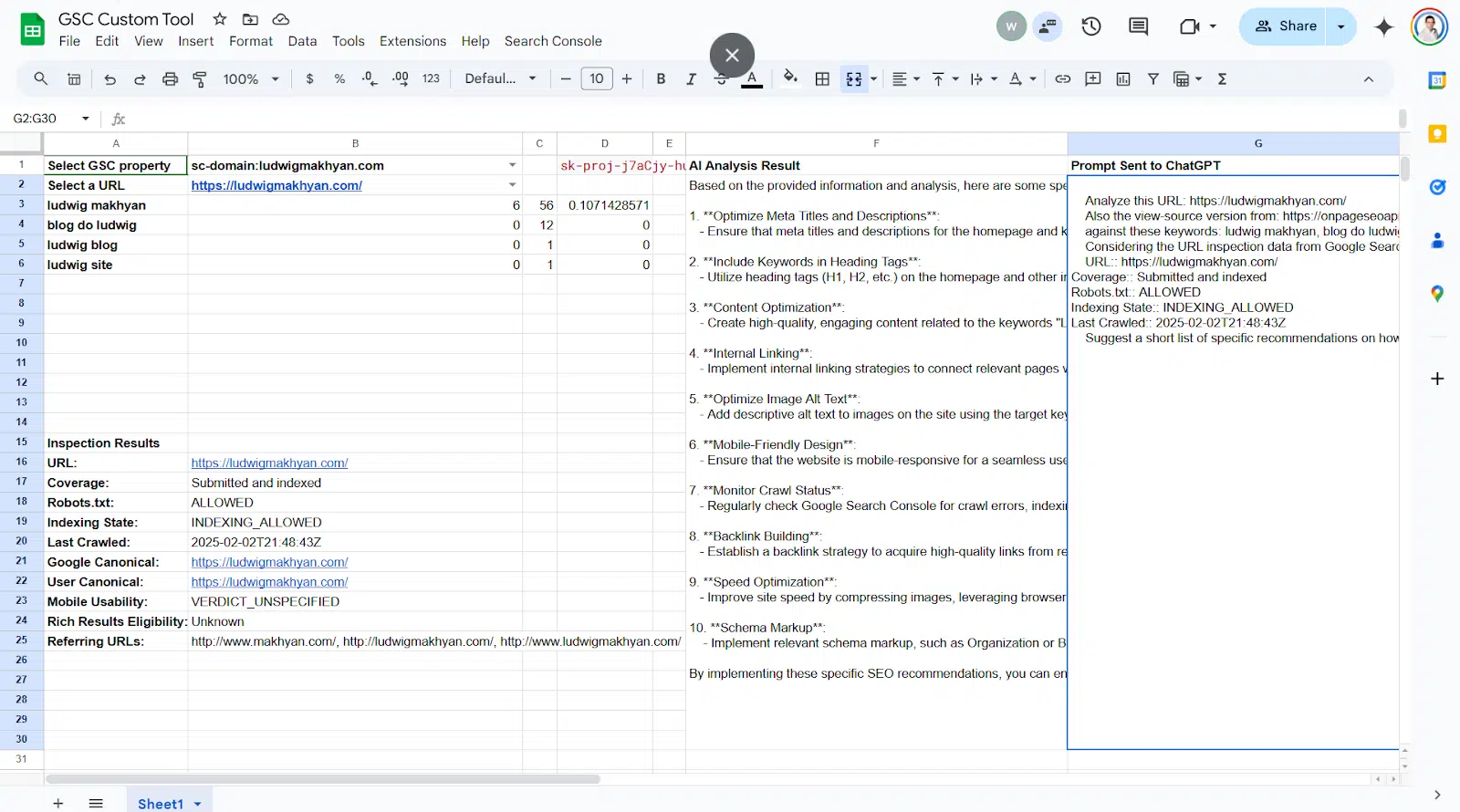
This entire process can be visualized in a custom tool, like the one shown below, where GSC data is automatically fed to an AI to generate recommendations within a single interface.
Conclusion
You've now reached the final step of the modern analytics workflow. By combining the automated data aggregation from our last lesson with the AI-powered analysis techniques from this one, you can dramatically reduce the time spent on manual reporting and focus your energy on high-impact strategic decisions.
Key Takeaways:
- AI tools like ChatGPT's Advanced Data Analysis transform data analysis from a manual chore into an interactive conversation.
- Effective analysis relies on iterative prompting: start with broad questions and then ask specific follow-up questions to dig deeper and uncover hidden opportunities.
- You can apply this methodology to both high-level strategic planning (using GA4 data) and quick, tactical optimizations (using GSC data).
- Advanced prompt engineering allows you to create structured, reusable prompts that can generate comprehensive reports in a single step, saving even more time.
This concludes our module on Advanced Analytics. You've learned to build dashboards, automate data pipelines, and now, to interpret that data at scale with AI.
In our next module, Future-Proofing for Generative AI Search, we'll flip the script. Instead of using AI to analyze our own data, we will start analyzing how Google's AI—in the form of the Search Generative Experience (SGE)—sources information and ranks content. This will be crucial for positioning your SEO strategy for success in 2026 and beyond.