Welcome to the next lesson in our Java refresher. In our previous session, we made our programs interactive by learning to read user input with the Scanner class. This allowed us to work with single pieces of data provided at runtime. Now, we're going to take a significant step towards handling more complex data by learning about one-dimensional arrays.
Arrays are the most fundamental data structure in programming. They allow you to store and manage a collection of items, like a list of numbers, names, or any other data type. For your goal of mastering Data Structures and Algorithms for job interviews, a solid understanding of arrays is non-negotiable. In this lesson, we will cover how to declare, initialize, and traverse one-dimensional arrays in Java, setting the foundation for countless interview problems.
What is an Array?
At its core, an array is a container object that holds a fixed number of values of a single type. Think of it as a numbered list of boxes, where each box holds an item of the same kind, and the list has a predetermined length that cannot be changed.
To get a quick and clear introduction to the concept and its syntax in Java, the Bro Code channel provides an excellent walkthrough.
This video introduces arrays, explaining how to declare them and access their elements.
Watch the following segments: The initial explanation of what an array is and how to declare one using the curly brace {} syntax. The section on accessing and reassigning values in an array using an index. The explanation that all elements in an array must have the same data type. The demonstration of an alternative declaration method using the new keyword.
Declaring and Initializing Arrays
As you saw in the video, there are two primary ways to create an array in Java. Let's formalize them.
-
Declare and Initialize Simultaneously: This is useful when you know the values of the array elements at the time of writing the code.
// An array of integers int[] highScores = {98, 95, 92, 88, 85}; // An array of strings String[] daysOfWeek = {"Monday", "Tuesday", "Wednesday", "Thursday", "Friday", "Saturday", "Sunday"}; -
Declare First, Initialize Later: This method is common when the size of the array is known, but the values will be filled in later—for example, from user input or a file. You use the
newkeyword to allocate memory for the array.// 1. Declare an array variable int[] numbers; // 2. Allocate memory for 5 integers numbers = new int[5]; // 3. Assign values to each element by index numbers[0] = 10; numbers[1] = 20; // and so on...
It's crucial to remember that array indices start at zero. So, an array of size 5 has indices from 0 to 4. Attempting to access an index outside this range (like numbers[5]) will crash your program with an ArrayIndexOutOfBoundsException.
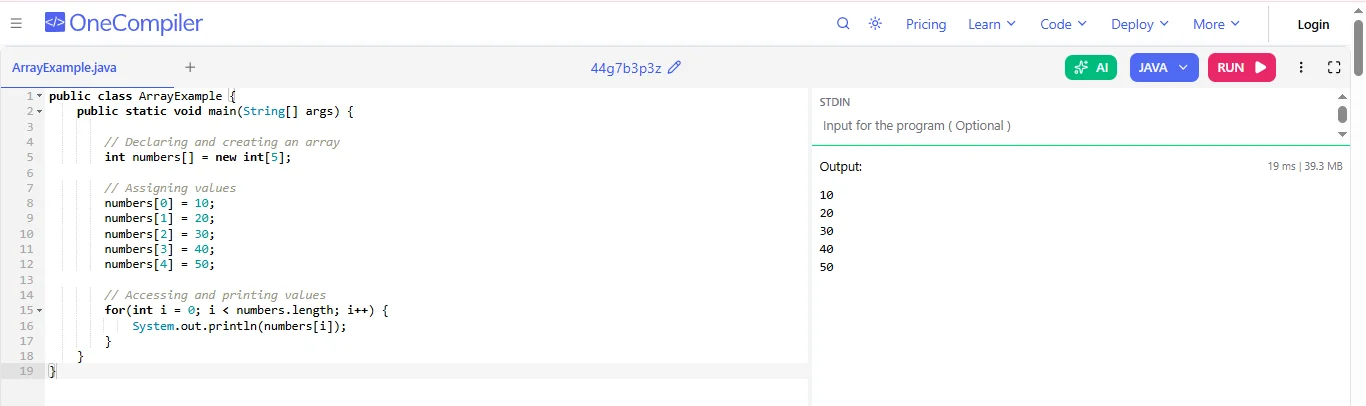
The image below shows a complete, runnable example of the second method: declaring an array with a specific size and then populating it.
Traversing an Array
Once you have an array, you'll almost always need to iterate through its elements. This is called traversing the array. The most common way to do this is with a for loop. To control the loop, we use the array's built-in length property, which gives the total number of elements in the array.
A standard for loop for an array looks like this:
int[] myScores = {100, 85, 92, 78, 95};

for (int i = 0; i < myScores.length; i++) {
    // 'i' will go from 0 to 4.
    // We can use 'i' as the index to access each element.
    System.out.println("Score at index " + i + ": " + myScores[i]);
}
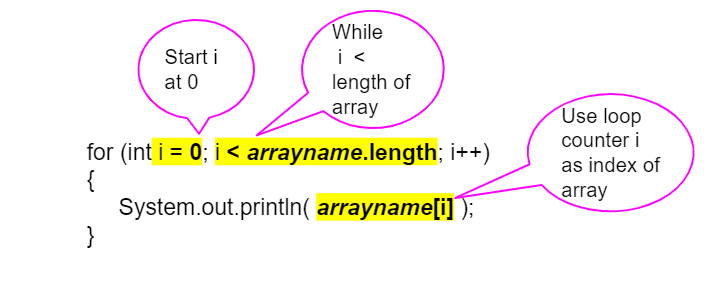
The following image provides a great visual breakdown of how the parts of the for loop map to array traversal.
The Enhanced For Loop (For-Each Loop)
Java also provides a simpler loop syntax, called the "enhanced for loop" or "for-each loop," for situations where you only need to access each element in order and don't need the index i.
The syntax is: for (type variable : array). It reads as "for each element in the array...".
int[] myScores = {100, 85, 92, 78, 95};

// "For each score in myScores"
for (int score : myScores) {
    // The variable 'score' will hold the value of each element, one by one.
    System.out.println(score);
}
This is cleaner and less error-prone when you don't need the index, but you cannot use it to modify the array's elements as you traverse.
For a final review of these concepts with code examples, please consult this article from GeeksforGeeks.
One Dimensional Array in Java - GeeksforGeeks
This article from GeeksforGeeks reinforces the concepts of initialization and traversal with clear code examples.
Focus on the following parts: In the section "Example of a One-Dimensional Array," review the code block. Notice the two helper methods: printArray uses a standard for loop, while calculateSum uses an enhanced for-each loop. This shows both traversal types in action. Read the "Important Notes" at the end. Pay close attention to the explanation of using the .length property to avoid errors.
Hands-On Practice: Interview Problem
Since your goal is to be interview-ready, let's tackle a classic array problem. This will put your new skills to the test.
Problem: Write a Java program to find the second largest element in an integer array.
Example:
- For an input array
{45, 51, 28, 75, 49, 42}, the second largest element is51. - For an input array
{-9, 3, 36, -25, 71, 0}, the second largest element is36.
Instructions:
- Create a new Java class.
- Inside the
mainmethod, declare and initialize an integer array with some test values. - Declare two integer variables, for example,
firstLargestandsecondLargest. - Think about the logic. You'll need to traverse the array and update these two variables as you find larger numbers. Consider edge cases, such as the largest number appearing at the beginning of the array.
- Hint: You can solve this with a single pass through the array. Initialize both variables carefully before you start the loop.
- After the loop finishes, print the value of
secondLargest.
This exercise is excellent practice because it requires careful traversal and state management, which are common patterns in algorithm problems.
Conclusion
In this lesson, you've mastered the fundamentals of one-dimensional arrays in Java, a critical building block for your journey into data structures and algorithms.
Here are the key takeaways:
- Arrays are fixed-size collections that store elements of the same data type.
- Declaration and initialization can be done in two ways: with initial values using
{}or by specifying a size withnewand populating the elements later. - Array elements are accessed via a zero-based index (e.g.,
myArray[0]). Accessing an invalid index results in anArrayIndexOutOfBoundsException. - Traversal is the process of iterating through elements, typically with a
forloop using the.lengthproperty or a simpler enhancedforloop.
You are now equipped to handle collections of data. In the next lesson, we will build directly on this knowledge to explore two-dimensional arrays, which are used to represent grids, tables, and matrices.