In our last lesson, we mastered one-dimensional arrays, learning how to store and manage linear collections of data. This was a crucial first step in handling structured data. Now, we'll build directly on that knowledge to explore a new dimension.
This lesson focuses on two-dimensional arrays, which allow you to represent data in a grid-like structure, such as tables, matrices, or game boards. Understanding 2D arrays is fundamental for many common interview problems, especially those involving matrix manipulation or grid traversal. Today, we will cover how to declare, initialize, and traverse these structures in Java. This is the final topic in our core Java refresher, and mastering it will complete the foundational syntax you need before we move into Object-Oriented Programming and essential data structures.
From One Dimension to Two
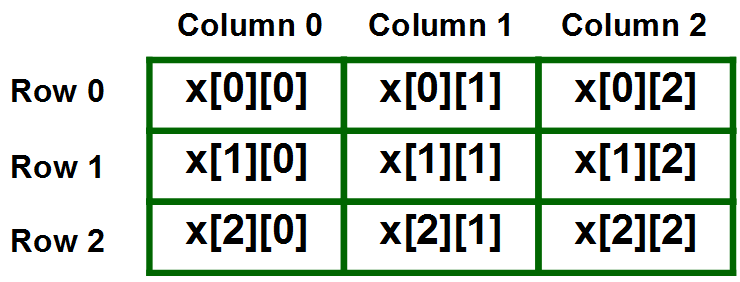
Conceptually, a two-dimensional array is simply an "array of arrays." While a 1D array is like a single row of boxes, a 2D array is like a cabinet with multiple rows of boxes. Each element is identified by two indices: one for its row and one for its column.
For a quick and intuitive explanation, the Bro Code channel provides a great analogy.
This video introduces the concept of 2D arrays as an "array of arrays," using a simple parking lot analogy to make the idea of rows and columns easy to grasp.
Watch the introductory part of the video from the beginning to understand the core concept.
Declaring and Initializing 2D Arrays
Just as with 1D arrays, there are two primary ways to create a 2D array in Java. Your choice will depend on whether you know the array's contents beforehand.
-
Declare and Allocate Size: You can declare an array and specify its dimensions (number of rows and columns) using the
newkeyword. This is useful when the size is known but the data will be filled in later (e.g., from user input or calculations).// A 2D array of integers with 3 rows and 4 columns int[][] matrix = new int[3][4]; // You can then assign values to individual elements matrix[0][0] = 1; // Row 0, Column 0 matrix[0][1] = 2; // Row 0, Column 1 // ...and so on -
Declare and Initialize with Values: If you know the values at the time of declaration, you can use curly braces. This syntax clearly visualizes the row-column structure. Each inner set of braces represents a row.
// A 3x3 2D array initialized with values
String[][] ticTacToe = {
    {"X", "O", "X"},
    {"O", "X", "O"},
    {"X", "X", "O"}
};
For a more detailed look at the syntax and examples, the following article provides clear code snippets.
This article from CodeGym provides a concise overview of how to declare and initialize 2D arrays in Java.
Focus on the code block in the section Declare & Initialize a 2D Array. Note the different ways both integer and string arrays are created, including one with jagged (uneven) rows (matrix5), which is a good concept to be aware of.
Traversing 2D Arrays
To access every element in a 2D array, you need to iterate through each row, and for each row, iterate through each column. This is naturally accomplished using nested loops.
Using Nested for Loops
This is the most common and versatile method for traversal. The outer loop iterates through the rows, and the inner loop iterates through the columns of the current row.
- The number of rows is given by
array.length. - The number of columns in a specific row
iis given byarray[i].length.
int[][] matrix = {
    {10, 20, 30},
    {40, 50, 60},
    {70, 80, 90}
};

// Outer loop for rows
for (int i = 0; i < matrix.length; i++) {
    // Inner loop for columns
    for (int j = 0; j < matrix[i].length; j++) {
        // Access the element at [row][column]
        System.out.print(matrix[i][j] + " ");
    }
    // Move to the next line after each row is printed
    System.out.println();
}
The video below provides a fantastic, step-by-step visual trace of how nested loops work to traverse a 2D array. This is excellent for solidifying your mental model of the process.
Traversing a 2 Dimensional Array (Java Tutorial)
This tutorial by Bill Barnum meticulously traces the execution of nested loops over a 2D array, showing how the row and column indices change and which element is accessed at each step.
Watch the segments that explain the concept and demonstrate traversal with standard for loops. Pay close attention to how arr.length gives the row count and arr[i].length gives the column count for that row.
Using Nested for-each Loops
For situations where you only need to read the elements and don't need their indices, the enhanced for-each loop offers a cleaner syntax.
int[][] matrix = {
    {10, 20, 30},
    {40, 50, 60}
};

// Outer loop iterates through each row (which is a 1D array)
for (int[] row : matrix) {
    // Inner loop iterates through each element in the current row
    for (int element : row) {
        System.out.print(element + " ");
    }
    System.out.println();
}
This approach is less error-prone as you don't have to manage indices manually. However, remember that you cannot use it to modify the array's elements.
Hands-On Practice: Interview Problem
Since your focus is on job interviews, let's apply this knowledge to a classic problem involving 2D arrays.
Problem: Write a Java program to calculate the sum of the elements on the main diagonal of a square matrix. The main diagonal consists of elements where the row index is equal to the column index (i.e., matrix[i][i]).
Example:
For the matrix:
{ {1, 2, 3},
  {4, 5, 6},
  {7, 8, 9} }
The main diagonal elements are 1, 5, and 9. The sum is 1 + 5 + 9 = 15.
Instructions:
- Create a new Java class.
- Inside the
mainmethod, declare and initialize a square 2D integer array (e.g., 3x3 or 4x4). - Declare an integer variable,
diagonalSum, and initialize it to 0. - Traverse the array to find the diagonal elements. Think about the relationship between the row and column index for these elements. Can you do this with a single loop instead of nested loops?
- Add each diagonal element to
diagonalSum. - After the loop, print the final sum.
This exercise reinforces declaration and traversal while also making you think about efficient access patterns—a key skill for algorithmic problem-solving.
Conclusion
You have now extended your knowledge from one-dimensional to two-dimensional arrays, completing our refresher on Java's core data containers. This is a significant milestone.
Here are the key takeaways:
- 2D arrays are "arrays of arrays" used to represent grids or matrices.
- Elements are accessed with two indices:
array[row][column]. - Initialization can be done by specifying dimensions with
newor by providing values directly with nested{}. - Traversal is typically done with nested
forloops, where the outer loop handles rows (array.length) and the inner loop handles columns (array[i].length). - The enhanced
for-eachloop provides a simpler syntax for read-only traversal.
You are now well-prepared to move beyond basic syntax. In our next lesson, we will begin a new module focusing on a data type you will encounter in almost every coding interview: Strings. We'll explore how to create and manipulate them effectively and discuss the important differences between String, StringBuilder, and StringBuffer.