Welcome back! In our last lesson, we mastered loops, giving you the power to make your programs repeat tasks. You learned to use for, while, and do-while loops to control program flow through iteration, a skill you practiced by creating nested loops for pattern printing. Now, we'll take the next crucial step in organizing your code.
This lesson introduces methods, which are essential for writing clean, reusable, and manageable code. You'll learn how to define your own methods, pass information to them using parameters, and get results back using return values. For any programmer, and especially for someone preparing for technical interviews, a deep understanding of how to structure programs with methods is non-negotiable. This is the foundation upon which all complex applications and algorithms are built.
What is a Method?
So far, all the code we've written has been inside the main method. But what exactly is a method? In simple terms, a method is a named block of code that performs a specific task. Instead of writing the same chunk of code over and over, you can define it once as a method and then "call" it whenever you need it. This principle is known as DRY (Don't Repeat Yourself).
Let's start with a formal definition. The following resource, framed as a common interview question, provides a concise explanation of what a method is and its basic syntax in Java.
Java Methods Interview Questions | Coding Shuttle
Please read the introduction to this resource and the answer to the first question, "What is a method in Java, and how is it declared?".
Focus on the definition provided in the section Methods in Java. Pay attention to the syntax breakdown: returnType methodName(parameters) { body }. We will explore each of these parts in detail.
The Flow of Control: Calling and Returning
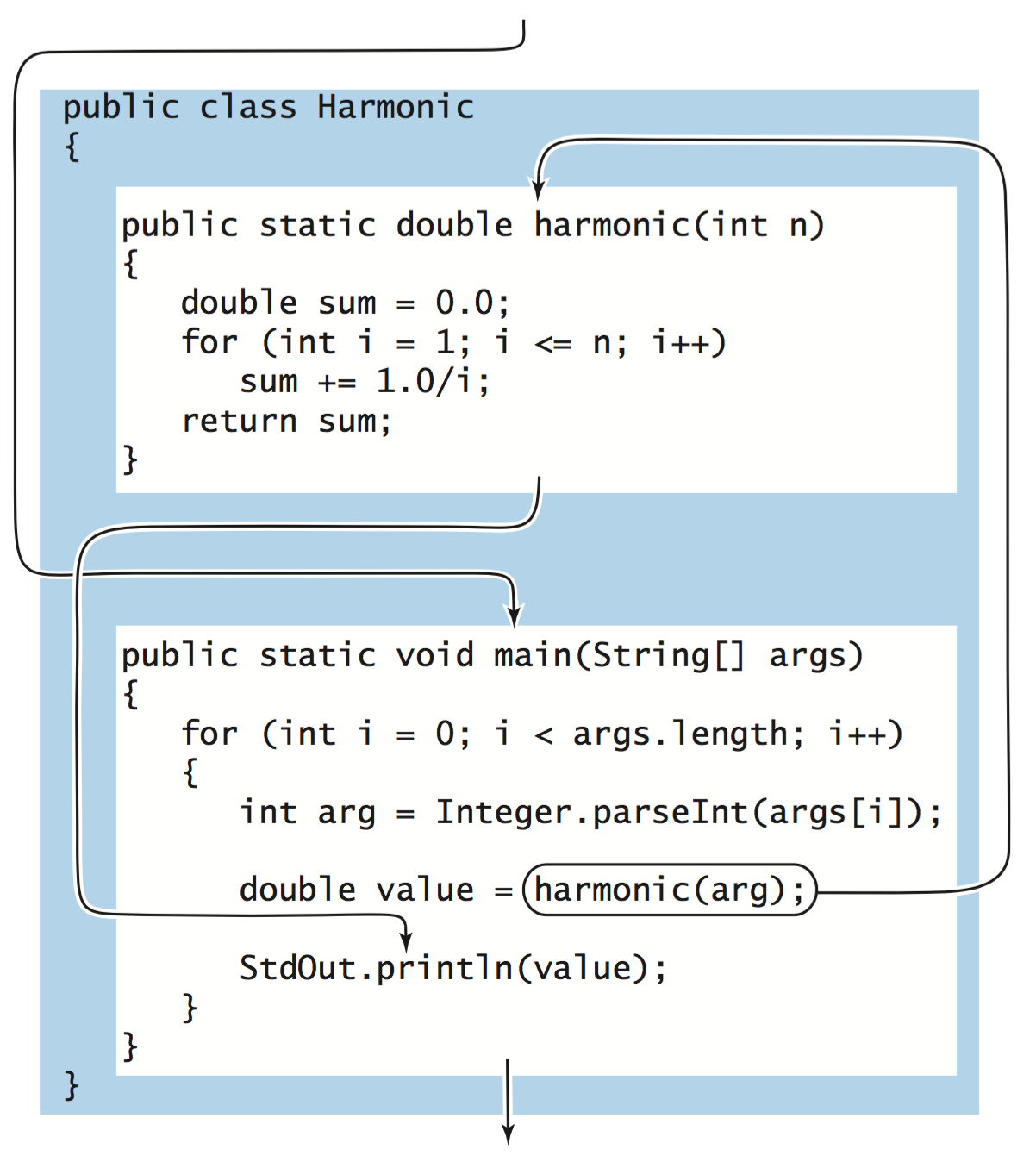
When you call a method, the program's execution flow takes a detour. It jumps to the first line of the called method, executes its code, and then (usually) returns to the point right after the original method call.
The image below illustrates this flow. The main method calls the harmonic method. Control transfers to harmonic, it computes a value, and then returns that value back to main, where it is used.
A Practical Walkthrough
Watching concepts in action is often the quickest way to understand them. The following video by Bro Code provides a comprehensive and fast-paced tour of creating and using methods in Java. It covers defining a simple void method, passing data to a method using parameters, and getting data back using a return value.
Java methods explained in 10+ minutes! 📞
Watch this video for a practical demonstration of defining and calling methods.
Part 1 (Simple Methods): See how to define a basic method that performs an action but doesn't return a value (a void method). Part 2 (Parameters): Learn how to pass arguments (like a name or age) into your method to make it more flexible. Part 3 (Return Values): Understand how to get a value out of a method using the return statement.
Deep Dive: Return Values and the Call Stack
As you saw in the video, methods can be divided into two categories:
voidmethods: These perform an action (like printing to the console) but do not produce a result for the caller.- Non-
voidmethods: These perform a calculation and return a value (like anint,double, orString) back to the caller.
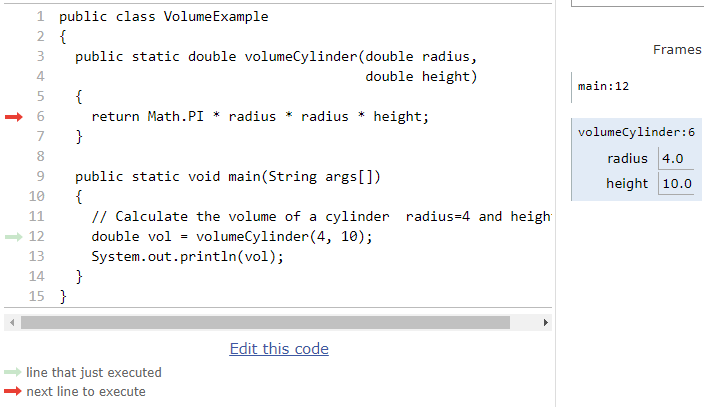
To understand how this works under the hood, we need to think about the call stack. Every time a method is called, a new "frame" is pushed onto the call stack. This frame holds the method's local variables, including its parameters. When the method finishes, its frame is popped off the stack, and if it has a return value, that value is passed back to the calling method.
This image shows a snapshot during a method call. The main method has called volumeCylinder. Notice how a new frame for volumeCylinder is created with its own variables (radius and height).
For a more detailed, step-by-step visualization of this process, let's turn to a more structured resource.
This resource provides an excellent, interactive walkthrough of how method calls and returns work, using the concept of stack frames.
First, read the introductory section, Method Returns, which sets the stage. Then, carefully follow the step-by-step execution in the section Method Return Type. As you click through the tabs, observe how the "Frames" diagram changes. This visualizes the call stack, showing how parameters are passed in and how the final value is returned.
To solidify your understanding of void methods and the return statement, let's consult our interview-focused guide again.
Java Methods Interview Questions | Coding Shuttle
Read the explanations for questions 3 and 4.
First, read question 3 to clarify the role of the void keyword. Then, read question 4 to understand how return works in both void and non-void methods.
Parameter Passing: Pass-by-Value
A common interview question is "How does Java pass parameters to methods?". The answer is that Java always uses pass-by-value. As a Computer Science student, you've likely encountered pass-by-value vs. pass-by-reference. In Java, the distinction is crucial:
- For primitive types (
int,double, etc.), the method receives a copy of the value. Any changes made to the parameter inside the method do not affect the original variable. - For object types (including arrays), the method receives a copy of the reference (the memory address). This means the method can use the reference to modify the original object's state, but it cannot change where the original reference variable points.
This is a subtle but critical point. The following resource explains it clearly.
Java Methods Interview Questions | Coding Shuttle
Read the answer to question 5, "How are parameters passed to methods in Java?".
Analyze the code example carefully. Notice how number (a primitive) is unchanged, but the text StringBuilder (an object) is modified.
Hands-On Practice
Your preference for practice is key to mastery. Let's apply what you've learned. The following exercises are from the "CS Java" resource.
Exercise 1: Refactoring to Return a Value
Currently, the inchesToCentimeters method does its calculation and prints the result itself. This is inflexible. A better design is for the method to do one thing: perform the calculation and return the result. The caller (main) can then decide what to do with that result (e.g., print it, store it, use it in another calculation).
Your task is to refactor the code. Find the coding exercise in the resource below and follow the instructions.
Find the first "Coding Exercise" on the page.
The instructions are under the heading Coding Exercise. You will need to: Change the method's return type from void to double. Replace the System.out.println statement with a return statement. In the main method, capture the returned value in a variable and print it.
Exercise 2: Writing a Method from Scratch
Now, let's write a new method. This exercise requires you to think about integer division, a common pitfall.
Find the second "Coding Exercise" on the page, just before the summary.
Read the instructions for the method convertToMiles. Remember that if you divide two integers in Java, the result is an integer (e.g., 500 / 2000 is 0). To get a fractional result, at least one of the numbers in the division must be a floating-point type (like a double).
Conclusion
In this lesson, you've moved from writing code in a single block to structuring it into modular, reusable units. This is a fundamental leap in programming proficiency.
Here are the key takeaways:
- Methods encapsulate code into named blocks to promote reusability and readability (DRY principle).
- The method signature defines its name, parameters (inputs), and return type (output).
voidmethods perform actions but do not return a value. Non-voidmethods must use thereturnstatement to send a value back to the caller.- The call stack manages the execution flow, creating a new frame for each method call to store its local variables.
- Java uses pass-by-value for all parameters, which has different implications for primitive types versus object types.
You are now well-equipped to write more organized and sophisticated programs. In our next lesson, we will make our programs interactive by learning how to read user input from the console using the Scanner class. You'll be able to use the methods you create to process data provided by the user in real-time.