Welcome back! In our last session, we established a solid grasp of Java's primitive data types and the rules for casting values between them. This foundation is essential for everything that follows.
Today, we will build directly on that knowledge by learning how to use variables to create expressions. This lesson focuses on the core tools for computation and logic: arithmetic, relational, and logical operators. Mastering these operators is fundamental to writing any meaningful code, as they form the backbone of algorithms, decision-making, and data manipulation. By the end of this lesson, you'll be able to combine variables and values to perform calculations and make logical comparisons, a critical skill for solving interview problems.
Arithmetic Operators: The Tools for Calculation
Just as in mathematics, Java provides a standard set of operators to perform arithmetic. You are likely familiar with most of these, but there are a few nuances in programming that are important to master.
The primary arithmetic operators are:
+(Addition)-(Subtraction)*(Multiplication)/(Division)%(Modulo)
For a quick and clear demonstration of these, along with some useful shortcuts, please watch the following video.
This video from Bro Code covers the basic arithmetic operators and then introduces shorthand assignment and increment/decrement operators, which are extremely common in Java code.
Watch the section on basic arithmetic, paying close attention to the modulus operator (%). Next, watch the segment on augmented assignment operators (+=, *=, etc.). These are important for writing concise code. Finally, review the section on increment and decrement operators (++ and --). You will see these constantly in loops.
Two operators deserve special attention: division (/) and modulo (%).
Integer Division: When you divide two integers in Java, the result is also an integer. The fractional part is truncated, not rounded. This is a frequent source of bugs for beginners and a concept often tested in coding challenges.
int a = 10;
int b = 4;
int result = a / b; // result is 2, not 2.5

double c = 10.0;
double doubleResult = c / b; // doubleResult is 2.5
The Modulo Operator (%): This operator gives you the remainder of a division. It's incredibly useful for tasks like determining if a number is even or odd (number % 2 == 0), managing cyclic behavior in arrays, and many other algorithmic tricks.
int a = 10;
int b = 4;
int remainder = a % b; // remainder is 2, because 10 = 2*4 + 2
Operator Precedence
When an expression contains multiple operators, Java follows a strict order of operations, similar to the PEMDAS/BODMAS rule from mathematics. Multiplication, division, and modulo have higher precedence than addition and subtraction.
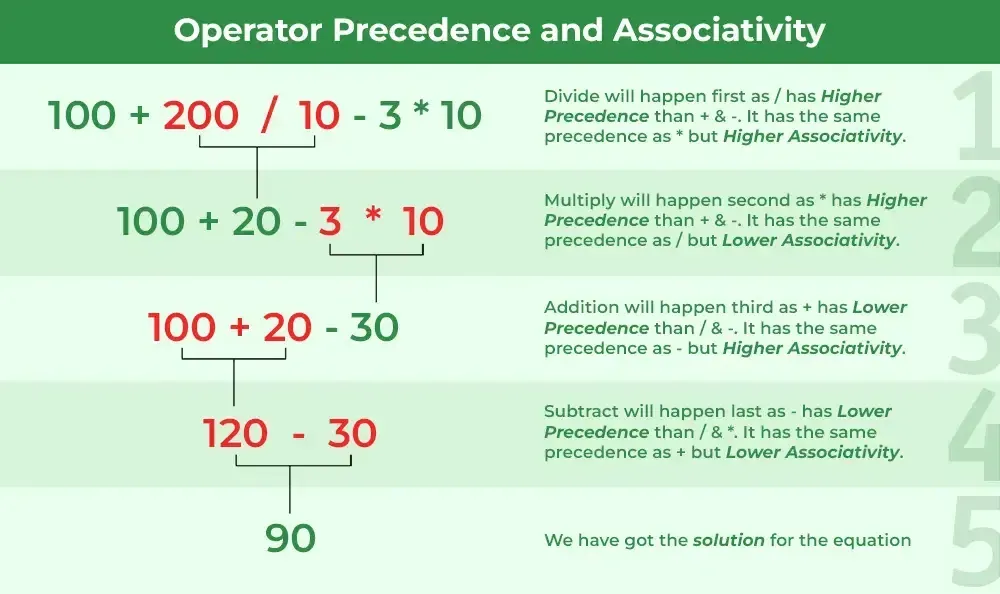
When operators have the same precedence (like * and /), they are evaluated based on their associativity, which is typically left-to-right. You can always use parentheses () to explicitly control the order of evaluation. This is good practice for clarity and to avoid subtle bugs.
For example, 3 + 4 * 2 evaluates to 11 because multiplication is done first. If you wanted the addition to happen first, you would write (3 + 4) * 2, which evaluates to 14.
Relational Operators: The Tools for Comparison
While arithmetic operators produce numeric results, relational operators are used to compare two values and always produce a boolean result: true or false. These are the building blocks of conditional logic.
The relational operators are:
==(Equal to)!=(Not equal to)>(Greater than)<(Less than)>=(Greater than or equal to)<=(Less than or equal to)
The following image shows these operators in a simple Java program.
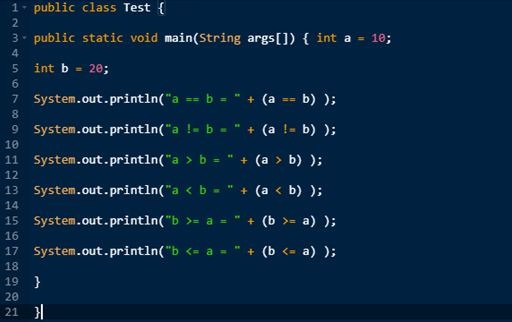
A critical distinction for any programmer, and a common interview pitfall, is the difference between the assignment operator (=) and the equality operator (==).
int x = 5;assigns the value 5 to the variablex.x == 5;compares the value ofxto 5 and evaluates totrue.
Using = where you mean == is a valid statement in some contexts, but it leads to logical errors that can be hard to find. The following video explains this and other aspects of relational operators very clearly.
#10 Relational Operators in Java
The presenter from Telusko provides a focused explanation of relational operators, their boolean outcomes, and the crucial difference between = and ==.
Watch the introduction to get an overview of comparison. Pay close attention to the explanation of assignment vs. comparison (= vs. ==). This is a key concept. The next segment introduces the full set of operators, including !=, <=, and >=. Understand that the result is always boolean. Finally, see a code demonstration that puts it all together.
Logical Operators: Combining Boolean Expressions
Logical operators allow you to combine multiple boolean expressions into a single, more complex condition.
&&(Logical AND):trueonly if both operands aretrue.||(Logical OR):trueif at least one operand istrue.!(Logical NOT): Inverts a boolean value (truebecomesfalse,falsebecomestrue).
For example, to check if a number is within a specific range, you would use the && operator:
int score = 85;
boolean isB_Grade = (score >= 80 && score < 90); // true
Short-Circuit Evaluation
A key feature of && and || in Java (and many other languages) is short-circuiting. This is an optimization that can also affect program logic.
- For
expression1 && expression2, ifexpression1isfalse,expression2is never evaluated because the entire result must befalse. - For
expression1 || expression2, ifexpression1istrue,expression2is never evaluated because the entire result must betrue.
This is important when expression2 involves a method call or an operation with a side effect, like ++x.
For a consolidated textual reference on all the operators we've discussed, please review the following guide.
Java Operators: Arithmetic, Relational, Logical and more
This article from Programiz provides clear definitions and code examples for each category of operator.
First, review the section on Arithmetic Operators, which reinforces what you saw in the video. Next, read the section on Relational Operators for a textual summary. Finally, read the section on Logical Operators. Pay attention to the examples for && and ||.
Hands-On Practice: Predict the Output
As a CS student preparing for interviews, being able to quickly trace code and predict its output is a vital skill. Let's test your understanding of operators, precedence, and side effects.
For each of the following code snippets from a Java practice sheet, try to determine the exact output before moving on. These are exactly the kind of "gotcha" questions you might see in a technical screen.
Problem 1: Arithmetic Precedence
What is the output of this code?
int i = 5, j = 6, k = 7, n = 3;
System.out.println( i + j * k - k % n );
System.out.println( i / n );
Think about the order of operations: % and * before + and -. Remember integer division.
Click to see the solution and explanation
Output:
46
1
Explanation:
i + j * k - k % nis evaluated as5 + (6 * 7) - (7 % 3).6 * 7is42.7 % 3is1.- The expression becomes
5 + 42 - 1, which is46. i / nis5 / 3. With integer division, the result is1.
Problem 2: Relational and Logical Operators
What does this program output?
int n;
System.out.println( (n = 4) );
System.out.println( (n == 4) );
System.out.println( (n > 3) );
System.out.println( (n < 4) );
System.out.println( (n == 0 || true) );
System.out.println( (!(n == 2)) );
Remember that an assignment (=) is an expression that also returns the assigned value.
Click to see the solution and explanation
Output:
4
true
true
false
true
true
Explanation:
(n = 4)assigns 4 tonand the expression itself evaluates to4.nis now 4, so(n == 4)istrue.4 > 3istrue.4 < 4isfalse.(n == 0 || true)short-circuits. The second part istrue, so the whole expression istruewithout checking the value ofn.nis 4, so(n == 2)isfalse. The!operator inverts this totrue.
Problem 3: Short-Circuiting
What is the output of this code snippet?
int found = 0, count = 5;
if (!found || --count == 0) {
    System.out.println("danger");
}
System.out.println("count = " + count);
Hint: In Java, an int value of 0 does not automatically mean false. A boolean expression is required. The code in the if condition has a compilation error as written in the source PDF (!found). Assume found was a boolean initialized to false. Let's correct it to boolean found = false; to analyze the intended logic.
Let's analyze the corrected version:
boolean found = false;
int count = 5;
if (!found || --count == 0) {
    System.out.println("danger");
}
System.out.println("count = " + count);
Click to see the solution and explanation
Output:
danger
count = 5
Explanation:
boolean foundisfalse. So!foundistrue.- The
ifcondition is(true || --count == 0). - Because of short-circuit evaluation, since the left side of the
||istrue, the right side (--count == 0) is never executed. - The
ifblock runs, printing "danger". - Since
--countwas never executed, the value ofcountremains5.
This problem (taken from problem #6 in the Practice Problems PDF) perfectly illustrates why understanding short-circuiting is critical.
Conclusion
In this lesson, we have armed you with the essential operators needed to perform calculations and construct logical expressions in Java.
Here are the key takeaways:
- Arithmetic operators (
+,-,*,/,%) are used for calculations. Be mindful of integer division's truncating behavior. - Relational operators (
==,!=,>,<) compare values and always result in aboolean. - Logical operators (
&&,||,!) combine boolean expressions, using short-circuit evaluation for efficiency. - Operator precedence determines the order of operations, but using parentheses
()is always a good idea for clarity and correctness.
You are now ready to use these expressions to control the flow of your programs. In our next lesson, we will do just that by exploring conditional logic using if-else and switch statements. The boolean expressions you learned to write today are the keys that will unlock decision-making in your code.