Hello! In our last lesson, we learned about AWS IAM, the security guard of AWS that controls who can do what. We now know how to create roles and policies to give specific, limited permissions to our services. This is crucial for building secure systems.
Now that we know how to manage access, the next logical question is: where do we actually put all our data? For machine learning, we need a central, reliable, and massive place to store everything from raw customer feedback and images to the clean, structured datasets we'll use for training.
This lesson introduces you to that central place: Amazon S3, and explains its role as the foundation of a data lake for all our machine learning data.
What is a Data Lake? A Basket of Raw Fruit
Before we talk about the specific AWS service, let's understand the concept of a "data lake."
Imagine you have a giant basket. You can throw any kind of fruit into it—apples, bananas, oranges, even ones you haven't identified yet. You don't wash them, peel them, or sort them. You just collect everything in one place. This is your basket of raw fruit.
A data lake is just like that basket, but for data. It's a central repository where you can store all of your data—structured (like neat tables), semi-structured (like JSON files), and unstructured (like images, videos, audio, and raw text)—in its original, raw format. You don't have to define what the data is for or how you'll use it upfront. You just store it.

This "store everything now, figure it out later" approach is incredibly powerful for machine learning, because ML models can often find patterns in raw, unstructured data that we might have filtered out in a more traditional system.
This short post on LinkedIn provides the perfect analogy to grasp the concept of a data lake.
Read the first couple of posts that use the fruit analogy. Focus on the definition of a Data Lake as a basket of raw fruits. This simple idea of storing everything in its raw form is the most important takeaway.
Amazon S3: Your Infinite Cloud Storage
So, if a data lake is the concept, what is the actual tool we use to build it in AWS? The answer is Amazon Simple Storage Service (S3).
Think of S3 as a magical, infinitely large storage shed in the cloud. You can put almost anything you want in it, and it will be kept safe. You pay only for what you use, and it's extremely inexpensive. In S3, you store your files, which are called "objects," inside containers called "buckets." A bucket is like a top-level folder for your project.
Amazon/AWS S3 (Simple Storage Service) Basics | S3 Tutorial, Creating a Bucket | AWS for Beginners
The video "Amazon S3 Basics" from Tiny Technical Tutorials (the same channel from our last lesson) gives a clear and simple introduction to S3.
Watch the segment from the introduction that explains what S3 is and what "object storage" means in this context. Then, continue with the short part that defines S3 buckets.
Why S3 is the Foundation of an AWS Data Lake
S3 isn't just a storage service; its specific features make it the perfect foundation for building a data lake. It's the default choice for storing ML data on AWS for several key reasons:
- Massive Scalability: S3 offers virtually unlimited storage. You can store terabytes or even petabytes of data without ever worrying about running out of disk space.
- High Durability: S3 is designed to be incredibly resilient. It automatically stores your data across multiple physical locations, making it extremely unlikely that you'll ever lose a file.
- Cost-Effectiveness: Storing data in S3 is very cheap, which is essential when you're dealing with the massive volumes of data required for machine learning.
- Flexibility: S3 doesn't care what kind of data you give it. You can store CSV files, images, videos, JSON logs, and trained model files all in the same place. This is the core requirement of a data lake.
- Centralization: S3 acts as the "single source of truth." All other AWS services are built to integrate with it. Your data pipeline, your ML training service, and your analytics tools can all read from and write to S3.
This central role is why S3 is at the heart of the AWS data ecosystem.
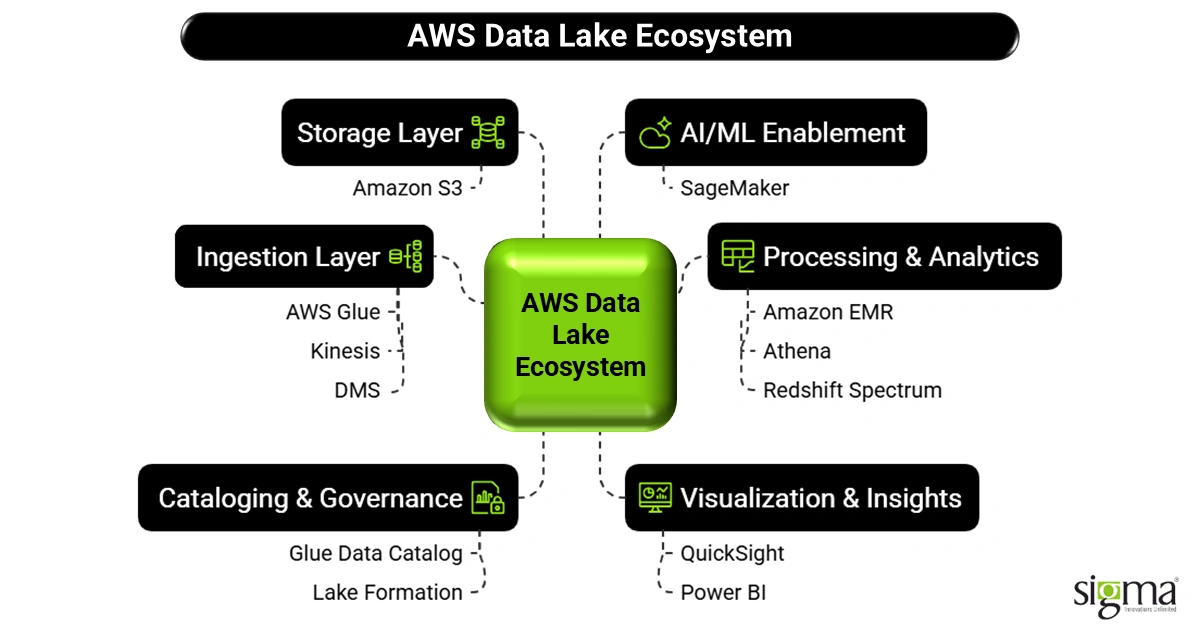
AWS Data Lake - Overview, Architecture, Best Practices & Formation
This article from Intellipaat summarizes exactly why S3 is the go-to service for building data lakes.
First, read the section Why build on S3?, which lists the key reasons we just discussed. After that, look over the Benefits table to see these points summarized, especially noting flexible storage, cost-effective scaling, and its role as a centralized repository.
S3 in a Typical ML Workflow
In a practical machine learning project, you'll typically use S3 to store data at different stages of your pipeline. A common practice is to use folders (which are technically called "prefixes" in S3) within a single bucket to keep things organized:
- Raw Zone (
s3://my-project-bucket/raw/): This is where all data first lands, completely untouched. It could be raw logs from a server, a dump of a database table, or images uploaded by users. This is your "basket of raw fruit." - Processed Zone (
s3://my-project-bucket/processed/): After a data preparation job runs (which we'll cover in the next lesson), the clean, transformed, and feature-engineered data is saved here. This is the data that is ready for an ML model to consume. This is your "fruit juice." - Model Zone (
s3://my-project-bucket/models/): Once a model is trained, the resulting model artifact (the file containing the trained model) is also saved back to S3, ready to be deployed.
This separation keeps your data lake organized and prevents it from turning into a messy and unusable "data swamp." And, tying back to our last lesson, you would use IAM policies to grant specific services permission to, for instance, only read from the /raw/ folder and only write to the /processed/ folder.
Database vs Data Warehouse vs Data Lake | What is the Difference?
This video highlights why data lakes are especially beneficial for modern machine learning applications.
Watch the short clip from the use cases to hear why ML practitioners benefit from having access to all the raw, varied data that a data lake provides.
Conclusion
You now understand one of the most fundamental components of the AWS cloud and its central role in machine learning. S3 is more than just a place to store files; it's the bedrock of your entire data strategy on AWS.
Here are the key takeaways:
- A data lake is a central repository for storing vast amounts of data in its raw, native format.
- Amazon S3 is the ideal AWS service for building a data lake because it is highly scalable, durable, cost-effective, and flexible.
- In machine learning, we use S3 to store everything: raw data, prepared datasets for training, and the final trained models.
- Organizing your S3 bucket with folders (prefixes) and securing it with IAM is crucial for maintaining a healthy data lake.
We've established where our data lives (S3) and how to secure it (IAM). The next question is: how do we automatically transform the raw data in our lake into the clean data our models need? In the next lesson, we will explore AWS Glue, a service that acts as an automated data factory for discovering, cataloging, and transforming your data at scale.