Hello! In our last lesson, we established Amazon S3 as our massive "data lake," a central place to store all our raw data. But raw data is like a pile of uncooked ingredients—you can't make a meal with it directly. You need to wash the vegetables, chop the onions, and mix everything according to a recipe.
This is where our next service, AWS Glue, comes in. Think of AWS Glue as an automated data factory or a robot chef for your data lake. Its job is to find your raw data, figure out what it is, and then clean and prepare it so it's ready for your machine learning models to consume.
In this lesson, you'll learn how AWS Glue works by breaking it down into its three main functions: discovering your data, cataloging it, and transforming it into something useful.
What is ETL? The Core Idea Behind Glue
Before we dive into Glue itself, let's understand a key concept it's built on: ETL. This stands for Extract, Transform, and Load.
- Extract: Get the data from its source (like our S3 data lake).
- Transform: Change the data. This could mean cleaning up messy text, converting data types, or combining information from different files.
- Load: Save the newly transformed data to a destination, like another folder in S3.
This process is the backbone of almost all data preparation work. AWS Glue is a service designed to automate this ETL process for you.
What is AWS Glue? A Detailed Introductory Guide - Last Week in AWS Blog
This article from the Last Week in AWS Blog provides a great, clear definition of AWS Glue and the ETL process it's built upon.
Read the first two sections, starting from the beginning down to the end of "What is ETL?". Focus on understanding the definitions of AWS Glue and the core idea of ETL. This sets the stage for everything else we'll cover.
The Three Main Parts of AWS Glue
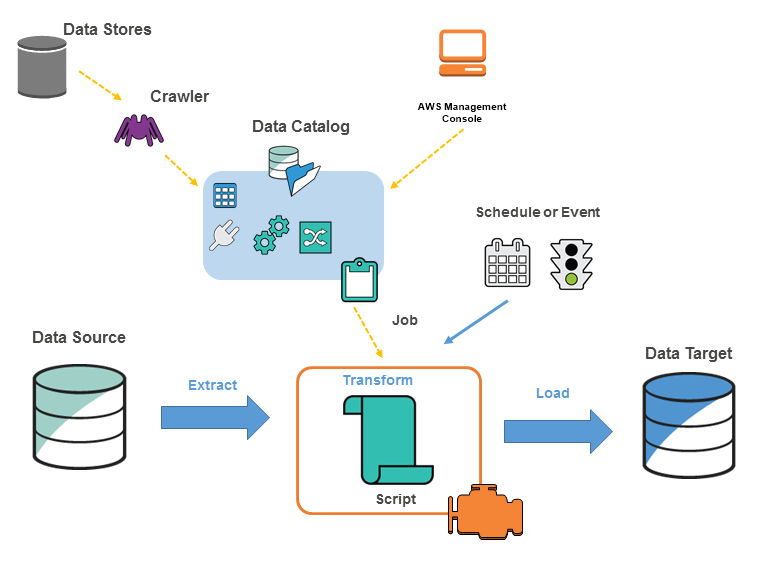
AWS Glue accomplishes its data preparation work using three core components that work together. The diagram below shows the entire workflow.
Let's use an analogy to understand these parts:
- The Crawler (The Data Detective): This is like a detective that scans your data stores (e.g., your S3 bucket) to see what's there. It automatically figures out if your files are CSVs or JSONs, what columns they have, and what kind of data is in each column (numbers, text, etc.).
- The Data Catalog (The Data Library): Once the crawler discovers your data, it doesn't move the data itself. Instead, it writes down all the information it found—the file format, the columns, the location—into a central "catalog." Think of this as a library card catalog for all your data.
- The ETL Job (The Data Factory): This is the part that does the actual work. A "Job" is a script that reads the instructions from the Data Catalog, extracts the raw data from S3, transforms it according to rules you set, and loads the clean data into a new location.
Now, let's look at each of these parts more closely.
1. Discover with the AWS Glue Crawler
The first step in any data preparation pipeline is knowing what data you have. Imagine you have thousands of files dumped into S3 from different sources. How do you figure out their structure without opening each one manually? This is the problem the Crawler solves.
You point the Crawler at your S3 bucket, and it automatically:
- Connects to the data store.
- Uses built-in "classifiers" to guess the data format (like a detective recognizing clues).
- Infers the schema (the column names and data types).
- Writes this metadata into the Data Catalog.
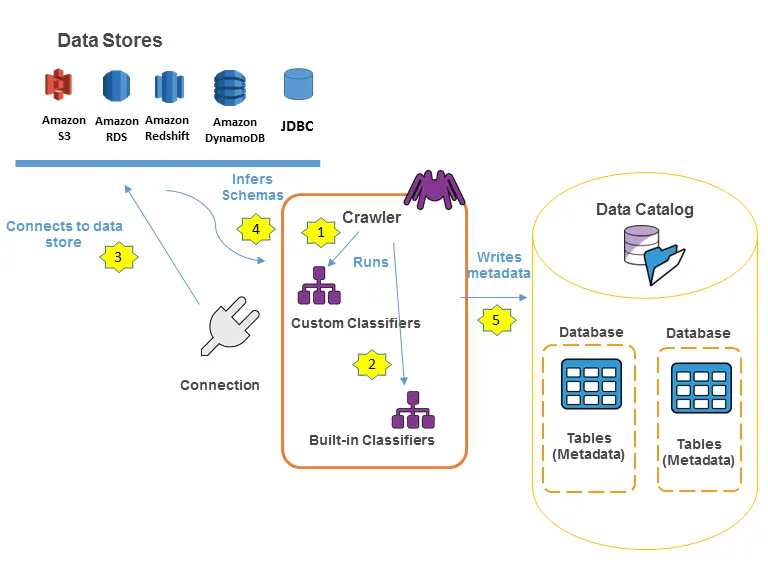
This "data discovery" is a huge time-saver, especially when you're dealing with large and varied datasets.
AWS Glue 101: All you need to know with a real-world example
This section from the Towards Data Science article gives a simple, practical explanation of what a crawler does.
Read the short section titled Create and Run Glue Crawlers. The key takeaway is that crawlers scan your data and automatically identify the structure.
2. Catalog with the AWS Glue Data Catalog
After the crawler has done its investigation, it creates a table in the Glue Data Catalog. It's very important to understand that this is metadata only. The catalog contains a pointer to your data in S3 and a description of its structure. The actual data never leaves S3.
Why is this so useful? Because the Data Catalog acts as a central source of truth for all your data. Other AWS services, like our ML services, can simply ask the Data Catalog, "Hey, what's the schema for the 'customer_logs' data?" and immediately know how to read and query it, without you having to define it again. It makes your data lake accessible and usable.
What is AWS Glue? A Detailed Introductory Guide - Last Week in AWS Blog
Let's return to the "Last Week in AWS" article to get a clear definition of the catalog and jobs.
In the "Components of AWS Glue" section, read the paragraphs about Catalogs. Then, read the first paragraph of the Jobs section to understand what they do at a high level.
3. Transform with AWS Glue ETL Jobs
Now that we have discovered and cataloged our data, we can finally transform it. A Glue Job is a script that performs the ETL process. The best part is that AWS Glue can often write this script for you!
You can visually define a job by specifying:
- Source: The table in your Data Catalog (which points to your raw data in S3).
- Transformations: What you want to do. For example, "drop this column," "rename that column," or "convert text to lowercase."
- Target: Where to save the clean data (e.g., a different folder in your S3 bucket).
Glue then generates a script (using Python and a framework called Apache Spark) and runs it on a serverless platform. "Serverless" is a key term here. It means you don't have to manage any computers or servers yourself. You just give Glue the job, and it automatically finds the necessary computing power, runs the script, and shuts down when it's done. This is what allows Glue to work "at scale"—it can handle tiny files or massive terabyte-sized datasets with the same setup.
This official video from Amazon Web Services provides an excellent and concise summary of how all these pieces fit together in a real-world scenario.
Watch the entire video (it's short!). Pay close attention to the example starting at the example. It perfectly demonstrates how a crawler discovers data from different sources (S3 and a database), populates the catalog, and how a Glue job uses that information to transform the data and load it into a final destination for analysis.
Conclusion
You've now seen how AWS Glue acts as the automated data factory for your S3 data lake. It automates the tedious but critical process of preparing data for machine learning.
Here are the key takeaways:
- AWS Glue is a serverless ETL (Extract, Transform, Load) service.
- It uses a Crawler to automatically discover the schema of your raw data in S3.
- It stores this schema as metadata in the Data Catalog, creating a single source of truth about your data.
- It uses ETL Jobs to transform the raw data into a clean, usable format and save it back to S3.
- Because it's serverless, Glue can handle data preparation tasks at any scale without you needing to manage any infrastructure.
In our previous lessons, we covered storing data (S3) and securing it (IAM). Now, with Glue, you have a powerful tool for processing that data. However, sometimes you want a more hands-on, visual way to explore and clean your data, especially when you're first experimenting.
In our next and final lesson for this module, we will look at Amazon SageMaker Data Wrangler, a service that provides a visual interface for data preparation, complementing the automated, large-scale approach of AWS Glue.