Hello! In our last lesson, we learned how to spot and handle outliers—those strange data points that are far removed from the rest. This was a crucial step in making sure our machine learning model isn't misled by anomalies.
Today, we'll tackle the final topic in our "Data Cleaning Essentials" module. Our goal is to learn how to identify and remove duplicate records from a dataset. Instead of dealing with strange data, we're now dealing with extra data. Think of it as finding and deleting identical files that are cluttering up your hard drive. By the end of this lesson, you'll understand why these copies are a problem and how to clean them up, giving us a pristine dataset ready for the next stage of our ML journey.
What Are Duplicate Records?
A duplicate record is simply a row in your dataset that is an identical copy of another row. This often happens due to things like data entry errors, bugs in data collection software, or merging different data sources together.
For example, if you have a list of sales transactions, a duplicate would be the exact same sale recorded more than once.
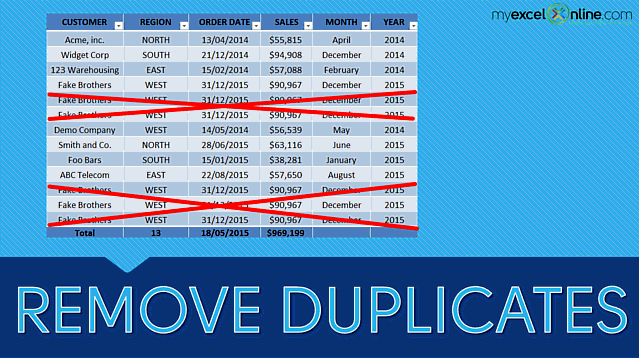
There are two main kinds of duplicates to think about:
- Full Duplicates: The entire row is identical to another row across all columns. These are the most straightforward to find and remove.
- Partial Duplicates: The rows are not identical across all columns, but they are duplicates based on a specific set of key columns. For instance, two rows might have the same
UserIDandEmailbut a differentLoginTimestamp. Deciding if this is a duplicate depends on your goal. Are you counting unique users, or unique user logins?
Why Do Duplicates Cause Problems?
Leaving duplicates in your data isn't just messy; it actively harms your analysis and your machine learning models. Let's explore the three main reasons why we need to remove them.
Reasons to Remove Duplicate Data
This article from ApX Machine Learning clearly explains the negative impacts of duplicate data. It's a great conceptual overview.
Please read the first three sections, focusing on these key problems: Skewed Statistical Analysis: Notice how the duplicate entries in the example table change the calculated average purchase amount. Biased Machine Learning Models: This is the most critical point for us. Understand how duplicate data can make a model "over-learn" certain patterns and give a false sense of accuracy. Wasted Computational Resources: As a software engineer, you'll immediately see the logic here—processing redundant data is inefficient.
To summarize, duplicates give certain data points more weight than they deserve. This is like voting multiple times in an election. If you have ten identical records for "Customer A bought a widget," your model will think that event is ten times more important than "Customer B bought a gadget," even if each only happened once. This leads to a biased model that doesn't reflect reality.
How to Identify and Remove Duplicates
Now for the practical part: how do we get rid of them? The approach you take depends on whether you're dealing with full or partial duplicates. Most data cleaning tools, including those on AWS, give you options for both scenarios.
The core idea is to define a rule for what makes a row a "duplicate" and then tell the tool to keep only the first instance it finds that matches the rule.
Using Drop Duplicates - AWS Glue
This AWS Glue documentation page provides a perfect, simple explanation of the two main strategies for dropping duplicates. Although it's for a specific AWS service, the concept is universal.
Read through the page to understand the two options: First, look at the example of matching entire rows. Here, only rows that are 100% identical are removed (like rows 6 and 7 in their example). Next, see how you can specify keys. In this case, they decide that name and email are the unique identifiers. Any row that has the same name and email as a row seen before is dropped, even if other columns like Age are different.
This choice—whether to match on all columns or a subset of key columns—is the fundamental decision you have to make when dealing with duplicates. There's no single right answer; it always depends on the data and the question you are trying to answer.
Deduplication in Practice
To see how these concepts fit into the bigger picture, let's watch a quick clip.
What is Data Cleaning? | Data Fundamentals for Beginners
This video from Alex The Analyst gives an overview of the data cleaning process.
Watch this short segment on Deduplication. Notice how it's presented as a standard step in the data cleaning cycle.
The logic you learned from the AWS documentation is implemented in most data science libraries. For example, in the popular Python library pandas, the function is called drop_duplicates(). You don't need to know the code for your exam, but seeing the logic can make the concept very clear.
Pandas Drop Duplicates // Drop duplicate rows in Python pandas with examples for subset and keep
This video by Kimberly Fessel demonstrates how to use the drop_duplicates() function in pandas. We'll just watch two short clips to see our concepts in action.
First, watch how a basic call to the function works from this point. This is the "match entire rows" strategy. It finds and removes rows that are identical across all columns. Next, see how a subset is used from this point. This is the "specify keys" strategy. By providing a list of column names, you tell the function to only consider those columns when looking for duplicates.
When you use a visual tool like AWS Glue Studio or Amazon SageMaker Data Wrangler, you won't be writing code. Instead, you'll see a user interface with options like "Remove duplicates" and then a checkbox or a dropdown menu to select the columns to use as your keys. The underlying logic is exactly the same.
Conclusion
Congratulations on completing the "Data Cleaning Essentials" module! We've now covered the three most common data quality issues: missing values, outliers, and duplicates.
Let's recap today's key takeaways:
- Duplicate records are identical or near-identical copies of rows in a dataset.
- They are a problem because they bias ML models, skew statistics, and waste computational resources.
- You can remove duplicates by matching on all columns (for full duplicates) or on a subset of key columns (for partial duplicates).
- The choice of which columns to use as keys depends on what uniquely identifies a record in your specific context.
With our data now clean and tidy, we're ready to move on to the next major phase: preparing data for model training. In our next lesson, we will start Module 3 by learning how to convert non-numeric data, like categories, into numbers that a machine learning model can understand.