Hello! Welcome to the first lesson of our third module. Having cleaned our data by handling missing values, outliers, and duplicates, we're now ready to transform it into the perfect format for a machine learning model.
Today, we'll tackle a fundamental step in this process: converting categorical data into numbers. Many machine learning models are built on mathematics and can't understand text labels like "Red" or "Small". They need numbers to work. Think of it as translating words into a language a calculator can understand.
By the end of this lesson, you will be able to explain and apply the two most common translation techniques: one-hot encoding and label encoding. This will equip you to handle one of the most common data types you'll encounter in any ML project.
What is Categorical Data?
First, let's be clear about what we're dealing with. Categorical data is information that can be sorted into distinct groups or labels, rather than being measured on a numerical scale. For example, "Color" is a category, but "Temperature" is a number.
There are two main flavors of categorical data, and telling them apart is key to choosing the right encoding method.
Encoding Categorical Data | Machine Learning Fundamentals
This video from Kody Simpson provides a fantastic, clear introduction to categorical data and its two types.
Please watch the first part of the video from the beginning. Focus on understanding the difference between nominal and ordinal data.
As the video explained, the two types are:
- Nominal Data: Categories that have no natural order or ranking. Examples include colors (Red, Blue, Green) or types of animals (Dog, Cat, Cow). One is not "greater" or "better" than another.
- Ordinal Data: Categories that have a meaningful order or ranking. Examples include T-shirt sizes (Small, Medium, Large) or customer satisfaction ratings (Bad, Good, Excellent).
This image provides a great visual summary of the two types.
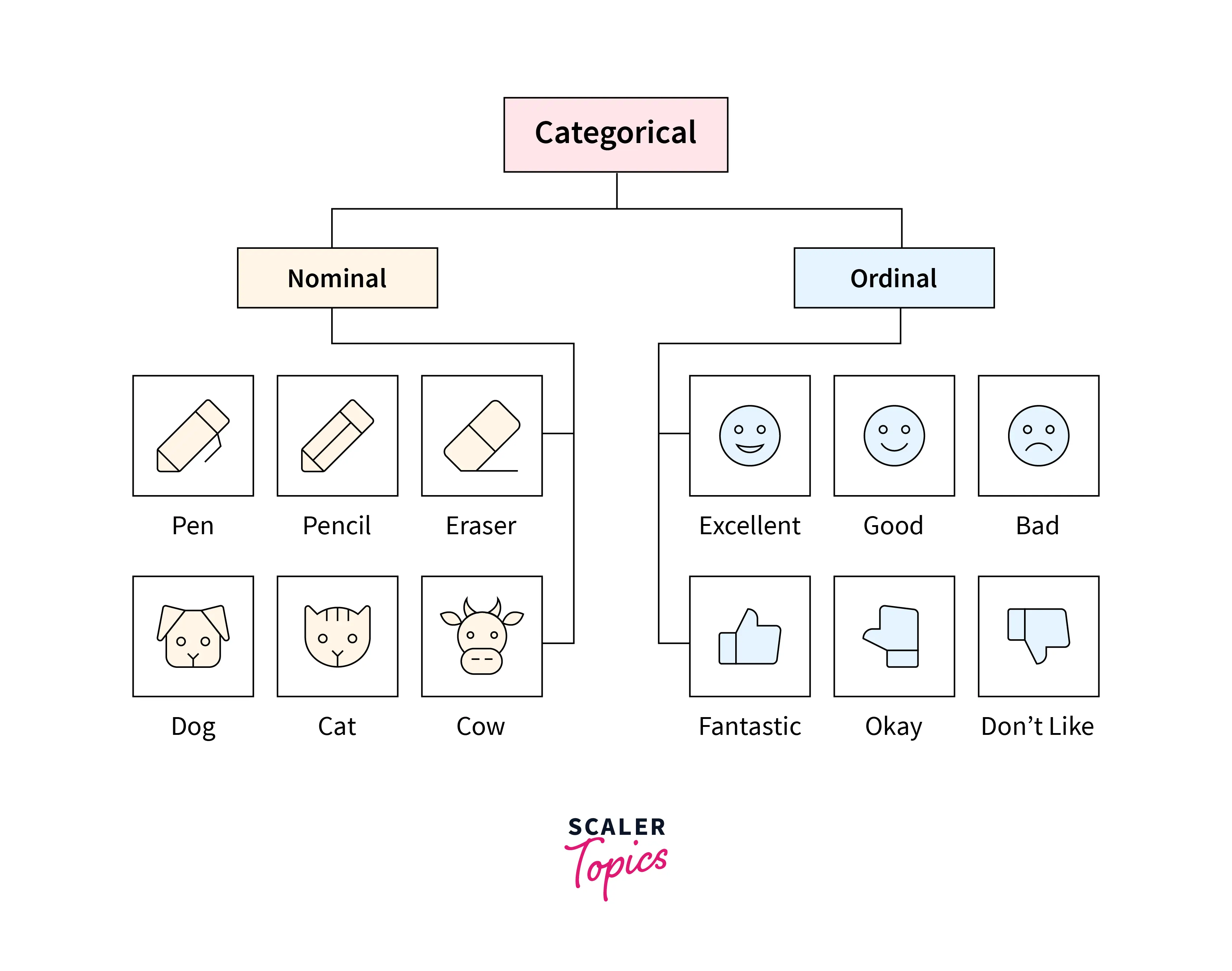
Understanding this distinction is the most important part of this lesson, as it directly tells you which encoding method to use.
Method 1: Label Encoding (for Ordinal Data)
When your categories have a clear order, the simplest approach is to replace each category with a number. This is called label encoding or ordinal encoding.
The key is to assign the numbers in a way that preserves the original order.
For example, for T-shirt sizes, you might create this mapping:
- Small = 1
- Medium = 2
- Large = 3
- Extra Large = 4
This way, the model can understand that "Large" is greater than "Small".
Encoding Categorical Data | Machine Learning Fundamentals
Let's see a practical example of how this works. This clip continues from where you left off.
Watch this segment on encoding ordinal data. Notice how a simple mapping (a dictionary in the code example) is used to convert the sizes into numbers while keeping the order intact. You can ignore the code specifics and focus on the logic.
When should you use label encoding?
Use it only for ordinal data, where the categories have a natural ranking.
What's the risk?
If you use label encoding on nominal data (like colors), you introduce a fake order that can confuse your model. For instance, if you encode Red=1, Green=2, Blue=3, the model might incorrectly assume that Blue is "more important" or "larger" than Red.
One-Hot, Label, Target and K-Fold Target Encoding, Clearly Explained!!!
The StatQuest video by Josh Starmer perfectly explains this potential problem.
Watch this short clip about the problems with label encoding when used incorrectly.
To avoid this problem with non-ordered data, we need another technique.
Method 2: One-Hot Encoding (for Nominal Data)
When your categories have no order (nominal data), the safest way to convert them to numbers is one-hot encoding.
Instead of putting all categories into one column with different numbers, you create a new column for each category. Then, you use 0s and 1s to show which category a row belongs to. A 1 means "this is the category," and a 0 means "it's not."
For a "Color" feature with three options (Red, Blue, Green), you would:
- Remove the original "Color" column.
- Add three new columns:
Color_Red,Color_Blue, andColor_Green.
A row that was originally "Red" would now have:
Color_Red: 1Color_Blue: 0Color_Green: 0
This way, you represent the category numerically without implying any one is "bigger" or "better" than another.
One-Hot, Label, Target and K-Fold Target Encoding, Clearly Explained!!!
The StatQuest video also has a great, simple explanation of one-hot encoding.
Watch this segment from One-Hot Encoding to see how it works visually.
The transformation looks like this in a table:

When should you use one-hot encoding?
Use it for nominal data, where categories have no meaningful order.
What's the downside?
If you have a feature with many, many categories (e.g., a "City" column with hundreds of cities), one-hot encoding will create hundreds of new columns. This can make your dataset very large and slow to process.
One-Hot, Label, Target and K-Fold Target Encoding, Clearly Explained!!!
This quick clip explains the scalability issue.
Watch this part about the problem with many options, using postal codes as an example.
How to Choose: A Simple Guide
The choice between label encoding and one-hot encoding is one of the most common decisions in data preparation. Luckily, the rule is very simple:
- Check if your categorical data has a meaningful order.
- Yes (Ordinal Data): Use Label Encoding.
- No (Nominal Data): Use One-Hot Encoding.
This article provides an excellent summary of when to use each method, along with their pros and cons.
Encoding Categorical Variables: One-Hot vs. Label ...
This article from Unidata.pro gives a clear comparison.
Read the section titled "One-Hot vs. Label Encoding: How to Choose?". Focus on the two main points about nominal and ordered data. Then, pay close attention to the summary table, which brings everything together perfectly.
Conclusion
Great job! You've just learned how to handle one of the most common data preparation tasks. Converting categories to numbers is a critical step that enables our models to learn from labeled data.
Here are the key takeaways:
- Categorical data comes in two types: nominal (no order) and ordinal (ordered).
- Label Encoding assigns a unique integer to each category (e.g., 1, 2, 3). It should only be used for ordinal data to preserve the natural ranking.
- One-Hot Encoding creates a new binary (0/1) column for each category. It's the standard choice for nominal data because it avoids creating a false sense of order.
- The choice is simple: if the categories have an order, use label encoding; if not, use one-hot encoding.
Now that we know how to prepare categorical features, what about numerical ones? In our next lesson, we'll explore normalization, a technique used to bring all our numerical features to a common scale, which helps many ML models train more effectively.