Welcome to our next lesson. In our previous session, you mastered the Condition element in IAM policies, learning how to construct fine-grained, context-aware rules. This gave you the tools to control how and when permissions are applied. Now, we will shift our focus from permissions for human users to permissions for AWS services themselves.
As an enterprise architect, you're accustomed to the concept of service accounts or identities that allow applications to interact with other systems securely. AWS formalizes this through IAM Roles. This lesson will teach you how to create and configure an IAM role, specifically for an AWS service like Lambda. You will learn about the two fundamental components of a role—the trust policy and the permissions policy—and understand the critical iam:PassRole permission that governs how roles are assigned. This is a cornerstone of building secure, automated applications on AWS and a key topic for the DVA-C02 exam.
By the end of this lesson, you'll be able to create an IAM role for a service, attach the necessary permissions, and understand the security model that allows a user to delegate those permissions to a service like AWS Lambda.
What is an IAM Role?
An IAM Role is an IAM identity that you can create in your account that has specific permissions. It is similar to an IAM user in that it is an AWS identity with permission policies that determine what the identity can and cannot do in AWS. However, instead of being uniquely associated with one person, a role is intended to be assumable by anyone who needs it. Also, a role does not have standard long-term credentials such as a password or access keys associated with it. Instead, when a principal (a user, application, or service) assumes a role, it receives temporary security credentials for the duration of the session.
For developers, the most common use case is granting permissions to an AWS service. For example, you might have a Lambda function that needs to read data from a DynamoDB table. You don't hardcode credentials in the function; instead, you create an IAM Role that the Lambda function can "assume" to get temporary permissions to access DynamoDB.
The infographic below provides a great high-level overview of the key concepts we'll discuss, including Roles, Trust Policies, and the iam:PassRole permission.
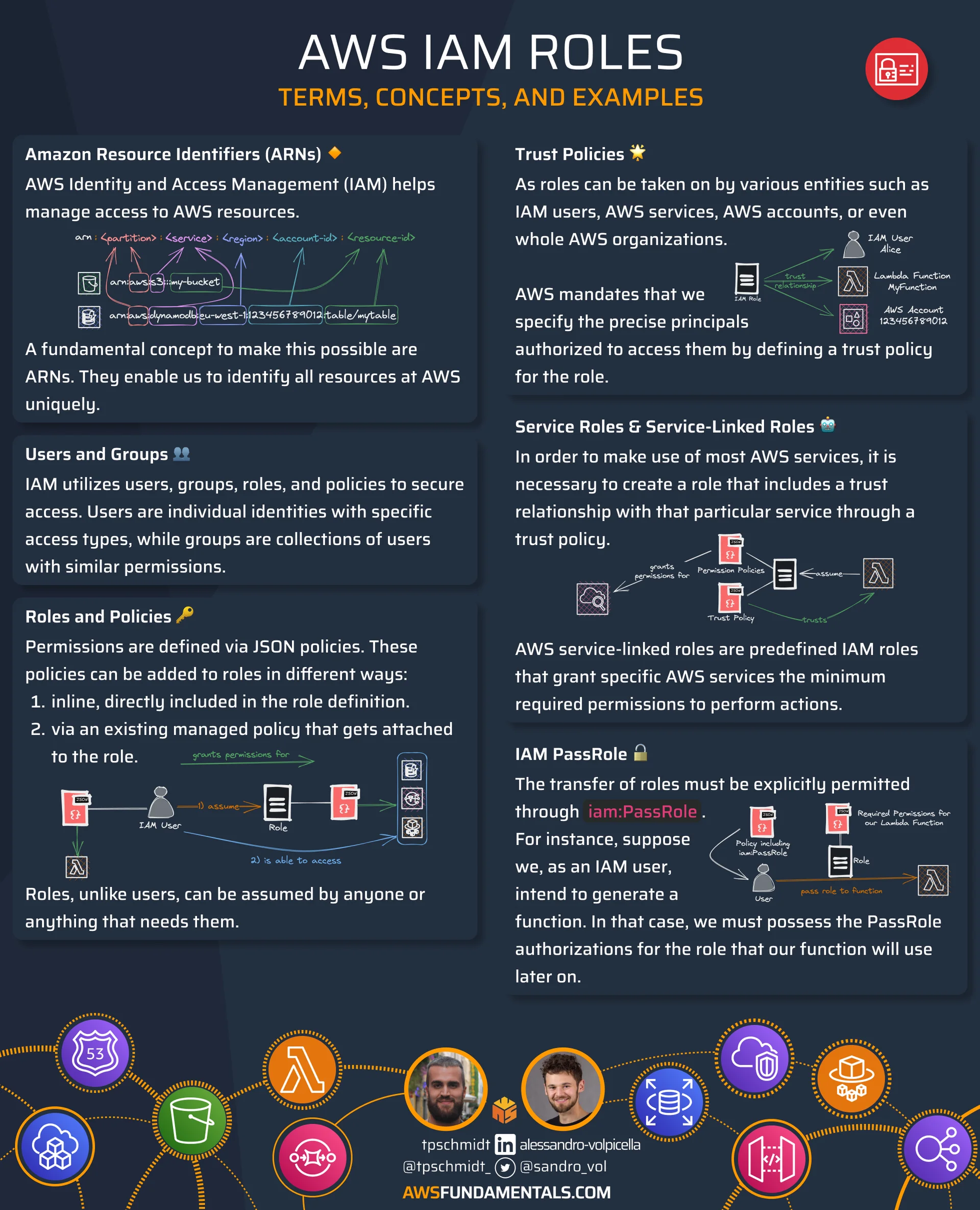
The Two Pillars of an IAM Role
An IAM role is defined by two distinct policies:
-
Trust Policy: This policy specifies the principals (users, services, or other accounts) that are allowed to assume the role. It answers the question, "Who can use this role?" For a Lambda function, the principal would be the Lambda service itself, identified as
lambda.amazonaws.com. -
Permissions Policy: This is an identity-based policy (or multiple policies) that you've worked with before. It defines the specific
ActionsandResourcesthe role is allowed to access. This policy answers the question, "What can be done by someone who assumes this role?"
Think of it like this: the trust policy is the bouncer checking IDs at the door, deciding who gets in. The permissions policy is the set of rules that dictates what you're allowed to do once you're inside.
The following documentation provides an excellent introduction to this concept, known as the execution role in the context of Lambda.
Defining Lambda function permissions with an execution role
This official AWS documentation introduces the concept of a Lambda function's execution role.
Read the introductory section, starting from the beginning. Pay close attention to the distinction made between the execution role itself and the trust policy that specifies the lambda.amazonaws.com service principal.
Creating a Role for AWS Lambda
Let's walk through how to create an execution role. While the AWS console simplifies this, as a developer preparing for the DVA-C02 exam, you must be proficient with the AWS CLI and understand the underlying API calls.
The Console Experience: A Mental Model
When you create a Lambda function in the AWS Console, you are prompted to configure its permissions. The console offers to create a new role for you. This is a helpful shortcut that abstracts away the details, but it's useful to see what it does.
The following video clip shows this process and then inspects the role that AWS creates automatically.
Invoking AWS Lambda Functions from the AWS CLI
This video from Digital Cloud Training demonstrates creating a Lambda function and inspecting the auto-generated IAM role.
First, watch the section on role creation options during the function setup. Then, see how the instructor inspects the role and its trust relationship in the IAM console. This reinforces the two-policy structure: a permissions policy for CloudWatch Logs and a trust policy for the Lambda service.
The Developer's Way: AWS CLI and SDKs
As you saw, the console creates a role with a trust policy and attaches a permissions policy. Programmatically, this is a two-step process:
iam:CreateRole: You create the role and provide the trust policy document.iam:AttachRolePolicy: You attach one or more permissions policies to the new role.
The AWS CLI commands directly mirror these API actions. The following documentation provides the exact commands you need.
Defining Lambda function permissions with an execution role
This section of the AWS documentation shows the precise CLI commands for creating an execution role.
Review the section Creating and managing roles with the AWS CLI. Note the create-role command and its --assume-role-policy-document parameter. This is where you define the trust policy. Then, look at the attach-role-policy command, which links the permissions (in this case, the AWSLambdaBasicExecutionRole managed policy) to the role.
Your extensive background in Java, Python, and JavaScript/TypeScript means you'll be working with the AWS SDKs. The process is conceptually identical across all SDKs: you call the CreateRole action with a trust policy document and then attach permission policies.
The official AWS documentation has excellent code examples for this. You don't need to read them all in detail now, but it's important to know where to find them and to recognize the pattern.
Use CreateRole with an AWS SDK or CLI
This documentation page provides code examples for creating an IAM role using various AWS SDKs and the CLI.
First, quickly review the AWS CLI examples to reinforce what you just learned. Then, skim the code snippets for Python (Boto3), Java, and JavaScript. Focus on the Python example under SDK for Python (Boto3). Notice how the trust_policy is constructed as a JSON object and passed to the create_role function call. This pattern is common across the SDKs.
The Crucial iam:PassRole Permission
We've covered how a service gets permissions, but there's a critical security check we haven't discussed. When you, as a developer, try to launch a service (like an EC2 instance or a Lambda function) and assign a role to it, AWS performs an authorization check on you. Do you have the permission to pass that specific role to the service?
This is what the iam:PassRole permission is for. It prevents a user with limited permissions from attaching a highly privileged role to a service, thereby escalating their own permissions. For example, without this protection, a junior developer with only permissions to create Lambda functions could create a function, attach the AdministratorAccess role to it, and then invoke the function to gain full control over the AWS account.
iam:PassRole is a permission you add to the user (or the user's group/role) who is configuring the service, not to the role being passed.
This concept can be tricky, and it is a very common topic on the DVA-C02 exam. The following video provides an excellent, practical demonstration of why PassRole is needed and how it works.
This video from Prasad Domala is dedicated to explaining the IAM PassRole permission. It uses a clear, step-by-step example.
First, watch the demonstration of the error that occurs when PassRole is missing. The section from the initial attempt shows a user trying to launch an EC2 instance with a role, failing, and then decoding the error message, which explicitly points to a missing iam:PassRole permission. Next, see how the issue is resolved by adding the permission in the section from adding password permission. Finally, watch the important discussion on considerations and caveats. As an architect, you will appreciate the points about permission inheritance and the auditing challenges, as iam:PassRole itself is not an API action logged in CloudTrail.
Tying It All Together
Let's connect this back to a concrete developer action: creating a Lambda function with the AWS CLI. The AWS Lambda CLI Cheat Sheet shows the syntax for this.
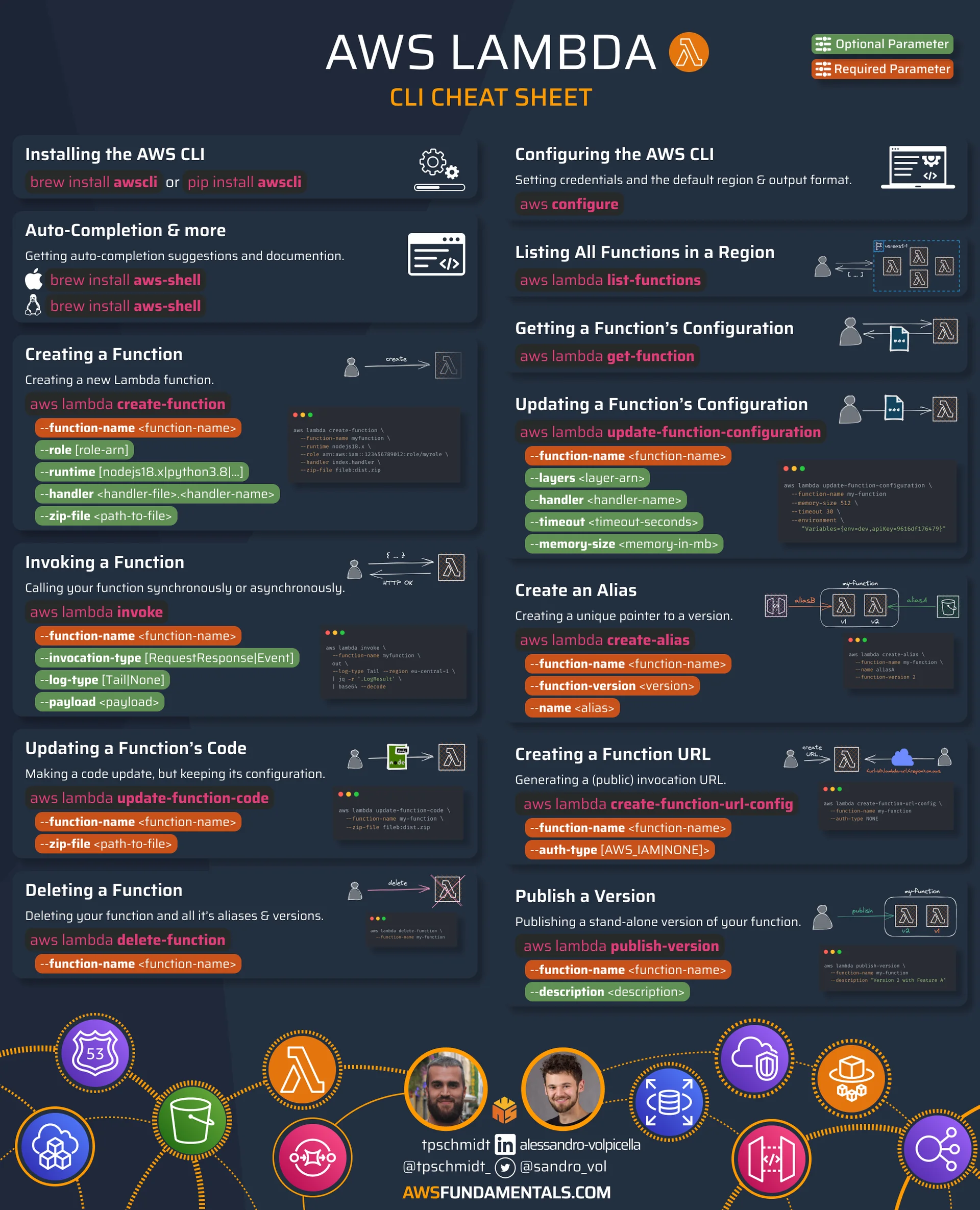
Notice the aws lambda create-function command. It has a required parameter: --role <role-arn>. When you execute this command, the following checks occur:
- IAM checks if your user has the
lambda:CreateFunctionpermission. - IAM checks if your user has the
iam:PassRolepermission on the role specified by the ARN.
If both checks pass, the function is created. When the function is later invoked, the Lambda service will successfully assume the role (thanks to the trust policy) and execute your code with the permissions granted by that role's permissions policies.
Conclusion
In this lesson, you've bridged the gap between IAM policies and practical application security. You now understand how to grant permissions to AWS services using IAM Roles, a fundamental pattern for building secure and scalable cloud applications.
Here are the key takeaways:
- IAM Roles for Services: Roles are the standard mechanism to grant AWS services permission to access other AWS resources.
- Trust vs. Permissions: A role is defined by two policies: a trust policy that specifies who can assume the role (e.g.,
lambda.amazonaws.com) and permissions policies that define what the role can do. - Programmatic Creation: Creating a role via the CLI or SDK is a two-step process:
create-rolewith the trust policy, followed byattach-role-policyto add permissions. - The
iam:PassRoleGateway: A user needs theiam:PassRolepermission to assign a role to a service. This is a crucial security feature that prevents privilege escalation.
Now that you can grant permissions to services, the next logical step is to consider how you can safely delegate the ability to manage these permissions to other developers or teams. In our next lesson, we will explore IAM permission boundaries, a powerful feature for enforcing maximum permission levels within your organization.