In our previous lesson, we established the fundamental difference between identity-based and resource-based policies, focusing on the core elements: Effect, Action, Resource, and Principal. You now understand how AWS determines access based on who is making a request and what resource they are targeting.
This lesson drills down into the most powerful component for fine-grained control: the Condition element. While the other elements define the broad strokes of a permission, conditions add the critical "if-then" logic. For you as a backend engineer and architect, this is the AWS equivalent of the context-aware authorization logic you implement in your services—checking JWT claims, request parameters, or user roles before allowing an operation. By mastering conditions, you can enforce security policies that are not only robust but also dynamic and scalable.
By the end of this lesson, you will be able to author sophisticated IAM policies that use conditions to control access based on IP address, required security protocols, user identity attributes, and resource-specific properties.
The Anatomy of a Condition
An IAM policy statement grants or denies permission based on its Effect, Action, and Resource. The optional Condition element adds a crucial final check: the statement only applies if the conditions are met.
The Condition block has a specific JSON structure:
"Condition": {
  "ConditionOperator": {
    "ConditionKey": "ConditionValue"
  }
}
Let's break this down:
ConditionKey: This is a specific property of the request context that AWS evaluates, such as the source IP address (aws:SourceIp) or the S3 object prefix (s3:prefix). Keys are either global (starting withaws:) or service-specific.ConditionValue: This is the value you specify in the policy that the key from the request will be compared against.ConditionOperator: This defines the type of comparison, such asStringEquals,NumericLessThan, orIpAddress.
The following video provides an excellent introduction to the Condition element and the logic of how it's evaluated.
IAM Policy Evaluation Series: AWS IAM policy language explained | Amazon Web Services
This video from the official Amazon Web Services channel explains the core components and Boolean logic of the Condition element.
Watch the segment starting from the condition element. Pay close attention to the definitions of operator, key, and value, and how the video explains the logical AND and OR evaluations.
Understanding the Logic: AND vs. OR
How conditions are combined is a critical concept for the exam and for practical use.
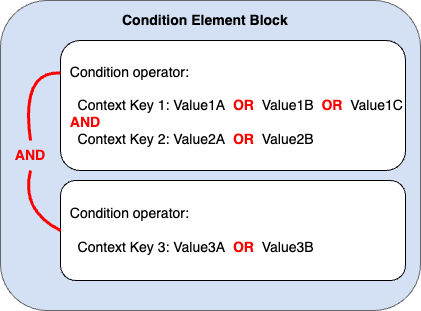
- Multiple values for a single key are evaluated with OR. If you provide a list of values for a key, the condition is true if the request's value matches any of the values in the list.
- Multiple condition keys within a statement are evaluated with AND. For the policy statement to apply, all specified conditions must be true.
This diagram illustrates the logic clearly. Within a single condition operator block, multiple values for a key are OR'd, while multiple keys are AND'd.
Condition Keys: Global and Service-Specific
Condition keys fall into two categories. Understanding both is essential for creating effective policies.
1. Global Condition Keys
These keys, prefixed with aws:, are available for use across most AWS services. They relate to properties of the request that are universal.
Let's explore some of the most common ones with practical examples. The following article is a concise, exam-focused reference you should review.
This guide from Trusted Institute provides a great overview of common condition keys and operators.
Focus on the sections explaining the components and common operators, the list of Global Condition Keys, and the list of Service-Specific Condition Keys.
Here are a few examples of global keys in action:
- Enforce MFA for sensitive operations:
"Condition": { "Bool": { "aws:MultiFactorAuthPresent": "true" } } - Restrict access to a corporate IP range:
"Condition": { "IpAddress": { "aws:SourceIp": "203.0.113.0/24" } } - Require requests to use encryption-in-transit (HTTPS/TLS):
"Condition": {
  "Bool": { "aws:SecureTransport": "true" }
}
2. Service-Specific Condition Keys
These keys are unique to a particular AWS service and allow for extremely fine-grained control within that service. For a developer, these are invaluable. A classic example is s3:prefix, which lets you control access to specific "folders" (which are object key prefixes) within an S3 bucket.
The next video demonstrates this exact use case. You'll see how to build an IAM policy step-by-step to grant a user access to a specific folder in an S3 bucket.
Amazon S3 Access Control - IAM Policies, Bucket Policies and ACLs
This video from Digital Cloud Training provides a hands-on demonstration of using user policies with conditions to grant granular access to S3.
Watch the segments from "C. Root level bucket items" through granting GetObject/PutObject. Notice how the policy evolves by adding new statements and how the s3:prefix condition is used to limit ListBucket actions to specific paths.
Dynamic Policies with Policy Variables
Hardcoding values like usernames or folder names in policies isn't scalable. As an architect, you aim for reusable and maintainable solutions. Policy variables allow you to create generic policies that adapt based on the context of the request.
A policy variable is a string like ${aws:username} that AWS replaces with a value from the request context when the policy is evaluated. This allows you to write a single policy that applies to many users, where the permissions are tailored to each user.
This is commonly used to grant users access to their own "home directory" in an S3 bucket.
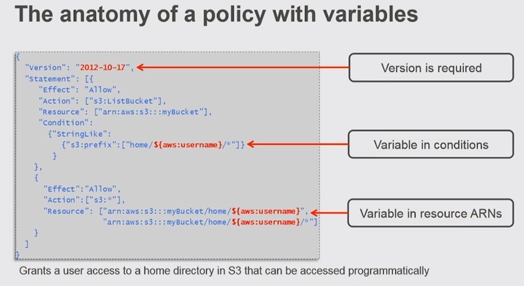
In this example:
- The
ListBucketaction is constrained by aConditionons3:prefix. The prefix must behome/${aws:username}/. When a user namedjanemakes a request, AWS evaluates this ashome/jane/. - The
s3:*actions (likeGetObject,PutObject) are allowed on aResourceARN that also includes the${aws:username}variable, dynamically scoping access to the user's own objects.
Advanced Scenario: Fine-Grained Access in DynamoDB
Your experience with databases makes this next example particularly relevant. DynamoDB, a NoSQL database, supports powerful fine-grained access control using service-specific condition keys. This allows you to implement row-level (item-level) and column-level (attribute-level) security directly within IAM, a pattern that can secure multi-tenant applications efficiently.
The key condition keys here are:
dynamodb:LeadingKeys: Restricts access to items based on the partition key value. This is how you enforce row-level security.dynamodb:Attributes: Restricts access to specific attributes (columns) within an item.
The following AWS documentation provides detailed examples of how this works.
Using IAM policy conditions for fine-grained access control
This official AWS documentation provides developer-oriented examples of implementing fine-grained access control in DynamoDB.
First, read the section on Using condition keys to familiarize yourself with DynamoDB-specific keys like dynamodb:LeadingKeys and dynamodb:Attributes. Then, review the policies in the section Example policies. Pay special attention to Example 1 and Example 2, which show how to use dynamodb:LeadingKeys with a policy variable (${www.amazon.com:user_id}) to restrict a user's access to only the items they own. This is a powerful pattern for multi-tenancy.
This approach allows you to store data for many different users in a single table while ensuring, via IAM, that users can only ever see or modify their own data.
Exam Preparation
For the DVA-C02 exam, questions involving conditions are very common. They will test your ability to read a policy and determine its effect, or choose the correct condition to achieve a specific security outcome.
Let's revisit the Trusted Institute article for its excellent, targeted exam advice.
Carefully read the section Exam Tips. These ten points are a fantastic summary of what you need to know for exam day.
Key points to memorize:
- Common Keys:
aws:SourceIp,aws:MultiFactorAuthPresent,aws:SecureTransport,s3:prefix, anddynamodb:LeadingKeys. - Logic:
ANDfor multiple keys/operators,ORfor multiple values for one key. To achieve a logical OR between different conditions, you must use separate policy statements. - Operators: Know the difference between
StringEquals(exact match) andStringLike(wildcard*match). ...IfExists: A condition operator with anIfExistssuffix (e.g.,StringEqualsIfExists) means the condition is only checked if the key is present in the request. If the key is absent, the condition is considered true.
Conclusion
You have now added the most versatile tool in the IAM policy language to your toolkit. The Condition element elevates a simple permission statement into a precise, context-aware rule.
Here are the main takeaways:
- Structure: Conditions consist of an operator, a key, and a value, allowing you to build "if-then" logic into your policies.
- Evaluation: Multiple values for one key are OR'd; multiple keys in a statement are AND'd.
- Key Types: Global keys (
aws:*) apply broadly, while service-specific keys (likes3:prefixordynamodb:LeadingKeys) enable deep, resource-specific control. - Scalability: Policy variables (
${...}) are essential for creating dynamic and reusable policies that don't require hardcoding user-specific information.
With a solid grasp of policy structure and conditions, you are now ready to apply these policies in a real-world context. In our next lesson, we will explore IAM Roles, which allow AWS services like Lambda or EC2 to assume a set of permissions to act on your behalf, using the very policies you've just learned to author.