Hello! In our last lesson, we focused on granting permissions to AWS services using IAM roles, covering the essential iam:PassRole permission that acts as a gateway for delegating authority. This set the stage for a critical question in any enterprise environment: how do you empower your developers to create roles and manage permissions for their applications without granting them overly broad administrative privileges?
This lesson directly addresses that challenge by introducing IAM permissions boundaries. You'll learn how to implement these boundaries to safely delegate permissions management. This is a powerful feature that allows you to enforce "guardrails," setting the maximum level of permissions a user or role can have, even if their identity-based policies grant more. For an enterprise architect, this is a key mechanism for balancing developer autonomy with central security governance, and it's a frequent topic on the DVA-C02 exam.
By the end of this lesson, you will understand the concept of a permissions boundary, how it interacts with other IAM policies, and how to implement a policy that allows developers to create new roles while ensuring they cannot escalate their own privileges.
The Problem: Delegating Safely
In our previous lesson, you learned how to create a role for a Lambda function. Imagine your organization has dozens of development teams, each building multiple serverless applications. As the central architect, you can't be the bottleneck creating every single IAM role. You need to delegate this responsibility. However, giving developers iam:CreateRole and iam:AttachPolicy permissions is risky. A developer could potentially create a role, attach the AdministratorAccess policy to it, and use that role to gain unrestricted access to the account—a classic privilege escalation attack.
IAM permissions boundaries are designed to solve this exact problem. They act as a preventative guardrail.
When and where to use IAM permissions boundaries - AWS
This article from the AWS Security Blog provides an excellent high-level overview of the primary use case for permissions boundaries.
Read the Background section to understand the business problem that permissions boundaries solve. Then, read the section titled Permissions boundaries to get a clear technical definition. Focus on the idea that a boundary is a preventative guardrail that defines a maximum level of permission.
The Logic: An Intersection of Permissions
The core concept you must grasp is that a permissions boundary, by itself, does not grant any permissions. It only sets a ceiling. For a principal (a user or role) with a permissions boundary, an action is allowed only if it is permitted by both its identity-based policies (like IAMFullAccess or a custom policy) and its permissions boundary.
The effective permissions are the intersection of these two sets of policies.
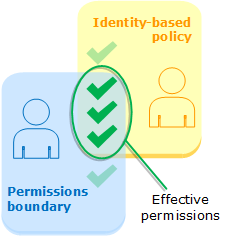
An explicit Deny in either the identity policy or the permissions boundary will always override any Allow.
This evaluation logic is a fundamental part of IAM. The official documentation provides a more detailed look at how boundaries interact with other policy types like resource-based policies and Service Control Policies (SCPs).
Permissions boundaries for IAM entities
This document explains how AWS evaluates permissions when a boundary is present.
Focus on the section Identity-based policies with boundaries. This directly explains the intersection logic shown in the diagram above. You can skim the other sections on resource-based policies and SCPs for now; the key takeaway is that the effective permissions are always the most restrictive combination of all applicable policies.
Implementing a Permissions Boundary: A Hands-On Example
Now let's move from theory to practice. The best way to understand permissions boundaries is to see them in action, preventing a privilege escalation attempt. The following video provides a perfect, step-by-step demonstration.
You'll see a scenario with a user named "Lindsay" who has IAMFullAccess.
- Without a boundary: Lindsay creates a new user, "X User," attaches the powerful
AdministratorAccesspolicy, and successfully uses this new user to perform actions (like launching EC2 instances) that Lindsay herself could not do. This is a successful privilege escalation. - With a boundary: A permissions boundary is applied to Lindsay. Now, when she tries to create "X User," she is forced to attach the same boundary to the new user. The result is that even though "X User" has the
AdministratorAccesspolicy, its effective permissions are capped by the boundary, and the privilege escalation attempt fails.
Apply AWS IAM Permissions Boundary | Hands-on
This video from Digital Cloud Training provides a complete, hands-on demonstration of creating and applying a permissions boundary to prevent privilege escalation.
First, understand the goal and the policy logic in the introduction from the beginning. Next, watch the demonstration of the problem: privilege escalation without a boundary. See how a user with only IAM access can create a full administrator user. Finally, watch the demonstration of the solution: applying the boundary and re-running the test. Pay close attention to the error message when the developer tries to create a user without attaching the boundary, and how the new user's permissions are restricted with the boundary.
The Key Policy Statements
The video you just watched uses a custom policy that is a fantastic template. Let's break down the most critical parts that make this work. These are the kinds of policy snippets you need to recognize for the DVA-C02 exam.
1. Forcing the Boundary on New Principals:
The policy attached to the developer (Lindsay) must have a Condition that forces them to attach a specific permissions boundary when they call iam:CreateUser or iam:CreateRole.
{
    "Effect": "Allow",
    "Action": "iam:CreateRole",
    "Condition": {
        "StringEquals": {
            "iam:PermissionsBoundary": "arn:aws:iam::123456789012:policy/DeveloperBoundary"
        }
    }
}
This statement says: "You are allowed to create a role, but only if you are setting the permissions boundary to DeveloperBoundary." Any attempt to create a role without this exact boundary will fail.
2. Preventing Tampering:
The developer must also be prevented from modifying or deleting the boundary policy itself. This is achieved with Deny statements.
{
    "Effect": "Deny",
    "Action": [
        "iam:CreatePolicyVersion",
        "iam:DeletePolicy",
        "iam:SetDefaultPolicyVersion",
        "iam:DeleteRolePermissionsBoundary"
    ],
    "Resource": "arn:aws:iam::123456789012:policy/DeveloperBoundary"
}
This statement says: "You are explicitly denied from making any changes to the DeveloperBoundary policy or removing it from a role."
The combination of a conditional Allow on creation and an explicit Deny on modification creates a secure delegation model.
Case Study: A Deeper Dive into Delegation
The AWS documentation provides a comprehensive, multi-step scenario that formalizes the concepts you saw in the video. It details how an administrator named María delegates user creation duties to a developer named Zhang, using a set of carefully crafted policies.
This example is more complex but mirrors a real-world enterprise setup. Reviewing it will solidify your understanding of how the different policies (the boundary itself, the developer's permissions, and the developer's boundary) all work together.
Permissions boundaries for IAM entities
This documentation provides a detailed, four-task walkthrough of delegating permissions using boundaries.
Read through the section Delegating responsibility. You don't need to memorize every line of JSON, but focus on: Task 1: The XCompanyBoundaries policy that defines the guardrails for all new users. Task 2: The DelegatedUserBoundary policy applied to Zhang, which contains the iam:PermissionsBoundary condition. Task 3: The DelegatedUserPermissions policy that gives Zhang IAMFullAccess, which is then constrained by his boundary. Task 4: The failure and subsequent success when Zhang tries to create a new user. This reinforces the hands-on video's lesson.
Conclusion
In this lesson, you've learned how to use IAM permissions boundaries to solve a common and critical security challenge: delegating permissions without ceding ultimate control. This is a fundamental skill for building secure and scalable applications on AWS, especially in a team environment.
Here are the key takeaways:
- Guardrails, Not Permissions: Permissions boundaries set the maximum possible permissions for a user or role; they do not grant permissions on their own.
- Intersection Logic: Effective permissions are the intersection of what's allowed by the identity-based policy and the permissions boundary.
- Safe Delegation: The primary use case is to allow non-admin users (like developers) to create new users and roles for their applications within a safe, predefined boundary.
iam:PermissionsBoundaryCondition: This condition key is the mechanism used in a developer's IAM policy to enforce that they attach a specific boundary to any new principal they create.- Prevent Privilege Escalation: By correctly implementing boundaries, you prevent developers from creating new principals with more permissions than they themselves have.
In our previous lessons, we've explored controlling access for users, services, and now we've learned how to delegate permission management. Next, we will shift our focus to the resources themselves. Our next lesson will cover how to configure resource-based policies on services like S3 and SQS to manage cross-account access, another crucial aspect of AWS security.