Hello! Welcome to the final lesson in our module on Error and Exception Handling.
In our last session, you learned the crucial skill of implementing try-catch blocks to handle runtime exceptions. We saw how this prevents your application from crashing and allows you to manage failures gracefully. You now know how to catch exceptions that PHP or its extensions throw.
Today, we're taking the next logical step. This lesson will teach you how to define and throw custom exception classes for application-specific errors. Instead of relying on the generic Exception class, you'll learn to create your own descriptive exceptions like InvalidPaymentAmountException or UserNotFoundException. This practice is fundamental to building professional, maintainable, and easy-to-debug web applications, directly supporting your goal of PHP mastery.
1. Why Generic Exceptions Aren't Enough
In the previous lesson, we threw a generic exception like this: throw new Exception('Division by zero.');. This works, but it has a major limitation. As your application grows, you might throw exceptions for many different reasons: invalid user input, a failed file upload, a business rule violation, etc. If all of them are just Exception objects, your catch blocks become cluttered with if statements trying to figure out what exactly went wrong based on the error message string.
This is where custom exceptions become invaluable. They allow you to create specific, named error types that your code can catch and handle with precision.
Let's look at an article that illustrates this problem and its solution perfectly.
Custom Exceptions in PHP: Building Your Own Error Handling System
The article 'Custom Exceptions in PHP' by Kanishka Meddegoda provides a clear, practical example of why generic exceptions are problematic and how custom exceptions solve the issue.
Please read the sections 'Why Should You Care About Custom Exceptions?' and 'Enter Custom Exceptions'. Pay close attention to the user registration example, which contrasts catching a single generic Exception with catching multiple, specific custom exceptions.
As you can see, using InvalidEmailException, WeakPasswordException, and UnderageException allows you to have separate catch blocks, each tailored to handle a specific error. This makes your code cleaner, more readable, and much easier to maintain.
2. Creating and Throwing Your First Custom Exception
Creating a custom exception is surprisingly simple. At its core, it's just a class that extends PHP's built-in Exception class.
The most basic custom exception looks like this:
class MyCustomException extends Exception {}
That's it! MyCustomException now inherits all the properties and methods of the base Exception class. You can throw it just like any other exception:
throw new MyCustomException("This is my own special error!");
This flowchart visualizes the process:
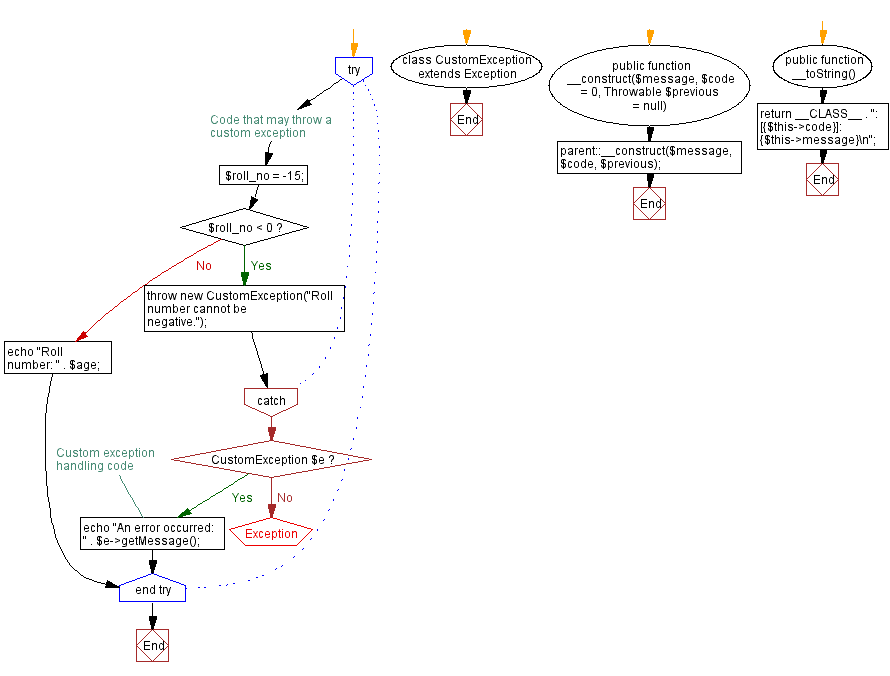
Let's watch a short video that walks through a practical example of creating and throwing a custom exception for a business logic error.
OOP Error Handling In PHP - Exceptions & Try Catch Finally Blocks - Full PHP 8 Tutorial
We'll return to the 'OOP Error Handling In PHP' tutorial by Program With Gio. This segment demonstrates creating a MissingBillingInfoException to handle a specific application rule.
Watch from 05:18 to 07:11. Notice how a custom class is created by extending Exception and then thrown when a specific condition (missing billing info) is met. This replaces the less-descriptive generic Exception.
3. Making Custom Exceptions More Powerful with Context
A custom exception class is a regular PHP class. This means you can add your own properties and methods to it, allowing you to pass rich, structured information from the point of error to the error handler. This is far more powerful than just passing a simple string message.
First, let's remember what we get from the base Exception class we're extending.
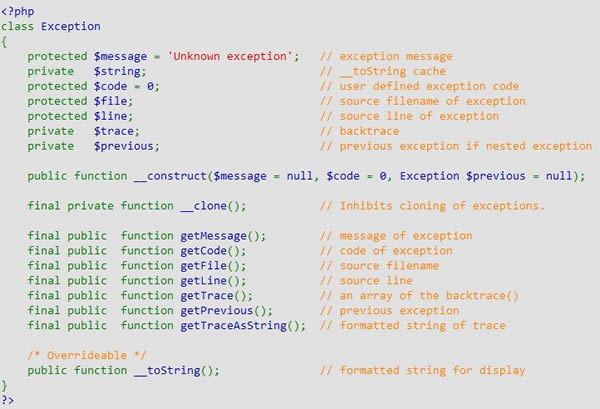
Now, let's add our own properties. Imagine a validation error where you want to know not just that an error occurred, but also which form field was invalid and what value was submitted.
Custom Exceptions in PHP: Building Your Own Error Handling System
The 'Custom Exceptions in PHP' article has an excellent section on this. It shows how to create a ValidationException that carries extra data.
Read the section 'Adding Extra Properties'. Focus on how the ValidationException class has its own constructor and properties ($field, $value) to store extra context about the error.
Here is how you would use that powerful ValidationException:
// The custom exception class from the article
class ValidationException extends Exception {
    private $field;
    private $value;

    public function __construct($message, $field, $value) {
        // Call the parent Exception's constructor
        parent::__construct($message);

        $this->field = $field;
        $this->value = $value;
    }

    public function getField() {
        return $this->field;
    }

    public function getValue() {
        return $this->value;
    }
}

// Using it in your application
$username = ""; // Assume this came from a form

try {
    if (empty($username)) {
        // Throw the exception with extra context
        throw new ValidationException(
            "Username cannot be empty",
            "username",
            $username
        );
    }
} catch (ValidationException $e) {
    // Now you can provide a much better user experience!
    echo "Error on field: " . $e->getField(); // Outputs: Error on field: username
    echo "<br>Error message: " . $e->getMessage(); // Outputs: Error message: Username cannot be empty

    // You could use this info to highlight the specific form field with an error.
}
4. Organizing Exceptions in Professional Projects
As you build larger applications, you'll create many custom exceptions. Throwing them all into the global space is messy. Professional PHP projects organize code using namespaces and exception hierarchies.
Namespaces for Exceptions
Just like you organize your controllers and models, you should organize your exceptions. A common practice is to place them in a dedicated namespace, like App\Exceptions.
Exceptions and Error Handling - My Web Training
The article 'Exceptions and Error Handling' from My Web Training demonstrates this modern approach by creating a PageNotFoundException within a namespace.
Read the sections starting from 'Incorporating namespaces and use statements...' and continuing through the 'PageNotFoundException' and 'Example' code blocks. Observe how the exception is defined in one namespace (Framework\Exceptions) and then imported with a use statement to be thrown in another (App\Controllers).
This is a critical pattern for code organization and is directly tied to how modern dependency managers, like Composer, work.
Exception Hierarchies
You can also create "parent" custom exceptions for different parts of your application. This allows you to catch exceptions at different levels of specificity. For example, you could catch a very specific DatabaseQueryException, or you could catch a more general DatabaseException that handles any database-related issue.
Custom Exceptions in PHP: Building Your Own Error Handling System
Let's go back to the 'Custom Exceptions in PHP' article, which has a fantastic, clear illustration of an exception hierarchy.
Read the section 'Building an Exception Hierarchy'. Study the code showing the hierarchy (e.g., DatabaseException extends AppException) and the try-catch block that follows, which demonstrates catching exceptions at different levels.
This hierarchical approach gives you incredible flexibility in how you handle errors throughout your application.
Conclusion
You've now moved beyond simply handling errors to architecting a robust and descriptive error-handling system of your own. This is a hallmark of a professional developer.
Key Takeaways:
- Custom exceptions make your error handling more specific, readable, and maintainable than using the generic
Exceptionclass. - You create a custom exception by defining a class that extends
Exception. - You can add custom properties and methods to your exception classes to carry rich, contextual information about the error.
- For professional applications, you should organize your exceptions using namespaces and create hierarchies to allow for flexible error handling.
Preview of the Next Module:
This lesson concludes our module on Error and Exception Handling. We've gone from configuring error reporting to catching runtime exceptions and now to creating our own. You saw how we can organize our custom exceptions into namespaces. A natural question arises: How do we manage all these different files and classes without a mess of include and require statements?
The next module, Dependency Management with Composer, will answer exactly that. We'll introduce Composer, the standard package manager for PHP, and learn how it can automatically load our classes (including our new custom exceptions!) on demand using a PSR-4 autoloader. This will be a major step in modernizing your development workflow.