Hello! Let's dive into the next lesson in our module on Error and Exception Handling.
In the previous lesson, we established a crucial foundation: configuring PHP to report errors appropriately for development and production environments. You learned to make errors visible while coding and to log them securely on a live server. However, that was about reporting problems. Today, we move on to handling them.
This lesson addresses how to prevent your application from coming to a halt when something unexpected goes wrong. We will focus on implementing try-catch blocks to handle runtime exceptions. This is the primary mechanism in PHP for building resilient applications that can gracefully manage failures, such as a failed database connection or an invalid value being passed to a function. For your goal of building professional web applications, mastering exception handling is non-negotiable.
1. From Errors to Exceptions
In the last lesson, we dealt with PHP's traditional error system (Notices, Warnings, etc.). An exception, however, is a different concept. It's an object that signals an exceptional, or erroneous, state has occurred. When an exception is "thrown," it disrupts the normal flow of your script and looks for a special block of code designed to "catch" it. If none is found, your script will terminate with a fatal error.
The key difference is that exceptions provide a structured, object-oriented way to manage errors. Instead of just logging a message and continuing (or halting), you can actively intervene.
To understand the core idea, let's start with a resource that explains why we need exception handling and how it differs from traditional error handling.
PHP Try Catch: A PHP Exception Handling Tutorial - Stackify
The article 'PHP Try Catch: A PHP Exception Handling Tutorial' from Stackify provides a clear introduction to the purpose of exception handling.
Please read the sections 'What Is Exception Handling?' and 'Exception Handling vs Error Handling'. Focus on the four reasons why exception handling is necessary.
2. The try-catch Syntax
The fundamental structure for handling exceptions is the try-catch block. The logic is straightforward:
- The
tryblock contains the code that might throw an exception. - The
catchblock contains the code that will execute only if an exception is thrown inside thetryblock.
Let's watch a video that introduces the throw keyword (which triggers an exception) and then shows how a try-catch block intercepts it.
OOP Error Handling In PHP - Exceptions & Try Catch Finally Blocks - Full PHP 8 Tutorial
This segment from the 'Program With Gio' tutorial demonstrates what an exception is and how to use a try-catch block to gracefully handle it.
Watch from 00:24 to 00:55 to understand what an exception is and how it's thrown. Then, skip ahead and watch from 07:11 to 09:10 to see the try-catch block in action. Pay attention to how the exception object ($e) is used to get details about the error.
As you saw, the catch block receives an exception object, which contains useful information. You can access its methods to understand what went wrong:
$e->getMessage(): The primary error message.$e->getCode(): An integer code associated with the exception.$e->getFile(): The file path where the exception was thrown.$e->getLine(): The line number where the exception was thrown.$e->getTraceAsString(): A string representation of the call stack.
Here is a classic code example from the official PHP documentation that illustrates the concept perfectly.
<?php
function inverse($x) {
    if (!$x) {
        // 'throw' creates and sends the exception.
        // We'll learn to create our own custom exceptions in the next lesson.
        throw new Exception('Division by zero.');
    }
    return 1/$x;
}

try {
    echo inverse(5) . "\n";
    // The next line will throw an exception
    echo inverse(0) . "\n";
    // This line will never be reached
    echo "This will not be printed.\n";
} catch (Exception $e) {
    // The code here executes because an exception was caught.
    echo 'Caught exception: ' . $e->getMessage() . "\n";
}

// Execution continues here after the catch block finishes.
echo "Hello World\n";
Output:
0.2
Caught exception: Division by zero.
Hello World
Notice how the script didn't crash. The catch block handled the issue, and the program continued.
3. Handling Multiple Exception Types
Sometimes, a block of code can throw different kinds of exceptions, and you might want to handle them differently. You can do this in two ways:
- Multiple
catchblocks: List them one after another, from most specific to most general. - Pipe
|character (PHP 7.1+): Combine multiple exception types into a singlecatchblock if the handling logic is the same.
This next video segment clearly demonstrates both approaches.
OOP Error Handling In PHP - Exceptions & Try Catch Finally Blocks - Full PHP 8 Tutorial
Let's return to the 'Program With Gio' tutorial to see how to handle different types of exceptions.
Watch the segment from 09:10 to 11:07. It covers using multiple catch blocks and then refactoring to use the | operator for more concise code.
4. The finally Block: For Guaranteed Cleanup
What if you need a piece of code to run regardless of whether an exception occurred? For example, closing a database connection or a file handle. That's the purpose of the finally block.
- The code in
finallyalways executes after thetryandcatchblocks. - It runs if the
tryblock succeeds. - It runs if an exception is thrown and caught.
- It even runs if an exception is thrown and not caught!
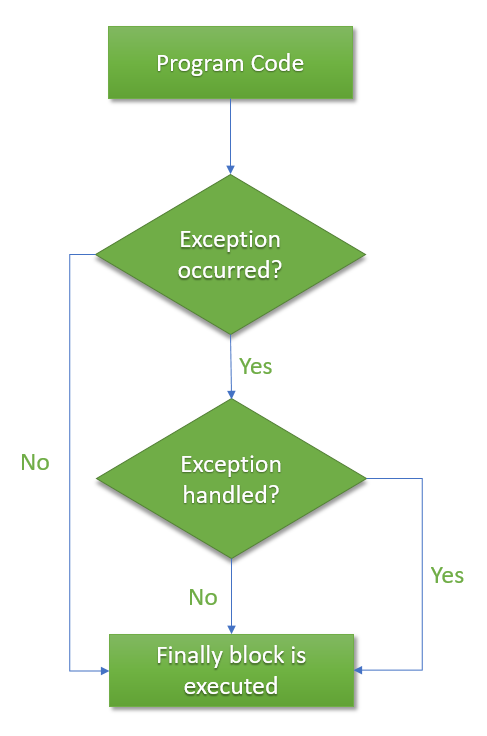
The following video explains this concept and its important interactions with return statements.
OOP Error Handling In PHP - Exceptions & Try Catch Finally Blocks - Full PHP 8 Tutorial
This final segment from the 'Program With Gio' tutorial explains the purpose and behavior of the finally block.
Watch from 11:07 to 13:47. Focus on understanding when the finally block executes and how it affects the value returned from a function.
5. Exception vs. Error: Catching Everything with Throwable
A very important change in modern PHP (since version 7) is the distinction between Exception and Error.
Exception: Generally represents errors in your application's logic that you can anticipate and handle (e.g., invalid input, failed query).Error: Generally represents more fundamental problems in the PHP engine itself (e.g., calling a method onnull, providing the wrong number of arguments to a function, or a class not found).
Crucially, a catch (Exception $e) block will NOT catch an Error.
To solve this, both Exception and Error implement a common interface called Throwable. If you want to build a truly robust handler that catches everything, you should catch Throwable.
This next video provides an excellent, practical demonstration of this problem.
Laravel and PHP Try-Catch: Exceptions VS Errors?
The video 'Laravel and PHP Try-Catch: Exceptions VS Errors?' from Laravel Daily clearly illustrates why catch (Exception $e) can be misleading.
Watch from 02:16 to 05:41. Notice how a simple typo leads to a PHP Error that is not caught by the Exception handler, but is caught by an Error handler. This demonstrates the importance of the Throwable interface.
6. Practical Application: PDO and Database Connections
Let's bring this all together with a scenario directly relevant to your goal of building web applications. Connecting to a database is a common point of failure—the server might be down, or credentials could be wrong. Using a try-catch block is the standard way to handle this.
The PHP Data Objects (PDO) extension can be configured to throw a PDOException on error. This is the perfect use case for a try-catch block.
PHP Try Catch: A PHP Exception Handling Tutorial - Stackify
This section from the Stackify article shows a best-practice example of how to handle potential database connection errors using PDO and a try-catch block.
Read the section 'How to Use try catch With MySQL', focusing on the 'PDO' subsection. Pay close attention to the PDO::ATTR_ERRMODE => PDO::ERRMODE_EXCEPTION setting—this is what enables PDO to throw exceptions that your try-catch block can handle.
Here's that code for easy reference. This is a pattern you will use very frequently.
<?php
$dsn = 'mysql:host=localhost;dbname=your_db;charset=utf8mb4';
$username = 'your_user';
$password = 'your_pass';

try {
    // Enable exceptions for error handling
    $options = [
        PDO::ATTR_ERRMODE            => PDO::ERRMODE_EXCEPTION,
        PDO::ATTR_DEFAULT_FETCH_MODE => PDO::FETCH_ASSOC,
        PDO::ATTR_EMULATE_PREPARES   => false,
    ];

    // Attempt to connect
    $pdo = new PDO($dsn, $username, $password, $options);

    echo "Connected successfully!";

} catch (PDOException $e) {
    // On failure, log the error and show a generic message.
    // In a real app, you would use the logging setup from our last lesson.
    error_log("DB connection error: " . $e->getMessage());

    // Never show the raw error message to the user in production!
    die("Unable to connect to the database. Please try again later.");
}
Conclusion
You've now learned how to transition from passively reporting errors to actively managing them. This is a significant step toward writing professional, robust, and secure PHP code.
Key Takeaways:
- Exceptions interrupt the normal program flow and must be handled to prevent a fatal error.
- The
try-catchblock is the primary tool for handling exceptions. - The
finallyblock is used for cleanup code that must always execute. - Since PHP 7, you need to catch the
Throwableinterface to handle bothExceptionandErrortypes. - Enabling exception mode in PDO and wrapping database operations in
try-catchis a standard and essential practice for web applications.
Preview of the Next Lesson:
So far, we've focused on catching exceptions that PHP or its extensions throw. But what if you want to signal an error specific to your own application's logic, like "InvalidInvoiceAmount" or "UserNotFound"? In the next lesson, we will learn how to define and throw custom exception classes, giving you complete control over your application's error handling flow.