Hello! Welcome back to our PHP refresher.
In the last lesson, we explored PHP operators, learning how to perform calculations and, most importantly, how to create expressions that evaluate to true or false using comparison and logical operators. Now, it's time to use those boolean results to make decisions and control the flow of your application.
Today's lesson is all about conditional statements. You'll learn how to use if, else, elseif, and switch to execute different blocks of code based on specific conditions. This is the bedrock of dynamic web applications—it's how you can show a welcome message to a logged-in user, display an error for invalid input, or route a request to the correct part of your application.
1. Making Decisions with if, else, and elseif
The most fundamental control structure is the if statement. It allows you to execute a piece of code only if a certain condition is met. You can then extend it with else to provide a fallback option, and elseif to check for multiple, sequential conditions.
The following video provides a great walkthrough of how to build these conditional chains.
8 | Conditions & Control Structures in PHP | 2023 | Learn PHP Full Course for Beginners
Watch this segment to understand how if, elseif, and else statements are chained together to create branching logic in your code.
Watch from the beginning up to 08:26. Pay close attention to how a single if statement is expanded with elseif to check multiple conditions and else to create a default action.
Let's break down the key structures from the video.
The if Statement
This is the simplest form. The code inside the curly braces {} runs only if the condition in the parentheses () is true.
$user_age = 21;

if ($user_age >= 18) {
    echo "You are eligible to vote.";
}
The if-else Statement
This provides an alternative path for when the if condition is false.
$temperature = 12;

if ($temperature > 25) {
    echo "It's a warm day!";
} else {
    echo "It's a bit chilly.";
}
The if-elseif-else Ladder
This allows you to check multiple conditions in order. PHP will execute the code block for the first condition that evaluates to true and then skip the rest of the chain.
The image below shows a practical example of greeting a user differently based on the time of day.

This structure is incredibly versatile for handling different application states or user inputs.
For a quick written reference and some helpful flowcharts on these statements, you can review the following resource.
This article from GeeksForGeeks provides concise explanations and flowcharts for the if, if-else, and if-elseif-else structures.
Read the first three sections: '1. if Statement', '2. if...else Statement', and '3. if...elseif...else Statement'. The flowcharts are a great way to visualize the logic.
2. The switch Statement: A Cleaner Alternative
When you find yourself writing a long if-elseif-else chain that checks the same variable against many different values, a switch statement is often a cleaner and more readable solution.
It evaluates an expression (usually a single variable) once and compares its value to a series of case labels.
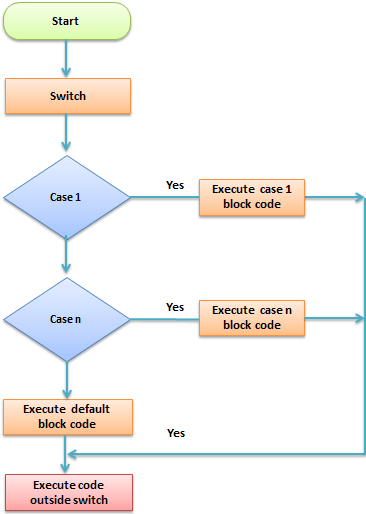
Let's watch a video explanation of how to use the switch statement.
8 | Conditions & Control Structures in PHP | 2023 | Learn PHP Full Course for Beginners
This video segment explains the syntax of the switch statement and introduces the essential case, break, and default keywords.
Watch from 08:26 to 11:33. Focus on how a case corresponds to a potential value and why the break statement is so important.
Key Components of a switch Statement:
case: A block that runs if its value matches theswitchvariable.break: This is crucial. It tells PHP to exit theswitchstatement after acaseblock is executed. Without it, PHP will "fall through" and execute the code in the nextcaseas well, which is a common source of bugs.default: This is an optional block that runs if none of thecasevalues match. It's similar to the finalelsein anif-elseifchain.
The official PHP documentation provides the definitive explanation for these behaviors.
Reading the official manual is a key habit for professional developers. This resource explains the 'fall-through' behavior without break and how to handle multiple cases or a default value.
Read the sections that describe how the switch statement is executed. Pay special attention to the example that shows what happens when you omit the break statement, and the example showing how to have multiple cases share the same code block.
Here is an example demonstrating these concepts:
$user_role = 'editor';

switch ($user_role) {
    case 'admin':
        echo "Access to all settings.";
        break;
    case 'editor':
        echo "Can write and publish posts.";
        break;
    case 'viewer':
        echo "Can only view content.";
        break;
    default:
        echo "Unknown role.";
        break;
}
// Output: Can write and publish posts.
3. When to Use if-elseif vs. switch
Knowing which structure to use is a mark of a good developer. While they can sometimes be used interchangeably, they each have their strengths.
This final video segment offers a clear comparison.
8 | Conditions & Control Structures in PHP | 2023 | Learn PHP Full Course for Beginners
This clip directly addresses the common question: 'When should I use a switch statement instead of an if-elseif chain?'
Watch from 11:33 to 13:18. The key is understanding the type of comparison each structure is best suited for.
In summary:
- Use an
if-elseif-elsechain when you need to evaluate complex or varied conditions. Eachelseifcan check a completely different expression (e.g.,if ($age > 18) ... elseif ($country === 'US') ...). - Use a
switchstatement when you are comparing a single variable against multiple, distinct, simple values (like strings or numbers). It's often more readable for this specific scenario.
Test your understanding!
Imagine you're building a feature for a content management system. You need to write a PHP script that sets the $status_message based on a post's status, which is stored in the $post_status variable.
The possible statuses and their messages are:
'draft'->'This post is a draft.''published'->'This post has been published.''archived'->'This post is archived.'- Any other value ->
'Unknown status.'
Which control structure (if-elseif-else or switch) would be more appropriate here, and why? Write the code to implement this logic.
Show answer
A switch statement is more appropriate because we are checking a single variable ($post_status) against a set of specific, simple string values. This makes the code cleaner and easier to read than a series of if-elseif checks.
$post_status = 'published'; // You can change this value to test other cases
$status_message = '';

switch ($post_status) {
    case 'draft':
        $status_message = 'This post is a draft.';
        break;
    case 'published':
        $status_message = 'This post has been published.';
        break;
    case 'archived':
        $status_message = 'This post is archived.';
        break;
    default:
        $status_message = 'Unknown status.';
        break;
}

echo $status_message; // Outputs: This post has been published.
Conclusion
Great job! You've now mastered the essential tools for controlling your program's flow. You can direct your application to respond dynamically to different data and inputs, a core skill for any developer.
Key Takeaways:
if,elseif, andelsestatements create powerful, branching logic for handling a wide variety of conditions.- A
switchstatement provides a clean and readable alternative when comparing a single variable against a list of specific values. - The
breakstatement is critical for preventing "fall-through" errors inswitchblocks. - The
defaultcase in aswitchstatement (or the finalelse) acts as a catch-all for unexpected values.
Now that we can make decisions, what if we need to perform an action multiple times? In our next lesson, we will explore loops (for, while, and foreach), which will allow you to efficiently iterate over data, such as processing a list of users from a database or displaying items in a shopping cart.