Hello again! Welcome back to your PHP fundamentals refresher.
In our last lesson, we learned how to make our code "smart" by using conditional statements like if and switch to execute different code blocks based on specific conditions. Now, we'll learn how to make our code "efficient" by performing repetitive tasks without rewriting the same code over and over.
This lesson focuses on loops. You will learn to use for, while, and foreach to iterate through data. This is a fundamental skill you'll use constantly, whether you're displaying a list of products from a database, processing all the files in a directory, or handling multiple user inputs from a form.
1. The while and do-while Loops: Repeating Based on a Condition
The simplest type of loop is the while loop. It repeatedly executes a block of code as long as a specified condition remains true. This is perfect for situations where you don't know in advance how many times you need to loop.
A close relative is the do-while loop, which has one key difference: it guarantees the code block will run at least once, because it checks the condition after each iteration, not before.
PHP Loops Tutorial - Break & Continue Statements - Full PHP 8 Tutorial
This video from Program With Gio provides a clear demonstration of both while and do-while loops. Pay close attention to how the loop's controlling variable is managed.
Watch from 00:14 to 04:23. Notice the three essential parts of the while loop example: the initial setup of the counter ($i = 0;), the condition ($i <= 15), and the update within the loop ($i++). Also, observe the key difference in behavior shown for the do-while loop.
The while Loop
The syntax is straightforward:
$counter = 1;

while ($counter <= 5) {
    echo "The count is: " . $counter . "<br>";
    $counter++; // Crucial: Increment the counter
}
Watch out for infinite loops! If you forget to include code that eventually makes the condition false (like $counter++ in the example above), your loop will run forever and crash your script.
The do-while Loop
This loop is useful when you need to perform an action at least once and then decide whether to repeat it.
$dice_roll = 0;

do {
    $dice_roll = rand(1, 6); // Roll a six-sided die
    echo "You rolled a " . $dice_roll . "<br>";
} while ($dice_roll != 6); // Keep rolling until you get a 6

echo "You finally rolled a 6!";
In this example, you are guaranteed to roll the die at least once.
2. The for Loop: Repeating a Known Number of Times
When you know exactly how many times you want to loop, the for loop is your best friend. It packages the initialization, condition, and increment/decrement expressions into one concise line, making it highly readable and less prone to causing infinite loops.

Let's see it in action.
PHP Loops Tutorial - Break & Continue Statements - Full PHP 8 Tutorial
This next segment from the same video details the for loop. The instructor explains its three expressions and provides a very important performance tip.
Watch from 04:23 to 07:21. Focus on the three parts inside the parentheses: for (initializer; condition; updater). Pay special attention to the performance discussion around calling functions like count() inside the loop's condition.
The syntax consists of three parts separated by semicolons:
- Initializer: Executed once at the beginning of the loop (e.g.,
$i = 0). - Condition: Checked before each iteration. If
true, the loop continues. - Updater: Executed at the end of each iteration (e.g.,
$i++).
Here is a classic example that counts from 1 to 10:
for ($i = 1; $i <= 10; $i++) {
    echo "This is iteration number " . $i . "<br>";
}
As the video pointed out, for performance reasons, it's a good practice to avoid calling functions inside the condition of a loop if the result of the function doesn't change.
// Less efficient: count() is called on every iteration
$items = ['a', 'b', 'c', 'd', 'e'];
for ($i = 0; $i < count($items); $i++) {
    // ...
}

// More efficient: count() is called only once
$items = ['a', 'b', 'c', 'd', 'e'];
$item_count = count($items);
for ($i = 0; $i < $item_count; $i++) {
    // ...
}
3. The foreach Loop: The Best Way to Loop Through Arrays
The foreach loop is designed specifically for iterating over arrays. It's the most common and convenient loop you will use in web development, especially when handling data retrieved from a database. It abstracts away the need for counters and checking array lengths.
To get a solid overview, let's watch one more segment.
PHP Loops Tutorial - Break & Continue Statements - Full PHP 8 Tutorial
This final segment explains the foreach loop, which is essential for working with arrays. It covers iterating over values, keys and values, and modifying arrays by reference.
Watch from 07:21 to 11:47. Note the two syntaxes: one for getting just the value, and another for getting both the key and value. The part about using a reference (&) to modify the original array is an advanced but important concept.
For a detailed text-based reference on foreach, the W3Schools page is excellent.
This article from W3Schools focuses solely on the foreach loop, providing clear examples for both simple (indexed) and key-value (associative) arrays.
Read the first two sections, 'PHP foreach Loop on Indexed Arrays' and 'PHP foreach Loop on Associative Arrays'. Use the 'Try it Yourself' buttons to experiment with the code.
Looping Over Values (Indexed Array)
This is for simple, non-associative arrays.
$permissions = ['read', 'write', 'execute'];

foreach ($permissions as $permission) {
    echo "User has '" . $permission . "' permission.<br>";
}
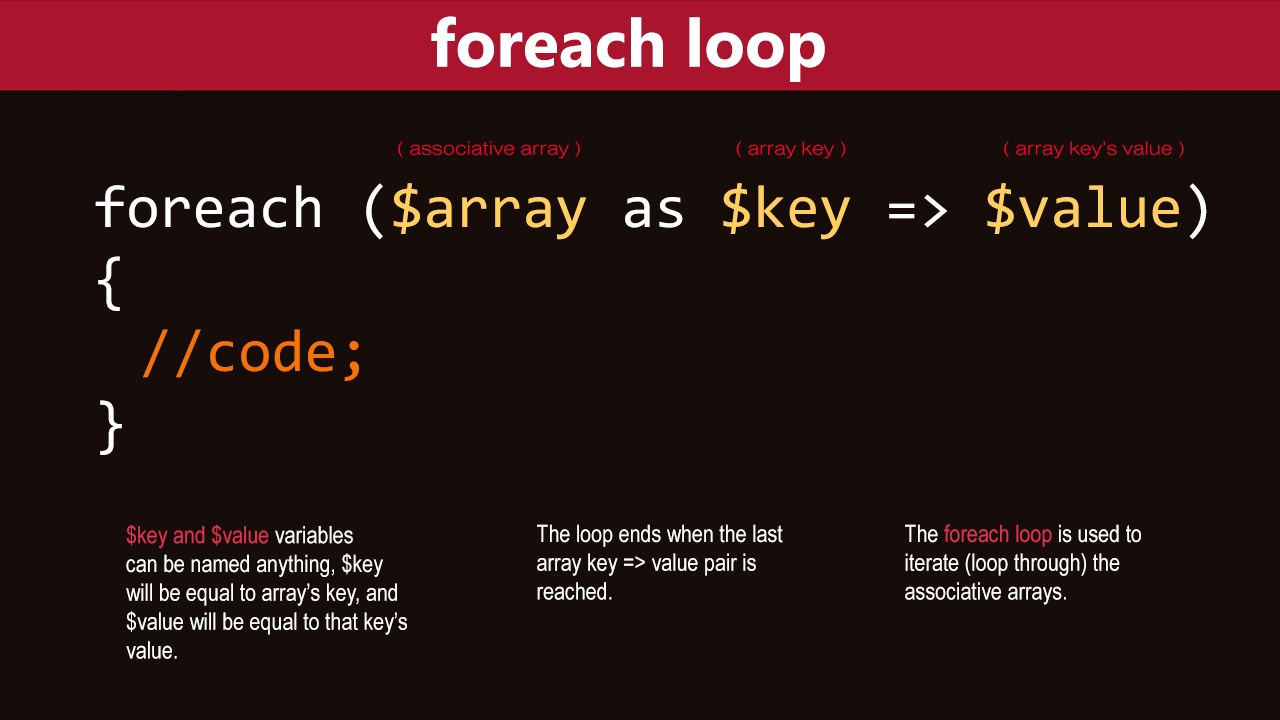
Looping Over Keys and Values (Associative Array)
This is incredibly useful for associative arrays, which you'll encounter everywhere in PHP.
$user_data = [
    'name' => 'Alex',
    'email' => 'alex@example.com',
    'role' => 'admin'
];

foreach ($user_data as $key => $value) {
    echo ucfirst($key) . ": " . $value . "<br>";
}
Test your understanding!
You have an array of products for an e-commerce site. Each product is an associative array.
$products = [
    ['name' => 'Laptop', 'price' => 1200, 'stock' => 15],
    ['name' => 'Mouse', 'price' => 25, 'stock' => 0],
    ['name' => 'Keyboard', 'price' => 75, 'stock' => 32],
    ['name' => 'Monitor', 'price' => 300, 'stock' => 8],
];
Write a foreach loop that iterates through the $products array. Inside the loop, use an if statement to print the name and price of only the products that are in stock (i.e., stock is greater than 0).
Show answer
$products = [
    ['name' => 'Laptop', 'price' => 1200, 'stock' => 15],
    ['name' => 'Mouse', 'price' => 25, 'stock' => 0],
    ['name' => 'Keyboard', 'price' => 75, 'stock' => 32],
    ['name' => 'Monitor', 'price' => 300, 'stock' => 8],
];

echo "<h3>Available Products:</h3>";
echo "<ul>";

foreach ($products as $product) {
    if ($product['stock'] > 0) {
        echo "<li>" . $product['name'] . " - $" . $product['price'] . "</li>";
    }
}

echo "</ul>";

/*
Expected Output:
<h3>Available Products:</h3>
<ul>
    <li>Laptop - $1200</li>
    <li>Keyboard - $75</li>
    <li>Monitor - $300</li>
</ul>
*/
4. Controlling Loops with break and continue
Sometimes you need to alter the normal flow of a loop. PHP provides two statements for this: break and continue.
break: Immediately terminates the entire loop.continue: Skips the rest of the current iteration and starts the next one.
This reading provides a couple of clear, simple examples.
Loops | Free PHP & MySQL Tutorial
This article from Noble Desktop gives straightforward explanations for break and continue with practical code examples.
Read the two final sections, 'Breaking Out of the Loop' and 'Continue Statements'. Focus on how break stops the countdown completely, while continue just skips certain numbers.
Here's a quick example: Let's find the first user with an 'admin' role and then stop.
$users = [
    ['name' => 'Ben', 'role' => 'editor'],
    ['name' => 'Sue', 'role' => 'admin'],
    ['name' => 'Joe', 'role' => 'viewer'],
];

$admin_name = null;

foreach ($users as $user) {
    if ($user['role'] === 'admin') {
        $admin_name = $user['name'];
        break; // Found the admin, no need to check the rest.
    }
}

echo "The first admin found is: " . $admin_name; // Output: The first admin found is: Sue
Conclusion
You've now added another essential set of tools to your PHP toolkit. Loops are the workhorses of programming, allowing you to process large amounts of data with just a few lines of code.
Key Takeaways:
whileloop: Use when you need to loop as long as a condition is true, and the number of iterations is unknown.do-whileloop: Use when the code must execute at least once.forloop: The best choice for looping a specific, known number of times.foreachloop: The standard, most convenient way to iterate over every element in an array.breakandcontinue: Powerful statements to control loop execution flow from within.
With the ability to create conditions and loops, your code is becoming much more powerful. However, as our scripts get longer, we need a way to organize and reuse code blocks. In the next lesson, we will cover functions, which allow you to package code for reuse, making your applications more modular and maintainable.