Hello! Welcome back to your PHP Mastery course.
In our last lesson, we refreshed our understanding of variables and data types, the basic building blocks for storing information. We now have our data; this lesson is about putting that data to work.
Today, we'll dive into PHP operators. These are the special symbols you use to perform calculations, make comparisons, and combine logical conditions. Mastering operators is essential because they form the core of your application's logic, from calculating the total of a shopping cart to checking if a user's password is correct.
By the end of this lesson, you will be able to confidently use arithmetic, comparison, and logical operators to manipulate data and create expressions that guide your program's decisions.
1. Arithmetic and Assignment Operators
Let's start with the most familiar category: arithmetic operators. These are the tools you'll use for any mathematical calculations in your code. Closely related are assignment operators, which provide convenient shortcuts for modifying a variable's value.
To get a clear overview of these operators, please watch the following segment from a video by Dani Krossing. It covers the basics of math operations, the order of operations (precedence), and how to use shorthand assignment operators to write cleaner code.
7 | The PHP Operators You Need to Know! | 2023 | Learn PHP Full Course for Beginners
This video will walk you through the essential arithmetic and assignment operators in PHP.
Watch the sections on 'Arithmetic Operators' (from 03:24 to 07:08) and 'Assignment Operators' (from 07:08 to 09:27). Pay attention to the modulo (%) operator and how parentheses () are used to control the order of calculations.
Let's recap the key points from the video.
Arithmetic Operators
These perform standard mathematical operations.
| Operator | Name | What it does | Example | Result |
|---|---|---|---|---|
+ |
Addition | Sums two numbers | $x + $y |
12 |
- |
Subtraction | Subtracts the second number from the first | $x - $y |
8 |
* |
Multiplication | Multiplies two numbers | $x * $y |
20 |
/ |
Division | Divides the first number by the second | $x / $y |
5 |
% |
Modulus | Returns the remainder of a division | $x % 3 |
1 |
** |
Exponentiation | Raises the first number to the power of the second | $x ** 2 |
100 |
(Assuming $x = 10 and $y = 2) |
A crucial concept is operator precedence. By default, PHP follows standard mathematical rules (* and / are performed before + and -). You can use parentheses () to force a different order, just like in mathematics.
$result = 3 + 5 * 2; // PHP calculates 5 * 2 first, so result is 13
$result_forced = (3 + 5) * 2; // Parentheses force 3 + 5 first, so result is 16
Assignment Operators
You're already familiar with the basic assignment operator (=). PHP also provides combined operators that offer a shorthand for modifying a variable's value based on its current value.
| Operator | Same As... | Description |
|---|---|---|
+= |
$x = $x + $y |
Add and assign |
-= |
$x = $x - $y |
Subtract and assign |
*= |
$x = $x * $y |
Multiply and assign |
/= |
$x = $x / $y |
Divide and assign |
%= |
$x = $x % $y |
Modulus and assign |
Using these makes your code more concise and often easier to read.
$score = 100;
$score += 50; // $score is now 150
Test your understanding!
Imagine you are building a simple e-commerce feature. You have a variable $totalPrice that starts at 0. A user adds three items costing 15.50 each, and then a shipping fee of 5.00 is added.
Using what you've learned, write the PHP code to calculate the final value of $totalPrice. Use a combined assignment operator where appropriate.
Show answer
$totalPrice = 0;
$itemPrice = 15.50;
$shippingFee = 5.00;

// Add the cost of three items
$totalPrice = $itemPrice * 3;

// Add the shipping fee using a combined assignment operator
$totalPrice += $shippingFee;

echo $totalPrice; // Outputs: 51.5
2. Comparison Operators
While arithmetic operators are for calculations, comparison operators are for asking questions. They compare two values and evaluate to a boolean result: true or false. This is the foundation of decision-making in your code, which we will use heavily in the next lesson on if/else statements.
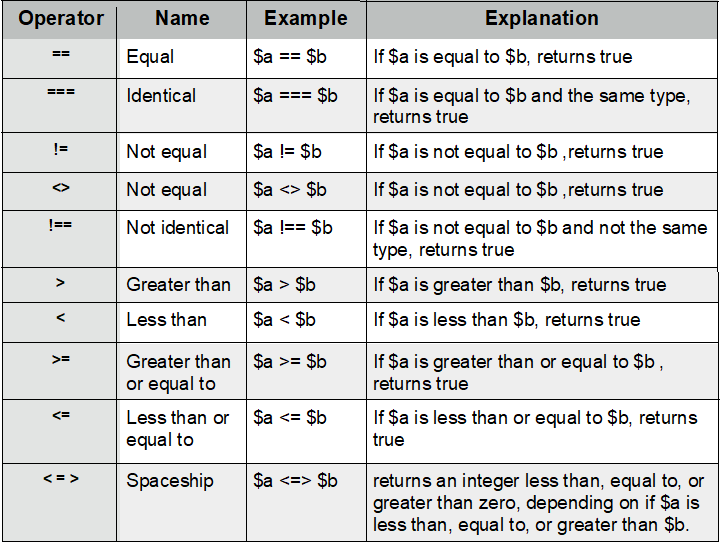
One of the most important distinctions in modern PHP is between loose comparison (==) and strict comparison (===). Getting this right can prevent subtle bugs. The following video provides an excellent explanation, including a real-world example using strpos() that highlights why strict comparison is almost always the safer choice.
PHP Operators Part 1 - Full PHP 8 Tutorial
This video from Program With Gio clearly explains the difference between loose (==) and strict (===) comparison and demonstrates why it matters.
Watch from timestamp 07:36 to 12:23. Focus on the strpos example and the explanation of how PHP 8 changed string-to-number comparisons.
To summarize the critical takeaway from the video:
- Loose Comparison (
==): Checks if values are equal after performing type juggling. For example,5 == "5"evaluates totruebecause PHP converts the string"5"to an integer before comparing. - Strict Comparison (
===): Checks if values are equal AND if they are of the same data type.5 === "5"evaluates tofalsebecause one is an integer and the other is a string.
Best Practice: For professional development, you should default to using strict comparison (=== and !==). This prevents unexpected behavior from PHP's type juggling and makes your code's intent clearer and less prone to bugs.
3. Logical Operators
Logical operators are your tools for creating complex conditions. They allow you to combine the results of multiple comparison expressions. For example, you might want to check if a user is logged in AND has administrator privileges.
The main logical operators are:
&&(orand): Logical AND -trueonly if both sides aretrue.||(oror): Logical OR -trueif at least one side istrue.!: Logical NOT - Inverts a boolean value (truebecomesfalse,falsebecomestrue).
This next video segment will show you how to combine these operators to build more expressive conditions.
7 | The PHP Operators You Need to Know! | 2023 | Learn PHP Full Course for Beginners
This clip demonstrates how to use logical operators to check multiple conditions at once, a common task in programming.
Watch from 14:25 to 20:01. Pay attention to how && (and) and || (or) are used to avoid nested if statements.
The video mentions that && has a higher precedence than ||, meaning and operations are evaluated before or operations. Just like with arithmetic, you can use parentheses () to explicitly control the order.
Here is a practical code example that determines if a year is a leap year. Notice how logical operators and parentheses are used to combine multiple conditions into a single if statement.
$year = 2024;

// A year is a leap year if it is divisible by 4,
// unless it is divisible by 100 but not by 400.
if (($year % 4 == 0 && $year % 100 != 0) || ($year % 400 == 0)) {
    echo "$year is a leap year.";
} else {
    echo "$year is not a leap year.";
}

// Output: 2024 is a leap year.
4. Other Useful Operators
Finally, let's cover a few other operators that are extremely common in daily PHP development.
String Concatenation Operator
To join strings together, PHP uses the dot (.) operator.
$firstName = "Alex";
$lastName = "Jones";

// Use the dot operator to join the strings with a space
$fullName = $firstName . " " . $lastName;

echo $fullName; // Outputs: Alex Jones
There is also a combined assignment version, .=, which appends a string to an existing one.
$message = "Hello";
$message .= ", welcome to the site!";
echo $message; // Outputs: Hello, welcome to the site!
Increment and Decrement Operators
These are simple shortcuts to add or subtract 1 from a variable, which is especially useful when writing loops (a topic for a future lesson).
++$x(Pre-increment): Increments$xby one, then returns$x.$x++(Post-increment): Returns$x, then increments$xby one.--$x(Pre-decrement): Decrements$xby one, then returns$x.$x--(Post-decrement): Returns$x, then decrements$xby one.
The difference between pre- and post-increment can be subtle but important.
$apples = 5;
echo ++$apples; // Outputs 6 (increments first, then echos)

$oranges = 5;
echo $oranges++; // Outputs 5 (echos first, then increments)
echo $oranges;   // Outputs 6
Conclusion
Excellent work! You've now revisited the fundamental operators that drive the logic in any PHP application.
Key Takeaways:
- Arithmetic operators (
+,-,*,/,%,**) perform mathematical calculations. Use parentheses()to control the order of operations. - Assignment operators (
=,+=,*=, etc.) are shorthands for modifying variables. - Comparison operators (
==,===,!=,<,>) compare values and result intrueorfalse. - Always prefer strict comparison (
===and!==) to avoid bugs from PHP's automatic type juggling. - Logical operators (
&&,||,!) combine boolean expressions to create complex conditions.
Now that you can create expressions that evaluate to true or false, you have the tools to make decisions. In our next lesson, we will learn how to use these expressions to control the flow of your program with if, else, and switch statements.