Hello! Welcome back to our module on web application security.
In our last lesson, we focused on securing data on its way out of your application by using htmlspecialchars() to prevent Cross-Site Scripting (XSS). This is a crucial step to protect your users from malicious code running in their browsers.
Today, we turn our attention from data being displayed to data being stored. Specifically, we're tackling one of the most critical responsibilities a developer has: protecting user passwords. Storing passwords in plain text is a recipe for disaster. If your database is ever compromised, every single user account becomes vulnerable.
Your learning outcome for this lesson is to hash and verify passwords securely using password_hash() and password_verify(). This is the modern, standard, and only correct way to handle passwords in PHP.
1. The Problem: Why We Don't Store Passwords
Imagine an attacker gains access to your user database. If you've stored passwords as plain text, the attacker immediately has the keys to every user's account, not just on your site, but potentially on other sites where users have reused that same password.
To solve this, we use hashing. Hashing is a one-way process that transforms a password into a long, fixed-length string of characters called a hash.
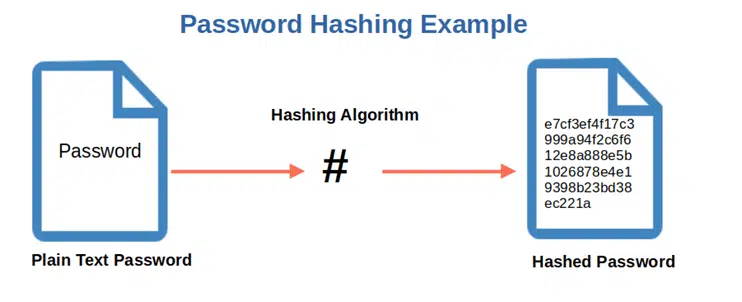
The key feature is that this process is irreversible. You cannot "un-hash" a hash to get the original password back. Let's see why this is so important.
27 | Hashing Using PHP for Beginners | 2023 | Learn PHP Full Course For Beginners
The video 'Hashing Using PHP for Beginners' by Dani Krossing starts by perfectly illustrating the vulnerability of storing plain-text passwords.
Watch the first minute (00:00 to 01:15). The presenter shows a database table with passwords stored in plain text, highlighting how easily they can be read by anyone with access to the database.
2. Why Old Hashing Methods Are Not Enough
You might have heard of older hashing algorithms like MD5 or SHA-1. While they are one-way functions, they are completely unsuitable for password storage today for two main reasons:
- They are too fast. Modern computers can calculate billions of these hashes per second, making it easy for an attacker to guess common passwords, hash them, and compare them to your database.
- They don't use a "salt". A salt is a random piece of data added to each password before it's hashed. Without a salt, two users with the same password (e.g., "password123") will have the same hash. This allows attackers to use pre-computed lists of hashes, known as "rainbow tables," to crack many passwords at once.
To see just how fast an old hash can be cracked, watch this short demonstration.
User Registration & Password Hashing - Build Expense Tracker App With PHP 8
The video 'User Registration & Password Hashing' by Program With Gio includes a powerful demonstration of cracking an MD5 hash.
Watch the segment from 04:49 to 06:12. Notice how quickly the website cracks the MD5 hash of '12345'. This is why fast hashing algorithms are dangerous for passwords.
This is why modern password hashing relies on three pillars: a one-way algorithm, a unique salt for every password, and a "cost" factor to make the process intentionally slow.
3. The Right Way: password_hash()
Fortunately, PHP provides a simple and secure API that handles all of this for you. You should never attempt to write your own hashing logic.
The primary function for creating a password hash is password_hash(). It takes care of:
- Choosing a strong, modern hashing algorithm (currently Bcrypt by default).
- Generating a cryptographically secure random salt for each password.
- Combining the password and salt.
- Applying a "cost" factor to make the hashing process slow.
- Producing a single string that contains the algorithm, cost, salt, and hash, ready for database storage.
Let's watch how to use it.
27 | Hashing Using PHP for Beginners | 2023 | Learn PHP Full Course For Beginners
Returning to Dani Krossing's video, he now explains how to use PHP's built-in password_hash() function.
Watch from 11:39 to 16:17. Pay close attention to the parameters: the password, the algorithm constant (PASSWORD_BCRYPT or PASSWORD_DEFAULT), and the options array where the cost is set. The cost factor is crucial for security.
Here's the essential code structure for hashing a password:
// The user's submitted password from a signup form
$passwordFromForm = 'user-secret-password123';

// Options for the hashing algorithm
// The 'cost' determines how many rounds the algorithm runs.
// A higher cost is more secure but takes longer to compute.
// A cost of 12 is a good starting point today.
$options = [
    'cost' => 12,
];

// Hash the password
// PASSWORD_DEFAULT is recommended as it will be updated in future PHP versions.
// Currently, it points to PASSWORD_BCRYPT.
$hashedPassword = password_hash($passwordFromForm, PASSWORD_DEFAULT, $options);

// Now, you store $hashedPassword in your database.
// Example output: $2y$12$4f2bT7Iu8XJ2bT6K5lJjNeJzF2wU9zB4qX9pC6lJjNeJzF2wU9zB4
echo $hashedPassword;
Notice that every time you run this code with the same password, you get a different hash. This is because a new random salt is generated each time.
4. Verifying Passwords with password_verify()
When a user tries to log in, you need to check if the password they provided is correct. Since hashing is a one-way process, you can't decrypt the stored hash. Instead, you hash the submitted login password using the same salt and parameters as the stored hash and see if the results match.
The password_verify() function handles this entire process for you. It automatically extracts the algorithm, cost, and salt from the stored hash string and performs a secure, timing-attack-safe comparison.
27 | Hashing Using PHP for Beginners | 2023 | Learn PHP Full Course For Beginners
The next part of Dani Krossing's video demonstrates how to use password_verify().
Watch from 16:17 to 19:00. The key takeaway is that password_verify() takes the plain-text password from the login attempt and the full hash string from the database and returns a simple true or false.
The code for verification is just as simple:
// The user's submitted password from a login form
$loginPassword = 'user-secret-password123';

// The hash you retrieved from the database for this user
$storedHash = '$2y$12$4f2bT7Iu8XJ2bT6K5lJjNeJzF2wU9zB4qX9pC6lJjNeJzF2wU9zB4';

if (password_verify($loginPassword, $storedHash)) {
    echo 'Password is correct! User is logged in.';
} else {
    echo 'Invalid password.';
}
It's that straightforward. PHP's password hashing API is designed to be easy to use correctly and hard to use incorrectly.
Security Corner: Basics of Password Hashing
For a concise textual reference, the article 'Basics of Password Hashing' from PHP Architect reinforces these points.
Read the sections 'Primarily, PHP developers should use...', 'Secure Password Verification', and 'In Conclusion'. These sections strongly emphasize using the built-in functions and avoiding the temptation to create your own solution.
5. Hands-On Practice: Securing a Signup Form
Now let's apply this to a real-world scenario. The final segment of the video shows how to integrate password_hash() into the signup form handler we've seen in previous lessons.
27 | Hashing Using PHP for Beginners | 2023 | Learn PHP Full Course For Beginners
Watch how to modify a form handler to save a hashed password instead of plain text.
Watch from 19:00 to 21:38. Focus on the two key changes: hashing the password before the database query and binding the new $hashedPassword variable to the prepared statement.
Here is a simplified script for you to try.
Instructions:
- Save the code below as a PHP file (e.g.,
register.php) and run it on your local server. - Enter a username and password and submit the form.
- Observe the output. You will see the plain-text password you entered and the secure hash that should be stored in a database.
- Notice how the hash is different every time, even with the same password.
<?php
$username = '';
$password = '';
$hashedPassword = '';

if ($_SERVER['REQUEST_METHOD'] === 'POST') {
    $username = $_POST['username'] ?? '';
    $password = $_POST['password'] ?? '';

    if ($username && $password) {
        $options = ['cost' => 12];
        $hashedPassword = password_hash($password, PASSWORD_DEFAULT, $options);
    }
}
?>

<!DOCTYPE html>
<html lang="en">
<head>
    <meta charset="UTF-8">
    <title>Password Hashing Demo</title>
    <style>
        body { font-family: sans-serif; max-width: 600px; margin: 2em auto; line-height: 1.6; }
        .output { border: 1px solid #ccc; padding: 1em; margin-top: 1em; background-color: #f0f0f0; word-wrap: break-word; }
        input { width: 100%; padding: 8px; margin-bottom: 10px; box-sizing: border-box; }
        button { padding: 10px 15px; }
    </style>
</head>
<body>
    <h1>User Registration</h1>

    <form action="" method="post">
        <div>
            <label for="username">Username:</label>
            <input type="text" id="username" name="username">
        </div>
        <div>
            <label for="password">Password:</label>
            <input type="password" id="password" name="password">
        </div>
        <button type="submit">Register</button>
    </form>

    <?php if ($hashedPassword): ?>
        <div class="output">
            <h3>Registration Data</h3>
            <p><strong>Username:</strong> <?php echo htmlspecialchars($username); ?></p>
            <p><strong>Password (Plain Text):</strong> <?php echo htmlspecialchars($password); ?></p>
            <p><strong>Hashed Password (for Database):</strong><br><?php echo $hashedPassword; ?></p>
            <p><em>In a real application, you would now store the username and hashed password in the database. Never store the plain text!</em></p>
        </div>
    <?php endif; ?>
</body>
</html>
Conclusion
You have now learned the modern and correct way to handle user passwords in PHP. This is a non-negotiable skill for any professional developer.
Key Takeaways:
- Never, ever store passwords in plain text.
- Do not use outdated hashing algorithms like MD5 or SHA-1 for passwords.
- Do not try to build your own password hashing system.
- Use
password_hash()to create a secure hash of a user's password during registration. - Use
password_verify()to check a user's password during login. - The
costfactor is an important part of making hashing secure by making it deliberately slow.
Preview of the Next Lesson:
With user passwords securely stored, our next topic will address a different kind of threat: Cross-Site Request Forgery (CSRF). You will learn what CSRF is and how to implement token-based protection to ensure that actions taken in your application are intentional and initiated by the actual user.