Hello! Welcome back to our series on PHP security.
In our last lesson, we built our first line of defense by focusing on input validation. We learned how to use filter_var() to ensure that data coming into our application matches the expected format. This is a crucial step to maintain data integrity and prevent certain types of attacks.
However, even data that passes validation can be dangerous if handled improperly. This brings us to the second pillar of handling user-supplied content: securing the data we send out to the browser.
Today's lesson addresses a critical and extremely common web vulnerability: Cross-Site Scripting (XSS). Your learning outcome is to sanitize output by escaping HTML to prevent Cross-Site Scripting (XSS) attacks. This is a non-negotiable skill for any professional web developer.
1. Understanding the Threat: Cross-Site Scripting (XSS)
Before we can prevent XSS, we need to understand what it is. At its core, an XSS attack occurs when a malicious user injects client-side code (usually JavaScript) into a web page that is then viewed by other users. The victim's browser has no way of knowing the script is malicious and executes it as if it were a legitimate part of the page.
To get a clear picture of how this works and why it's so dangerous, let's watch a short video.
Cross-Site Scripting: A 25-Year Threat That Is Still Going Strong
The video 'Cross-Site Scripting: A 25-Year Threat That Is Still Going Strong' from IBM Technology provides an excellent overview of an XSS attack, explaining the roles of the attacker, the victim, and the vulnerable website.
Watch the section from 01:11 to 05:13. Focus on understanding the core concept: the attacker's code runs in the victim's browser under the context of a trusted website, allowing them to hijack sessions, deface pages, or steal information.
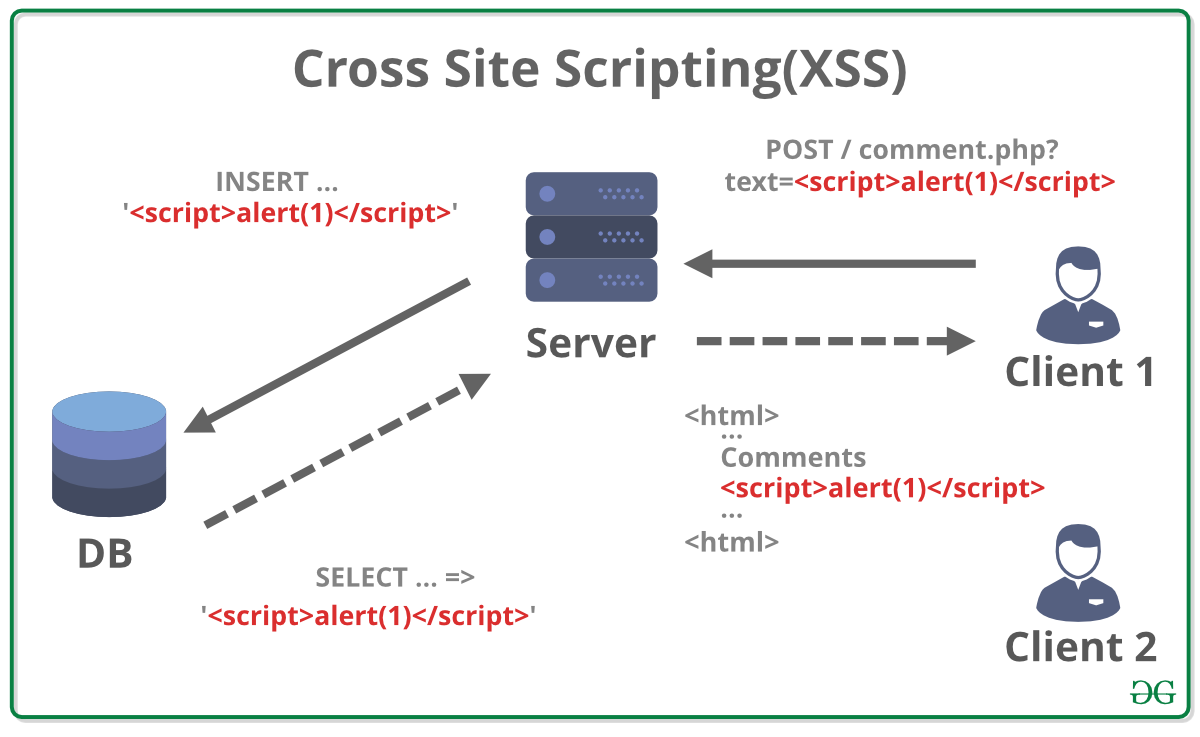
There are several types of XSS attacks, but one of the most common is Stored XSS. The following diagram illustrates this flow perfectly:
- An attacker submits malicious script as input (e.g., in a comment field).
- The web server, not realizing the input is malicious, stores it in the database.
- A legitimate user (the victim) requests the page containing the comments.
- The server retrieves the malicious script from the database and includes it in the HTML sent to the victim's browser.
- The victim's browser executes the script, thinking it's part of the website.
2. XSS in a PHP Application: A Practical Example
Let's see what this looks like in a real PHP application. Imagine a simple note-taking app where you display user-submitted notes. If you're not careful, this is a prime target for XSS.
The following video demonstrates this vulnerability clearly.
PHP For Beginners, Ep 26 - Always Escape Untrusted Input
In 'PHP For Beginners, Ep 26 - Always Escape Untrusted Input,' the Laracasts channel provides a perfect, code-level demonstration of an XSS attack.
Watch the segment from 02:47 to 04:29. The presenter injects both simple HTML and a <script> tag into a form to show how it can break the page layout and, more importantly, execute arbitrary JavaScript.
As you saw, simply echoing user data directly to the page is a major security risk.
// VULNERABLE CODE - DO NOT USE
// If $_POST['comment'] contains "<script>alert('XSS!');</script>"
// this will execute the script in the user's browser.
echo $_POST['comment'];
3. The Solution: Output Encoding
The fundamental defense against XSS is output encoding (also called escaping). The goal is to instruct the browser to treat user-submitted data as literal text to be displayed, not as HTML code to be executed.
We achieve this by converting special HTML characters into their corresponding HTML entities.
<becomes<(less than)>becomes>(greater than)"becomes"(double quote)'becomes'(single quote)&becomes&(ampersand)
When a browser sees <script>, it renders the literal text <script> on the screen instead of interpreting it as the start of a script tag. The danger is neutralized.
htmlspecialchars(): Your Go-To Function
PHP provides a built-in function for this exact purpose: htmlspecialchars(). This function converts special HTML characters into their entity equivalents.
Let's return to the Laracasts video to see the fix in action.
PHP For Beginners, Ep 26 - Always Escape Untrusted Input
The same Laracasts video shows how to fix the vulnerability using htmlspecialchars().
Now watch from 04:29 to 07:09. Observe how wrapping the output in htmlspecialchars() prevents the script from running. Pay close attention to the explanation where the presenter shows the page source to reveal the escaped characters (<, >, etc.).
The key takeaway is this simple rule: Anywhere you output user-provided data into an HTML document, wrap it in htmlspecialchars().
// SECURE CODE
// If $_POST['comment'] contains "<script>alert('XSS!');</script>"
// this will safely display the string on the page.
echo htmlspecialchars($_POST['comment'], ENT_QUOTES, 'UTF-8');
What about htmlentities()?
You may also see another function called htmlentities(). It does a similar job but is more aggressive, converting all characters that have an HTML entity equivalent. htmlspecialchars() is generally preferred because it's more targeted and sufficient for preventing XSS, without potentially causing display issues with certain character sets.
Cross-site scripting in PHP Web Applications
For a clear comparison, let's consult the article 'Cross-site scripting in PHP Web Applications' from Brightsec.
Read the sections 'Input Sanitization in PHP' and 'htmlentities() vs htmlspecialchars()'. The article explains why htmlspecialchars() is usually the right choice and notes the importance of using the ENT_QUOTES flag to ensure single quotes are also encoded.
The recommended practice is to use htmlspecialchars() with two important arguments:
ENT_QUOTES: This flag ensures that both double (") and single (') quotes are encoded. This is vital for preventing XSS inside HTML attributes, like<div class='...'.'UTF-8': Explicitly specifying the character encoding helps prevent certain advanced attacks and ensures consistency.
4. Hands-On Practice
Let's solidify this with a practical exercise. Here is a complete PHP script for a simple comment form.
Instructions:
- Save this code as a PHP file (e.g.,
comment.php) and run it on your local server. - First, try submitting a comment with the following malicious payload:
<script>alert('You have been hacked!');</script>. You will see the alert box pop up. - Next, uncomment the "Secure" line and comment out the "Vulnerable" line.
- Submit the same malicious payload again. This time, you should see the raw text
<script>alert('You have been hacked!');</script>displayed safely on the page.
<?php
// A simple script to demonstrate XSS and its prevention.

$comment = '';
if ($_SERVER['REQUEST_METHOD'] === 'POST') {
    // Check if 'comment' is set in the POST data, default to empty string if not
    $comment = $_POST['comment'] ?? '';
}
?>

<!DOCTYPE html>
<html lang="en">
<head>
    <meta charset="UTF-8">
    <title>XSS Demo</title>
    <style>
        body { font-family: sans-serif; max-width: 600px; margin: 2em auto; }
        .comment-box { border: 1px solid #ccc; padding: 1em; margin-top: 1em; background-color: #f9f9f9; }
        textarea { width: 100%; height: 80px; }
    </style>
</head>
<body>

    <h1>Leave a Comment</h1>

    <form action="" method="post">
        <textarea name="comment" placeholder="Type your comment here..."></textarea>
        <br>
        <button type="submit">Submit</button>
    </form>

    <?php if ($comment): ?>
        <div class="comment-box">
            <h3>Your Comment:</h3>
            <?php
            // Vulnerable: Directly echoing user input
            // echo '<p>' . $comment . '</p>';

            // Secure: Echoing user input after escaping it
            echo '<p>' . htmlspecialchars($comment, ENT_QUOTES, 'UTF-8') . '</p>';
            ?>
        </div>
    <?php endif; ?>

</body>
</html>
This simple exercise demonstrates the power and simplicity of using htmlspecialchars() to defend against XSS.
Conclusion
You have now learned one of the most important security practices in web development. By consistently escaping user output, you disarm XSS attacks and protect your users' data and sessions.
Key Takeaways:
- Never trust user input, even after validation. Always assume it could be malicious when displaying it.
- Cross-Site Scripting (XSS) allows attackers to execute malicious scripts in a victim's browser.
- The primary defense against XSS is output encoding/escaping.
- In PHP, use
htmlspecialchars($variable, ENT_QUOTES, 'UTF-8')every time you display user-provided data within an HTML context.
Preview of the Next Lesson:
We've now covered securing data on its way in (validation) and on its way out (escaping). Our next security lesson will tackle another critical area: user credentials. We will learn how to hash and verify passwords securely using password_hash() and password_verify(), ensuring that even if your database is compromised, user passwords remain safe.