Hello! Welcome to the next lesson in our module on Web Application Security Essentials.
In our last lesson, you learned how to securely handle user passwords using password_hash() and password_verify(). This is a fundamental skill for protecting data at rest in your database. Today, we're shifting our focus to protecting actions and ensuring that requests submitted to your server are legitimate and intentional.
This brings us to our learning outcome: to explain Cross-Site Request Forgery (CSRF) and implement token-based protection. You'll learn how an attacker can trick a logged-in user into performing actions they never intended, and you'll implement the standard defense against this common and serious threat.
1. Understanding the Threat: What is Cross-Site Request Forgery?
Cross-Site Request Forgery (CSRF, sometimes pronounced "sea-surf") is an attack that forces an authenticated user to submit a malicious request to a web application. The core of the problem is that browsers automatically include relevant cookies (like session cookies) with every request to a domain, regardless of where the request originated. An attacker can exploit this behavior.
Imagine you are logged into your online banking website. The website uses a session cookie to remember that you are authenticated. Now, imagine you visit a malicious website in another browser tab. This malicious site could contain a hidden form or even just an image tag that sends a request to your bank's server, for example, POST /transfer_funds.php with amount=1000&to=attacker_account.
Because you are still logged into your bank, your browser will helpfully attach your session cookie to this request. The bank's server sees a valid request with a valid session cookie and processes the fund transfer. You just transferred money without your knowledge or consent.
This diagram illustrates the flow of a typical CSRF attack:

To see a practical demonstration of how easily this can be exploited, especially with forms using the GET method, the following video is very insightful.
PHP CSRF (Cross Site Request Forgery) Protection (Part 1/2)
The video 'PHP CSRF (Cross Site Request Forgery) Protection' from Codecourse provides an excellent real-world explanation of the attack vector.
Watch from the beginning to 04:05. The presenter demonstrates how an attacker can craft a URL that submits a form on behalf of a user, highlighting why this is a security risk.
The key takeaway is that the server, by default, has no way of knowing if a request came from your application's actual form or from a malicious site.
2. The Solution: The Synchronizer Token Pattern
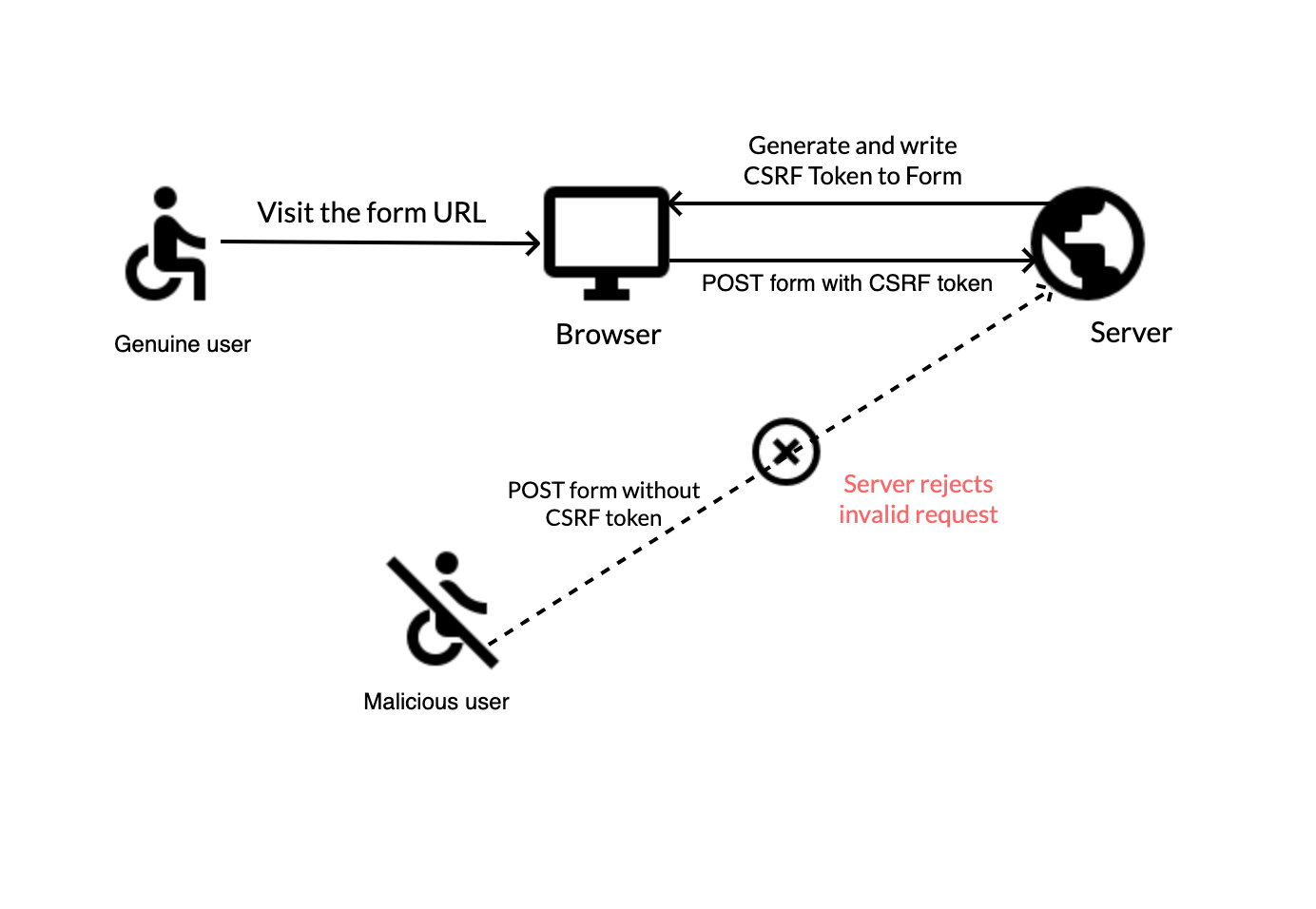
To prevent CSRF, we need a way for the server to verify that a request was genuinely initiated by the user from within our application. The most common and effective method is the Synchronizer Token Pattern.
Here's how it works:
- Generate & Store: When the server generates a page containing a form, it also generates a unique, secret, and unpredictable string called a CSRF token. It then stores this token in the user's session data on the server.
- Embed: The server embeds this same token as a hidden field within the form that is sent to the user's browser.
- Submit & Verify: When the user submits the form, the token is sent back to the server along with the other form data. The server then compares the submitted token from the form with the token it stored in the session.
- If the tokens match, the request is considered legitimate and is processed.
- If the tokens do not match (or the token is missing), the request is rejected as a potential CSRF attack.
An attacker cannot guess the secret token, and because of browser security policies (Same-Origin Policy), they cannot read the token from your page to include it in their forged form.
This diagram shows how this protection works:
3. Implementing CSRF Protection in PHP
Now let's translate the theory into code. The following reading provides a clear, step-by-step guide to generating, embedding, and verifying CSRF tokens in a PHP application.
Understanding and Implementing CSRF Tokens in PHP Forms
The article 'Understanding and Implementing CSRF Tokens in PHP Forms' provides a comprehensive and practical guide to this topic.
Please read the first half of the article, starting from the introduction down to and including the section 'Verifying the Token'. Focus on the three key parts of the implementation: generating the token, including it in the form, and verifying it on the server.
Let's summarize the key PHP functions and logic from that guide.
Step 1: Generate and Store the Token
First, you must have a session started. Then, generate a cryptographically secure random token and store it in the $_SESSION superglobal.
// Make sure to start the session at the top of your script
session_start();

// Generate a token if one doesn't already exist for this session
if (empty($_SESSION['csrf_token'])) {
    // random_bytes() generates cryptographically secure pseudo-random bytes.
    // bin2hex() converts the binary data into a hexadecimal representation.
    $_SESSION['csrf_token'] = bin2hex(random_bytes(32));
}

$csrfToken = $_SESSION['csrf_token'];
Step 2: Embed the Token in Your Form
Next, you need to include this token in any form that performs a state-changing action (e.g., creating, updating, or deleting data). This is done with a hidden input field.
<form action="process.php" method="post">
    <!-- Other form fields like username, email, etc. -->
    <input type="text" name="email" placeholder="New email address">

    <!-- Include the CSRF token as a hidden field -->
    <input type="hidden" name="csrf_token" value="<?php echo htmlspecialchars($csrfToken); ?>">

    <button type="submit">Update Email</button>
</form>
Step 3: Verify the Token on Submission
Finally, in your form processing script (process.php in this case), you must verify that the submitted token matches the one in the session before processing the request.
For this comparison, it's critical to use the hash_equals() function. A simple == comparison is vulnerable to "timing attacks," a type of side-channel attack where an attacker can analyze the time it takes for the server to respond to figure out the token character by character. hash_equals() always takes the same amount of time to execute, regardless of whether the strings match or not, thus preventing this vulnerability.
// Start the session to access the stored token
session_start();

// Check if the request is a POST request and if the tokens match
if ($_SERVER['REQUEST_METHOD'] === 'POST') {
    if (isset($_POST['csrf_token']) && hash_equals($_SESSION['csrf_token'], $_POST['csrf_token'])) {
        // CSRF token is valid. Process the form data.
        echo "Token is valid. Processing request...";
        // ... your code to update the email address ...

    } else {
        // CSRF token is invalid or missing.
        // It's best to terminate the script and log the attempt.
        die('CSRF token validation failed.');
    }
}
4. Hands-On Practice
Let's put all the pieces together in a single file. This example simulates a form to change a user's profile information.
Instructions:
- Save the code below as a PHP file (e.g.,
profile.php) and run it on your local server. - Submit the form with some new data. You should see a "success" message.
- Experiment: Use your browser's developer tools (right-click -> Inspect) to find the hidden input field for
csrf_token. Either delete the field or change itsvalueattribute, then try to submit the form again. You will now see the "CSRF token validation failed" error, proving that your protection is working.
<?php
// 1. Start the session
session_start();

// 2. Generate and store the CSRF token
if (empty($_SESSION['csrf_token'])) {
    $_SESSION['csrf_token'] = bin2hex(random_bytes(32));
}
$csrfToken = $_SESSION['csrf_token'];

$message = '';
$message_type = '';

// 3. Verify the token on form submission
if ($_SERVER['REQUEST_METHOD'] === 'POST') {
    // Check for token existence and validity
    if (!isset($_POST['csrf_token']) || !hash_equals($_SESSION['csrf_token'], $_POST['csrf_token'])) {
        // Token is invalid, stop execution
        $message = 'CSRF token validation failed.';
        $message_type = 'error';
    } else {
        // Token is valid, "process" the data
        $username = $_POST['username'] ?? 'N/A';
        $message = 'Profile updated successfully for ' . htmlspecialchars($username) . '!';
        $message_type = 'success';

        // In a real application, you would regenerate the token after a successful request
        // to prevent token reuse (token rotation).
        unset($_SESSION['csrf_token']);
    }
}
?>

<!DOCTYPE html>
<html lang="en">
<head>
    <meta charset="UTF-8">
    <title>CSRF Protection Demo</title>
    <style>
        body { font-family: sans-serif; max-width: 600px; margin: 2em auto; line-height: 1.6; }
        .message { padding: 1em; margin: 1em 0; border-radius: 4px; }
        .success { background-color: #d4edda; color: #155724; border: 1px solid #c3e6cb; }
        .error { background-color: #f8d7da; color: #721c24; border: 1px solid #f5c6cb; }
        input[type="text"] { width: 100%; padding: 8px; margin-bottom: 10px; box-sizing: border-box; }
        button { padding: 10px 15px; }
    </style>
</head>
<body>
    <h1>Edit Your Profile</h1>

    <?php if ($message): ?>
        <div class="message <?php echo $message_type; ?>">
            <?php echo $message; ?>
        </div>
    <?php endif; ?>

    <form action="profile.php" method="post">
        <div>
            <label for="username">Username:</label>
            <input type="text" id="username" name="username" value="testuser">
        </div>

        <!-- 4. Embed the token in the form -->
        <input type="hidden" name="csrf_token" value="<?php echo htmlspecialchars($csrfToken); ?>">

        <button type="submit">Save Changes</button>
    </form>
</body>
</html>
Conclusion
You have now learned about a critical web application vulnerability and, more importantly, how to defend against it. Protecting your users' actions is just as important as protecting their data.
Key Takeaways:
- CSRF attacks trick an authenticated user's browser into sending an unwanted request to your application.
- The Synchronizer Token Pattern is the standard defense mechanism.
- The implementation involves three core steps: generating a token and storing it in the session, embedding it in a hidden form field, and verifying it on submission.
- Always use a secure random token generator like
random_bytes(). - Always use
hash_equals()for comparing tokens to prevent timing attacks.
Preview of the Next Lesson:
We will continue our exploration of web application security by tackling another common point of entry for attackers: file uploads. You will learn how to secure file uploads by validating file type, size, and using safe storage paths to prevent users from uploading malicious scripts or overwhelming your server.