Hello! Welcome back to our series on building AI agents.
In our last lesson, we built our first multi-agent system using the Supervisor pattern. We created a "manager" agent that successfully routed tasks to specialized "worker" agents. We used a simple shared AgentState object containing a list of messages and a next field to control the workflow.
Today, we'll dive deeper into that core mechanism. This lesson is all about managing shared state and message passing between agents. You'll learn how this "shared blackboard" concept works in LangGraph, explore different strategies for how agents can communicate through it, and see how to give your agents a persistent memory. Mastering this is key to designing more complex and robust collaborations.
1. The "Shared Blackboard" Model of Communication
In software engineering, you've likely encountered various communication patterns for distributed systems, such as the actor model where components have private state and communicate via message queues. LangGraph takes a different approach.
LangGraph Uncovered: Building Stateful Multi-Agent Applications with LLMs-Part I
The article 'LangGraph Uncovered' provides an excellent comparison between LangGraph's shared state model and traditional actor models. This will help frame why LangGraph's approach is well-suited for agentic workflows.
Please read the introduction and the sections 'LangGraph vs. Traditional Actor Models' and 'State (Shared Context)'. Focus on how the shared state allows agents to collaborate more directly than isolated actors.
As you just read, LangGraph uses a central, shared state object. Think of it as a common blackboard that all agents in the graph can read from and write to.
- State: The blackboard itself. It’s a Python object (usually a
TypedDict) that holds all the information relevant to the task, such as the conversation history, intermediate results, and routing decisions. - Nodes: The agents or tools. Each node is a function that gets to walk up to the blackboard, read what's there, perform its work, and then write its own contribution (or erase/modify something).
- Edges: The rules that determine which agent gets to go to the blackboard next.
This shared blackboard model is what enables message passing. An agent "sends a message" simply by writing to the shared state, knowing another agent will read it in a subsequent step.
2. Architectures for Agent Collaboration
This shared state model supports several collaboration architectures. The Supervisor pattern we implemented is just one.
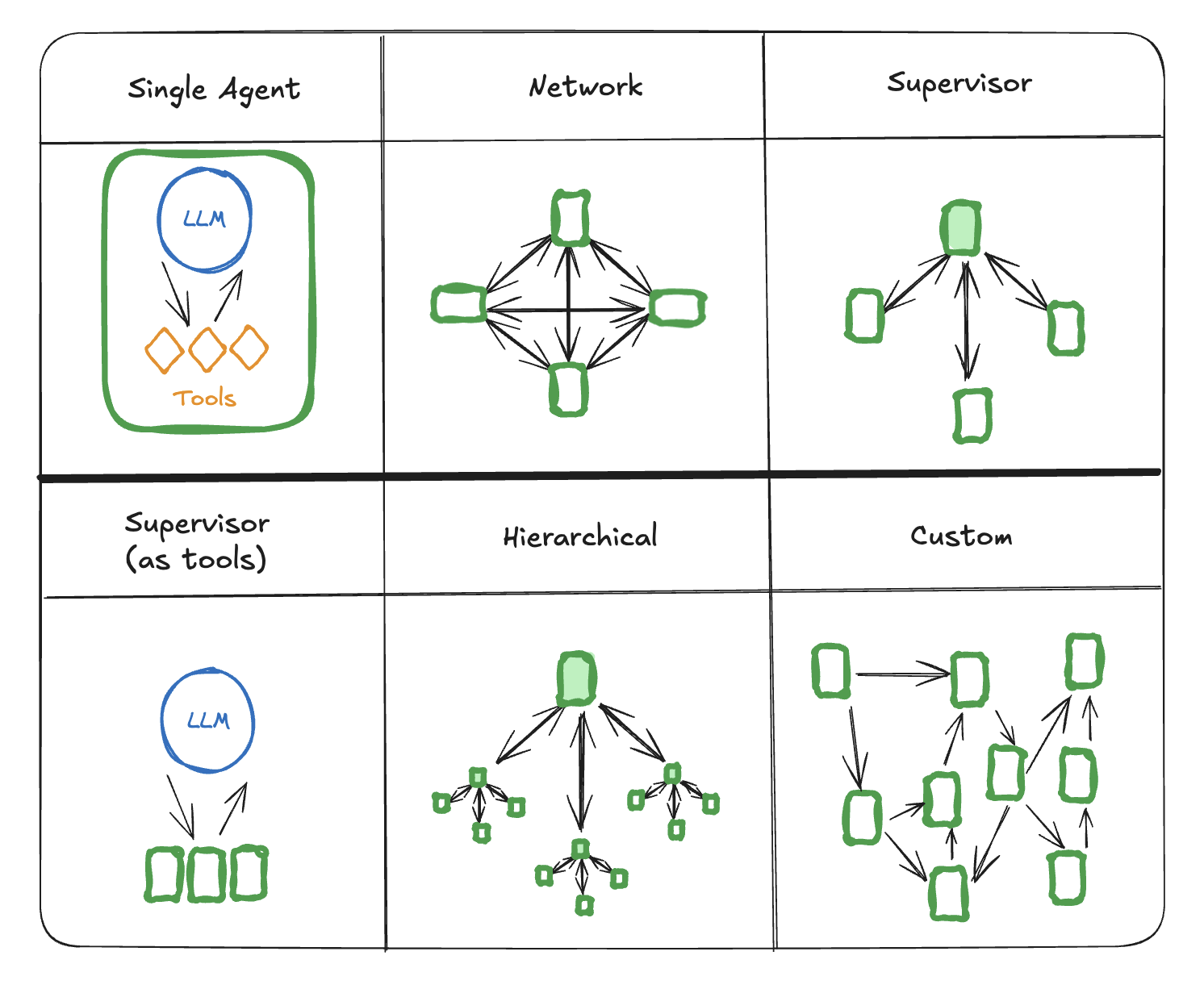
Now, let's explore two primary patterns for how agents interact with the shared state within these architectures.
3. Pattern 1: Collaborative Brainstorming (Global Shared Scratchpad)
In this pattern, all agents read and write to the same list of messages. Every thought, tool call, and observation from every agent is appended to a single, continuous history.
- Analogy: A team brainstorming session where everyone writes on the same whiteboard. The full history of the discussion is visible to all participants at all times.
- When to use it: This is excellent for tasks requiring tight collaboration, where each agent needs to see the detailed reasoning process of the others.
The following video demonstrates this pattern, which the authors call "Multi-Agent Collaboration."
LangGraph: Multi-Agent Workflows
The 'LangGraph: Multi-Agent Workflows' video by LangChain provides a clear, code-driven demonstration of this collaborative pattern. Pay close attention to how the 'messages' list in the state grows with each agent's contribution.
Watch the section on 'Multi-Agent Collaboration' from 01:56 to 11:33. Observe how both the 'researcher' and 'chart_generator' agents append their outputs to the same global state, creating a unified history.
In this model, the state object often includes a list of messages. Each node (agent) appends its output to this list, creating a complete audit trail that the next agent can use for context.
4. Pattern 2: Supervised Delegation (Independent Scratchpads)
In this alternative pattern, specialist agents perform their work in isolation and only report their final result back to the supervisor. The detailed, step-by-step work of the specialist (its internal "scratchpad") is not added to the main shared state.
- Analogy: A manager assigns a research task to an analyst. The analyst uses their own notes, drafts, and tools to complete the task. They don't show the manager every single web search; they just deliver the final summary report.
- When to use it: This is useful for keeping the main conversational history clean and high-level. It reduces the amount of information the supervisor has to process and can be more efficient for both cost and latency, as you're not passing around a massive history for every step.
The same video you just watched also demonstrates this pattern.
LangGraph: Multi-Agent Workflows
Now, let's watch the section on the 'Agent Supervisor' pattern from the same video. Notice the key difference in how state is managed.
Watch the section on the 'Agent Supervisor' from 11:33 to 17:25. The key takeaway is that the worker agent (e.g., the 'coder') runs its own internal loop, and only its final output is passed back to the supervisor's message history.
In this pattern, the supervisor's state remains concise. It contains the initial request and the final answers from the workers, but not the messy intermediate steps. The worker agent itself might be a complex graph or a standard LangChain agent with its own memory.
Test your understanding!
You are tasked with building a multi-agent system where a "Critic" agent reviews the work of a "Writer" agent and provides iterative feedback. The Writer then revises its work based on the feedback. This may go back and forth several times.
Which state management pattern would be more suitable for this task, and why?
Show answer
The Collaborative Brainstorming (Global Shared Scratchpad) pattern would be more suitable.
The Critic needs to see the Writer's exact output, and the Writer needs to see the Critic's specific feedback. Appending each agent's turn to a shared message history allows both agents to have the full context of the iterative review process. The Supervised Delegation pattern would be less effective because the final output of one agent might not contain enough detail for the other to act upon in the next turn.
5. Implementing State Persistence with Checkpointers
So far, our state has been ephemeral—it's lost once the graph finishes running. For a true conversational agent that can remember past interactions, we need to persist the state. LangGraph handles this with Checkpointers.
A checkpointer saves the state of the graph after each step. This allows you to:
- Resume a long-running task if it's interrupted.
- Maintain conversational memory across multiple user interactions.
The simplest checkpointer is MemorySaver, which stores the state in memory. To manage different conversations, you pass a thread_id in the configuration when you invoke the graph. This tells the checkpointer which conversation history to load and save.
This short video provides a very focused demonstration of defining a state, a node, and compiling the graph with a memory checkpointer.
Introduction to LangGraph State
The video 'Introduction to LangGraph State' gives a quick, practical walkthrough of using an in-memory checkpointer.
Watch from 01:52 to 03:50. Focus on how the MemorySaver is created and passed to the .compile() method, and how the thread_id is used in the config object during the .invoke() call.
Let's look at the code. Here is a simple example that builds on our previous lesson, but adds a memory checkpointer.
from typing import TypedDict, Annotated, List
from langgraph.graph import StateGraph, END
from langgraph.checkpoint.memory import MemorySaver
from langchain_core.messages import BaseMessage, HumanMessage, SystemMessage
from langchain_openai import ChatOpenAI

# 1. Define the state
class AgentState(TypedDict):
    messages: Annotated[List[BaseMessage], lambda x, y: x + y]

# 2. Define the agent node
llm = ChatOpenAI(model="gpt-4-turbo-preview")
def chatbot_node(state: AgentState) -> dict:
    """A simple chatbot that responds to user messages."""
    print("---
NODE: Chatbot
---")
    return {"messages": [llm.invoke(state["messages"])]}

# 3. Build the graph
workflow = StateGraph(AgentState)
workflow.add_node("chatbot", chatbot_node)
workflow.set_entry_point("chatbot")
workflow.add_edge("chatbot", END)

# 4. Add a checkpointer
memory = MemorySaver()
app = workflow.compile(checkpointer=memory)

# 5. Invoke the graph with a thread_id
# This ID uniquely identifies the conversation
thread_id = "my-first-conversation"
config = {"configurable": {"thread_id": thread_id}}

# First interaction
initial_state = {"messages": [HumanMessage(content="Hi! My name is Alex.")]}
response = app.invoke(initial_state, config=config)
print(f"AI: {response['messages'][-1].content}\n")

# Second interaction - notice we don't pass the history, the checkpointer handles it
follow_up_state = {"messages": [HumanMessage(content="What is my name?")]}
response = app.invoke(follow_up_state, config=config)
print(f"AI: {response['messages'][-1].content}\n")

# You can even inspect the state of a thread
thread_state = app.get_state(config)
print("---
Final State of Thread
---")
print(thread_state)
When you run this code, you'll see that the agent remembers the name "Alex" in the second interaction. This is because the checkpointer loaded the state associated with "my-first-conversation", which already contained the first message. This is the fundamental mechanism for giving your agents memory.
Conclusion
You now have a much deeper understanding of how agents communicate and collaborate within LangGraph. This isn't just an implementation detail; it's a core architectural choice that shapes how you design your agentic systems.
Key Takeaways:
- Shared State Model: LangGraph uses a "shared blackboard" model where agents communicate by reading from and writing to a central state object.
- Collaboration Patterns:
- Global Shared Scratchpad: All agents see the full, detailed history. Best for tight, iterative collaboration.
- Supervised Delegation: Workers operate independently and only report final results. Best for keeping the main context clean and improving efficiency.
- State Persistence: Checkpointers like
MemorySaverare essential for giving agents memory by saving and loading the graph's state across multiple invocations, using athread_idto manage sessions.
In our next lesson, we will begin our module on Production-Ready Agents. We'll discuss the key challenges in deploying agents, such as ensuring reliability, managing costs, and reducing latency. As you'll see, the state management patterns we discussed today have a direct impact on all of these factors.