Welcome to the final lesson of our first module. In our last session, you mastered a crucial skill for any e-commerce entrepreneur: calculating the true, fully loaded cost of your product. We broke down everything from manufacturing to shipping, and briefly touched upon "channel fees." Today, we'll dive deep into that topic.
Choosing your e-commerce platform is one of the most significant decisions you will make. This platform is not just a tool; it's the digital foundation of your entire business—your storefront, your cash register, and your operations hub. Making a hasty choice can lead to unforeseen costs, limitations on your growth, and a lot of future frustration.
In this lesson, we will systematically compare and select an e-commerce platform that fits the specific needs and budget of your home-based business. We will explore the fundamental types of platforms, establish a clear framework for evaluation based on the cost principles you've already learned, and compare the top contenders in the market. This structured analysis will give you the confidence to make an informed, long-term decision.
1. The Two Main Paths: Hosted vs. Self-Hosted
At the highest level, e-commerce platforms fall into two categories: hosted and self-hosted. Understanding this distinction is the first step in narrowing down your options.
-
Hosted Platforms (SaaS - Software as a Service): Think of these as renting a fully-equipped retail space in a managed shopping center. The platform provider (like Shopify or BigCommerce) handles all the technical aspects: security, updates, hosting, and performance. You pay a monthly fee for this service. This is the most common path for new entrepreneurs because it's fast and requires no technical expertise.
-
Self-Hosted Platforms (Open Source): This is like owning your own building. You get the software (like WooCommerce) for free, but you are responsible for everything else: finding your own web hosting, installing the software, managing security, and handling updates. This offers ultimate control and flexibility but comes with a steeper learning curve and technical responsibility.
To see this explained clearly, the video "How to Choose an Ecommerce Platform" from the EcommerceGold channel offers a great overview.
How to Choose an Ecommerce Platform
This video breaks down the core differences between hosted and self-hosted platforms, and why it's a decision you should make for the long term.
Watch these two key segments: Hosted vs. Self-Hosted: This section uses the analogy of renting vs. owning to explain the trade-offs in cost, control, and technical management. Think Long Term: The presenter explains why frequently switching platforms can be detrimental, especially for your search engine rankings (SEO).
Choosing a platform is a long-term commitment. Migrating a store from one platform to another is a complex, costly, and disruptive process. It's best to make a well-researched decision from the start.
2. A Framework for Your Decision
With your background in business development, you know that any major investment requires due diligence. Selecting a platform is no different. We need a consistent set of criteria to evaluate each option. The article "Small Business Ecommerce in 2026" from BigCommerce provides an excellent, practical framework.
Small Business Ecommerce in 2026 (Choose the Right Platform)
This article outlines seven critical questions that cut through the marketing jargon and help you assess the true value and cost of a platform.
Please read the section titled Seven questions to ask before choosing your platform. As you read, focus on how each question relates to the "fully loaded cost" we calculated in the previous lesson: True Total Cost: This goes beyond the monthly subscription. As you've learned, you must account for themes, essential apps, and transaction fees. Security & PCI Compliance: A non-negotiable for handling customer payments. Hosted platforms typically manage this for you. Transaction Fees: A direct cut from your revenue, on top of what payment processors like Stripe or PayPal charge. Brand & Customization: Can the platform's themes be adapted to create a unique brand identity? Inventory Scalability: Will the platform handle a growing number of products and variations without issue? Standard Analytics: What data will you have out-of-the-box to make informed business decisions? Native vs. Third-Party Features: Are essential functions like abandoned cart recovery built-in, or will you need to pay for extra apps?
This framework moves you from simply looking at a price tag to conducting a proper cost-benefit analysis for your business. Let's look at how the real costs can add up.

3. Comparing the Top Contenders
Now, let's apply this framework to the most popular platforms for home-based businesses. The following comparison table gives a high-level overview.
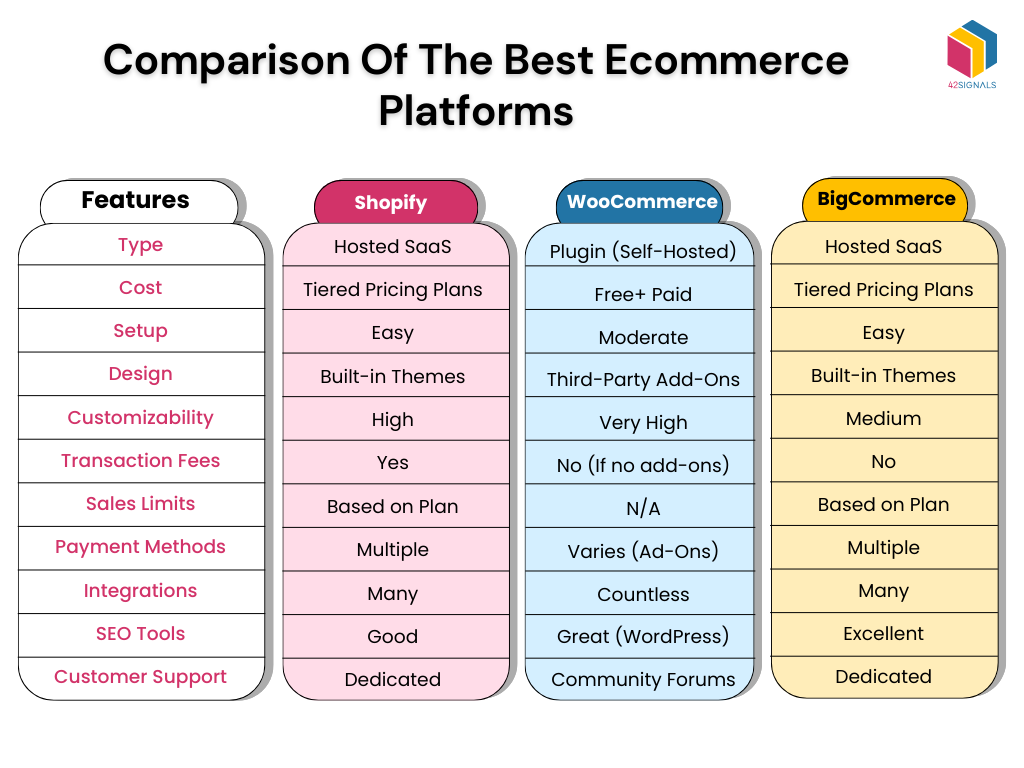
While many platforms exist, most new sellers will find their best fit among Shopify, WooCommerce, and BigCommerce. Let's look at the real-world trade-offs.
Shopify: The All-Rounder for Beginners
Shopify is the market leader for a reason: it's incredibly easy to use. You can have a professional-looking store up and running in a day. However, this simplicity comes with hidden costs and limitations.
Forget Shopify! These Alternatives Can Save You $500/Mo
The video "Forget Shopify! These Alternatives Can Save You $500/Mo" from the MyWifeQuitHerJob Ecommerce Channel provides a critical look at the platform's potential drawbacks.
Watch the first part of the video, from the beginning to the discussion on Shopify. Pay close attention to the three main points: The True Cost of Apps: How a $29/month plan can quickly balloon to hundreds per month. Payment Processing Fees: The penalty fees for not using Shopify's in-house payment system. Lack of Control: The risk of having your store shut down with little warning.
- Verdict: Choose Shopify if your top priority is ease of use and speed to launch, and you are prepared for the monthly costs of apps to grow with your business.
WooCommerce: The Choice for Total Control
WooCommerce is a free plugin that turns a WordPress website into a powerful e-commerce store. It offers complete freedom and ownership. If you value flexibility and want to minimize monthly fees, it's a compelling option. The trade-off is that you become your own IT department.
Forget Shopify! These Alternatives Can Save You $500/Mo
Let's continue with the same video to understand the WooCommerce proposition.
Watch the segment from on WooCommerce. The speaker highlights its strengths in freedom, cost, and SEO, but also gives a frank warning about the technical responsibilities involved.
- Verdict: Choose WooCommerce if you value total control and low running costs, have a strong focus on content marketing (blogging), and are comfortable with troubleshooting technical issues or are willing to learn.
BigCommerce: The Scalable Middle Ground
BigCommerce aims to offer the best of both worlds: the convenience of a hosted SaaS platform with more built-in features than Shopify, aiming to reduce the reliance on costly apps.
Forget Shopify! These Alternatives Can Save You $500/Mo
Finally, let's review the section on BigCommerce from the same video.
Watch the segment from covering BigCommerce. Note how it positions itself against Shopify by including more features "out of the box" and not charging extra transaction fees, but also mentions its steeper learning curve.
- Verdict: Choose BigCommerce if you anticipate rapid growth, have a large or complex product catalog, and want to minimize transaction fees and the number of third-party apps, even if it means a slightly steeper learning curve initially.
What About Wix and Squarespace?
Platforms like Wix and Squarespace are excellent website builders that have added e-commerce functionality. They are known for their beautiful templates and drag-and-drop simplicity. However, they are generally considered best for very small-scale operations or for businesses where the website's primary function is not commerce (e.g., a portfolio with a small shop). For a business focused primarily on selling physical products, their limited e-commerce features, smaller app ecosystems, and scalability constraints often make them less suitable for long-term growth compared to the "big three."
4. Making Your Decision
The best way to make a final choice is to test the platforms yourself. All the major hosted platforms offer free trials.
How to Choose an Ecommerce Platform
Let's return to the EcommerceGold video for some final, actionable advice.
Watch the last two segments: Ease of Use: This section stresses that finding a platform you are comfortable with is arguably the most important factor. Creating a Shortlist: This gives a practical method for using reviews to create a shortlist and then using free trials to make a final, personal decision.
Your task now is to create a shortlist of 2-3 platforms and sign up for their free trials. Spend a few hours with each. Try adding a product, customizing a theme, and navigating the dashboard. This hands-on experience is invaluable and will reveal which platform's workflow feels most intuitive to you.
Conclusion
You now have a robust framework for selecting the digital home for your business. We've moved beyond surface-level prices to a more sophisticated analysis of true costs, features, and long-term viability.
Key Takeaways:
- Hosted vs. Self-Hosted: Your first decision is between the "renting" model (Shopify, BigCommerce) for ease of use, and the "owning" model (WooCommerce) for ultimate control.
- Evaluate the True Cost: Your platform's cost is the sum of its subscription fee, transaction fees, and the essential apps you'll need. A cheap base plan can become expensive quickly.
- The "Big Three" Trade-off:
- Shopify: Prioritizes ease of use at the cost of control and potentially high app fees.
- WooCommerce: Prioritizes control and low cost at the price of technical responsibility.
- BigCommerce: A scalable option with more built-in features, representing a middle ground.
- Test Before You Commit: There is no substitute for hands-on experience. Use free trials to find the platform that you feel most comfortable working with every day.
This lesson concludes the first module of your course. You have gone from evaluating a product idea to selecting the foundational technology to sell it. In our next lesson, we will begin Module 2: Building Your Digital Storefront, starting with a critical first step: creating and configuring your Facebook and Instagram business profiles to drive traffic to your new store.