Welcome to your fourth lesson. In our last session, you achieved a major milestone: you wrote, compiled, and ran your first C program. You saw your code produce the classic "Hello, World!" message, confirming your development environment is ready for action. But that code probably felt like a magic spell—a set of incantations you typed to get a result.
Today, we're going to become code-breakers and dissect that spell line by line. This lesson is all about fulfilling your preference for understanding the "why" behind the code. We will explore the purpose of each component of your hello.c program: the #include directive, the main() function, the statement terminator, and the return keyword. By the end, the magic will be replaced by logic, and you'll understand the fundamental structure of every C program you write from here on.
The Anatomy of "Hello, World!"
Let's look at that code again. Every piece has a distinct and crucial role.
#include <stdio.h>

int main() {
    printf("Hello, World!\n");
    return 0;
}
This simple structure can be broken down into a few key parts, as shown in the image below. We'll examine each of these parts in detail.
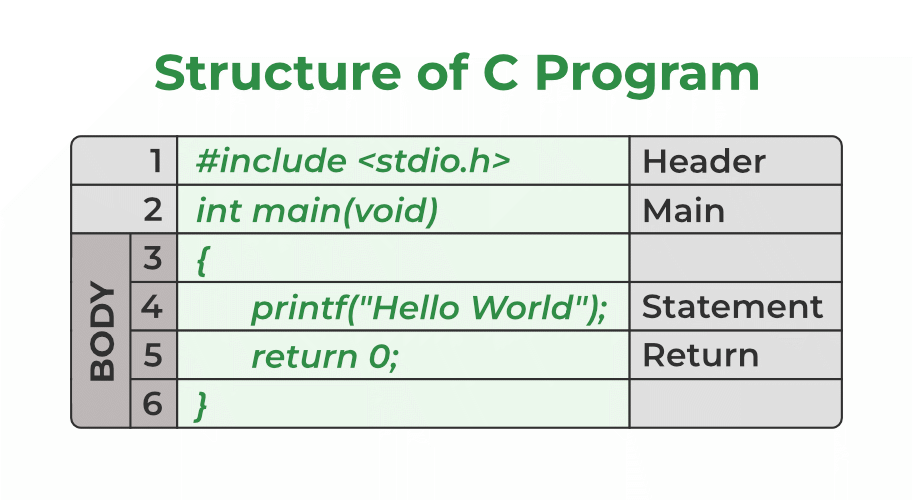
To get a concise and clear overview of these components, let's start with a short video that explains each line's purpose.
Why #include? | Why int main() | Why return 0 | Simple C Program | Log2Base2
The video "Why #include? | Why int main() | Why return 0" from Log2Base2 is an excellent, quick walkthrough that directly answers the key questions about this basic program structure.
Watch the video from the beginning until the end. As you watch, focus on the answers to these four questions: What is the purpose of #include <stdio.h>? Listen here. Why is the main() function special, and what does int mean? Listen here. Why do we need curly braces {} and semicolons ;? Listen here. What does return 0; signify? Listen here.
The video gave you a quick tour. Now, let's solidify that knowledge by digging deeper into each concept.
1. The Preprocessor Directive: #include <stdio.h>
The first line, #include <stdio.h>, isn't technically part of the C language itself. It's a preprocessor directive. Think of the preprocessor as an assistant that prepares your code file before the main compiler takes over.
#: Any line starting with a#is an instruction for this preprocessor.include: This command tells the preprocessor to find a file and copy its entire contents into your program right at that spot.<stdio.h>: This is the file you're including. It's a header file from the C Standard Library.stdiostands for "Standard Input/Output," and the.hsignifies it's a header. This specific file contains the declarations for essential functions that handle input (like reading from the keyboard) and output (like printing to the screen).
By including stdio.h, you are essentially telling the compiler, "I'm going to use some standard input/output tools, like printf(). Please include the information necessary to understand what printf() is." Without this line, the compiler would see printf() and complain that it doesn't recognize the command.
2. The Entry Point: int main()
Every C program, no matter how large or small, must have a main() function. This is non-negotiable. When you run your compiled program, the operating system starts execution at the beginning of main(). It is the designated entry point.
int: This is the return type. It specifies that themainfunction promises to give an integer value back to the operating system when it finishes. This integer acts as an exit code.main: This is the special name of the function.(): The parentheses indicate thatmainis a function. Later, we'll see how to put things inside these parentheses to pass information into our program from the command line.
The code for the function is contained within the curly braces { ... }. This is known as the function's body.
3. The Workhorse: Statements and Terminators
Inside the body of main, we have the instructions that do the actual work.
printf("Hello, World!\n");
This line is a statement. A statement is a single, complete instruction for the computer to execute. In this case, the instruction is a function call. We are calling the printf function, which we have access to because we included stdio.h. We are passing it one piece of information (an "argument"): the text string "Hello, World!\n".
Notice the semicolon ; at the end of the line. The semicolon is a statement terminator. It's the equivalent of a period in a sentence. It tells the compiler, "This instruction is complete. You can move on to the next one." Forgetting a semicolon is one of the most common errors for beginner C programmers.
4. The Exit Status: return 0;
This last statement, return 0;, fulfills the promise that int main() made.
return: This keyword exits the function and passes a value back to whoever called it (in this case, the operating system).0: This is the integer value being returned. By convention in programming, an exit code of0means success. It's a signal that the program ran and finished without any errors.;: Again, the statement terminator marks the end of the instruction.
If the program had encountered a critical error, it might return 1; or some other non-zero number to signal that something went wrong. This allows other programs or scripts to check whether your program ran successfully.
For a more detailed and narrative explanation of these concepts, "Beej's Guide to C" is a fantastic resource known for its clarity and humor.
This guide dissects the "Hello, World!" program with excellent, in-depth explanations that reinforce what we've just discussed.
Read the chapter "Hello, World!". Pay special attention to the breakdowns of each line: Start from the beginning and read about comments. Continue to the section that begins "what is this #include?" for a deep dive into header files. Then, read the explanation of the main() function, starting from the main() section. Finally, read the analysis of the printf() call and the semicolon, which starts with the printf() explanation.
Conclusion
You've now moved from simply using code to understanding its structure and syntax. This foundational knowledge is critical, as these components form the skeleton of every C program you will write.
Let's summarize the key takeaways:
#include <stdio.h>: A preprocessor directive that includes the Standard Input/Output header file, giving you access to functions likeprintf().int main(): The mandatory entry point of every C program. Execution starts here. Theintsignifies that the function will return an integer exit code to the operating system.{ ... }: Curly braces define the body of a function, grouping all its statements together.;(Semicolon): The statement terminator. It marks the end of a single command, much like a period in a sentence.return 0;: This statement exits themainfunction and returns the exit code0, which conventionally signals that the program completed successfully.
You've dissected the "Hello, World!" program. You know how to print a fixed string of text to the screen. But what if you want to print numbers, or results of calculations?
Preview of the next lesson: We will take a closer look at the printf() function. You'll learn how to use special "format specifiers" to print different types of data, such as integers (%d), decimal numbers (%f), and single characters (%c). This will unlock the ability to display dynamic information, a key step towards building interactive and useful programs.