Welcome to your fifth lesson. In our last session, we demystified the basic structure of a C program. You learned that #include <stdio.h> gives you access to a library of tools, and the most important of these is the printf() function, which you used to print a fixed message to the screen.
So far, printf() has been like a parrot, only able to repeat the exact text you give it. This is useful, but not very powerful. The real strength of programming is handling data that changes—user scores, sensor readings, calculation results. How can we print those?
This lesson is where you unlock that power. We will dive deep into printf() and learn how to use format specifiers. These are special codes that act as placeholders, allowing you to print variables of different types—integers, decimal numbers, and characters—within your text. Mastering this is a fundamental step toward making your programs dynamic and interactive.
From Static Text to Dynamic Output
The printf() function is more sophisticated than it first appears. Its first argument, the string in double quotes, is a format string. It can contain not just literal text, but also placeholders that will be filled in by the additional arguments you pass to the function.
This process is a bit like a mail merge: you have a template letter ("Your score is: %d") and a list of data to substitute into it (the value of your score variable).
The video below provides a fantastic, comprehensive tour of how printf() works, from the absolute basics to more advanced formatting.
printf Basics | C Programming Tutorial
This "printf Basics" tutorial from Portfolio Courses is a perfect step-by-step guide. It covers everything from basic placeholders to the fine-grained formatting control that is essential for creating clean, readable output—a key skill in competitive programming and application development.
I recommend watching the video in its entirety, but we will focus on specific sections. For now, watch the beginning to understand how printf() handles simple text, newlines, and other special characters. Escape Sequences: Watch from the beginning to this point. Pay attention to the special "escape sequences" like \n (newline), \t (tab), \" (double quote), and \\ (backslash). You already know \n, but the others give you more control over your text layout.
Printing Different Kinds of Data
Now for the core concept: format specifiers. Each specifier tells printf() what type of data to expect for a particular placeholder. The specifier must match the type of the variable you are printing.
%dor%ifor integers (int)%ffor floating-point numbers (floatordouble)%cfor single characters (char)%sfor strings (which we'll cover in detail later)
Let's continue with the video to see these in action.
printf Basics | C Programming Tutorial
Now, let's see how to print the values stored in variables.
Watch the section from here. The presenter demonstrates how to use: %d to print an integer variable. %c to print a character variable. %f to print float and double variables. Multiple placeholders in a single printf call.
To reinforce this, let's look at a static code example that brings these concepts together. The following program declares four variables of different types and then uses printf() with various format specifiers to display their values.

Let's break down the printf calls in this image:
printf("Integer:%d\n", num);takes the integer54from thenumvariable and places it where%dis.printf("Float:%.2f\n", val);is more interesting. It takes the float2.7fromval. The%.2fspecifier tellsprintfto display the number with exactly two decimal places, which is why the output is2.70.printf("Character:%c\n", ch);takes the character'z'from thechvariable and inserts it at the%cposition.
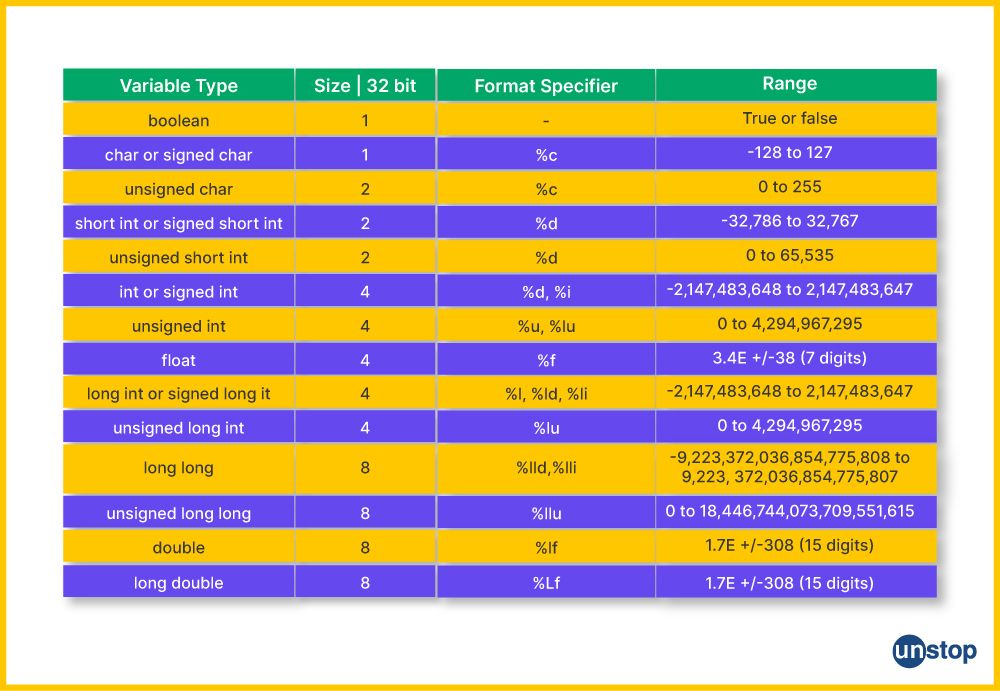
The following table is a useful reference that connects C's data types to their corresponding printf format specifiers. You'll be learning more about these data types in the next module, but it's good to see the connection now.
A Challenge: Breaking printf
You've expressed a desire for a deep understanding of why things work. One of the best ways to learn a system's rules is to see what happens when you break them. This is not just for fun; understanding compiler warnings and runtime errors is a crucial debugging skill.
Try this on your own. Create a new .c file and experiment:
- Mismatch the specifier and the data type. What happens if you try to print a
floatvariable using%d, or anintvariable using%f?int whole_number = 10; float decimal_number = 3.14; printf("An integer printed as a float: %f\n", whole_number); printf("A float printed as an integer: %d\n", decimal_number); - Mismatch the argument count. What happens if you provide a format specifier but forget to provide the variable?
printf("My lucky number is %d\n"); // Forgot the variable!
Compile and run your code. Observe the warnings the compiler gives you. Then, observe the strange output (or crash!) when you run the program. This happens because printf() blindly trusts you. When you use %d, it expects an integer's worth of bytes. If you give it something else, it will misinterpret that data, leading to nonsensical results. This is a classic C "gotcha".
Fine-Tuning Your Output
For tasks like competitive programming or generating reports, you often need to format your output precisely—aligning numbers in columns, controlling decimal places, and setting minimum widths. printf gives you powerful tools for this.
printf Basics | C Programming Tutorial
Let's return to the video one last time to see how to control the formatting in detail. This is where printf goes from a simple printing tool to a precision instrument.
Watch the final section of the video from the end. Focus on understanding: Width: How specifying a number like %10d reserves a minimum number of characters for the output, which is useful for aligning text. Precision: How %.2f controls the number of decimal places for a float. Flags: How the minus sign flag (%-10d) forces the output to be left-aligned within the reserved space.
These formatting options are explained clearly in the Programiz article as well. It provides simple, copy-pasteable examples for each core data type.
C Input/Output: printf() and scanf()
This page from Programiz offers a concise summary of the format specifiers for the most common data types.
In the "C Output" section, quickly review the code and output for: Example 2: Integer Output Example 3: float and double Output Example 4: Print Characters
Conclusion
You have now transformed printf() from a simple tool into a versatile instrument. You are no longer limited to printing static text; you can now display the state of your program as it runs.
Here are the key takeaways from this lesson:
- Format Specifiers:
printf()uses placeholders like%d(integer),%f(float), and%c(char) to insert variable data into a string. - Type Matching is Crucial: The type of the variable must match the format specifier. Mismatches lead to compiler warnings and undefined behavior, producing garbage output or crashing your program.
- Escape Sequences: Special character combinations like
\n(newline) and\t(tab) allow you to control the layout of your text. - Precision Formatting: You can control the appearance of your output with width (
%5d), precision (%.2f), and alignment (%-5d) modifiers.
Preview of the next lesson: In our "Breaking printf" challenge, you saw firsthand how easy it is to make mistakes that the compiler might warn you about, but won't always stop. In the next lesson, we will systematically explore the most common beginner errors—missing semicolons, mismatched braces, printf mistakes, and more—and, most importantly, learn how to interpret the error messages to fix them quickly.