Welcome to the fifth module of our course. Having spent the last four modules mastering the art of retrieving and analyzing data with SELECT statements, we are now shifting gears from reading data to modifying it. In our previous lesson, we built a sophisticated query to detect malicious login patterns, a task squarely in the domain of a security analyst. That was the pinnacle of data retrieval. Now, we begin our exploration of Data Manipulation Language (DML), the set of commands used to add, change, and remove data.
This lesson focuses on the INSERT statement, the fundamental command for adding new rows to a table. While your primary role as an analyst often involves querying existing data, understanding how to add data is crucial. You might need to populate a custom threat intelligence database, create test data to probe an application's behavior, or understand how data is written in order to later identify vulnerabilities like second-order SQL injection.
By the end of this lesson, you will be able to write INSERT statements to add both single and multiple rows of data to a database table.
Populating a Database: The INSERT Statement
The INSERT INTO statement is used to add new records to a table. Its basic structure is straightforward: you specify the table, the columns you want to fill, and the values to put in them.
The general syntax is:INSERT INTO table_name (column1, column2, ...) VALUES (value1, value2, ...);
The list of values must correspond directly to the list of columns in both order and data type. Let's look at a simple visual breakdown.
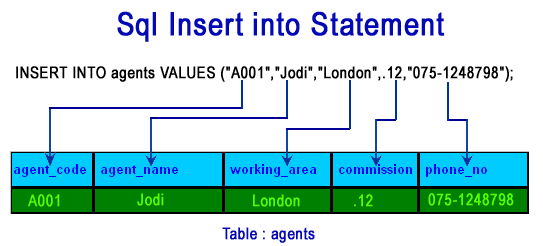
Inserting a Single Row
There are two primary ways to insert a single row:
- Implicitly, by providing values for all columns: If you are providing a value for every single column in the table, and your values are in the same order as the columns appear in the table's definition, you can omit the column list.
INSERT INTO table_name VALUES (value1, value2, value3, ...); - Explicitly, by specifying columns: This is the safer and more readable method. You explicitly list the columns you are inserting data into. This allows you to provide columns in any order and to omit columns that have default values or are auto-incrementing (like primary keys).
INSERT INTO table_name (column3, column1) VALUES (value3, value1);
The following article from the "The road to Cyber Threat Intelligence using MySQL" blog post provides a perfect, hands-on example. The author creates a table to track malicious actors and then adds the first record. This is a great model for a practical cybersecurity project.
The road to Cyber Threat Intelligence using MySQL.
This article details a practical project for a security professional learning SQL: building a threat actor database. It's a great example of why DML skills are relevant in your field.
First, familiarize yourself with the table structure by reading the CREATE TABLE statement for Malicious_Adversaries found in this section. Then, focus on the query and explanation for the INSERT statement that adds the first threat actor to the table. Notice how it explicitly lists the columns.
For a video walkthrough of inserting single rows, including how to handle columns with DEFAULT or auto-generated values (like primary keys), the following video from Socratica is very clear.
SQL INSERT INTO Statement |¦| SQL Tutorial |¦| SQL for Beginners
This video provides a concise demonstration of the INSERT INTO statement.
Watch the segment from the beginning of the demonstration. Pay close attention to the two examples: the first insert specifies a value for each column (using DEFAULT for the auto-generated ID), while the second insert only specifies a subset of columns, leaving the others to become NULL.
Efficiency Matters: Inserting Multiple Rows
Imagine you've just received a threat feed with 50 new indicators of compromise (IOCs). Running 50 separate INSERT statements is inefficient and slow. SQL provides a syntax to insert multiple rows within a single statement, which is significantly faster and more resource-friendly.
There are two ways to approach this, one of which is far superior. Let's start by understanding the less optimal approach and its drawbacks.
How to Insert Multiple Rows in SQL
The "How to Insert Multiple Rows in SQL" video from Database Star begins by explaining the common but inefficient method of using separate INSERT statements.
Watch the first part of the video from the introduction. The presenter discusses the problems with this method: it's slow, involves repetitive code, and can lead to partial data insertion if an error occurs midway through.
Now that you understand the pitfalls of using multiple statements, let's look at the correct and efficient way to add multiple rows. The syntax is a simple extension of the single-row insert: you just provide a comma-separated list of row value tuples.
INSERT INTO table_name (column1, column2) VALUES (row1_val1, row1_val2), (row2_val1, row2_val2), (row3_val1, row3_val2);
The image below illustrates the result of such a query. Notice how a single INSERT statement adds three new records to the Customers table.

The video from Database Star continues by explaining this superior method and its benefits.
How to Insert Multiple Rows in SQL
This video provides a clear explanation and demonstration of the multi-row INSERT syntax and its advantages.
First, watch the demonstration of the correct multi-row syntax. Note how the VALUES clause is followed by multiple parenthesized lists of values. Then, watch the summary of the benefits from this section. The key advantages are speed and atomicity. Atomicity means the entire statement is treated as a single operation: either all rows are inserted successfully, or if any single row fails, the entire operation is rolled back, and no rows are inserted. This prevents the partial data states you saw in the inefficient method.
This multi-row syntax is supported by most modern database systems including MySQL, PostgreSQL, and SQL Server, making it a reliable and essential tool for bulk data loading.
Conclusion
In this lesson, we took our first step into Data Manipulation Language by learning how to add new data to our tables. You now have the tools to populate databases, whether for creating test scenarios or, more applicably to your field, for building and maintaining your own security-related datasets like a threat intelligence platform.
Key Takeaways:
- The
INSERT INTOstatement is used to add new rows to a table. - You can insert a single row by providing a
VALUESlist that matches the table's column order, but it is safer and more flexible to explicitly name the columns. - To insert multiple rows efficiently, use a single
INSERTstatement with multiple comma-separated value tuples in theVALUESclause. - The multi-row
INSERTis not only faster but also atomic, ensuring that your data insertions are an "all or nothing" operation, which prevents data inconsistencies.
In our next lesson, we will continue our journey through DML by learning how to modify existing records using the UPDATE statement. This will allow you to do things like update the status of a threat actor or change a user's access level in a database.