Welcome back. In our previous lesson, we began exploring Data Manipulation Language (DML) by learning how to add new records to a table with the INSERT statement. This is a fundamental skill for populating a database, whether for testing purposes or for building your own security-related data stores.
Today, we continue our journey into DML by focusing on how to modify data that already exists. This lesson addresses the UPDATE statement, a powerful command for changing values within a table. As a security analyst, you might use this to change the status of an investigated security event, update a user's permissions, or correct information in a threat intelligence database. Understanding UPDATE is also a prerequisite for recognizing how certain SQL injection attacks can corrupt data.
Our goal is to learn how to write UPDATE statements that use a WHERE clause to precisely target and modify specific rows.
The Anatomy of an UPDATE Statement
The UPDATE statement is used to modify existing records in a table. The command has three essential components:
UPDATE table_name: Specifies which table you intend to modify.SET column1 = value1, ...: Specifies which column(s) to change and the new value(s) to assign.WHERE condition: Crucially, this specifies which row(s) should be affected by the change.
The general syntax is:
UPDATE table_name
SET column_name = new_value
WHERE condition;
Let's begin with a video that clearly demonstrates this structure in action.
SQL UPDATE Statement |¦| SQL Tutorial |¦| SQL for Beginners
The "SQL UPDATE Statement" video by Socratica provides a fantastic introduction to the core concepts of updating data.
First, watch the demonstration of a basic update from the first example, where a character's name is corrected in the database. Then, jump to the explanation of the general syntax. The narrator gives a critical warning about the role of the WHERE clause that you should pay very close attention to.
As you saw, the WHERE clause is the control mechanism that ensures your change is surgical and precise. Without it, the consequences can be disastrous—a topic we will revisit shortly.
To solidify your understanding of the syntax, the following article provides a concise written explanation and a clear example.
This article from sqltutorial.org offers a clear, text-based breakdown of the UPDATE statement's structure and usage.
Read the introduction to review the formal syntax. Afterward, study the example under the heading "Updating one row in a table". Note how the author uses a SELECT statement before and after the UPDATE to verify that the change was successful—a very good practice.
Modifying Multiple Fields and Rows
The UPDATE statement is versatile. You are not limited to changing just one column at a time or affecting only a single row.
Updating Multiple Columns
To change the values in several columns within the same row, you simply list them in the SET clause, separated by commas. This is far more efficient than running separate UPDATE statements for each column.
UPDATE users
SET is_active = 'false', last_login = '2023-10-27 10:00:00'
WHERE user_id = 15;
The next segment of the Socratica video shows a perfect example of this.
SQL UPDATE Statement |¦| SQL Tutorial |¦| SQL for Beginners
The video continues by demonstrating how to efficiently update multiple columns in a single statement.
Please watch the segment from this part, where two different columns, code_name and salary, are updated for a single agent in one query.
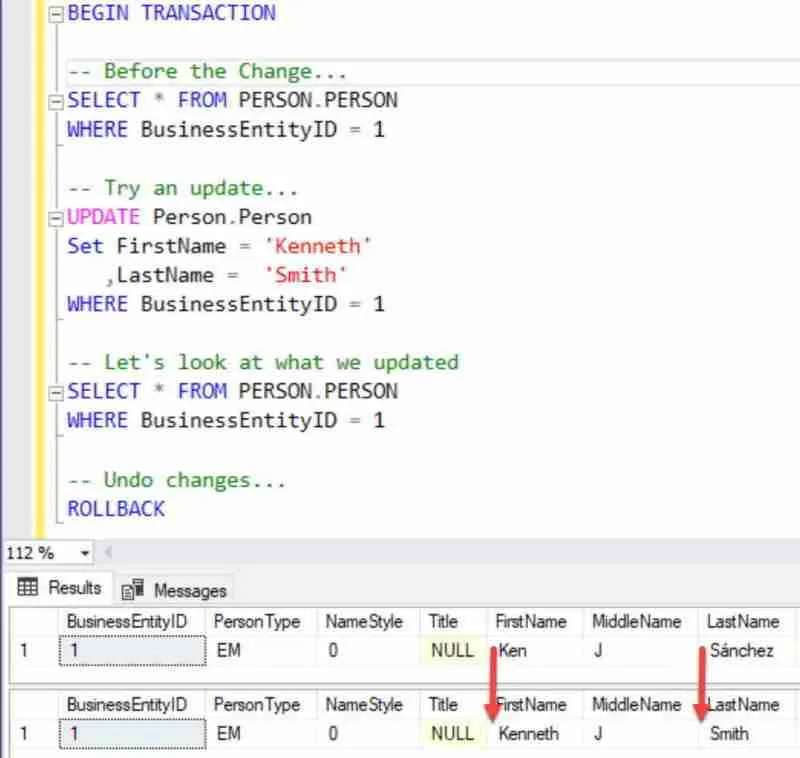
The image below provides a static visual of a similar operation, showing the "before" and "after" states of the data, which makes the change easy to see.
Updating Multiple Rows
The WHERE clause is not limited to matching a single, unique record. If your condition matches multiple rows, the UPDATE statement will apply the change to all of them. This is extremely useful for bulk operations. For instance, you could deactivate all user accounts associated with a particular company:
UPDATE accounts
SET status = 'disabled'
WHERE company_id = 105;
Let's see this in action.
SQL UPDATE Statement |¦| SQL Tutorial |¦| SQL for Beginners
Now, let's observe how a single UPDATE statement can modify a group of records that share a common attribute.
Watch from this section, where the salaries of all agents belonging to the 'MI6' organization are updated at once. This effectively demonstrates using the WHERE clause to target groups of records.
A Critical Security Warning: The Missing WHERE Clause
We've emphasized the importance of the WHERE clause throughout this lesson. Now it's time to understand why. If you execute an UPDATE statement without a WHERE clause, it will not target a specific row or group of rows. Instead, it will apply the change to every single row in the entire table.
From a cybersecurity perspective, this is not just a simple mistake; it's a potential vector for data corruption or a denial-of-service attack. Imagine an application that is vulnerable to SQL injection. An attacker could potentially craft an input that causes the application's UPDATE query to execute without its intended WHERE clause. Consider the impact of this query on a user table:
UPDATE users SET password_hash = '...hacked...' -- (without a WHERE clause)
This would lock every user out of their account. The following reading selection illustrates this danger with a simple, clear example.
SQL UPDATE Statement Explained with Examples
This article starkly illustrates the danger of omitting the WHERE clause. Recognizing this is not just about avoiding coding errors; it's about understanding a potential attack surface.
First, read the section titled "Example without WHERE Clause" to see a demonstration of how an entire column is overwritten. Then, scroll down and focus on the first bullet point under the "Common Mistakes" heading, which explicitly warns about this exact scenario.
Always double- or even triple-check your UPDATE statements to ensure the WHERE clause is present and correct, especially when working on live production databases.
Conclusion
In this lesson, we've added a powerful tool to our DML toolkit: the UPDATE statement. You are now equipped to modify existing data in a controlled and precise manner, a skill essential for managing data in any database.
Key Takeaways:
- The
UPDATEstatement modifies existing data in a table. - The
SETclause specifies which columns to change and their new values. You can update multiple columns at once by separating them with commas. - The
WHEREclause is the most critical part of anUPDATEstatement. It targets the specific row(s) to be modified. - A
WHEREclause can target a single row (e.g., using a primary key) or multiple rows that match a condition. - Omitting the
WHEREclause is extremely dangerous as it causes theUPDATEto apply to every row in the table. This is a common mistake and a potential security risk.
In our next lesson, we will learn how to remove data using the DELETE statement. Afterward, we will dedicate a practical session to demonstrating the destructive—and irreversible—impact of running both UPDATE and DELETE queries without a WHERE clause in a safe, controlled environment.