Welcome to the final lesson of our module on advanced SQL queries. This lesson is where we put everything together to solve a practical problem that you, as a security analyst, might encounter daily. In our previous lesson, we explored derived tables, learning how a subquery in the FROM clause can create a temporary dataset that we can then analyze further. This "prepare then process" approach is fundamental to tackling complex analytical tasks.
Today, we will apply that very technique to a crucial security monitoring task: identifying repeated failed login attempts from specific IP addresses. This is a classic method for detecting potential brute-force or credential-stuffing attacks. By the end of this lesson, you will have constructed a sophisticated query that can distinguish between incidental failed logins and a pattern of sustained, potentially malicious, activity.
The Analyst's Challenge: Finding the Signal in the Noise
System logs are flooded with events. A single failed login is usually just noise—a user mistyping their password. A pattern of repeated failures from the same IP address, however, is a signal worth investigating.
Imagine your database contains a log table with every login attempt, tracking the user, the source IP address, the time of the attempt, and whether it was successful. The raw data might look something like the events shown in a log viewer.
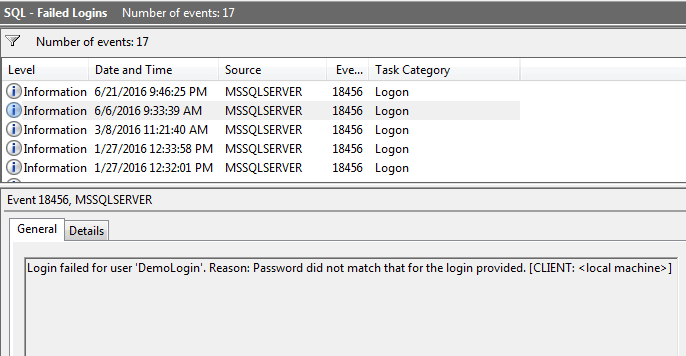
The challenge is to write a query that intelligently identifies suspicious IPs. A naive approach of simply flagging any IP with more than five failures is flawed. Many users behind a corporate or public network share the same public IP address (a concept known as Network Address Translation or NAT). Blocking that IP could inadvertently lock out dozens of legitimate users.
A more robust approach is to count the number of failed login attempts from an IP address since the last successful login from that same IP. An IP with many recent failures and no recent successes is a much stronger candidate for a blocklist.
Building the Detection Query, Step by Step
Let's assume we have a logon table with the following structure, as proposed in a common security scenario:
logon (logref SERIAL, ipaddress CHAR(20), logtime DATETIME, logresult BOOL)
Where logresult is 1 (or TRUE) for success and 0 (or FALSE) for failure.
To solve our problem, we need to handle two distinct cases:
- An IP address that has had successful logins in the past but is now showing a pattern of failures.
- An IP address that has never had a successful login and is only generating failures.
This is a perfect use case for the techniques we've learned: derived tables, joins, aggregation, and unions.
Step 1: Finding the Last Successful Login for Each IP
First, we need to establish a baseline. For every IP address that has ever logged in successfully, we need to find the reference ID (logref) of its most recent successful login. We can do this with a simple aggregation query that will become our derived table.
SELECT
    MAX(logref) AS max_logref,
    ipaddress
FROM
    logon
WHERE
    logresult = TRUE
GROUP BY
    ipaddress
This query gives us a temporary table mapping each "good" IP to its last known successful login event.
Step 2: Counting Failures After the Last Success
Now, we can use the result from Step 1 as a derived table. We JOIN the main logon table back to this derived table on ipaddress. This allows us to compare every login attempt with the last known success from its IP.
We are interested in failed logins (logon.logresult = FALSE) that occurred after the last success (logon.logref > good_logins.max_logref).
SELECT
    logon.ipaddress,
    COUNT(*) AS bad_logins
FROM
    logon
JOIN
    (SELECT MAX(logref) AS max_logref, ipaddress FROM logon WHERE logresult = TRUE GROUP BY ipaddress) AS good_logins
ON
    logon.ipaddress = good_logins.ipaddress
WHERE
    logon.logref > good_logins.max_logref AND logon.logresult = FALSE
GROUP BY
    logon.ipaddress;
This query effectively handles our first case.
Step 3: Finding IPs with Only Failures
Our second case involves attackers who have never successfully logged in. These IPs won't appear in our good_logins derived table, so the JOIN in Step 2 would exclude them. We need a separate query for this.
We can find these IPs by grouping all logins within a certain time frame and using the HAVING clause to select only those groups where the MAX(logresult) is FALSE. This clever trick ensures that every single login attempt in that group was a failure.
SELECT
    ipaddress,
    COUNT(*) AS bad_logins
FROM
    logon
WHERE
    logtime > DATE_SUB(NOW(), INTERVAL 1 DAY) -- Look at the last 24 hours
GROUP BY
    ipaddress
HAVING
    MAX(logresult) = FALSE;
Step 4: Combining the Results with UNION
Finally, we can combine the results of the queries from Step 2 and Step 3 using UNION. This gives us a single, comprehensive list of suspicious IP addresses, covering both scenarios.
The following resource provides a real-world discussion and a complete query that implements this logic.
SQL for false logon lockout from a given IP
This Stack Overflow post directly addresses the problem we are solving. The accepted answer provides an excellent SQL query that combines the logic we've just discussed.
Please read the final, combined query presented in the accepted answer under the Updated heading. It starts with the full query. As you read, identify the different parts we've broken down: The subquery that finds the max_logref for good logins. The JOIN that counts bad logins after a good one. The UNION clause. The second SELECT statement that uses HAVING max(logresult) = false to find IPs with only failures.
From Ad-Hoc Queries to Automated Detections
The query we just built is perfect for an ad-hoc investigation. In a modern Security Operations Center (SOC), however, you would likely implement this logic as an automated detection rule that runs on a schedule.
Security platforms like SIEMs (Security Information and Event Management systems) or data analytics platforms allow analysts to write SQL queries that run periodically against incoming logs. A common workflow is to use a two-tiered approach:
- Create Signals: A simple, first-level query runs frequently (e.g., every minute) to identify individual suspicious events. For example, any login from a country where you have no employees could become a "signal." These signals are stored in a dedicated table.
- Create Alerts: A second, more complex query runs less frequently (e.g., every 15 minutes) against the
signalstable. This query looks for patterns, correlations, or aggregations of signals that indicate a high-confidence attack. For example, it could look for 10 login failure signals from the same IP within 5 minutes.
This approach is powerful because it separates low-confidence events (signals) from high-confidence patterns (alerts), helping analysts focus on what matters most.
The following resource from the security platform RunReveal illustrates this exact workflow.
Security Detections - SQL & Sigma Rules
This documentation shows how SQL is used in the real world to build automated security detections. It provides a concrete example that is highly relevant to our task.
First, briefly review the query in the section Example Use Case. Then, focus on the Complete Example and specifically study Step 3. Notice how this query aggregates results from a signals table, grouping by srcIP and using HAVING signal_count >= 5 to trigger an alert. This is the same core logic we used, but applied in a modern, automated detection context.
The underlying principle is the same in both the Stack Overflow example and the RunReveal documentation: you use SQL's ability to aggregate and filter data to find malicious patterns. Whether you do it in a single complex query with derived tables or in a two-stage process with signals and alerts depends on the tools at your disposal.
Conclusion
This lesson served as a practical capstone for our module on advanced querying. You have successfully leveraged subqueries, derived tables, aggregation, and UNION to construct a query that solves a genuine security problem. This exercise bridges the gap between theoretical SQL knowledge and its practical application in cybersecurity.
Key Takeaways:
- Detecting security threats like brute-force attacks often involves writing SQL queries to find patterns in log data.
- A sophisticated detection logic, such as counting failed logins since the last success, can be implemented by combining derived tables,
JOINs, and aggregation functions. - The
UNIONoperator is useful for combining results from different logical cases, such as IPs with a mixed history and those with only a history of failures. - The SQL skills you are learning are directly applicable in modern security platforms for creating automated detection rules and alerts.
We have now concluded our deep dive into querying and analyzing data. You are equipped to retrieve and dissect information from complex database structures. In our next module, we will change gears and begin exploring Data Manipulation Language (DML), starting with how to add new data to a database using INSERT statements.