Welcome to the final lesson in our module on advanced SQL queries. In the previous lessons, we explored how subqueries can be used in the WHERE and SELECT clauses, with a special focus on correlated subqueries that perform row-by-row computations. Today, we'll complete our tour of subquery locations by examining their role in the FROM clause.
Your work as a security analyst often involves multi-step data investigation. For instance, you might first need to aggregate raw log data to find suspicious activity patterns, and then query those patterns to identify specific actors. Using a subquery in the FROM clause allows you to perform precisely this kind of layered analysis within a single, coherent SQL statement.
This lesson focuses on creating and using derived tables. You will learn how to embed a query within the FROM clause to generate a temporary, virtual table on-the-fly, which you can then query, filter, and even join as if it were a permanent table in your database. This technique is a cornerstone of writing clean, logical, and powerful SQL for complex data analysis.
What is a Derived Table?
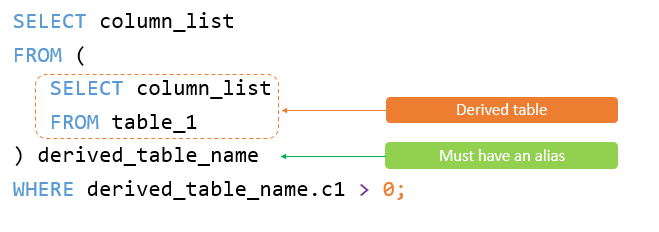
A derived table is the result set of a subquery that is used in the FROM clause of an outer query. Think of it as an intermediate table that you create for a single query's lifetime. It doesn't permanently exist in the database schema, but the outer query can interact with it as if it did.
There are two fundamental rules for creating a derived table:
- The subquery must be enclosed in parentheses
(). - The derived table must be given an alias using the
ASkeyword (or a space followed by the alias).
This structure allows you to build a query in logical steps: first, prepare a dataset with the inner query, and then, process that prepared dataset with the outer query.
This video provides an excellent introduction to why subqueries are used to break down complex tasks and how they fit into different parts of a query.
SQL Subquery (Visually Explained) | Complete Guide with Correlated Subquery | #SQL Course 27
This video from the "Data with Baraa" channel introduces the concept of subqueries and their role in structuring complex SQL logic.
Please watch the overview from the introduction. Pay attention to the idea of breaking a multi-step task into smaller query sections, where each subquery prepares data for the next step. This is the core philosophy behind using derived tables.
Creating and Querying a Derived Table
Let's put this into practice. Imagine a scenario where you need to analyze event logs. A common task is to find events that deviate from a baseline. For example, let's find all products whose price is higher than the average price across all products.
This is a two-step problem:
- Step 1: Calculate the average price of all products.
- Step 2: Compare each product's price to that average.
A derived table is a perfect tool for this. The inner query can prepare a table that includes the price and the calculated average, and the outer query can then easily filter it.
This video demonstrates exactly how to solve this problem using a derived table.
SQL Subquery (Visually Explained) | Complete Guide with Correlated Subquery | #SQL Course 27
This segment walks through a complete example of creating and using a derived table to solve a multi-step problem.
Watch the section from using a subquery in the FROM clause. Notice how the presenter first builds the inner query using a window function to get the average price, and then wraps it in an outer query to perform the final filtering. This illustrates the "prepare then process" workflow.
The execution flow for this type of query is distinct from the correlated subqueries we studied previously.
- The database fully executes the inner query (the subquery in the
FROMclause) one time. - The result of this inner query is stored in memory as a temporary table.
- The outer query then executes against this temporary table, not the original tables from the database.
- Once the entire query is complete, the temporary table is discarded.
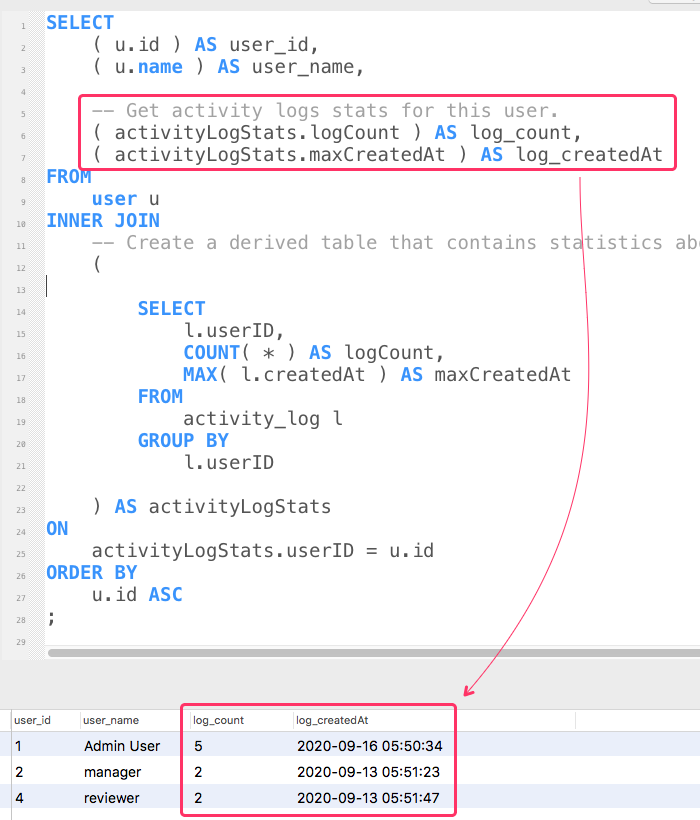
The following image provides another example, showing how an INNER JOIN can be used with a derived table that calculates statistics. The arrows clearly illustrate the flow from the inner subquery to the outer query's SELECT list.
Combining Multiple Derived Tables with JOINs
Because a derived table behaves like a regular table, you can use it in JOIN clauses. You can even join a derived table to another derived table. This technique is incredibly powerful for merging multiple, pre-processed datasets.
For instance, in a security context, you might create one derived table to summarize failed login attempts by IP address and another to summarize successful logins by the same IPs. You could then LEFT JOIN them to find IPs that have a high number of failures but no successes—a strong indicator of a brute-force attack.
This article provides clear, code-driven examples of how to join derived tables.
SQL Server Derived Table Example
This article from MSSQLTips demonstrates the syntax for creating basic derived tables and then moves on to the more advanced technique of joining them.
First, review the section Creating a Basic Derived Table to solidify the fundamental syntax. Then, carefully study the section Joining Derived Tables. Pay close attention to how two separate subqueries, each given an alias (cr and crc), are joined together using an INNER JOIN just as if they were permanent tables.
This ability to pre-aggregate or pre-filter data in separate subqueries and then combine them is essential for tackling complex analytical challenges without writing convoluted, hard-to-read queries.
Conclusion
You have now learned about the three primary locations for subqueries: the SELECT list, the WHERE clause, and the FROM clause. By mastering derived tables, you've gained a powerful tool for structuring complex queries logically. You can now break down a problem into sequential steps, with each step represented by a subquery that prepares data for the next stage of analysis.
Key Takeaways:
- A subquery in the
FROMclause creates a derived table, a temporary result set for the duration of the query. - Derived tables must be enclosed in parentheses and given an alias.
- The database executes the subquery first, materializes its results, and then the outer query runs against this temporary data. This is different from a correlated subquery, which runs for each row of the outer query.
- Derived tables can be treated like any other table, meaning you can filter them with
WHERE,GROUP BY, andJOINthem to other tables or even other derived tables.
In our next lesson, you will apply what you've learned about subqueries to a practical security analysis task: identifying repeated failed login attempts from specific IP addresses. This exercise will require you to use the derived table technique we covered today to aggregate log data before you can perform your final analysis.