Welcome to our next lesson on advanced SQL queries. In our previous session, we focused on EXISTS and NOT EXISTS, and in doing so, we encountered a powerful concept: the correlated subquery. You learned how these subqueries depend on the outer query to perform row-by-row existence checks.
Today, we will take a deeper dive into this concept. Our goal is to master the ability to write correlated subqueries in various contexts, not just with EXISTS. We will explore how to use them in the WHERE clause to filter data based on dynamic, per-row calculations, and in the SELECT list to compute new columns on the fly. This skill is essential for asking complex questions of your data, a critical capability in security analysis.
The Essence of Correlation: A Row-by-Row Loop
Let's begin by reinforcing our understanding of how correlated subqueries work. Unlike a standard subquery that runs once and provides a static value or list to the main query, a correlated subquery is executed repeatedly—once for every single row processed by the outer query.
Think of it as a nested loop in a programming script:
- The outer query fetches a row.
- It passes one or more values from that row to the inner subquery.
- The inner subquery executes using those specific values.
- The result of the inner subquery is used to evaluate the condition for the outer query's current row.
- The process repeats for the next row in the outer query.
This video provides an excellent visual walkthrough of this execution flow.
SQL Subquery (Visually Explained) | Complete Guide with Correlated Subquery | #SQL Course 27
This clip from the "Data with Baraa" channel visualizes the iterative, row-by-row processing that defines a correlated subquery.
Please watch the section from the explanation of correlated subqueries. Pay close attention to how the main query passes information from each of its rows to the subquery, which then runs again with that new information.
Now that we've refreshed our memory on the mechanism, let's put it into practice in new ways.
Correlated Subqueries in the WHERE Clause
One of the most common uses for a correlated subquery is to filter rows based on a condition that compares a row's value to an aggregate calculated only for that row's group.
Imagine a security scenario: you have a table of malware detections (malware_events) and you want to find "high-signal" events, defined as any detection whose severity score is greater than the average severity score for that specific type of malware. A global average wouldn't be useful; you need a per-malware-type average.
Let's look at a similar, classic example: finding employees who earn more than the average salary within their own department.
Subquery in SQL | Correlated Subquery + Complete SQL Subqueries Tutorial
The "techTFQ" channel provides a clear, step-by-step example of writing a correlated subquery in a WHERE clause. This demonstrates how to solve the department salary problem.
Watch the segment from the introduction to correlated subqueries. The key part is understanding how the outer query's department is used to filter the subquery's AVG() calculation for each employee record.
The logic of this query can be visualized as follows:
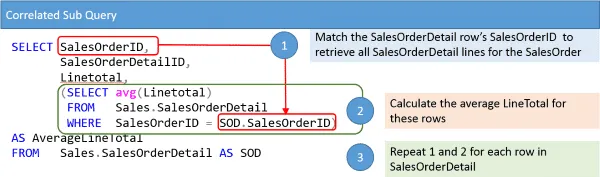
The SQL for such a query, using aliases to distinguish the outer and inner queries, looks like this:
SELECT
  employee_name,
  salary,
  department_name
FROM
  employees e1
WHERE
  salary > (
    SELECT AVG(salary)
    FROM employees e2
    WHERE e2.department_name = e1.department_name
  );
Here, for each row e1 that the outer query processes, the inner query calculates the average salary specifically for the department found in e1.department_name. This is the core of correlation: the inner query is dependent on the outer query's current row.
Correlated Subqueries in the SELECT List
You can also place a correlated subquery directly in the SELECT list. When used here, it must be a scalar subquery, meaning it must return exactly one row and one column for each row processed by the outer query.
This is extremely useful for adding calculated columns to your results. For example, as a security analyst, you might want to retrieve a list of all users and, for each user, display the timestamp of their last failed login.
Let's see an example of this in action, where we calculate the total number of orders for each customer.
SQL Subquery (Visually Explained) | Complete Guide with Correlated Subquery | #SQL Course 27
This section of the "Data with Baraa" video demonstrates using a correlated subquery in the SELECT clause to compute a value for each row.
Watch the example from calculating total orders per customer. Notice how the subquery COUNT(*) is filtered by the customer_id from the outer query's current row, ensuring the count is specific to that customer.
Applying this pattern to our security example:
SELECT
  u.username,
  u.email,
  (
    SELECT MAX(attempt_time)
    FROM login_attempts la
    WHERE la.user_id = u.id AND la.success = 0
  ) AS last_failed_login
FROM
  users u;
This query iterates through every user in the users table. For each user, it runs the subquery to find the most recent (MAX) timestamp of a failed login (success = 0) associated with that specific user.id. The result is a clean report showing each user alongside the timestamp of their last failure, or NULL if they've never had one.
EXISTS: A Correlated Subquery for Boolean Checks
As we saw in the previous lesson, the EXISTS operator is a natural fit for correlated subqueries. It doesn't care what the subquery returns, only if it returns anything. This makes it a highly efficient way to check for the existence of related records.
For example, to find all employees who are managers (i.e., employees whose employee_id appears in the manager_id column of another record), you would use EXISTS.
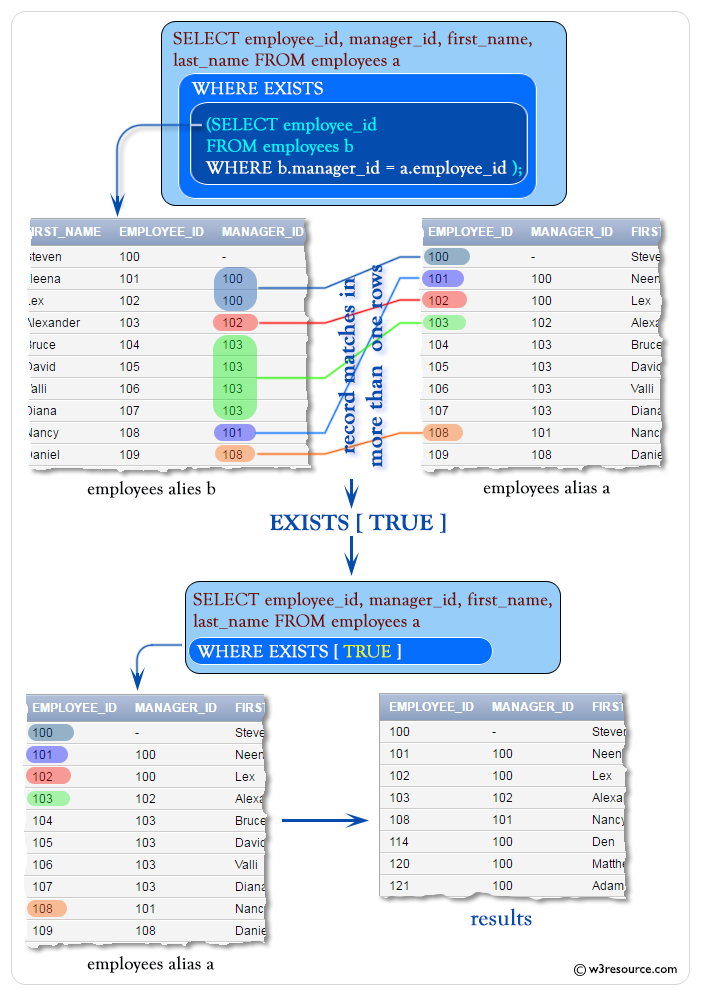
Performance and Alternatives
A crucial point to understand is that the row-by-row execution of correlated subqueries can be inefficient, especially on large tables. If the outer query has 1 million rows, the inner query will be executed 1 million times.
For this reason, database optimizers are very good at rewriting queries, and in many cases, a JOIN can achieve the same result with better performance. However, there are situations where a correlated subquery is more intuitive or even the only practical way to write the query. For our purposes, understanding the logic is paramount, as it mirrors the kind of iterative thinking you'll use when manually probing a database during a security assessment.
This brief reading compares correlated and non-correlated subqueries and highlights the performance considerations.
This article from GeeksForGeeks provides a concise comparison of the two main types of subqueries.
Please read the table in the section Nested vs. Correlated Subqueries. This summarizes the key differences in execution, dependency, and performance. Also, review the "Performance Considerations" that follow.
Conclusion
In this lesson, you've generalized your knowledge of correlated subqueries beyond the EXISTS operator. You are now equipped to write these powerful queries to perform complex, row-specific filtering and calculations.
Key Takeaways:
- A correlated subquery depends on the outer query and is executed once for each row processed by the outer query.
- They can be used in the
WHEREclause to filter data based on a per-row computed value (e.g., comparing a salary to a department's average salary). - They can be used in the
SELECTlist to create new, calculated columns (e.g., counting related records for each row). - While powerful and intuitive, they can have performance implications on large datasets, and
JOINs are often a more performant alternative. Understanding the logic, however, is a vital skill.
In our next lesson, we will cover the final type of subquery: those used in the FROM clause. These allow you to create what are known as derived tables—temporary, on-the-fly tables that you can then join to or query further, opening up even more advanced data analysis possibilities.