Welcome to our next lesson on advanced queries. In our previous session, you learned how to use the IN operator with a subquery to filter data against a dynamically generated list of values. This is an effective way to check for set membership. Now, we will explore a different but related approach using the EXISTS operator, which shifts the focus from checking for a specific value in a list to checking for the existence of a related row in another table.
This lesson will introduce you to EXISTS and NOT EXISTS, which are fundamental tools for writing sophisticated, efficient queries. A key concept we'll explore is the correlated subquery, where the inner query depends on the outer query. Mastering this will allow you to solve complex data correlation problems, such as finding users who have never performed a specific action or identifying assets that are missing required records.
Correlated Subqueries and the EXISTS Operator
Unlike the subqueries we used with IN, which could be run independently, the subqueries used with EXISTS are typically correlated. A correlated subquery is executed once for each row processed by the outer query, using values from that outer row to run.
The EXISTS operator is a boolean operator that simply checks if the subquery returns any rows.
- If the subquery returns one or more rows,
EXISTSevaluates toTRUE. - If the subquery returns zero rows,
EXISTSevaluates toFALSE.
Let's watch a video that explains the difference between non-correlated and correlated subqueries and introduces EXISTS.
SQL Subquery (Visually Explained) | Complete Guide with Correlated Subquery | #SQL Course 27
This segment from the "Data with Baraa" channel provides a clear visual explanation of how correlated subqueries work, contrasting them with the non-correlated subqueries you've seen before. It then introduces the EXISTS operator.
First, watch the explanation of correlated vs. non-correlated subqueries. Focus on the visual of the main query passing a row to the subquery for evaluation. Then, watch the brief introduction to the EXISTS operator to understand its purpose.
The key takeaway is that a correlated subquery creates a row-by-row evaluation loop. The main query fetches a row, passes a value from that row to the subquery, and then the subquery runs to check for a condition related to that specific row.
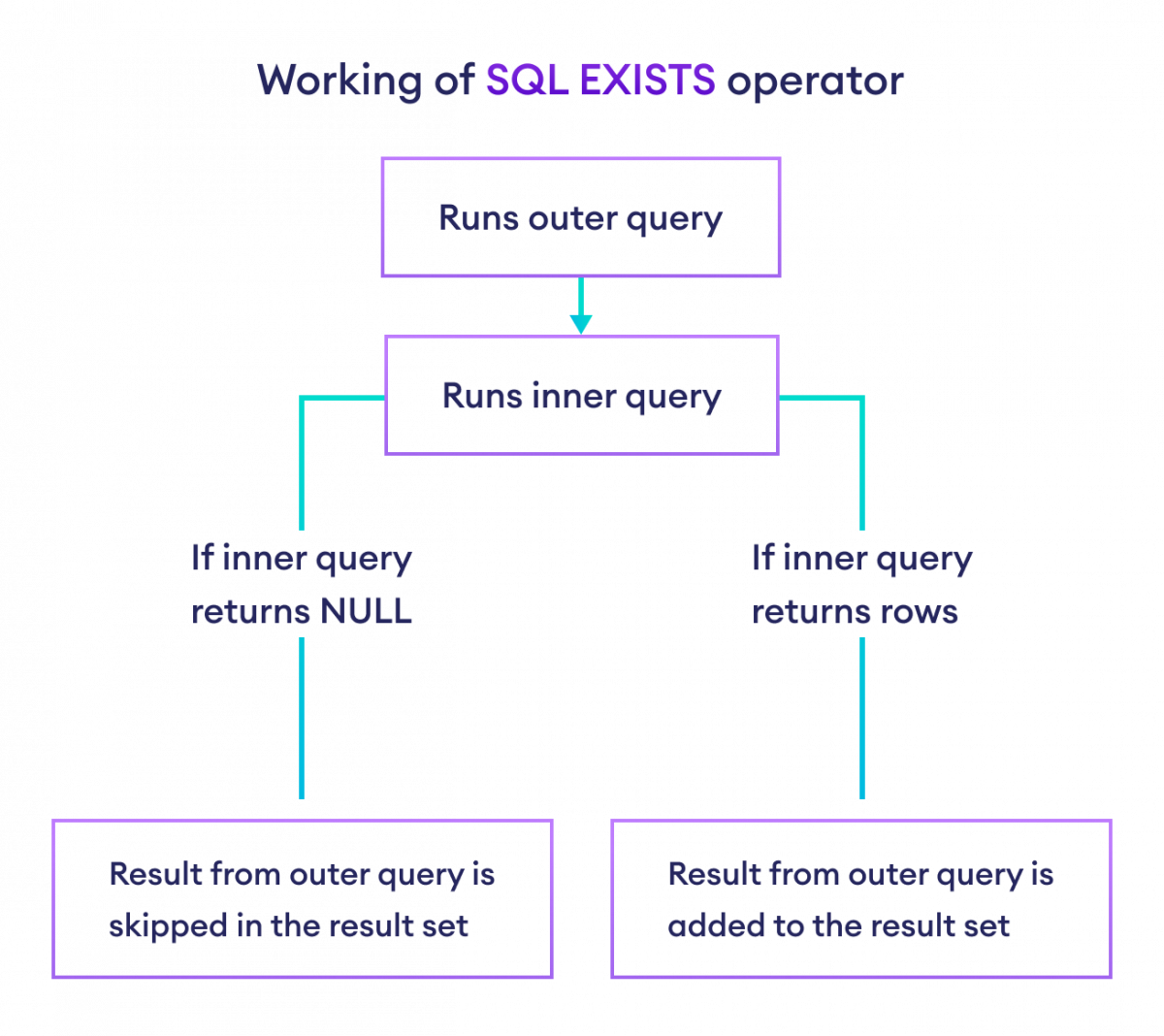
Syntax and Execution Flow
The syntax for EXISTS is straightforward. Note the convention of using SELECT 1. Since EXISTS only cares about the existence of rows, not their content, there is no need to return actual data. SELECT 1 is a highly efficient way to signal that a row was found.
Let's continue with the same video to see the syntax and a practical example.
SQL Subquery (Visually Explained) | Complete Guide with Correlated Subquery | #SQL Course 27
This part of the video details the syntax for using EXISTS and walks through a complete example of finding orders placed by customers from Germany.
Watch the section explaining the syntax of EXISTS, paying attention to how the inner and outer queries are linked via the WHERE clause. Then, follow the practical example from filtering orders by country to see it in action.
The general structure is:
SELECT
  column1, column2
FROM
  table1 t1
WHERE
  EXISTS (
    SELECT 1
    FROM table2 t2
    WHERE t2.linking_column = t1.linking_column
    AND t2.some_condition = 'some_value'
  );
In this structure, for every row in table1, the database runs the subquery, substituting the t1.linking_column value for that specific row. If the subquery finds a match in table2, EXISTS returns TRUE, and the row from table1 is included in the results.
Using NOT EXISTS to Find What's Missing
The real power of this operator, especially in analysis, often comes from its negation: NOT EXISTS. This allows you to find records in one table that have no corresponding record in another. For example, you can find users who have never logged in, or devices that have never been patched.
NOT EXISTS simply inverts the logic: it returns TRUE if the subquery returns zero rows.
SQL Subquery (Visually Explained) | Complete Guide with Correlated Subquery | #SQL Course 27
This short clip demonstrates how to use NOT EXISTS by slightly modifying the previous query to find orders made by customers from countries other than Germany.
Watch the explanation of the NOT EXISTS operator.
NOT EXISTS vs. NOT IN: A Critical Distinction
At first glance, NOT EXISTS might seem to do the same job as NOT IN, which you learned in the last lesson. While EXISTS and IN are often interchangeable, NOT EXISTS and NOT IN are not, and the difference is critical.
The problem with NOT IN arises when the subquery's result set contains a NULL value. When NOT IN compares a value against a list containing NULL, the result is UNKNOWN, not TRUE or FALSE. Because the overall condition must evaluate to TRUE, any NULL in the subquery's list can cause the NOT IN clause to return no rows at all, even when you expect it to.
NOT EXISTS, however, does not perform direct value comparisons in the same way. It checks for the existence of rows based on the join condition in its WHERE clause. A comparison like t2.id = t1.id will simply be false if one of the values is NULL, so the subquery won't return a row for that NULL comparison, and the logic proceeds as expected.
For this reason, NOT EXISTS is generally safer and more reliable than NOT IN.
This video from Database by Doug provides an excellent summary of this exact issue.
IN versus EXISTS - are they the same?
This video directly addresses the semantic differences between IN/EXISTS and NOT IN/NOT EXISTS, focusing on the problematic behavior of NOT IN when NULL values are present.
Watch the section that shows how NOT IN and NOT EXISTS are not equivalent. Then, pay close attention to the explanation of why NOT IN fails with NULLs due to three-valued logic. Finally, understand how NOT EXISTS handles NULLs more robustly.
To solidify this concept, let's turn to a detailed text explanation. The Stack Overflow community has a classic, highly-regarded discussion on this topic.
This discussion provides deep insight into the practical differences between NOT IN and NOT EXISTS, particularly concerning performance and NULL handling.
First, read Martin Smith's answer, which is widely considered the definitive explanation. Focus on the section beginning here. Don't worry about understanding the execution plan diagrams in full, but notice how the plan changes when NULLs are possible. Next, read buckley's answer, which provides a very clear logical breakdown. Start from this explanation to see how a single NULL can invalidate the entire NOT IN condition.
Security Analysis with EXISTS and NOT EXISTS
Let's apply this to a security scenario. Imagine you have a users table and the log_in_attempts table. You are tasked with identifying all active users who have never had a failed login attempt, perhaps to flag them for a security awareness review (as this might indicate an account that is either brand new or has never been targeted).
- Outer query: Selects users from the
userstable. - Inner query: For each user, checks if there is any record in
log_in_attemptswithsuccess = 0.
The NOT EXISTS operator is perfect for this:
SELECT
  username,
  last_login_date
FROM
  users u
WHERE
  NOT EXISTS (
    SELECT 1
    FROM log_in_attempts l
    WHERE l.user_id = u.id AND l.success = 0
  );
This query efficiently finds every user for whom the subquery "find a failed login" returns zero rows. Using NOT IN here would be risky; if the log_in_attempts table could have NULL values in the user_id column for some reason (e.g., corrupted data), the NOT IN query could produce incorrect results.
Conclusion
In this lesson, you have added the powerful EXISTS and NOT EXISTS operators to your SQL toolkit. You now understand how they leverage correlated subqueries to perform row-by-row existence checks, a fundamentally different approach from the set-based checks of IN.
Key Takeaways:
EXISTSchecks if a subquery returns any rows, making it ideal for verifying the presence of related data.EXISTSandNOT EXISTSare almost always used with correlated subqueries, which are evaluated for each row of the outer query.- The
SELECT 1convention is used because the content of the subquery's result is irrelevant, only its existence matters. NOT EXISTSis a safer and more reliable choice thanNOT INfor finding records without corresponding data, as it correctly handlesNULLvalues whereNOT INcan fail.
In our next lesson, we'll look at our final type of subquery: one used in the FROM clause. This will allow you to create temporary, derived tables on the fly, which you can then join or query just like a regular table.