In our last session, we explored how scalar subqueries can provide a single, dynamic value to a WHERE clause, allowing you to filter data against a calculated benchmark like an average. This is powerful, but what if your condition isn't a single value, but a whole list of them? For instance, how would you find all login attempts from a list of known malicious IP addresses?
This lesson builds directly on that foundation by introducing subqueries that return a list of values. You will learn to use the IN operator to filter records from an outer query against a dynamically generated set of values from an inner query. This technique is fundamental for correlating data across tables without explicit JOINs, a common requirement in security analysis when checking against watchlists or identifying users who belong to a specific group defined by their activity.
From a Single Value to a List of Values
In the previous lesson, you used a subquery with comparison operators like > or =. These operators require a single, scalar value on both sides of the comparison. The IN operator, which you've previously used with static lists (e.g., WHERE status IN ('FAIL', 'SUCCESS')), is designed to check if a value exists within a set. When you combine IN with a subquery, you unlock the ability to generate that set dynamically.
The core idea is simple:
- The inner query runs first, returning a single column with multiple rows (a list of values).
- The outer query then processes its rows, and for each row, the
WHEREclause checks if its value isINthe list returned by the inner query.
The following video provides an excellent visual explanation of this process.
SQL Subquery (Visually Explained) | Complete Guide with Correlated Subquery | #SQL Course 27
This clip from Data with Baraa clearly demonstrates how to use a subquery with the IN operator. It walks through a practical example of filtering orders based on customers from a specific country, breaking down the execution step-by-step.
Watch the segment from the in-depth explanation. Pay close attention to how the inner query first generates a list of customer_ids, and the outer query then uses this list to filter the orders table. The visual breakdown at the end is particularly helpful for understanding the execution flow.
As the video illustrates, the subquery acts as a dynamic list provider for the IN clause. This is a much more robust and scalable approach than hardcoding a list of values.
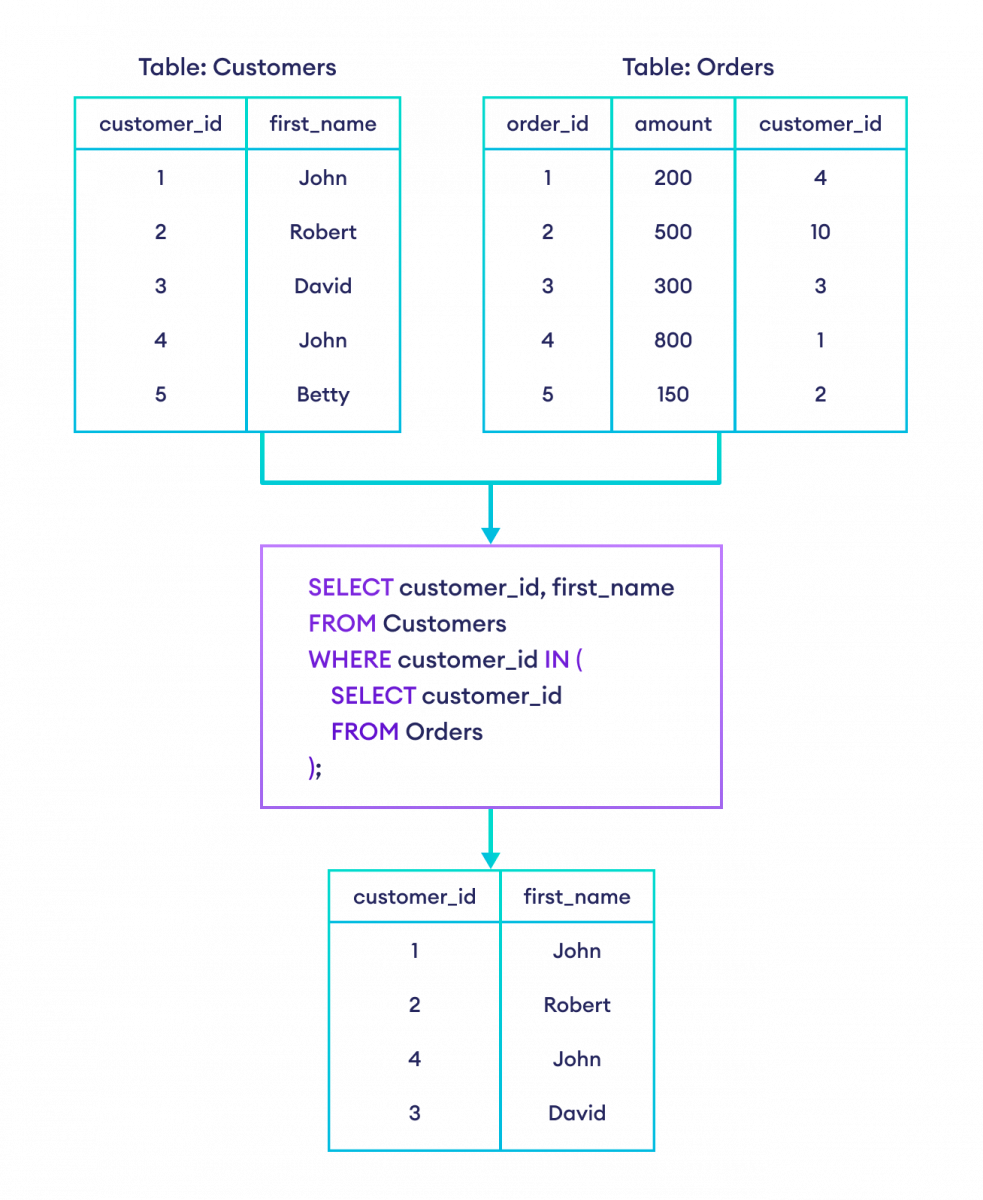
The image below shows another common use case: finding all customers who have placed at least one order. The inner query gets all customer_ids from the Orders table, and the outer query selects the details of those customers from the Customers table.
Using IN and NOT IN for Filtering
The subquery used with IN must return a single column. This is the most common type of multi-row subquery. Its counterpart, NOT IN, works identically but filters for rows where the value is not present in the list generated by the subquery. This is extremely useful for finding entities that don't have a certain attribute, such as users who have never successfully logged in.
Let's watch a short video that clarifies this type of subquery and demonstrates the use of NOT IN.
Subquery in SQL | Correlated Subquery + Complete SQL Subqueries Tutorial
This video from techTFQ, which we've used before, provides a concise example of a single-column, multiple-row subquery. It uses NOT IN to solve a practical problem: finding departments that have no employees.
Please watch from the section on single-column subqueries. The logic of using NOT IN to exclude a list of items is a key takeaway here.
Application in a Security Context
This technique is directly applicable to many cybersecurity analysis tasks. Imagine you are working with a log database. The log_in_attempts table, shown below, tracks every attempt to access your system.

Let's explore two scenarios using this data.
Scenario 1: Correlating with a Threat Intelligence Feed
You maintain a separate table called malicious_ips which is populated daily from a threat intelligence feed. You need to find all login attempts that originated from any of these known malicious IPs.
Your malicious_ips table might look like this:
| ip_address | reason |
|---|---|
| 192.168.1.5 | botnet_activity |
| 192.168.1.10 | phishing_source |
You can find all suspicious login attempts with a single query:
SELECT
  user_id,
  attempt_time,
  ip_address
FROM
  log_in_attempts
WHERE
  ip_address IN (SELECT ip_address FROM malicious_ips);
Here, the subquery (SELECT ip_address FROM malicious_ips) creates a dynamic list of IPs to check against. This is far more efficient and maintainable than manually updating a static list in your query.
Scenario 2: Identifying Suspicious User Behavior
As an analyst, you might hypothesize that an attacker is probing your system by trying to log in as multiple different users from the same IP address. You want to find any IP addresses that have been used to attempt logging in as more than three distinct users.
You can solve this with a subquery:
- Inner Query: First, find the IP addresses that meet the condition. You'll need to group by
ip_addressand useHAVINGto count the distinct users. - Outer Query: Then, select all login attempts that came from those IPs.
The complete query would be:
SELECT
  *
FROM
  log_in_attempts
WHERE
  ip_address IN (
    SELECT
      ip_address
    FROM
      log_in_attempts
    GROUP BY
      ip_address
    HAVING
      COUNT(DISTINCT user_id) > 3
  );
This query effectively combines aggregation (from Module 2) with the subquery concept to perform a sophisticated behavioral analysis.
Practice Exercises
To solidify your understanding, let's work through a couple of exercises.
SQL Subquery Practice: 15 Exercises with Solutions
This article from learnsql.com provides several well-explained practice problems. We'll focus on two that directly use IN and NOT IN.
Read and try to solve Exercise 1: Select Orchestras with a City of Origin. Review the provided solution and its explanation to see how IN is used to match cities. Next, read and try Exercise 2: Select Members that Belong to High-Rated Orchestras. This demonstrates the use of NOT IN to exclude members from a specific group of orchestras.
Conclusion
You have now extended your subquery skills from single scalar values to dynamic lists. This allows you to perform powerful filtering operations based on set membership, which is essential for cross-referencing data and identifying entities that meet complex, data-driven criteria.
Key Takeaways:
- A subquery can return a single column with multiple rows, creating a list of values.
- The
INoperator checks if a value from the outer query exists within the list generated by the inner subquery. - The
NOT INoperator filters for values that are absent from the subquery's list. - This technique is invaluable for checking against watchlists (e.g., malicious IPs, banned users) and segmenting data based on behavioral attributes.
In our next lesson, we will explore another way to achieve similar results using EXISTS and NOT EXISTS. While IN checks for membership in a list of values, EXISTS checks for the presence of any related rows. This subtle difference can have significant performance implications and will introduce you to the important concept of correlated subqueries.