Welcome to the first lesson of our module on advanced queries. In our previous module, we focused on using JOINs to correlate data from different log tables, stitching together a narrative of user activity. This is a powerful technique, but it relies on known relationships between tables. What happens when you need to filter your data based on a condition that isn't a fixed value, but one that must be calculated from the data itself?
This lesson introduces subqueries—queries nested inside other queries. They are a fundamental tool for performing more dynamic and complex analysis. Specifically, we will focus on the scalar subquery. You will learn how to write a query that returns a single, computed value and use it within a WHERE clause to filter your results. This will enable you to answer questions like, "Which actions were significantly different from the average?"—a key question in anomaly detection.
The Problem with Static Values
Imagine you're investigating a database of financial transactions for potential fraud. You want to flag any transaction whose value is unusually high. But what is "unusually high"? A fixed value like $10,000 might be arbitrary. A more robust analytical approach would be to define "unusually high" as "greater than the average transaction amount."
You could do this in two steps:
- First, calculate the average:
SELECT AVG(purchase_amount) FROM transactions; -- Let's say this returns 150.75 - Then, use that value in a second query:
SELECT * FROM transactions WHERE purchase_amount > 150.75;
This works, but it's inefficient and static. If new transactions are added, the average will change, and you would have to run the first query again to update the hardcoded value in the second. A subquery solves this by making the process dynamic.
Introducing the Scalar Subquery
A subquery, or inner query, is a SELECT statement nested inside another statement. A scalar subquery is a specific type of subquery that returns exactly one row and one column—a single, or "scalar," value. Because it returns a single value, you can use it with comparison operators like >, <, or =.
Let's see how to solve our previous problem in a single, dynamic query:
SELECT * FROM transactions
WHERE purchase_amount > (SELECT AVG(purchase_amount) FROM transactions);
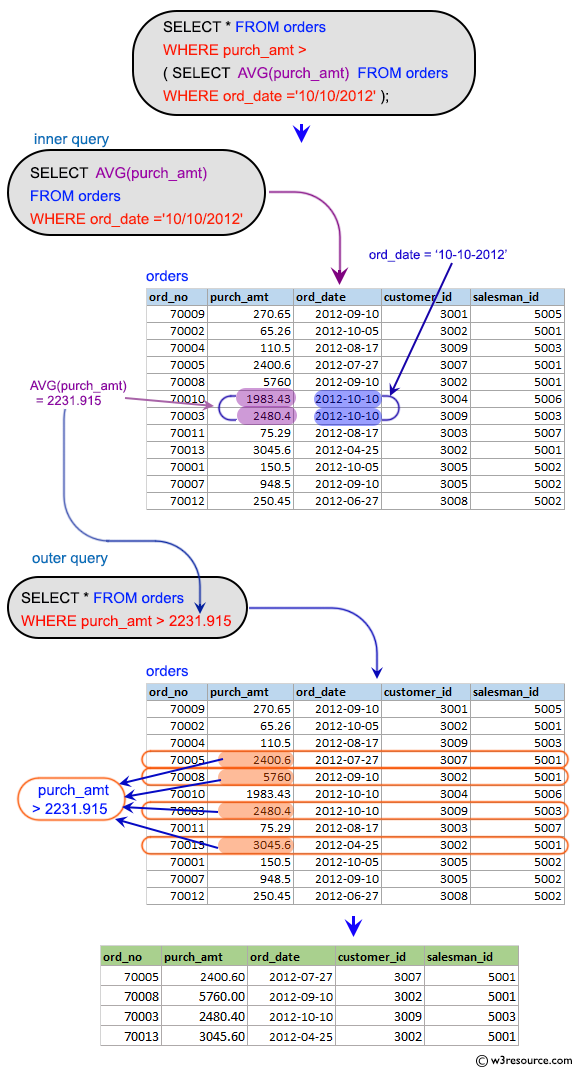
Here, the database first executes the inner query (SELECT AVG(purchase_amount) FROM transactions). It computes the average and returns a single value. The outer query then uses this dynamically generated value to filter the transactions table.
The following video provides an excellent, practical walkthrough of this exact concept.
Subquery in SQL | Correlated Subquery + Complete SQL Subqueries Tutorial
This video from techTFQ introduces subqueries by solving the problem of finding employees with salaries greater than the average. It clearly explains the logic and the execution flow.
Watch the segment from the main example. Pay close attention to how the query is built by replacing a hardcoded value with a subquery. The instructor also explains how the database engine processes this, which is a key concept: the inner query is executed first, and its result is used by the outer query. Then, watch the brief follow-up from defining a scalar subquery for the formal definition.
The video explains that the subquery is executed once, its result is held, and then the outer query is executed using that result for comparison against every row.
The diagram below provides a great visual breakdown of this process, showing how the inner query first runs against the orders table to produce a single value, which is then used by the outer query to filter the same table.
Syntax and Execution Order
To solidify your understanding of the structure and execution, the following guide from Datacamp provides a concise reference.
SQL Subquery: A Comprehensive Guide
This article formally defines the different types of subqueries and their execution order. We will focus on the parts relevant to the scalar subquery.
First, read the definition of Scalar Subqueries. Notice the example provided is exactly the type of problem we're solving. Next, look at the code example immediately following that section under the example query. Finally, read the sections on Syntax and structure and Non-correlated subqueries. The key takeaway here is that a non-correlated subquery is independent and executes first, which is precisely how our AVG() example works.
Application in a Security Context
This technique is directly applicable to security analysis. Consider a scenario where you are analyzing logs from a system to find anomalous activity.
Scenario: You have a log table access_log with columns user_id, timestamp, and data_transferred_kb. You are looking for potential data exfiltration events, which you hypothesize might involve single transfers that are significantly larger than the average.
Task: Write a query to find all log entries where the data_transferred_kb is greater than the overall average amount of data transferred in a single entry.
Your query would look like this:
SELECT
  user_id,
  timestamp,
  data_transferred_kb
FROM
  access_log
WHERE
  data_transferred_kb > (SELECT AVG(data_transferred_kb) FROM access_log);
This single query allows you to dynamically identify outliers based on the current state of the entire log dataset, forming a simple but effective anomaly detection rule.
Another common use case is filtering based on a specific event. For example, to find all failed login attempts that occurred after the most recent successful login for a specific user:
SELECT *
FROM login_attempts
WHERE
  user_id = 'some_user' AND
  status = 'FAIL' AND
  attempt_time > (
    SELECT MAX(attempt_time)
    FROM login_attempts
    WHERE user_id = 'some_user' AND status = 'SUCCESS'
  );
In this query, the scalar subquery finds the timestamp of the last successful login for 'some_user', and the outer query uses that timestamp to find all subsequent failures by that same user.
Conclusion
In this lesson, you have learned how to use scalar subqueries to make your filtering conditions dynamic. This is a significant step up from using static values in your WHERE clause and is a cornerstone of writing advanced analytical queries.
Key Takeaways:
- A subquery is a
SELECTquery nested inside another query. - A scalar subquery is a subquery that returns a single value (one row, one column).
- Scalar subqueries can be used with comparison operators (
=,>,<) in aWHEREclause to filter data against a dynamically calculated value. - For non-correlated subqueries, the inner query is executed once, and its result is then used by the outer query to filter its rows.
In the next lesson, we'll expand on this concept. Instead of a subquery that returns a single value, we'll explore subqueries that return a list of values. This will allow you to use the IN operator to check if a value from your outer query exists in a set of values generated by your inner query, unlocking even more powerful filtering capabilities for your security analysis.