Welcome to the final lesson in our module on combining data. So far, you've learned the mechanics of INNER JOIN for finding matching data, LEFT JOIN for including all data from one table, and UNION for stacking results. Now, we'll put these tools to work on a task that is fundamental to your role as a security analyst: log correlation.
In this lesson, you will practice using JOINs to connect the dots between disparate log sources. We will simulate a common investigative scenario where you need to piece together user activity by linking information from user accounts tables, login logs, and resource access logs. This is where SQL transitions from a database language to a powerful forensics tool.
By the end of this lesson, you will have applied your knowledge of JOINs to build queries that can reconstruct a user's actions, a crucial skill for incident response, threat hunting, and compliance auditing.
The Security Analyst's Challenge: Disparate Data
Imagine you are investigating a potential account compromise. You have several sources of data, but none of them tells the whole story on its own.
- A
userstable contains user details likeUserID,FullName, andEmail. - A
login_logtable records every login attempt, showing theUserID,Timestamp,IP_Address, and whether the attempt was aSuccessorFail. - An
access_logtable tracks which resources users access, containingUserID,Timestamp, andResource_Path.
A raw log might look something like this, showing a series of failed and successful logins.
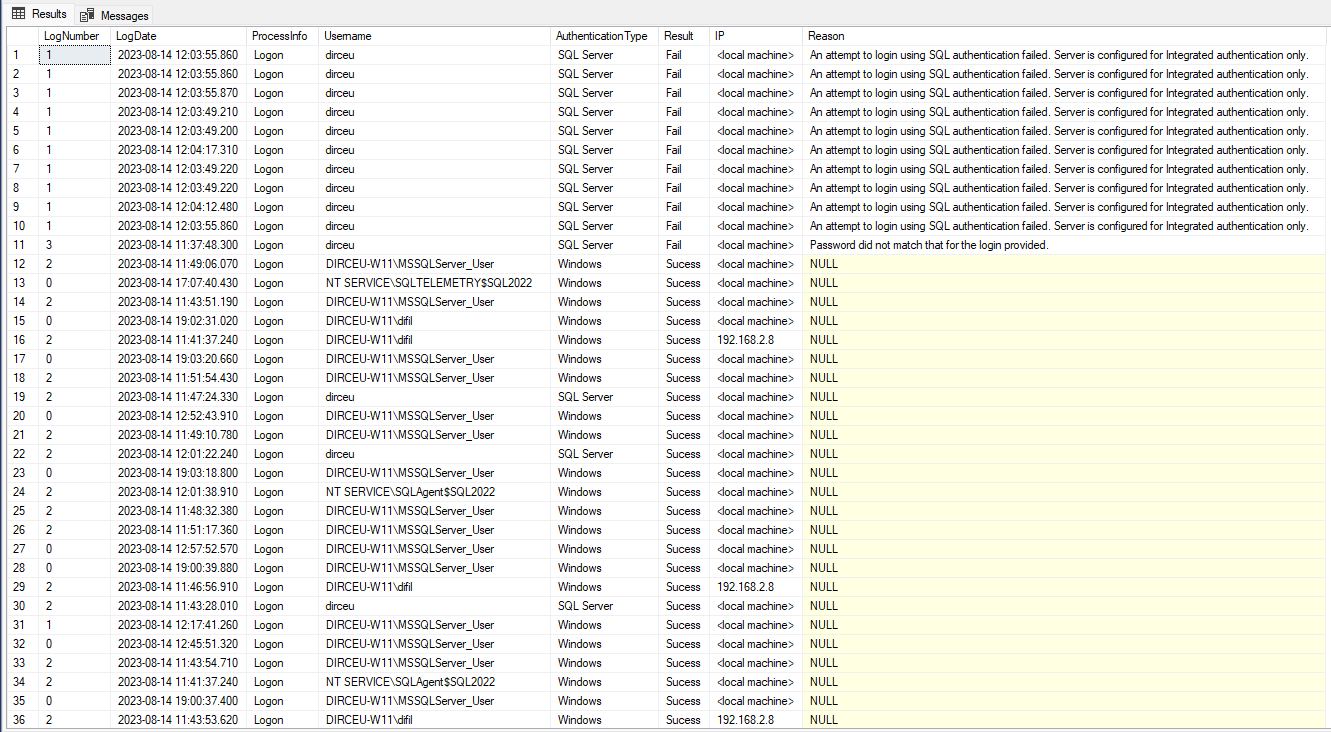
Our goal is to use JOINs to weave these separate threads into a single, coherent timeline of events. An INNER JOIN can connect a UserID from the login_log to the user's FullName in the users table. Another JOIN can then link that same UserID to the resources they accessed in the access_log.
Building the Query: Chaining JOINs
When you need to combine more than two tables, you simply chain JOIN clauses one after another. The database processes the first JOIN, creating a temporary, virtual table from the result, and then joins that result with the next table in the chain.
The query below demonstrates how four tables from the AdventureWorks database are joined together to get a complete picture of an employee's role.
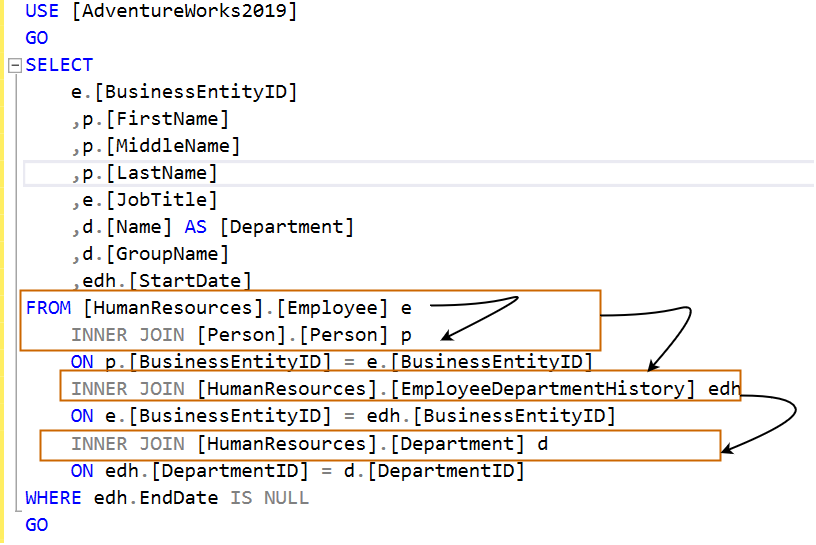
This process of building a complex query step-by-step is a critical skill. The following video provides an excellent, detailed walkthrough of how to construct a query that joins four different tables to satisfy a complex data request.
SQL JOINS Tutorial for beginners | Practice SQL Queries using JOINS - Part 1
This video from techTFQ methodically builds a complex query. Pay close attention to the thought process: identifying which tables are needed, determining the join conditions, and choosing the right type of join.
First, watch the setup of the complex problem from the scenario introduction. The request is to fetch all employees along with their manager, department, and project details, which requires joining four tables. Next, watch the step-by-step query construction from the multi-join demonstration. Notice how the instructor starts with two tables, verifies the result, and then progressively adds more JOINs. This iterative approach is key to managing complexity and troubleshooting errors.
Real-World Application 1: Analyzing Application Activity Logs
Let's look at a concrete example from a real system. Many large applications, like the Blackboard Learning Management System, store user activity in a dedicated table. The resource below describes their activity_accumulator table and provides SQL queries for analyzing it.
The Activity Accumulator and Tomcat Access Logs
This document shows how to query a real-world activity log table. It demonstrates joining this log with user and course tables to enrich the raw event data.
Read the initial section that presents several SQL queries. Start from the text at the beginning and examine the first three query examples. Notice how they JOIN the activity_accumulator table (aliased as aa) with the users table (u) and the course_main table (cm). The ON clauses (aa.user_pk1=u.pk1 and cm.pk1=aa.course_pk1) are the crucial links that correlate a generic activity event with a specific user and a specific course.
This is a classic log analysis pattern: the log table (activity_accumulator) contains foreign keys (user_pk1, course_pk1) that you use to JOIN with dimension tables (users, course_main) to get meaningful, human-readable information.
Real-World Application 2: Correlating Modern Cloud Logs
In modern, distributed systems, activity might not be in a single database. Logs from different services (like a load balancer and a web application) are often aggregated into a central logging platform. Here, a trace ID often serves as the "key" to connect events related to a single user request as it travels through the system.
The following resource shows how SQL can be used to query logs in Google Cloud's Log Analytics. The "Cross-Resource Log Correlation" example is particularly powerful.
How to Use Log Analytics in Cloud Logging to Query Logs ...
This article provides practical examples of querying logs with SQL. Focus on the example that correlates two different log sources.
Find the subsection titled Cross-Resource Log Correlation. This query joins the log table to itself (using aliases cr for Cloud Run and lb for load balancer). The join condition is ON cr.trace = lb.trace. This technique allows an analyst to find all the load balancer logs that share the same trace ID as an application error log, effectively linking a backend error to the specific user request that caused it. This is a vital incident response technique.
Choosing the Right JOIN for the Investigation
The choice between INNER JOIN and LEFT JOIN is critical in security analysis.
- An
INNER JOINis useful when you only want to see activity from known, existing users. - A
LEFT JOINis essential when you're looking for anomalies or gaps.
For example, to find all users and their last login time, you would use a LEFT JOIN from the users table to the login_log table.FROM users u LEFT JOIN login_log l ON u.UserID = l.UserID
This ensures that all users are returned, even those who have never logged in (their login time would appear as NULL). An INNER JOIN would have excluded these users entirely.
The techTFQ video you watched earlier contains a perfect demonstration of why this matters. The instructor's initial INNER JOIN query misses some employees, and he has to switch to a LEFT JOIN to meet the requirement of fetching all employees.
SQL JOINS Tutorial for beginners | Practice SQL Queries using JOINS - Part 1
Revisit this segment from the "SQL JOINS Tutorial" to solidify your understanding of when to use a LEFT JOIN.
Watch the section from the LEFT JOIN explanation. The instructor faces a new requirement: "fetch all the employees". He explains that an INNER JOIN is insufficient because it drops employees whose department isn't in the departments table. By switching to a LEFT JOIN, he ensures every employee from the "left" table (employees) is included in the final result, with NULL for the department name where no match is found.
This principle is directly applicable to security. If you need to audit all user accounts for activity, a LEFT JOIN is the correct tool.
Conclusion
In this lesson, you've moved beyond the theory of JOINs and applied them to the practical, high-stakes domain of security log analysis. This is where your SQL skills become a direct asset for protecting systems and investigating incidents.
Key Takeaways:
- Log correlation is the process of using
JOINs to stitch together data from multiple tables or log sources to create a comprehensive view of activity. - You can chain multiple
JOINclauses to connect several tables, with eachJOINbuilding on the result of the previous one. - The
JOINcondition is typically a shared key, such as aUserID, a primary key (pk1), or a moderntrace IDin distributed systems. LEFT JOINis crucial for investigative queries where you need to find gaps or audit all items in a set, such as finding users who have never logged in.
In our next module, we will explore subqueries. These "queries within a query" unlock another level of analytical power, allowing you to filter data based on dynamic conditions and perform even more sophisticated analyses, such as finding all login attempts from IP addresses that have a history of generating errors.