In our last lesson, we explored how JOIN operators combine tables horizontally, adding columns from one table alongside another. This is essential for correlating related data. Now, we will shift our perspective to combining data vertically. This lesson introduces the UNION operator, a powerful tool for stacking the results of multiple queries on top of one another into a single result set.
For your goal of mastering SQL for cybersecurity, UNION is more than just a data manipulation tool; it is the cornerstone of one of the most common and effective types of SQL injection. Understanding how UNION works, and more importantly, the strict rules it must follow, is the first step toward understanding how an attacker can hijack a vulnerable query to exfiltrate data from tables they were never meant to see.
By the end of this lesson, you will be ableto use UNION to combine the result sets of two or more SELECT statements, a foundational skill for both defensive analysis and offensive security testing.
Stacking Rows: UNION vs. JOIN
The fundamental difference between JOIN and UNION is the axis along which they combine data. JOINs add columns (width), while UNIONs add rows (height). Imagine you have two separate lists of employee names, one for the Sales department and one for the Support department. A JOIN would try to find a relationship between them and put their data side-by-side. A UNION, on the other hand, would simply append the Support list to the end of the Sales list, creating one consolidated roster.
To visualize this, let's start with a clear explanation of how set operators like UNION work compared to JOINs.
SQL SET Operators (Visually Explained) | UNION, UNION ALL, EXCEPT, INTERSECT | #SQL Course 11
This video from "Data with Baraa" provides an excellent visual and conceptual distinction between joining tables and using set operators.
Watch the first segment from the beginning until the introduction to syntax. Focus on the core idea that JOINs combine columns horizontally, while set operators like UNION combine rows vertically.
The diagram below illustrates this concept. Table A and Table B are combined row by row. Notice that the values 3 and 4, which exist in both tables, are included.

UNION vs. UNION ALL: The Duplicate Dilemma
The UNION operator has a close relative: UNION ALL. The difference is simple but critical:
UNION: Combines the result sets and removes any duplicate rows. This requires the database to perform an extra step to sort the data and identify duplicates, making it slightly slower.UNION ALL: Combines the result sets and includes all rows, even if they are duplicates. Since it skips the duplicate-checking step, it is faster and more efficient.
From an attacker's perspective, this distinction can sometimes be useful, but often UNION is sufficient. For a data analyst, choosing UNION ALL is a good performance optimization if you know your data sets have no duplicates or if the duplicates are meaningful and must be preserved.
This next diagram clearly shows the difference in output.
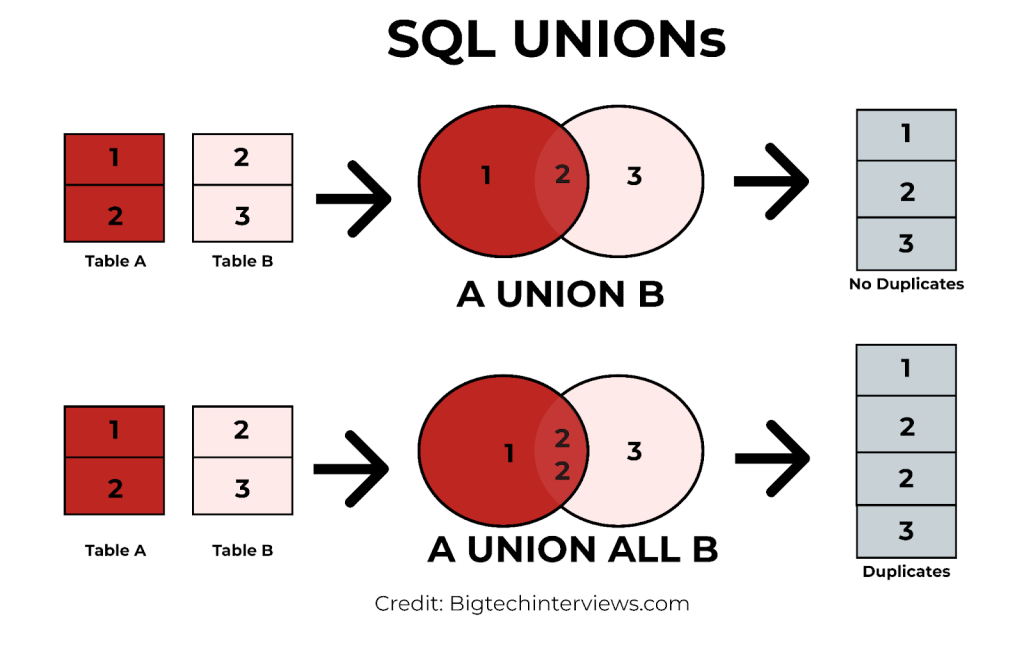
Let's see this in a practical demonstration.
Intermediate SQL Tutorial | Unions | Union Operator
In this video, Alex The Analyst demonstrates the use of both UNION and UNION ALL.
Watch the segment from the UNION demonstration. In the first part, a UNION is used, and he points out that a duplicate employee record for 'Darryl Philbin' is automatically removed. Next, he introduces UNION ALL from the UNION ALL explanation and shows how the same duplicate record is now included in the final result.
The Rules of Engagement: UNION Syntax Requirements
Unlike JOIN, UNION is very strict. For two SELECT statements to be combined with UNION, they must be compatible. Violating these rules will result in a syntax error, a fact that attackers leverage to probe a database's structure. These rules are non-negotiable:
- Same Number of Columns: Each
SELECTstatement must retrieve the same number of columns. You cannot stack a 3-column result on top of a 2-column result. - Compatible Data Types: The data types of the columns must be compatible in the same order. The first column of the first query must be compatible with the first column of the second query, and so on. You can't stack a column of strings on top of a column of integers.
- Column Names from the First Query: The final result set will use the column names (or aliases) from the first
SELECTstatement. ORDER BYClause at the End: You can only have oneORDER BYclause, and it must be at the very end of the entireUNIONstatement. It sorts the final, combined result set.
Understanding these rules is absolutely essential for performing a UNION-based SQL injection. An attacker must craft their malicious SELECT statement to perfectly match the structure of the application's original, hidden query.
The following resource provides a comprehensive guide to these rules and the errors that occur when you break them.
This section from a DataCamp tutorial clearly outlines the common pitfalls when using UNION. As you read, think about how an attacker would need to overcome each of these errors.
Read the entire section titled 3 Rules and Common Errors. Pay special attention to: The Column Count Mismatch: Note the fix using NULL as a placeholder. This is a standard technique in SQL injection. Data Type Compatibility: Understand that SQL combines columns by position, not by name. ORDER BY Limitations: See how the ORDER BY clause must come at the very end.
The Attacker's Playbook: UNION for Data Exfiltration
Now, let's connect these SQL rules to your goal of ethical hacking. When an attacker finds a part of a web application that is vulnerable to SQL injection (e.g., a search bar or a URL parameter), they can use a UNION operator to attach their own query to the application's legitimate one.
For example, if an application uses a query like this to show product details:SELECT name, description FROM products WHERE id = '1'
An attacker can inject a payload to change the query into this:SELECT name, description FROM products WHERE id = '1' UNION SELECT username, password FROM users--'
If the attacker correctly guesses that the original query returns two string-compatible columns, the database will execute both SELECT statements and return a combined result. The application, expecting only product names and descriptions, will then display the usernames and passwords on the page.
The PortSwigger Web Security Academy is the industry standard for learning these techniques. The following reading explains how an attacker uses the very rules we just discussed to probe a database and construct a successful UNION attack payload.
SQL injection UNION attacks | Web Security Academy
This article from PortSwigger explains the offensive application of the UNION operator.
Read the following sections to understand the attacker's methodology: Start with the introduction to understand the core concept of a UNION attack. Read Determining the number of columns. This section shows how the ORDER BY and UNION SELECT NULL techniques are used to satisfy the "same number of columns" rule. Next, read Finding useful columns to see how an attacker satisfies the "compatible data types" rule by injecting string values. Finally, read Using the UNION attack to see how it all comes together to exfiltrate data from a users table.
This process of using database errors and responses to systematically discover the structure of a hidden query is a fundamental skill in penetration testing.
Conclusion
In this lesson, we've seen that UNION is a tool for vertically stacking data, but its rigid syntax rules are what make it both a powerful analytical function and a vector for attack.
Key Takeaways:
UNIONcombines the rows from multipleSELECTstatements, whileJOINcombines columns.UNIONremoves duplicates, whereasUNION ALLincludes them and is generally faster.- A successful
UNIONrequires that all combined queries have the same number of columns with compatible data types in the same order. - These strict rules are not just for legitimate queries; they form a blueprint that an attacker must follow to probe a database and craft a payload for a UNION-based SQL injection attack.
In our next lesson, we will explore subqueries, which are queries nested inside other queries. This technique allows for more complex and powerful filtering and data retrieval, and, like UNION, it has significant applications in the world of advanced SQL injection.