Welcome back. In our previous lesson, we mastered the INNER JOIN, a powerful tool for combining data where matching records exist in multiple tables. We saw how this helps correlate related information, like linking a user account to a specific login attempt. However, INNER JOIN has a significant limitation: it only shows you what's there. It cannot help you find what's missing.
This lesson tackles that exact problem. We will explore the LEFT JOIN, a fundamental clause for any security analyst. You will learn how to write queries that not only retrieve matching data but also preserve all records from a primary table, highlighting gaps where related data doesn't exist. This is the key to answering critical questions like, "Which users have never logged in?" or "Which assets on our network have never been scanned for vulnerabilities?" By the end of this lesson, you'll be able to identify these crucial omissions in your datasets.
The Logic of a LEFT JOIN
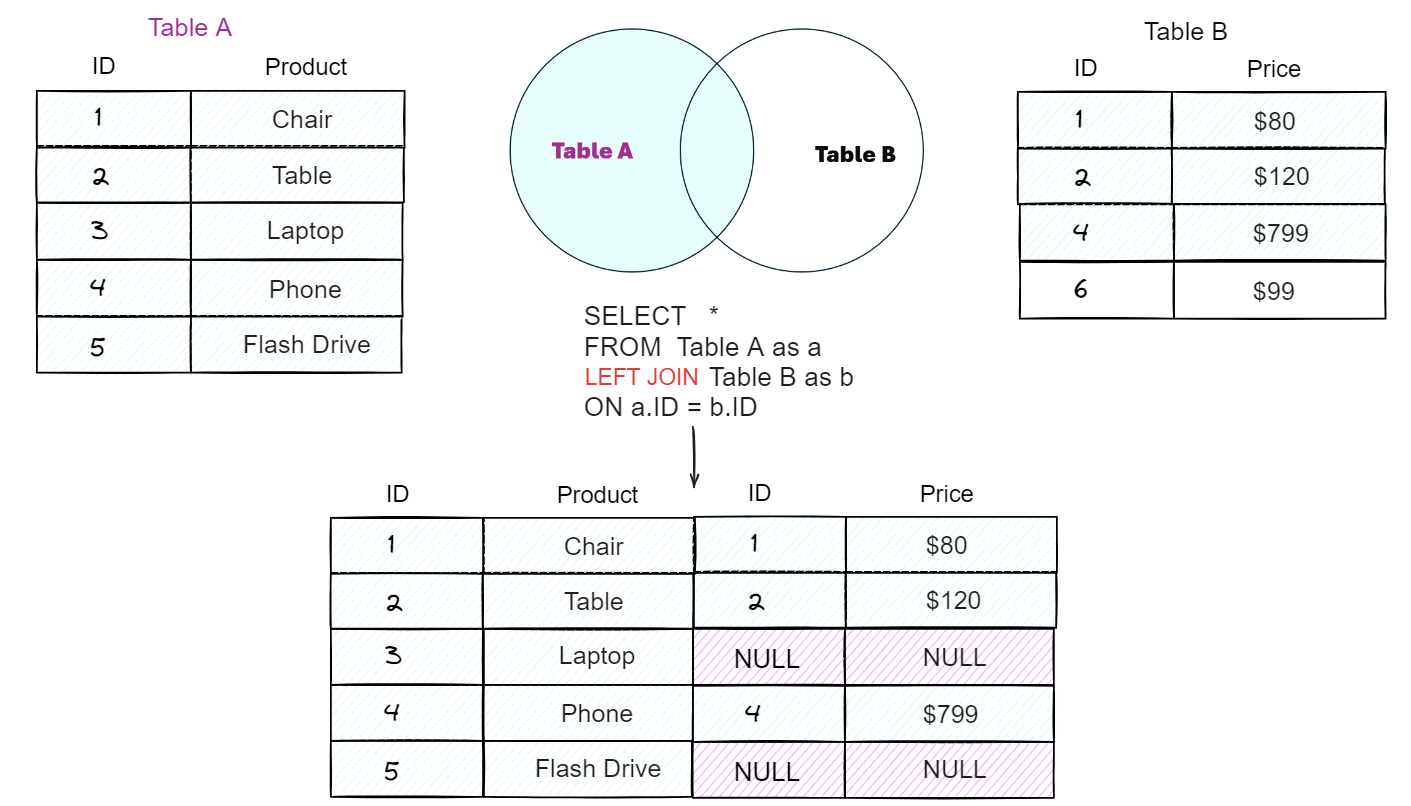
While an INNER JOIN returns only the intersection of two tables, a LEFT JOIN (also called a LEFT OUTER JOIN) behaves differently. It returns all rows from the left table, and for each of those rows, it returns the matched rows from the right table. If no match is found for a row from the left table, the columns selected from the right table will contain NULL values.
The "left" table is the one specified in your FROM clause, and the "right" table is the one specified after the LEFT JOIN keyword. The order is critical.
This diagram illustrates the concept perfectly. We have Table A (products) and Table B (prices). The LEFT JOIN ensures that every product from Table A appears in the result, even if it doesn't have a price in Table B. For those products without a price (like 'Laptop' and 'Flash Drive'), the Price column is filled with NULL.
To solidify this concept, let's look at it through the detective analogy from the SQLNoir article.
SQL Join Types Explained: All 6 Types With Visual ...
This article provides an excellent, intuitive explanation of join types.
Please read the section titled LEFT JOIN: Keep Everything From the Left. Note how the result set includes all suspects from the "left" suspects table, filling in NULL for the statement of those who were not interviewed.
Syntax and a Practical Demonstration
The syntax for a LEFT JOIN is almost identical to that of an INNER JOIN. You simply replace the INNER keyword with LEFT.
SELECT
    table1.column1,
    table2.column2
FROM
    table1 -- The 'left' table
LEFT JOIN
    table2 -- The 'right' table
ON
    table1.common_column = table2.common_column;
Let's watch a practical demonstration to see how this works with real data. The following video will walk you through setting up customers and orders tables and then using a LEFT JOIN to list all customers and their corresponding orders.
36 What is left join in sql server
This video from the "Learn SSIS" channel provides a clear, step-by-step walkthrough of a LEFT JOIN.
Watch from the beginning to the end of the example. The first 44 seconds provide a concise definition. The main part is the demo, where the presenter creates tables and executes the join. Pay close attention to the output, where the customer with ID 4 has NULL values for the order columns, indicating they have never placed an order.
Another helpful way to think about a LEFT JOIN is as a two-step process:
- First, an
INNER JOINis performed to find all the matching rows. - Then, the query goes back to the left table and adds any rows that were not part of the
INNER JOINresult, filling the columns from the right table withNULL.
The next video explains this mental model very clearly.
SQL JOINS Tutorial for beginners | Practice SQL Queries using JOINS - Part 1
This video from techTFQ offers a different and valuable perspective on the mechanics of a LEFT JOIN.
Watch the segment from the LEFT JOIN explanation. The instructor's description of the join as "first do an inner join, then add the rest from the left table" is an effective way to understand the underlying logic. He also emphasizes the critical importance of table placement to the left and right of the JOIN keyword.
The "Find Missing Records" Pattern
The most powerful application of LEFT JOIN for an analyst is finding what's missing. By combining LEFT JOIN with a WHERE clause that filters for NULL in a key column from the right table, you can isolate records in the left table that have no corresponding entry in the right table.
The pattern is: ... LEFT JOIN right_table ON ... WHERE right_table.key_column IS NULL.
This is invaluable for security auditing:
- Find users who have never logged in (
usersLEFT JOINlogin_logs). - Find employees who haven't completed mandatory security training (
employeesLEFT JOINtraining_records). - Find network assets that are missing from the latest vulnerability scan results (
asset_inventoryLEFT JOINscan_results).
Let's see this pattern in action with the same video we watched earlier.
36 What is left join in sql server
The video continues to demonstrate exactly how to isolate the non-matching records.
Watch the short segment from finding non-matching records. The addition of WHERE B.customer_id IS NULL to the previous query filters the result down to only the customer who has no orders. This is a fundamental technique you will use frequently.
Chaining Multiple LEFT JOINs
Just as with INNER JOIN, you can chain multiple LEFT JOINs together. This is essential when you need to pull data from several related tables while ensuring your primary dataset remains complete.
Imagine you need to generate a report of all employees, their department, and any projects they are working on.
employeesLEFT JOINdepartmentswill get you all employees and their department (orNULLif unassigned).- If you then use an
INNER JOINto connect to aprojectstable, you would lose any employees who aren't assigned to a project. - To prevent this, you must use another
LEFT JOIN.
When you chain joins, the "left table" for a new join is the entire result set produced by the previous joins. The next video provides an excellent, in-depth demonstration of this crucial concept.
SQL JOINS Tutorial for beginners | Practice SQL Queries using JOINS - Part 1
Let's return to the techTFQ video for a more complex, realistic scenario that highlights why chained LEFT JOINs are necessary.
Watch this detailed segment from multiple table joins. The goal is to fetch all employees with their department, manager, and project details. Observe the problem that arises when an INNER JOIN is used to connect to the projects table: employees without projects disappear from the results. Then, see the solution, where changing it to a LEFT JOIN fixes the query and returns all employees. The explanation of how the entire result set to the left of the new JOIN keyword is treated as the "left table" is a key insight for mastering complex queries.
Conclusion
You have now added the LEFT JOIN to your SQL toolkit, moving beyond simple data matching to sophisticated data analysis that includes identifying gaps and omissions. For a security analyst, what's missing is often more important than what's present.
Key Takeaways:
- A
LEFT JOINreturns all records from the left table and matched records from the right table. NULLvalues are used as placeholders in the right-table columns when no match is found.- The
LEFT JOIN ... WHERE right_table.key IS NULLpattern is the standard method for finding records in one table that lack a corresponding entry in another. - When building queries with multiple tables, using
LEFT JOINconsistently ensures that you don't unintentionally lose records from your primary dataset.
So far, we have combined tables by adding columns side-by-side (horizontally). In our next lesson, we will learn how to combine query results by stacking them on top of each other (vertically) using the UNION operator. This is a technique with direct and powerful applications in SQL injection, as it allows an attacker to append data from arbitrary tables to the results of a legitimate query.