In our last lesson, we learned how to read the "map" of a relational database by identifying primary and foreign keys within a schema. You now understand the theoretical connections that link tables together. Today, we put that knowledge into practice by learning how to traverse those connections to retrieve combined data.
This lesson focuses on the INNER JOIN clause, one of the most fundamental and powerful tools in SQL. By the end of this session, you will be able to write queries that merge information from multiple tables based on their shared keys. This is a critical skill for security analysis, allowing you to correlate disparate events—like linking a user account to a specific login attempt or a process ID to its executable's signature—to form a complete investigative picture.
The Logic of an INNER JOIN
In the previous module, every SELECT statement you wrote pulled data from a single table. However, real-world data is normalized, or split across multiple tables, to maintain integrity and reduce redundancy. The INNER JOIN clause is the primary tool for recombining this separated data.
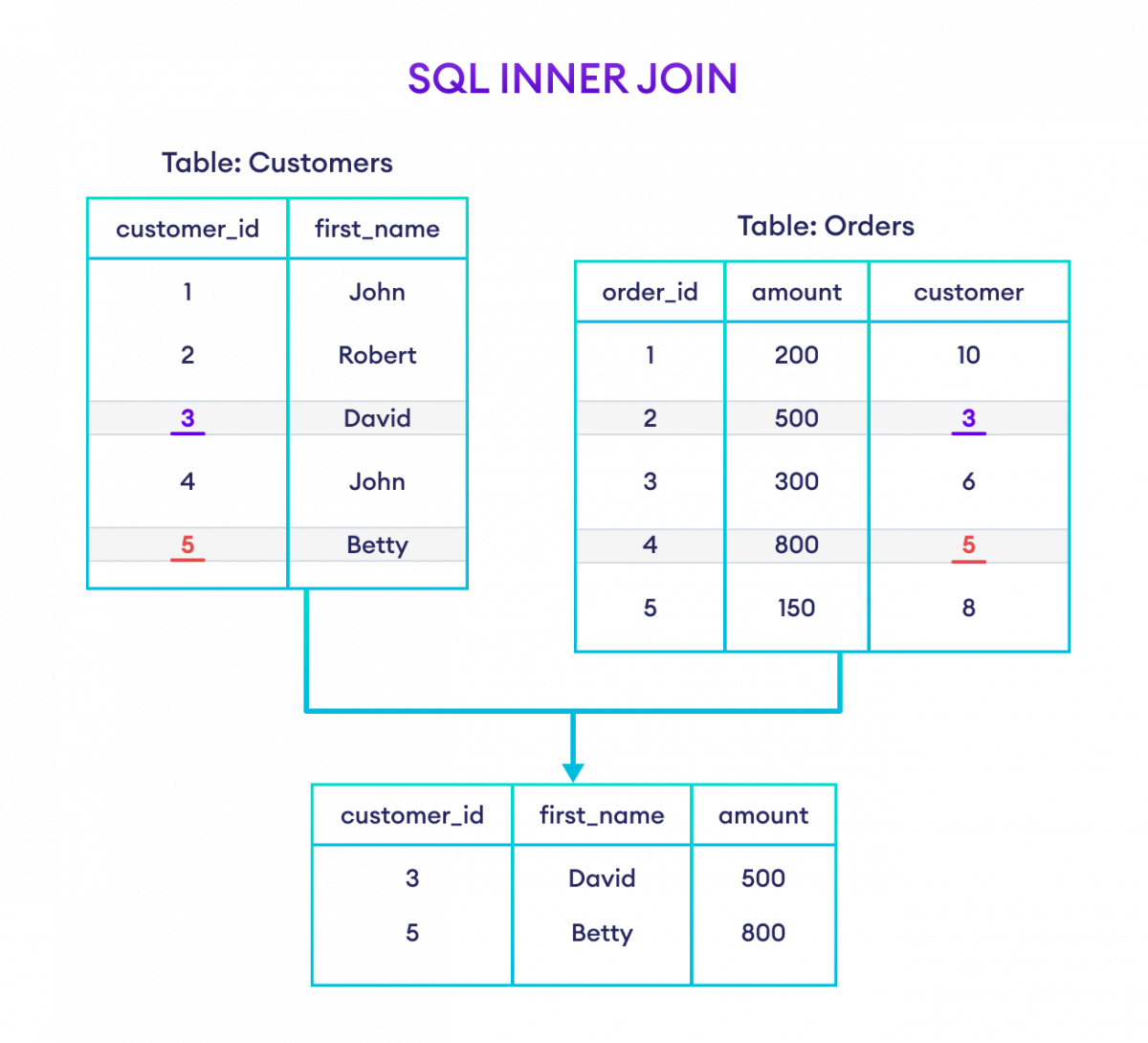
An INNER JOIN combines rows from two or more tables by matching values in a common column—typically the foreign key in one table and the primary key in another. The key principle of an INNER JOIN is that it only returns rows where a matching value exists in both tables. If a record in one table doesn't have a corresponding match in the other, it is excluded from the final result set.
The following diagram illustrates this concept. We have a Customers table and an Orders table. The INNER JOIN produces a result that only includes customers who have placed an order and orders that belong to an existing customer.
The INNER JOIN Syntax
The syntax for an INNER JOIN extends the SELECT statement by specifying the second table and the condition for joining.
The basic structure is as follows:
SELECT table1.column1, table2.column2
FROM table1
INNER JOIN table2
ON table1.common_column = table2.common_column;
Let's break this down:
SELECT table1.column1, table2.column2: You list the columns you want. It's a best practice to prefix the column name with the table name (table.column) to avoid ambiguity, especially when tables have columns with the same name.FROM table1: This is your starting point, often called the "left" table.INNER JOIN table2: You specify the second table you want to connect to, the "right" table. The keywordINNERis optional in most SQL dialects;JOINby itself defaults to anINNER JOIN.ON table1.common_column = table2.common_column: This is the crucial join condition. It tells the database how the tables are related. This is where you use the primary key/foreign key relationship you learned to identify in the last lesson.
Let's see a quick, practical demonstration of this syntax.
The basics of SQL for Cybersecurity Professionals
This video from Ryan McBeth provides a concise demonstration of a basic INNER JOIN to link an employee's job code to their job title in another table.
Please watch the segment from job code to job name. Notice how the query uses employee.jobcode = employeetype.jobcode in the ON clause to correctly link the two tables.
Building and Refining Joins
Real-world analysis often involves more than just a simple join. You might need to select specific columns, use aliases for readability, and filter the results of the join.
A highly recommended practice is using table aliases. An alias is a short, temporary name for a table in your query, declared using the AS keyword (or just a space). This makes your query much cleaner and easier to read, especially when joining multiple tables.
For example, FROM shipments AS s JOIN products AS p allows you to write s.date and p.product_name instead of the full table names.
The following video provides a more in-depth, step-by-step guide to building joins, using aliases, and then applying WHERE clauses to filter the joined data.
SQL Joins - Beginner to PRO Masterclass with 10 Examples
This video from the Chandoo channel offers excellent, practical examples using a sample "awesome chocolates" database.
Please watch the following two segments: First INNER JOIN: Start at the first SQL join. Pay close attention to how aliases (s for shipments, pr for products) are used to simplify the query. Filtering a Join: Now watch the segment from all shipments where category is bars. This demonstrates a critical pattern: the WHERE clause is applied after the join is performed to filter the combined result set.
A Security Analyst's Use Case: Correlating Logs
Now, let's apply this to a scenario more specific to your work. As a security analyst, you often deal with vast amounts of log data spread across different systems or "views." A web server might log HTTP requests, while an application server logs business logic events. To trace a single malicious action, you need to correlate these logs.
A common way to do this in modern distributed systems is by using a trace_id or span_id that is propagated across different services for a single request. An INNER JOIN is the perfect tool for this.
Sample SQL queries | Cloud Logging
This Google Cloud documentation provides a perfect example of joining log data.
Read the section titled Join two log views. Analyze the SQL query provided. It joins two different log views, LOG_VIEW_1 and LOG_VIEW_2, using both span_id and trace as the join condition. This is precisely how an analyst would reconstruct a sequence of events across different log sources to understand a full transaction or attack flow.
Joining Multiple Tables
The power of JOIN is not limited to two tables. You can chain JOIN clauses to link three, four, or even more tables together to answer complex questions. The logic remains the same: each JOIN clause adds a new table to the result set, connected by a new ON condition.
From a hacking perspective, this is how an attacker pivots through a database. After injecting into a products table, they might join it to a sales table, then join that to a users table, and finally join that to a credit_cards table, exfiltrating data at each step.
Let's see how to construct a query with multiple joins.
SQL Joins - Beginner to PRO Masterclass with 10 Examples
Let's return to the Chandoo video to see a three-table join in action.
Watch the segment from bar bar shipments. The query starts with the shipments table, joins it to the people table, and then joins that result to the products table. Notice how aliases become essential for keeping the query readable. The presenter also shows two ways to apply filtering: either within the ON clause or with a final WHERE clause. For clarity, using WHERE is generally preferred.
Conclusion
In this lesson, you've moved from understanding database relationships in theory to actively using them to combine data. The INNER JOIN is the workhorse of relational data analysis, and mastering it is non-negotiable for anyone working with SQL.
Key Takeaways:
INNER JOINcombines rows from tables when the values in the join columns match. Records without a match in the other table are excluded.- The syntax consists of
FROM table1 INNER JOIN table2 ON table1.column = table2.column. - Table aliases (e.g.,
FROM shipments AS s) are a best practice that dramatically improves the readability and maintainability of your queries. - You can filter the results of a join by adding a
WHEREclause after all theJOINandONclauses. - You can chain multiple
JOINclauses to query across several tables simultaneously, enabling complex data correlation.
We've focused on what happens when matches are found. But what if you need to find what's missing? For instance, how would you find all users in a users table who have never successfully logged in, meaning they have no corresponding entry in the logins table? An INNER JOIN can't answer that. In our next lesson, we will explore the LEFT JOIN, which is designed for precisely this type of scenario.